Archive for the 'Backup' Category
Wednesday, September 26th, 2007
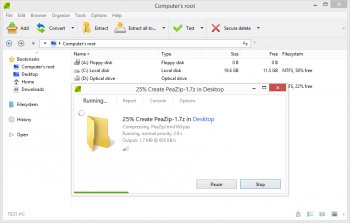 PeaZip has recently released its newest version of compression software in both the standard and portable options. Designed to save you space and improve the performance of your computer, this handy new program allows you to compress, span, and encrypt almost any file. PeaZip has recently released its newest version of compression software in both the standard and portable options. Designed to save you space and improve the performance of your computer, this handy new program allows you to compress, span, and encrypt almost any file.
As a utility program, PeaZip could not be more helpful. It does everything it says it does, and then some. First off, PeaZip supports most of the mainstream file types so you won’t have to search for multiple programs or a specific file type. Secondly, the latest version of the program has added a simpler toolbar to make the process of compression much easier. Lastly, since the functionality of the program is obviously not a problem, the designers have decided to allow you to change the skins and designs of your program while it is running. It’s just one more feature added to an already stellar program.
Beyond all of the great features this program has to offer in itself, there are also multiple versions and setup options which many other programs do not offer. You can purchase PeaZip for any Windows or Linux operating system. Then you can choose which kind of installation you wish, whether that be standard, portable, or RPM.
In any case, the program has earned very high ratings, and it is only getting better by the minute. To download your free version of PeaZip, check out: http://peazip.sourceforge.net/
Posted in Archive, Backup, Commercial, Freeware, Linux, Main, Windows | 7 Comments »
Thursday, September 6th, 2007

jv16 powertools is an all in one program containing various tools and utilities for your computer. It contains a registry cleaner, file wiper, duplicate file finder and lots more.
The main reason I was trying it out was because the registry cleaner seems to be different from any I’ve ever tried in the past. Apparently it has “Stateful registry cleaning” which is different from most registry cleaners and you can read more on that on this page here.
The numerous other utilities may be useful at times but the interface can be a little confusing, so i wouldn’t recommend this software for those who aren’t too knowledgeable about the inner workings of their pc. But if you’re computer savvy and looking for an all in one solution to some common computer tasks,it’s definitely worth checking out, as long as you know what you’re doing.
Click here for the homepage with the full list of features and detailed info on each one.
Posted in Backup, Design, Files and Folders, Information Management, Main, Programming, Shareware, Shell and Desktop, Utilities, Windows | No Comments »
Monday, August 6th, 2007
 Often website developers need to protect certain sections or web pages from unauthorized access. Manually coding such features for each page takes an inordinate amount of time which can be saved by the Page Protection software 1.0. The software presents the feature of protecting any specific web page with a password. It’s easy to use the software for setting the code. The developer can protect the page in manner so that the access granted is under permitted conditions. Often website developers need to protect certain sections or web pages from unauthorized access. Manually coding such features for each page takes an inordinate amount of time which can be saved by the Page Protection software 1.0. The software presents the feature of protecting any specific web page with a password. It’s easy to use the software for setting the code. The developer can protect the page in manner so that the access granted is under permitted conditions.
You would find the software downloaded in few moments and the installation is finished with a few clicks. The screen is not much burdened with unneccessary options giving it a simple look. The ‘Input’ option is for setting up of the code. You can select cookies, sessions and GET for the password memory. For generating the password you can select the letter case, numbers and exclude option. You can set the number for the length of the password. After doing all this you need to generate a password that would give the access to the web page. The user’s password validity can be set to as many days as you want. The style sheet for the password page can be applied. It can be left empty for the default style sheet. You can build the code when the variables have been set. The user is sent a password request by the server for displaying the page. The web page could only be accessed if the password submitted is correct. You can share the information making it secured by the password protector. Even the user would not be able to access the page after the time validity set for the password is over. You can store the password through the cookies in your computer.
This software is useful sharing confidential information with the selected people. It’s excellent to use and quick and easy to operate by any one. Overall the little piece of software is a great utility for professional web developers.
(More info and Download)
Posted in Backup, Business, Developer, Information Management, Security, Shareware, Windows | No Comments »
Wednesday, July 11th, 2007
 Here is a really useful tool for opera users, it’s called oSync. Here is a really useful tool for opera users, it’s called oSync.
This cool tool provides a simple and secure way to synchronize Opera bookmarks between computers. You will also love the fact that it can backup your bookmarks or publish them as HTML and clean up bloated bookmark files. And when it comes to the synchronizing, it really delivers in style, it can be completely automated and is aimed to be as transparent as possible for the user.
It is now also available on Opera Mini, meaning you can now use it on your mobile phone since Opera Mini is a free mobile browser.
For free download of o Sync visit http://osync.sourceforge.net/index2.html
Posted in Backup, Browsers, Developer, Freeware, Internet, Main, Utilities, Windows | No Comments »
Sunday, June 10th, 2007

Drivermax is a program that can backup and re-install your system’s drivers on Windows Vista and Windows XP.
Whenever you need to re-install your operating system,it can get awkward to find and reinstall all your systems drivers..but drivermax claims to turn this potentially time consuming and problematic step into a 5-10 minute job that only requires one restart. It can easily backup all of your systems drivers then simply use it to collectively reinstall these if you should ever need to do so.
The user interface is entirely wizard based; any chosen task is conveniently broken down into 2 or 3 simple screens.
It can also generate a report that lists all installed drivers and includes information such as the version numbers and dates.
This program is registerware (yours to keep for free when you register).
Check it out for more info and the download.
Posted in Backup, Developer, Main, Security, Shareware, Windows | 1 Comment »
Monday, May 28th, 2007
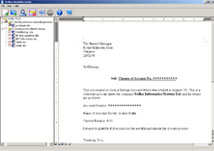 If you’ve been losing precious data to corrupted Microsoft word documents, this word recovery tool could be a life saver. If you’ve been losing precious data to corrupted Microsoft word documents, this word recovery tool could be a life saver.
Stellar Word Recovery is Word recovery software designed to recover and repair corrupted Microsoft Word documents. Stellar Word Recovery is an advanced document-repair program which easily restores damaged Word files after certain instances like virus attacks, unexpected system shutdown, media read error, etc.
Want to give it a shot? Go to http://www.stellarinfo.com/word-recovery.htm for more info and trial download.
Posted in Backup, Business, Commercial, Internet, Main, Security, Shareware, Windows | 3 Comments »
Monday, May 14th, 2007
 Window Washer is a useful privacy and cleanup tool. It deletes your browser usage tracks and much more. Window Washer is a useful privacy and cleanup tool. It deletes your browser usage tracks and much more.
A cool feature for the paranoid is the file “Bleaching” for added Security: Window Washer can completely overwrite files with random characters making them unrecoverable by undelete / unerase utilities — a security feature which “exceeds the tough standards of the United States Department of Defense.”
It can be set to run automatically for example each time you shut down or start up your computer. It also has a cookie keeper feature that allows you to save chosen cookies from useful sites you use while erasing all other cookies. Hundreds of Free Plug-ins are available to cleanup the junk files of a lot of popular applications. It also supports most major browsers.
For more detailed features check out the site here where you can download the trial.
Posted in Backup, Developer, Internet, Main, Security, Shareware, Windows | No Comments »
Tuesday, May 8th, 2007
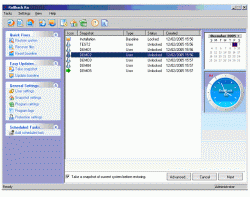 Here is a software that is really worth checking out, it’s called RollBack Rx. Here is a software that is really worth checking out, it’s called RollBack Rx.
RollBack Rx is a robust system restore utility that enables home users and IT professionals to easily restore a PC to a time before certain events occurred. By so doing it makes it very easy for all users regardless of their skill levels – newbie or IT pro to quickly and easily repair PC issues – saving time, money and PC trouble.
But what can RollBack Rx actually help achieve?
- Reverse any system crash (even if Windows can’t startup);
- Backout of any failed software installations, botched update etc.;
- Roll back minutes, hours, or even months;
- Roll backwards and forwards to any system snapshot;
- Fast, 100% clean uninstaller;
- Roll-back, yet recover files from your “future” snapshot(s);
- Retrieve files from a crashed PC, even if it can not boot into Windows;
- Access control – prevent unauthorized users from accessing any RollBack Rx functions;
- Day Zero Disaster Recovery with no data loss;
Etc.
You can get more info and a free trial download here.
NOTE: Before You Start Comparing Rollback Rx To Windows System Restore, Check Out The Software. Windows System Restore only restores system files, these restores so much more.
Check it out at http://www.horizondatasys.com/page.aspx?id=169614
Posted in Backup, Developer, Main, Programming, Security, Shareware, Utilities, Windows | No Comments »
Thursday, May 3rd, 2007
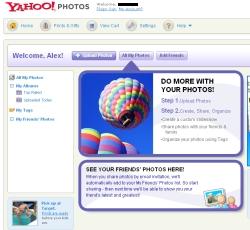 Yahoo Inc. is shutting down Yahoo Photos, its first-generation photo storage site, and asking users to move instead to Yahoo’s Web 2.0 photo sharing site, Flickr, a Yahoo official said on Thursday. Yahoo Inc. is shutting down Yahoo Photos, its first-generation photo storage site, and asking users to move instead to Yahoo’s Web 2.0 photo sharing site, Flickr, a Yahoo official said on Thursday.
In June, tens of millions of registered users of Yahoo Photos will be notified of various options including upgrading to Yahoo’s Flickr service or various outside-photo storage sites, according to Flickr co-founder Stewart Butterfield.
Yahoo also will offer consumers the option of loading their photos on competing sites when users are notified next month.
These include PhotoBucket — the most popular online photo sharing service among users of social network sites like News Corp.’s MySpace — or more conventional photo printing and storage site such as Kodak Gallery, Shutterfly Inc. or Snapfish, he said. (more…)
Posted in Backup, Business, Freeware, Internet, Photo, Social Software, Web services | No Comments »
Thursday, May 3rd, 2007
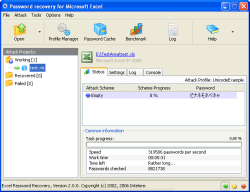 Intelore, one of the key developers of password recovery solutions, launched OpenOffice Password Recovery 1.0.4 – a powerfull software tool designed to help absent-minded or careless PC users recover forgotten passwords for a suite of OpenOffice.org programs (Writer, Calc, Impress, Draw, Math etc.).OpenOffice Password Recovery 1.0.4 offers a suite of mechanisms and schemes to quickly and smoothly recover all types of passwords and discard formatting and editing restrictions (for example, locked cells protection and permissions). Intelore, one of the key developers of password recovery solutions, launched OpenOffice Password Recovery 1.0.4 – a powerfull software tool designed to help absent-minded or careless PC users recover forgotten passwords for a suite of OpenOffice.org programs (Writer, Calc, Impress, Draw, Math etc.).OpenOffice Password Recovery 1.0.4 offers a suite of mechanisms and schemes to quickly and smoothly recover all types of passwords and discard formatting and editing restrictions (for example, locked cells protection and permissions).
OpenOffice Password Recovery features a variety of built-in attack profiles allowing you to efficiently recover passwords with a single key click. The sophisticated solution offers Unicode support and allows for recovery of multilanguage passwords(e.g. containing both Latin characters and hieroglyphs) regardless of their length or complexity.
By default, the recovery process is done in the background which enables the user to continue working with other programs. At the same time, OpenOffice Password Recovery allows the user to manually change the processing priority and make password recovery the foreground task.
OpenOffice Password Recovery can take into account the so-called “human factor” and recover a password containing typing errors! (more…)
Posted in Backup, Business, Developer, Information Management, Main, Shareware, Windows | No Comments »
|
|
|




