
BlueScreenView 1.27
O. James Samson - July 7, 2010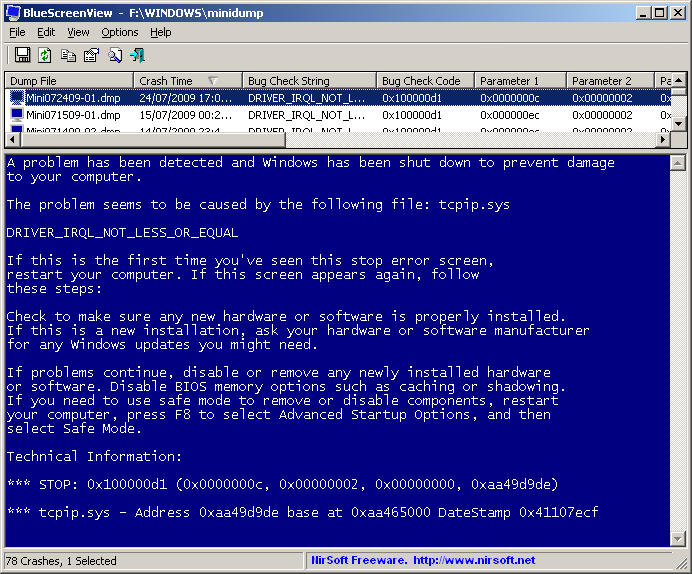 BlueScreenView can best be described as software that works by scanning minidump files created during “Blue Screen of Death” crashes, and display the information about all crashes in one table. For each crash, BlueScreenView can display basic information about each crash. The information that will be displayed includes the date/time of the crash, the basic crash information displayed in the blue screen, and the details of the driver or module that possibly caused the crash.
The major system requirements for any user wishing to make use of BlueScreenView are: Windows XP; Windows server 2003, Windows server 2008, Windows Vista, Windows 7. Windows must be configured to save minidump files during BSOD crashes. It can read the minidump files of 32-bit and X64 system.
BlueScreenView does not require any installation process. All that is needed is for the user to run the executable file executable file and it will automatically scan minidump folders and display all crash details in the upper pane.
BlueScreenView comes with other features like: users can view a blue screen which is very similar to the one that Windows displayed during the crash; enumerates the memory addresses inside the stack of the crash; users can work with another instance of Windows, simply by choosing the right minidump folder; and so on.
Want to check it out? Visit Nirsoft.net
This entry was posted on Wednesday, July 7th, 2010 at 5:02 pm and is filed under Main. You can follow any responses to this entry through the RSS 2.0 feed. You can skip to the end and leave a response. Pinging is currently not allowed.

 Loading...