
MyUninstaller – A Good Alternative To The Standard Add/Remove Applet
O. James Samson - August 8, 2007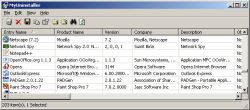 Here is something you will definitely find very useful. MyUninstaller is a good alternative to the standard Add/Remove applet of Windows operating system. It displays the list of all installed application, and allows you to uninstall an application, delete an uninstall entry, and save the list of all installed applications into a text file or HTML file. What makes it different from the standard Add/Remove applet?
It provides additional information for most installed applications that the standard Add/Remove applet doesn’t display: product name, company, version, uninstall string, installation folder and more.
A new updated version was just recently released, MyUninstaller 1.36 and the major change in this version is that a new feature has been added. Added “Change Software Installation” option, for programs that support installation change
Want to check it out? It’s free, go to http://www.nirsoft.net/utils/myuninst.html
This entry was posted on Wednesday, August 8th, 2007 at 4:22 am and is filed under Developer, Information Management, Main, Programming, Security, Shareware, Utilities, Windows. You can follow any responses to this entry through the RSS 2.0 feed. You can leave a response, or trackback from your own site.

 Loading...