
Little Piano 1.0
Monday, June 1st, 2009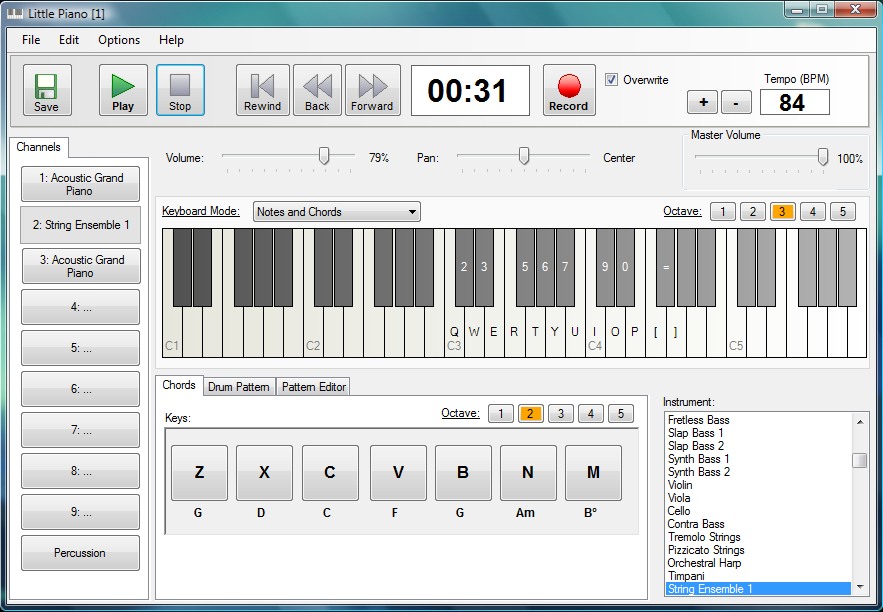 Most of us usually have this wish to learn to play a musical instrument some day, and piano rests at the top of the list of these instruments. The soothing sound of the piano along with its elegant look makes the instrument class apart. However, the heavy expenses involved in buying a piano and hiring a professional to learn to play it, often hold us back to fulfill this wish. But, you need not surrender yourself to financial constraints anymore as can get an effective solution in the form of Little Piano 1.0.
Using the application, you can install a virtual Piano on your PC and thereby create stunning music. It further supports recording songs, using multiple instruments, saving them as Midi files, along with sharing your songs with others. It integrates the sounds of more then 127 instruments, drums patterns, and up to 10 recording channels making it even interesting to use the program.
The Little Piano launches with neatly structured interface equipped with various required features for playing music with the Piano sounds. The program console comprises of upper panel containing play controls, recording, tempo, and save options for recording, playing, and saving the created music. The program’s mid screen presents the virtual piano keys marked with keyboard letter to help you play the required notes. Moving to left pane named as ‘Channels’, where you can select one instrument out of the provided list for each channel, or use ‘Percussion’ when needed.
The list of instruments covers a variety such as Acoustic Grand Piano, Bright Acoustic Piano, Electric Grand Piano, Rhodes Piano, Chorus Piano, Clavinet, Music Box, Xylophone, Marimba, and many others. In addition, it lets you decide the Chords and Drum Patterns you want to use, and also provides Pattern Editor to form desired patterns. While creating new music, it can be recorded and saved as Midi format file for further usage.
With the Little Piano 1.0 you can create new and stunning music, and share it with your friends.
 With the increasing incidents of copyright violations, media publisher prefer applying DRM protection on media files to prevent unauthorized picking, piracy and theft. However, such a protection can even become a headache for you even if you have purchased the music collection. This is simply because the protected files can’t be played with any other devices except iPod, CD player, MP3 player, etc, thereby hindering you from enjoying your favorite music. However, such trouble can be dealt effectively by using an appropriate utility to remove protection and make files compatible with different music player tools. Well, if you’re still looking for an adept tool, then SoundTaxi 2008.903 is worth giving a try. The utility imparts effective feature-set that facilitates you in removing the DRM protection from your music files and convert them into different known music formats making them compatible with several player devices.
 RSS Feed Creator PRO is a professional desktop RSS editor that allows you to create and maintain your own RSS newsfeeds and podcasts. RSS Feed Creator PRO – is the best solution for WYSIWYG editing of RSS feeds.


