
Start8 0.95 – Returning The Windows Start Menu To Windows 8
Tuesday, October 2nd, 2012 As expected, many Windows 8 applications or programs will hit start hitting the internet as often as possible. This is to be expected as a lot of publishers need to play catch up or update their current applications to be compatible with the new OS. Whether or not Start8 will represent a good start-menu is a different issue altogether.
Start8 brings the “Start” menu back to Windows 8. The Windows 8 Consumer Preview is available and has taken the Windows interface to a whole new level. Unfortunately, the preview did not come with a desktop feature that the world makes use of billions times a day, the “Start” menu.
So the Windows 8 “Start” menu has been an issue with a couple of people; but should it be? Most people don’t even use the start menu that much; and that probably explains why you won’t find among features of Windows 8 in the first place. Well, this program is out to bring that start-menu feeling back. The publisher has however, introduced a few updates and changes that include the following; addition of a completely new UI, new default theme, Metro/Modern apps have their own “Modern UI Applications” folder, and a few others.
Downsides
I very much doubt if Start8 is the program to replace Windows 8 start-menu that was not even added in the first place. However, it is still a nice program for those who would want to give it a shot.
Want to check it out? Visit Stardock.
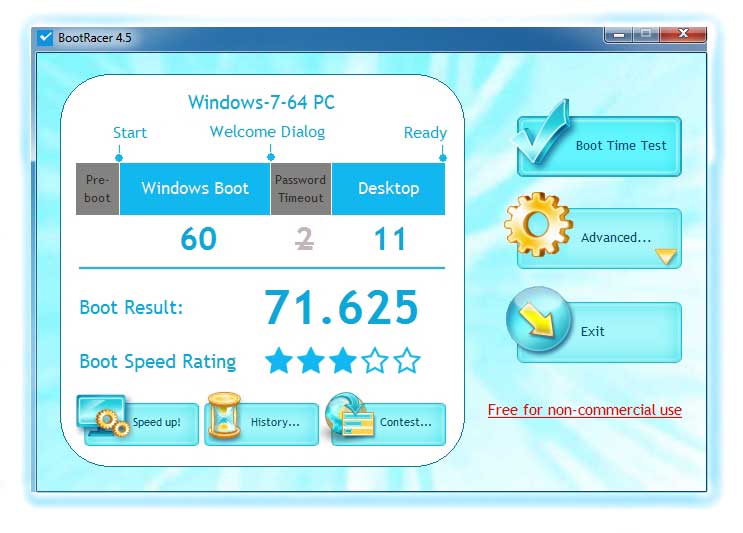 For those who truly care about how long it for their systems to boot; BootRacer should offer a helping hand. The program is free, and should not actually be overlooked as one of those applications that is regarded as a waste of time and space on a PC. However, it is no secret that all computers tend to slow down in terms of boot speed as software installation start piling up. BootRacer is more like an awareness program that draws your attention to the need to speed up your system.


