Author Archive
Monday, December 3rd, 2012
 Have you been searching for an application that is easy to use, and great for creating animated GIF images? Perhaps, you should consider Easy GIF Animator because it has some cool features that can easily help you create and edit animated GIF. Have you been searching for an application that is easy to use, and great for creating animated GIF images? Perhaps, you should consider Easy GIF Animator because it has some cool features that can easily help you create and edit animated GIF.
What is GIF Animator?
Easy GIF Animator is powerful yet very easy to use software for creating and editing animated GIF images. With this shareware application, you can easily create animated pictures, banners and buttons in no time. You can use special features to add stunning visual effects and prepare your animation for publishing on your web page. Easy GIF Animator supports all types of GIF animation and provides high compression and great quality for your animated GIF images.
What’s new in this version? The version includes a built-in image editor, banner wizard and special tools to make your experience even more productive, and minor bug fixes. Easy Gif Animator also retains some of its older features that include the following: easily create animated banners, pictures and buttons; edit and modify animated GIF images; add visual effects to your GIF animation, optimize animated GIF images so they take less space and load faster; preview GIF animation in web browser; manage animation frames; and a host of others.
Downsides
An extension of the trial period won’t be a bad idea after all.
Want to check it out? Visit Blumentals.
Posted in Main | No Comments »
Monday, December 3rd, 2012
 Everyday we get various opportunities to experience introduction of new applications. The problem is there are so many of them out there; but truth is not all can be installed on the PC. However, a program that consumes only a little space on a PC shouldn’t be something to worry about. Sentry puts you in charge of a couple of things installed on your system including locking down your Windows workstation on demand. Everyday we get various opportunities to experience introduction of new applications. The problem is there are so many of them out there; but truth is not all can be installed on the PC. However, a program that consumes only a little space on a PC shouldn’t be something to worry about. Sentry puts you in charge of a couple of things installed on your system including locking down your Windows workstation on demand.
What is Sentry?
Sentry is a shareware application that locks down your Windows workstation on demand, so it stays secure even when you aren’t using it. Its key features include; full control of the screen layout, multi-user support, Internet support, and more. With the help of Sentry, you can now lock your workstation in style. It lets you run your favorite screen savers, Take messages from passers-by, temporarily withdraw from networks, Run on Startup, and remote locking & unlocking support.
A couple of additions have also been made to version 3.01 to include the following; addition of localhost connectivity check, Sentry Manager help menu now works, layout no longer crashes if screensavers.dat is empty or corrupted, Sentrymanager URL now correct in Options page of Sentry Manager, and entry Manager URL is now either /manager or /sm (to match documentation).
Downsides
Easy to use, but requires that you save your work before running it for the first time.
Want to check it out? Visit FreshSoftware.
Posted in Main | No Comments »
Monday, December 3rd, 2012
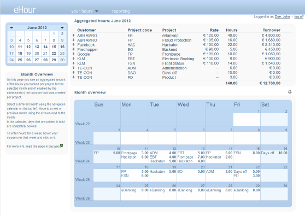 Keeping track of time is one major concern for a lot of people; and this slows down a lot of things on the business side of life for them. Projects are better handled, and tasks are better carried out when there is an effective application that helps to keep track of time spent. That is why the idea of having a program like eHour is not such a bad idea. Keeping track of time is one major concern for a lot of people; and this slows down a lot of things on the business side of life for them. Projects are better handled, and tasks are better carried out when there is an effective application that helps to keep track of time spent. That is why the idea of having a program like eHour is not such a bad idea.
What is eHour?
eHour is an open source web-based time tracking tool for consultancy companies and other project based businesses. The primary objective is to keep time tracking as simple and user friendly as possible while still being very effective at measuring and reporting the amount of time your team spends on a project.
eHour is an open source program with a lot of key features including the following; ability to create default projects so you can keep track of those hours as well, separation of user, reporting and administration role, excel export of all your reports, web-based user interface, no software needs to be installed on desktop machines, have different start and end dates and hourly rates per user for each project assignment, etc.
Some minor additions and improvements have been made to this version. These improvements include; restore of backup fails when users were deleted in the past, restore of backup fails to restore project assignments, etc.
Any downside?
eHour has no major downside.
Want to check it out? Visit eHour.
Posted in Main | No Comments »
Thursday, November 29th, 2012
 Need an application to help you completely remove your antivirus application? Then AppRemover is what you probably need. Need an application to help you completely remove your antivirus application? Then AppRemover is what you probably need.
What is the big deal about AppRemover?
AppRemover is a free utility that allows you to completely uninstall any of the following applications- antivirus, antispyware, firewall, security suites and public file sharing applications. It is very easy to use. It detects and allows you to choose which application to uninstall. It is designed to detect and remove security applications from the system.
This application is helpful when you’re: replacing one security application with another, when competing security applications tie up your computer, when the application’s built-in uninstall process fails and when you have forgotten the application password. It does not require any installation and takes up only minimal system resources. It is free and easy to use. It supports the following: McAfee, Symantec, ESET, AVG, Avira, Trend Micro and many others!
Any downsides?
There are some products it does not support presently. Anyways it is a very useful software as most antivirus are difficult to uninstall. It is also handy when you’re trying to clean up an infected system.
To learn more about this software, please go to Appremover.
Posted in Main | No Comments »
Thursday, November 29th, 2012
 Need a software that allows you to store, sync, and, share files online? Then get DropBox. Need a software that allows you to store, sync, and, share files online? Then get DropBox.
What is the big deal about DropBox?
This program allows you to easily store, sync, and, share files online. It has a beautiful and very easy to use interface. It works efficiently and seamlessly with your operating system. It automatically ensures that all your files are up dated. It supports the following operating systems: Windows, Mac, and Linux.
Any file or folder that you save in Dropbox is synced with Dropbox’s servers and any other computer linked to your account. Any file/folder that have been synced and updated will be checked with a green check mark. No need to worry about the security of your data stored in Dropbox: all data is transferred over SSL and encrypted with AES-256 before storage. It monitors and records all the changes made to the contents of the files or folders.
Obi, the publisher of this program has released a new version- Dropbox 1.6.0. They have added a new feature to this version: an improved web login from client and performance through use of Python 2.7. It comes with its own uninstaller.
Any downsides?
A really nice freeware. Works well with different OS. Very easy to use and install. Dropbox gives a miserly 2GB for referral to increase your storage space. Others give a whole lot more.
To learn more about this freeware, please visit Dropbox.
Posted in Main | No Comments »
Wednesday, November 28th, 2012
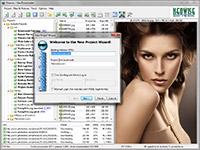 Need an application that allows you to download and view thousands of pictures from any websites (including TGP sites)? NeoDownloader is probably what you need? Need an application that allows you to download and view thousands of pictures from any websites (including TGP sites)? NeoDownloader is probably what you need?
What is it about this program?
It is a freeware bulk image downloader helps you to download pictures, audio and video files. Simply drag-n-drop a link to the Drop Basket and this intelligent downloader would scour the web and download all the pictures found onto your hard disk. You can instantly see all you’ve downloaded and delete any unwanted files. It could also be set to download only the pictures that you’ve pre-determined. It is very easy to use even for beginners.
Some of the features of this program include: image filtering, image preview, a built-in image viewer and the option to set selected picture as Windows wallpaper. Other features include a powerful and intelligent web spider engine; up to 10 simultaneous connections; it can download from TGP and password protected sites. Its advanced filtering allows you to download only files that you want. You could also use any of the downloaded pictures as a Windows wall paper. This comes with an uninstaller.
Any downsides?
The full version is it! Good software to download pictures from photo sites.
To familiarize yourself with this software, please go to Neowise.
Posted in Main | No Comments »
Tuesday, November 27th, 2012
 Do you know that there are about 80 menu short cuts for Mac OS X applications? Seriously how many of these can you correctly remember? Would you like an application that helps to use your Mac OS X applications more effectively? Then get KeyCue. Do you know that there are about 80 menu short cuts for Mac OS X applications? Seriously how many of these can you correctly remember? Would you like an application that helps to use your Mac OS X applications more effectively? Then get KeyCue.
What is the big deal about KeyCue?
Menu shortcuts are supposed to provide quick access to frequently used menu commands. This program displays a compact table of all menu shortcuts that are currently available. You no longer have to memorize and remember key combinations; just press the command key and KeyCue tells you what you want to know. With time, you’ll easily remember frequently used shortcut commands and start working more efficiently.
It also gives you an instant overview of the overall functionality of any application, plus lets you automatically start working more efficiently by making use of menu shortcuts.
The publishers, Ergonis Software, have added some minor changes to this version: Compatible with OS X 10.8 (Mountain Lion), a few minor improvements and fixes. For this application to work well, it requires Mac OS X 10.5.8 or newer, compatible with Mountain Lion. It has its own uninstaller.
Any downsides?
None. It’s a very good overview for all shortcuts for an app with great visual grid format.
To learn more about this program, visit Ergonis.
Posted in Main | No Comments »
Tuesday, November 27th, 2012
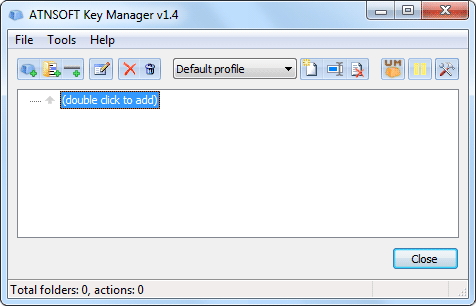 Key Manager is a program that allows you to save time and energy while using your mouse and keywords. Key Manager is a program that allows you to save time and energy while using your mouse and keywords.
What is it about Key Manager?
It can be used to assign the following actions to regular, long and sequential key presses and key combinations: show an actions menu, paste text, launch a program, open a file/folder, open a web page, press/block a key, key combination, mouse button, rotate the mouse wheel, create a new email, manage windows, manage the computer’s sound and power settings, manager the monitor’s power settings and much more.
Its very flexible interface allows you to create several actions and execute them using keys and mouse buttons and a combination of both. It also has a powerful key and mouse button redefinition and blocking tools. This function can be restricted to a particular application and or windows. With this software, you could change any key or mouse button into a user-defined modifier and use it in combination with other keys, mouse buttons and modifiers. You could use it to perform the following actions on all windows or on active ones only- close, minimize, maximize, restore, hide, show, redraw, move, resize.
Any downsides?
None for now. Works superbly well!
To learn more about this program, please do visit Atnsoft.
Posted in Main | No Comments »
Monday, November 26th, 2012
 Do you easily forget things? People tend to forget things a lot. It’s only natural to do so. After all our brains have limited capacity. What if I were to tell you that there is a program that will help you remember things better? Would you like an application that will help you to remember facts and details better? Do you easily forget things? People tend to forget things a lot. It’s only natural to do so. After all our brains have limited capacity. What if I were to tell you that there is a program that will help you remember things better? Would you like an application that will help you to remember facts and details better?
What is the big deal about this program?
This program is designed to help you remember facts quickly, easily and efficiently. With just a little effort, you could significantly improve the amount of material you remember, making study more productive, and more fun.
This program was initially designed for people studying Japanese and Japenese native speakers studying English but it can be used to remember anything at all. Research shows that people tend to forget about 75% of what the have studied after 48 hours. Forgetting so much within such a short time can be quite alarming. That is why this program is very helpful.
Some features of this program include: it allows you to study anywhere using your computer, cell phone or portable devices, you could keep your information across several computers using its synchronization feature, you could generate multiple views of information and input information in any format of your choice and so much more.
The publishers, Damien Elmes, have added a few new features to this version: fixed more issues with importing content that used a modified version of models already present in your collection, suspended cards now have their due date shown surrounded by brackets in the browser and a lot more.
Any downsides?
May be a bit bulky. Could one get a version that could also handle language translation?
To learn more about this program, please visit Ankisrs.net.
Posted in Main | No Comments »
Monday, November 26th, 2012
 Do you need a program that allows you to communicate and share files with only trusted friends? Try RetroShare. Do you need a program that allows you to communicate and share files with only trusted friends? Try RetroShare.
What is the big deal about this program?
It allows you to safely and securely communicate with your friends. It provides file sharing, chat, messages and channels. It is mainly designed to provide a decentralized Friend-2-Friend network, which allows you to share stuff with people you know and trust and not the entire world.
Its decentralized Friend-2-Friend network means there is no central authority to remove content. This makes it extremely difficult to intrude and hardly possible to monitor from an external point of view.” This makes government monitoring and prosecution impossible beyond the will of Retroshare users.
Some of the interesting functionalities of this program include: Reliable Identification and Authentication of your friends; an introduction scheme which connects you to the friends of your friends, and facilitates network growth; encrypted Communication, ensuring all shared information is known only to you and your peers.
A Communication Platform which can potentially support services such as Secure Email, File Sharing, Streaming, Video or Voice over IP, Photos, Wall and Messaging
A Decentralized Social Sharing Network designed for the people with no dependencies on any corporate system or central servers.
Any downsides?
Well it’s a good software to have if you really value your privacy and would like to keep it within close friends only.
To find out more about this software, do visit Retroshare.
Posted in Main | No Comments »
|
|
|






