Author Archive
Tuesday, August 7th, 2012
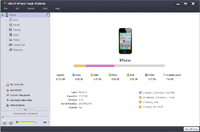 Looking for software that can help you backup all multimedia files in iphone to your computer or iTunes? Would you like to move files from your computer to iPhone, convert DVD/CD files with no requirement for installing any other decrypter or decoder software, download exciting online videos from top online videos websites, and extract audios to make personalized iPhone ringtones from audio/video files? Looking for software that can help you backup all multimedia files in iphone to your computer or iTunes? Would you like to move files from your computer to iPhone, convert DVD/CD files with no requirement for installing any other decrypter or decoder software, download exciting online videos from top online videos websites, and extract audios to make personalized iPhone ringtones from audio/video files?
Xilisoft iPhone Magic Platinum enables you to do all that and more! It is really an all-in-one iPhone manager. With this utility, you could transfer music, movies, photos, books (PDF and EPUB formats), iPhone ringtones, and also applications between iPhone and PC, even support application document management for some applications, easy and fast.
Xilisoft iPhone Magic integrates iPhone converter, transfer, ringtone maker and contacts manager. It supports all iPhone/iPod/iPod touch models and allows you to connect and manage several devices simultaneously which makes it easy to share and transfer files among the devices. This powerful iPhone solution provider makes your iPhone management simple and convenient.
Some of the main features of this software are: Convert all media files even DVDs to iPhone supported formats, download and convert online videos for playable on iPhone, backup and manage music, movies, photos, books, SMS and make customized iPhone ringtones and transfer to iPhone. You can also use it to backup, transfer, restore and manage your contacts information.
To find out more about this amazing software, please visit Xilisoft.
Posted in Main | No Comments »
Tuesday, August 7th, 2012
 QLPrism is short or another term or word for “Quake Live + Prism.” This is a web application-style launcher for Quake Live. Rather than loading up your web browser, you can simply double click the QLPrism icon on your desktop to directly launch Quake Live. This package essentially combines Quake Live and a modified version of Mozilla (the creators of Firefox) Lab’s Prism, which is an application that lets you split web applications out of their browser and run them directly on their desktop. QLPrism is currently available for Windows and Linux operating systems. QLPrism is short or another term or word for “Quake Live + Prism.” This is a web application-style launcher for Quake Live. Rather than loading up your web browser, you can simply double click the QLPrism icon on your desktop to directly launch Quake Live. This package essentially combines Quake Live and a modified version of Mozilla (the creators of Firefox) Lab’s Prism, which is an application that lets you split web applications out of their browser and run them directly on their desktop. QLPrism is currently available for Windows and Linux operating systems.
QLPrism has a lot of key features that include the following; it is not a full-fledged web browser, which means there are NO tabs, toolbars, or other extra stuff to slow you down, no need to have a separate browser running to play Quake Live, the program now supports full Xfire integration without having to install the Xfire toolbar, with QLPrism’s easy-to-use installer, you can now easily add QLPrism to your Steam library and access the Steam overlay while in Quake Live, the program is equipped with a built in IRC client, the program ensures that you will not be logged out from the QL site for inactivity, and many more.
Want to check it out? Visit Qlprism.
Posted in Main | 1 Comment »
Tuesday, August 7th, 2012
.jpg) Autoruns is a freeware that shows you not only what programs are configured to run during system bootup or login, but also shows you the entries in the order Windows processes them. These programs include ones in your startup folder, Run, RunOnce, and other Registry keys. If third-party auto-starting images have been added to your system, it’s A “show non-Microsoft only” option helps you to zoom in on it. You’ll be truly amazed at how many executables are launched automatically. Autoruns is a freeware that shows you not only what programs are configured to run during system bootup or login, but also shows you the entries in the order Windows processes them. These programs include ones in your startup folder, Run, RunOnce, and other Registry keys. If third-party auto-starting images have been added to your system, it’s A “show non-Microsoft only” option helps you to zoom in on it. You’ll be truly amazed at how many executables are launched automatically.
This utility, which boasts of a very comprehensive knowledge of auto-starting locations of any startup monitor, shows you what programs are configured to run during system bootup or login, and shows you the entries in the order Windows processes them. You can configure this software to show other locations, including Explorer shell extensions, toolbars, browser helper objects, Winlogon notifications, auto-start services, and much more. It goes way beyond the MSConfig utility bundled with Windows Me and XP.
It’s Hide Signed Microsoft Entries option helps you to zoom in on third-party auto-starting images that have been added to your system and it has support for looking at the auto-starting images configured for other accounts configured on a system. Also included in the download package is a command-line equivalent that can output in CSV format, Autorunsc.
To learn more about this software, please do visit Microsoft.com.
Posted in Main | No Comments »
Tuesday, August 7th, 2012
 To edit a raster file in your CAD program, you’ll need to first convert it to a vector file. This is exactly what RasterVect does. With this shareware, you can transform paper drawings or raster images into a vector format. You can import such paper drawings by having them scanned. This utility have TWAIN and WIA support for importing scanned images/files from all scanners. The target vector formats (DXF, WMF, EMF, AI and EPS) are supported by most CAD applications that use vector graphics, such as Corel Draw, Adobe Illustrator, AutoCAD. It does provide a way to getting a paper drawing into your CAD program for quick and easy editing. To edit a raster file in your CAD program, you’ll need to first convert it to a vector file. This is exactly what RasterVect does. With this shareware, you can transform paper drawings or raster images into a vector format. You can import such paper drawings by having them scanned. This utility have TWAIN and WIA support for importing scanned images/files from all scanners. The target vector formats (DXF, WMF, EMF, AI and EPS) are supported by most CAD applications that use vector graphics, such as Corel Draw, Adobe Illustrator, AutoCAD. It does provide a way to getting a paper drawing into your CAD program for quick and easy editing.
Some of the basic functionalities of this software are: viewing tools like scrolling, zooming and color selection. Its features include: recognizes orthogonal and inclined lines, arcs and circles; four various conversion methods (outlines, center-lines etc); several modes (ORTHO, SNAP and OSNAP); corrector for corners at crossing lines, arcs and circles.
It also keeps scale of an initial drawing; can correct a turn angle of an initial raster drawing; has despeckle filters. It can also recognize color images or transform them to black-and-white for the subsequent recognition; has macros and Batch Mode; Has raster and vector editing features; Supports various raster formats, such as BMP, GIF, TIFF, JPEG, PNG, and so on; has own combined (raster+vector) format.
To learn more about this utility, please do visit Rastervect
Posted in Main | No Comments »
Monday, August 6th, 2012
 If you are a web owner and are searching for ways to generate massive traffic to your website, then you probably would have heard about web directory submissions. Fast Directory Submitter is a friendly and easy-to-use semi-automated directory submission tool that allows you quickly submit your websites to thousands of free directories. With its smart in-built features, you can save a lot of time and money and generate natural traffic to your sites. It includes several 1000’s of online directories. If you are a web owner and are searching for ways to generate massive traffic to your website, then you probably would have heard about web directory submissions. Fast Directory Submitter is a friendly and easy-to-use semi-automated directory submission tool that allows you quickly submit your websites to thousands of free directories. With its smart in-built features, you can save a lot of time and money and generate natural traffic to your sites. It includes several 1000’s of online directories.
With Fast Directory Submitter, you simply put in your web site profile just once and click on “submit”. And within n minutes of doing so, your web site will be submitted to thousands of online directories. Nothing could be easier. Unlike other directory submission programs in the market, Fast Directory Submitter does not submit your site to directories that charge a submission fee or those that require a reciprocal link as well as directories that come from the same IP address. Google sees such sites with same IP as having a “relation” and thus treats them differently.
During the process of site submission, This software will rotate the link title, description and key words with each directory thus making it a unique and also helps your website to be listed in several directories under many different key words and link titles.
To know more about the unique features of this directory submission software, do visit FastDirectorySubmitter.
Posted in Main | 1 Comment »
Tuesday, July 31st, 2012
 Freehand Painter is a freeware that helps you create vector-based impressive paintings with brilliant effects on your computer. Its time to put your brushes, paints and canvas aside. Create eye-popping web graphics, design very attractive logos with this simple and adjustable brush tool. You could adjust the size of the brush tool to give your painting such a professional look. You could choose from its preset color palette or create your own unique colors. Freehand Painter is a freeware that helps you create vector-based impressive paintings with brilliant effects on your computer. Its time to put your brushes, paints and canvas aside. Create eye-popping web graphics, design very attractive logos with this simple and adjustable brush tool. You could adjust the size of the brush tool to give your painting such a professional look. You could choose from its preset color palette or create your own unique colors.
It has a simple user interface that helps you keep everything at your fingertips. Its stroke eraser helps you to erase the entire stroke instead of erasing your painting pixel by pixel. Its layer functionality allows you to create a painting with many independent layers.
Some of the key features of this freeware are: it helps you to create vector based graphics very easily, save your painting/graphics into standard ISF format, export your finished work as PNG, JPG or GIF file. You can also create and view your work in full screen mode. You could adjust the transparency level for color variations. Should you make a mistake, its Undo and Redo functions helps to correct it. Your entire workspace can be cleared by just a single click. With this software, you’ll be shocked how easy it is to create good graphics without spending hours on designing.
To learn more about this freeware, please visit Deskshare.com.
Posted in Main | No Comments »
Tuesday, July 31st, 2012
 If you are shy whenever you are in a chat room and wished there was a way you could hide your facial identity and alter your voice, then you are in luck! AV Webcam Morpher is am easy to use program that uses next generation advanced technology to digitally hide your shy face and embarrassing actions in video chat through webcam with terrific “nickfaces”, “nickvoices” and special effects. It helps you to alter your image, voice and background image all in real time. If you are shy whenever you are in a chat room and wished there was a way you could hide your facial identity and alter your voice, then you are in luck! AV Webcam Morpher is am easy to use program that uses next generation advanced technology to digitally hide your shy face and embarrassing actions in video chat through webcam with terrific “nickfaces”, “nickvoices” and special effects. It helps you to alter your image, voice and background image all in real time.
With several “nickfaces” and “nickvoices”to choose from, it allows you to literally become invisible in video chat rooms. You could refresh everyday with a new look, new voice and even new characteristics. This video chat software allows you to choose from almost a hundred ready-to-use video effects (surface, color, and water video effects) and audio effects (common and morpher effects) that will help you to explore a new world of video and sound.
It automatically changes the pitch and timbre of your voice to give you an unlimited variety of voice outputs. You could change your voice to a man, woman, teen, child e.t.c. you could also use this feature to create different voices for movies, music, and presentations. It has an in-built recorder which makes it possible to record your live webcam video chats and save it as a compressed .AVI file. Using the webcam, you can also create unique videos for your blogs, or online video library. You can capture webcam images (both incoming and outgoing) and share with your friends.
To find out more about this amazing software, please do visit Audio4Fun.
Posted in Main | No Comments »
Tuesday, July 31st, 2012
 Why waste time and energy extracting files one by one when you can simply extract all of them with just a single click. ExtractNow is a simple utility that lets you extract multiple files with ease. To extract files, simply drag and drop them into the main program window, or right-click the files while in Windows Explorer. This program makes extracting files easier and quicker. It offers support for ZIP, RAR, ISO, BIN, IMG, IMA, IMZ, 7Z, ACE, JAR, GZ, LZH, LHA and SIT archive formats. Why waste time and energy extracting files one by one when you can simply extract all of them with just a single click. ExtractNow is a simple utility that lets you extract multiple files with ease. To extract files, simply drag and drop them into the main program window, or right-click the files while in Windows Explorer. This program makes extracting files easier and quicker. It offers support for ZIP, RAR, ISO, BIN, IMG, IMA, IMZ, 7Z, ACE, JAR, GZ, LZH, LHA and SIT archive formats.
The manufacturer’s have added a few new features to this version: changed destination paths to use macro expanders, you could now time out the password dialog and new tool tips to browse for folders were added. You now have the ability to go online to download updates. You now have a “Yes’ or “No” to all archives option in overwrite dialog.
Some of the main features of this software are: simple and intuitive user interface for batch archive extractions, supports most major archive formats, search through archives exclusively for archives and the ability to control what happens after extraction. Other features include use password lists to find the correct password for an archive, monitor directories for archives and automatically extract them, support for advanced customizations through the use of Lua scripting and Windows Explorer integration through file type associations and context menus.
To learn more about this software, visit ExtractNow.
Posted in Main | No Comments »
Monday, July 30th, 2012
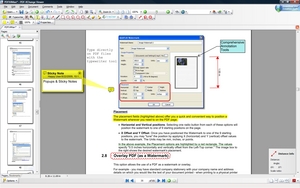 PDF-XChange Viewer is a unique PDF reader that allows you to view PDF files on your computer or online, but unlike other PDF readers, PDF-XChange Viewer Typing Mode allows you to type directly on the PDF page! So you don’t have to print out forms before filling them out. This program offers a very good alternative to the Adobe Reader. Users wishing to carry out simple editing tasks now have something to look up to. PDF-XChange Viewer is a unique PDF reader that allows you to view PDF files on your computer or online, but unlike other PDF readers, PDF-XChange Viewer Typing Mode allows you to type directly on the PDF page! So you don’t have to print out forms before filling them out. This program offers a very good alternative to the Adobe Reader. Users wishing to carry out simple editing tasks now have something to look up to.
This program is smaller, faster and has more feature rich than any other free PDF Reader/ PDF Viewer/ PDF Editor in the market. This free PDF viewer download also allows users to try the extended functionality offered by the PDF-XChange Viewer ‘PRO’ in evaluation mode – for free. No PDF reader or Viewer can boast of more features than PDF-XChange – or does so without compromising performance and quality. Its rich feature is a good buy, as it saves you a lot of money. The licensed PDF-XChange Viewer ‘PRO’, is a PDF creator in it’s own right, as it allows users to create PDF files directly from scanners, image files and can even take a .txt or a .rtf file and convert it to PDF or build your PDF document from scratch.
The FREE OCR functionality supports a base language set of English, French, German & Spanish and so much more. The manufacturer’s is pleased to offer their customers who have purchased PDF-XChange Viewer(PRO version), the means to convert to PDF from any windows based application with a ‘FREE’ ‘Commercial’ licensed copy of PDF-XChange 4.0 Lite (Business use allowed).
To find out more about this program, please visit Tracker-Software.
Posted in Main | No Comments »
Monday, July 30th, 2012
 Anvi Smart Defender is a a program that provides powerful and smart protection against malicious software such as virus, Trojans, adware, spyware, bots and other threats. Designed with a powerful engine, it can scan and detect online security threats very fast. It can also speed up slow PC and offers cloud scan feature to give your computer a more effective and powerful protection. Anvi Smart Defender is a a program that provides powerful and smart protection against malicious software such as virus, Trojans, adware, spyware, bots and other threats. Designed with a powerful engine, it can scan and detect online security threats very fast. It can also speed up slow PC and offers cloud scan feature to give your computer a more effective and powerful protection.
Some of its key features include: it scans your computer quickly and does not use much of system resources; its cloud scan offers more protection. Apart from protecting your computer from malware, it also optimizes the speed of your computer. It guards your PC with behavior guard, USB & external drive guard in a proactive way. It warns you when you are about to land on malicious sites. It blocks adware from displaying on sites you visit.
It also offers free system optimization function for speeding up PC and cleaning junk files. The manufacturers also provide round the clock technical support should you have any issues.
To find out more about this software, please visit Anvisoft.
Posted in Main | No Comments »
|
|
|




