Author Archive
Wednesday, November 9th, 2011
 Tor is a toolset for organizations and people that want to improve their safety and security on the Internet. With Tor installed on your system, anonymize Web browsing and publishing, instant messaging, IRC, SSH, and other applications that use the TCP protocol. Tor is a toolset for organizations and people that want to improve their safety and security on the Internet. With Tor installed on your system, anonymize Web browsing and publishing, instant messaging, IRC, SSH, and other applications that use the TCP protocol.
The application also provides a platform on which software developers can build new applications with built-in anonymity, safety, and privacy features. Communications are bounced around a distributed network of servers, called onion routers; and instead of taking a direct route from source to destination, data packets on the Tor network take a random pathway through several servers that cover your tracks so no observer at any single point can tell where the data came from or where it’s going. This makes it hard for recipients, observers, and even the onion routers themselves to figure out who and where you are.
The basic aim of this program is to provide Internet users with protection against “traffic analysis,” a form of network surveillance that threatens personal anonymity and privacy, confidential business activities and relationships, and state security. Tor is an open source program with lots of features advanced enough to give you a lot of confidence while online. The program is useful to private individuals, business, media, activists, and many more.
Want to check it out? Visit Torproject.
Posted in Main | No Comments »
Tuesday, November 8th, 2011
 Longitude is an agent-less application performance and network monitoring software that monitors, alerts and reports on availability and performance of your critical Windows, Unix and Linux systems. With Longitude Professional, you can automatically receive email, phone, and pager alerts, generate SNMP traps, and perform corrective action based on what’s important at your site. The program does not actually require any agents to install, and includes a wealth of packaged application performance monitoring and network performance monitoring solutions, Longitude lets you get started in minutes. Longitude is an agent-less application performance and network monitoring software that monitors, alerts and reports on availability and performance of your critical Windows, Unix and Linux systems. With Longitude Professional, you can automatically receive email, phone, and pager alerts, generate SNMP traps, and perform corrective action based on what’s important at your site. The program does not actually require any agents to install, and includes a wealth of packaged application performance monitoring and network performance monitoring solutions, Longitude lets you get started in minutes.
Longitude Professional has a Web-based interface and real-time Event Monitor that allows you to view how your environment is performing, receive proactive alerts, reveal root causes, automate corrective actions, tailor your monitoring, set up service level agreements (SLAs), and generate performance reports. Enterprises large and small value Longitude for its effectiveness, simplicity, and affordability. There is no need to be a professional IT person to be able to use this program to monitor your resources.
Some of the key features in Longitude Professional include the following; it is very easy to use, makes complete operating system and application monitoring possible with its broad range of platforms, saves you a lot of time, monitors and alerts on the availability and performance of systems, applications, networks, and SLAs, and many more.
Want to check it out? Visit Heroix.com.
Posted in Main | No Comments »
Tuesday, November 8th, 2011
 Emerge Desktop is a replacement windows “shell” (the desktop environment normally provided by Windows Explorer) for Windows 2000 and above. In order to replace Windows Explorer as a shell, it provides a system tray (the area that collects the icons collected at the lower right corner in Explorer), called emergeTray. Emerge Desktop also provides access to the users programs (normally accessed with the windows “start” button) via a right-click on the desktop, via emergeCore. Emerge Desktop is a replacement windows “shell” (the desktop environment normally provided by Windows Explorer) for Windows 2000 and above. In order to replace Windows Explorer as a shell, it provides a system tray (the area that collects the icons collected at the lower right corner in Explorer), called emergeTray. Emerge Desktop also provides access to the users programs (normally accessed with the windows “start” button) via a right-click on the desktop, via emergeCore.
Emerge Desktop is written in C++ and is licensed as open source (under the GPL). The entire source is available in Mercurial at Sourceforge. The program can be developed using Code::blocks, which is an IDEs for MinGW. The program has an open API, which allows for applets to be coded with compilers other than MinGW if someone wishes to do so.
On the downside, the publishers didn’t provide information on how this program can be run or installed by its users. That might as well be one of the biggest setbacks for Emerge Desktop that needs to be looked into or corrected on the website. However, that should not take anything away from Emerge Desktop. It is compatible with Windows 7, 2000, 2003, Vista, and XP.
Want to check it out? Visit EmergeDesktop.
Posted in Main | No Comments »
Tuesday, November 8th, 2011
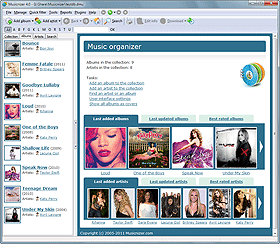 Musicnizer is a shareware application that scans your heap of song files; thereby generates a song catalog with data about each album and artist. Important data can be extracted from ID3 fields of the files. The organizer can also fetch cover art, track data, genre, year, label, album review, and more. You can achieve a lot of things with Musicnizer including the following; organize music albums of any format (vinyl LP, Audio CD, MP3, FLAC, APE, OGG, and others), create an illustrated music catalog containing covers, tracks lists, and reviews albums, helps you to become a music expert, and download discographies, biographies and photos of your favorite artists. Musicnizer is a shareware application that scans your heap of song files; thereby generates a song catalog with data about each album and artist. Important data can be extracted from ID3 fields of the files. The organizer can also fetch cover art, track data, genre, year, label, album review, and more. You can achieve a lot of things with Musicnizer including the following; organize music albums of any format (vinyl LP, Audio CD, MP3, FLAC, APE, OGG, and others), create an illustrated music catalog containing covers, tracks lists, and reviews albums, helps you to become a music expert, and download discographies, biographies and photos of your favorite artists.
Musicnizer also helps you to scan all your audio files and create a colorful music catalog. The program will download cover art, track lists, reviews, and other information of your choice from the internet. All you need to do is browse the catalog full of interesting information instead of looking at filenames. Interestingly, you can start playing albums or individual tracks directly from the catalog by using either the built-in audio player or any other media player. Other features included in this program are as follows; download information about various artistes, find connection between albums and artists, organize music albums, create an illustrated music albums, etc.
Want to check it out? Visit Musicnizer.com.
Posted in Main | No Comments »
Tuesday, November 1st, 2011
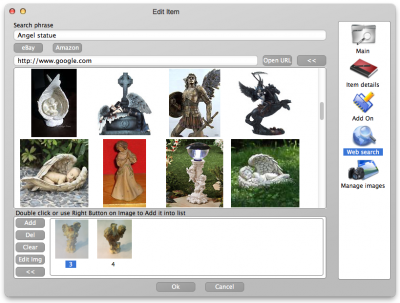 LignUp Multi Collector is a universal tool for managing many collections with any collectibles. The application includes a host of key features like creating custom collection database; capturing images from web camera, get images online, correct images in graphic editor, and edit various categories; password protection; report generation as PDF document and HTML site; smart filters and data sorting. LignUp Multi Collector is a universal tool for managing many collections with any collectibles. The application includes a host of key features like creating custom collection database; capturing images from web camera, get images online, correct images in graphic editor, and edit various categories; password protection; report generation as PDF document and HTML site; smart filters and data sorting.
With the LignUp Multi Collector lots of separate elements become a genuine treasure; an ordered harmonious collection. Each item keeps its own place in right category, and you can easily assort the collection as you like, add random sections and keep all necessary information about items in database.
When you install LignUp Multi Collector on your system, some of the features you can look forward to include the following; choose between dozens of categories or create custom one for your own needs, make photo of your items directly from your web camera, and edit your images using embedded image editor, search online information and capture images directly from program, use Google, eBay and Amazon to find proper images, keeps all information in the way you prefer, provides data export to many popular file formats (PDF, Excel CSV, HTML), so you can proudly present your collection to anyone, and many more.
Want to check it out? Visit Lignup.com.
Posted in Main | No Comments »
Tuesday, November 1st, 2011
 Sender’s Time Zone for Outlook is an application that will show you the sender’s local time when you open or reply to an e-mail message. As soon as the Sender’s Time Zone is installed, no setting and no configuring is required; and from then on, you will never be confused with the time zones differences. You just open an e-mail message and besides the standard Outlook timestamp, you will see the sender’s current time, your time zone difference and the time since the message was sent. Sender’s Time Zone for Outlook has undergone a lot of changes that include some of the following; addition of support for 64-bit version of Microsoft Outlook 2010, addition of feature that lets you customize sender’s time zone option, and addition of sender’s time zone panel shows up in the Outlook Explorer reading pane when replying to a message. Sender’s Time Zone for Outlook is an application that will show you the sender’s local time when you open or reply to an e-mail message. As soon as the Sender’s Time Zone is installed, no setting and no configuring is required; and from then on, you will never be confused with the time zones differences. You just open an e-mail message and besides the standard Outlook timestamp, you will see the sender’s current time, your time zone difference and the time since the message was sent. Sender’s Time Zone for Outlook has undergone a lot of changes that include some of the following; addition of support for 64-bit version of Microsoft Outlook 2010, addition of feature that lets you customize sender’s time zone option, and addition of sender’s time zone panel shows up in the Outlook Explorer reading pane when replying to a message.
The program is easy to install, light on your computer; and requires no major configuration. Once you open an email, and besides the standard Outlook timestamp you will see the sender’s current time, the time zone difference (i.e. the number of hours behind or ahead) and the time since the message was sent.
Want to check it out? Visit Ablebits.com.
Posted in Main | No Comments »
Monday, October 31st, 2011
 GPS Tracker Data Logger acts as the server and allows you to collect data from an unlimited number of various GPS trackers simultaneously. The data obtained is processed, uniformed and written to a log file or a database. Also, the program has a set of interfaces so other applications can get data in real time. GPS Tracker Data Logger is built with capacity to convert data into other formats (the formats of other trackers) and send them to other servers. This shareware application also allows you to connect previously unsupported devices to existing systems or view data from heterogeneous GPS trackers with the help of integrated client software. GPS Tracker Data Logger acts as the server and allows you to collect data from an unlimited number of various GPS trackers simultaneously. The data obtained is processed, uniformed and written to a log file or a database. Also, the program has a set of interfaces so other applications can get data in real time. GPS Tracker Data Logger is built with capacity to convert data into other formats (the formats of other trackers) and send them to other servers. This shareware application also allows you to connect previously unsupported devices to existing systems or view data from heterogeneous GPS trackers with the help of integrated client software.
GPS Tracker Data Logger can be used to solve a lot of problems; but you need a few technical skills to be sure you are doing the right thing. The program helps you to considerably reduce your company’s expenses due to reduced expenditure on deviations from the route, and prevents personal use of company’s vehicles. Companies can also reduce the amount of client and server software being used thanks to the possibility to receive and process data from various trackers. There are lots of other things you can achieve by using GPS Tracker Data Logger, but be sure you have some technical ability.
Want to check it out? Visit Aggsoft.
Posted in Main | No Comments »
Monday, October 31st, 2011
 BitTally is a professional and reliable network monitoring application that is more than a low-level packet sniffer, like the ones in use by most network administrators, programmers, and other geek types. BitTally is for normal people – like managers, parents, etc – who want to know what is going on their networks. The program includes a lot of functions or features that will help you do a lot of things easier than a couple of premium programs out there. The applications’ engine is based on based on Deep Packet Inspection technology (DPI). BitTally recognizes over 100 application protocols including the following; BitTorrent, eDonkey, FTP, HTTP, SMTP, POP3, SIP, Skype, and many more. Users can also be sure that the program also supports encrypted BitTorrent, Skype, and a host of others. BitTally is a professional and reliable network monitoring application that is more than a low-level packet sniffer, like the ones in use by most network administrators, programmers, and other geek types. BitTally is for normal people – like managers, parents, etc – who want to know what is going on their networks. The program includes a lot of functions or features that will help you do a lot of things easier than a couple of premium programs out there. The applications’ engine is based on based on Deep Packet Inspection technology (DPI). BitTally recognizes over 100 application protocols including the following; BitTorrent, eDonkey, FTP, HTTP, SMTP, POP3, SIP, Skype, and many more. Users can also be sure that the program also supports encrypted BitTorrent, Skype, and a host of others.
BitTally is also designed to track bandwidth usage, collecting statistics by user, application protocol, domain, domain category, country. The program also has capacity to detect suspicious activities, reset undesirable TCP connections, or even redirect HTTP sessions. BitTally Lite is created for some specific environment that includes the following; office (by increasing employee productivity), schools and library (set up and enforce acceptable internet usage policies), and in home environment (to help you know what your kids are up to or doing).
Want to check it out? Visit BitTally.
Posted in Main | No Comments »
Sunday, October 30th, 2011
 CodeTwo Outlook Reply All Reminder is a program created to prevent Outlook users from accidental excluding other recipients (specified in the Cc: or To: fields) when replying to a group message. Sometimes it does happen to everyone to forget to hit the Reply instead of the Reply All button, but when it comes to business group correspondence, skipping an important recipient may cause a lot of trouble. CodeTwo Outlook Reply All Reminder is a program created to prevent Outlook users from accidental excluding other recipients (specified in the Cc: or To: fields) when replying to a group message. Sometimes it does happen to everyone to forget to hit the Reply instead of the Reply All button, but when it comes to business group correspondence, skipping an important recipient may cause a lot of trouble.
A lot of people have lost a lot of deals just by hitting the Reply button instead of the Reply All button; and this can cause a lot of problems in the end; especially if you have an important project. Some of these mistakes can be very costly, and can actually make you lose a couple of important deals as well; and that is one of the reasons behind creating this program.
Code Two Outlook Reply All Reminder is an easy to use application that makes things easier for you. What it means is that you may eventually be able to overcome any problem that has to do with hitting the wrong button. The best part is that this program is free, and users can download and use it as soon as possible since it is also easy to understand.
Want to check it out? Visit CodeTwo.
Posted in Main | No Comments »
Sunday, October 30th, 2011
 Bram is a Batch Renamer and Mover program that is used to batch rename files or folders, as well as move them or copy them. You can work with one folder of items or include its subfolders’ items as well. The program offers you different ways by which you can rename files, including dynamic parts that are unique for each file. Bram also has an easy to use interface that will be familiar to anyone who has ever used the Windows file explorer, and also supports multithreading when it performs file and folder operations, so it’s efficient. Bram is a Batch Renamer and Mover program that is used to batch rename files or folders, as well as move them or copy them. You can work with one folder of items or include its subfolders’ items as well. The program offers you different ways by which you can rename files, including dynamic parts that are unique for each file. Bram also has an easy to use interface that will be familiar to anyone who has ever used the Windows file explorer, and also supports multithreading when it performs file and folder operations, so it’s efficient.
Bram is compatible with Windows 7, Vista, and XP, and includes a lot of key features such as; rename multiple files/folders using common naming scheme, dynamic naming scheme parts, undo the last set of changes in case you have some problems with applied changes, when displaying items, you can display either files or folders, when displaying items, you can either display only the items in a folder or you can include all of the items in its subfolders, when displaying files, you can filter the items by file extensions, and lots of other features.
Bram is an application that requires the Microsoft .NET Framework 4.X; and is also available for free download.
Want to check it out? Visit Weebly.com.
Posted in Main | No Comments »
|
|
|




