Author Archive
Sunday, October 23rd, 2011
 Highlight is a universal source code converter which transforms code to HTML, XHTML, RTF, Latex, TEX, SVG, BBCode and XML files with syntax highlighting. (X)HTML and SVG output is formatted by CSS. It supports customizable color theme and language descriptions with regular expressions. Highlight is an application that contains several options to provide a consistent formatting of the output code. However, the publisher has added some new few features and updated a couple of others that include the following; addition of support for MoonScript, UPS, N3, N-Triples, Turtle SPARQL, the print-style option has been fixed, and the addition and improvement of a few color schemes among other changes. Highlight is a universal source code converter which transforms code to HTML, XHTML, RTF, Latex, TEX, SVG, BBCode and XML files with syntax highlighting. (X)HTML and SVG output is formatted by CSS. It supports customizable color theme and language descriptions with regular expressions. Highlight is an application that contains several options to provide a consistent formatting of the output code. However, the publisher has added some new few features and updated a couple of others that include the following; addition of support for MoonScript, UPS, N3, N-Triples, Turtle SPARQL, the print-style option has been fixed, and the addition and improvement of a few color schemes among other changes.
Highlight has some unique and powerful features that include the following; coloured output in HTML, XHTML, RTF, TeX, LaTeX, SVG, BBCode and XML format, supports 160 programming languages, inclusion of 80 color themes, recognizes nested languages, language definitions and themes are Lua scrips, plugin interface to tweak syntax parsing and coloring, CLI, GUI and Lib builds available, and platform independent.
Highlight is open source and that means you have opportunity to use it for as long as you wish to; and of course, it is unlimited. The program supports a lot of non-win platforms including MAC operating system.
Want to check it out? Visit Andre-simon.
Posted in Main | No Comments »
Saturday, October 22nd, 2011
 PhotoLikr is a fast photo viewer application to review and upload your images, then your contacts will sort pictures for you by voting on the pictures they like or dislike by creating a lovely photo wall gallery. The program gives you the opportunity to quickly rate and sort pictures of a selected folder; using the arrow keys up or down to vote and left and right to navigate. PhotoLikr is a fast photo viewer application to review and upload your images, then your contacts will sort pictures for you by voting on the pictures they like or dislike by creating a lovely photo wall gallery. The program gives you the opportunity to quickly rate and sort pictures of a selected folder; using the arrow keys up or down to vote and left and right to navigate.
PhotoLikr allows you to upload pictures using Google+, Picasa or Gmail, Minus.com or PhotoOnWeb account. You also have the opportunity to Share on Facebook, Google+, Digg, Delicious, LinkedIn as well as Twitter. Some of its features include the following; unlimited storage using your Google account or email (if you choose 800 x 600), local application will let you vote for pictures and so you can upload to G+, Minus.com , PhotoOnWeb only the picture you prefer, online, the photo wall gallery, (let people see the picture but also vote for the one they prefer or hate, and after they have voted, you can see the vote in the computer desktop application, and thereby able to adjust to publish all-public favourites photos, or delete in batch the picture with the less votes), and a few others.
Want to check it out? Visit Obviousidea.com.
Posted in Main | No Comments »
Saturday, October 22nd, 2011
 MyChat is a client-server chat that is ideally suited for message passing and an exchange of files in a network. The application can easily work in corporate or intranet networks, and also through the Internet. MyChat will be useful to the companies to which need a resource of corporate dialogue, but usage of such IM systems, as ICQ is inadmissible because of possibility of information leakage. With MyChat such problems will not be: you install a server and can inspect all. Its latest changes and additions include the following; version control, new rights of user groups, improvements in panel contacts, convenient transfer of files, ban exit conference as well as option to filter users on the server. MyChat is a client-server chat that is ideally suited for message passing and an exchange of files in a network. The application can easily work in corporate or intranet networks, and also through the Internet. MyChat will be useful to the companies to which need a resource of corporate dialogue, but usage of such IM systems, as ICQ is inadmissible because of possibility of information leakage. With MyChat such problems will not be: you install a server and can inspect all. Its latest changes and additions include the following; version control, new rights of user groups, improvements in panel contacts, convenient transfer of files, ban exit conference as well as option to filter users on the server.
MyChat is a powerful LAN chat and messenger for local networks and you will discover that it is also useful for instant messaging and files exchanging in the corporate or SOHO networks. The program also serves as an effective tool organizing a useful instant messenger system in your company. Some of the program’s key features include the following; notice board, flexible and easy user management, tree-like list of contacts, SL encryption of transmitted messages, mass notification, and lots of other amazing features.
Want to check it out? Visit Nsoft-S.com.
Posted in Main | No Comments »
Friday, October 21st, 2011
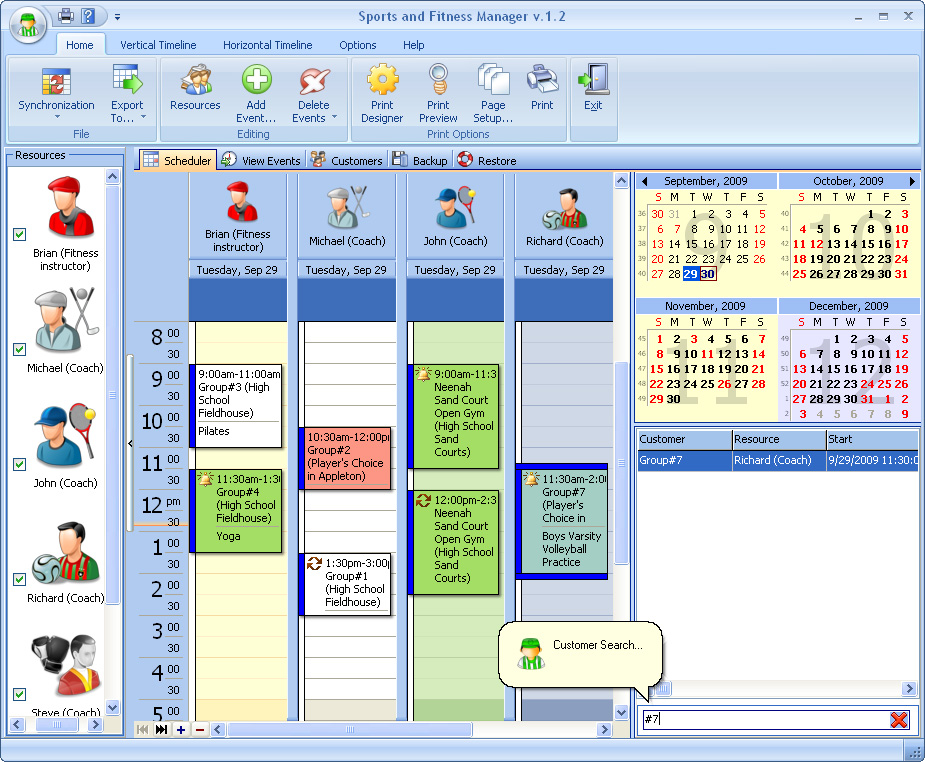 Sports and Fitness Manager is a comprehensive solution that simply allows creating the database and events planned. The program is absolutely essential for coaches, fitness instructors, aerobics instructors, group exercise instructors, fitness coordinators, scuba diving instructors, trainers and team leaders, as it provides them with a tool to organize the business and to manage it effectively. If you are a coach or a trainer or a sport instructor, Sports and Fitness Manager will help you plan your working hours so you can practice; thereby not allowing your lessons to overlap with someone else and keep track of scheduled appointments. Sports and Fitness Manager is a comprehensive solution that simply allows creating the database and events planned. The program is absolutely essential for coaches, fitness instructors, aerobics instructors, group exercise instructors, fitness coordinators, scuba diving instructors, trainers and team leaders, as it provides them with a tool to organize the business and to manage it effectively. If you are a coach or a trainer or a sport instructor, Sports and Fitness Manager will help you plan your working hours so you can practice; thereby not allowing your lessons to overlap with someone else and keep track of scheduled appointments.
Sports and Fitness Manager stores information about clients, such as their address, health and emergency data, personal notes, family data, membership fee and renew dates, comments. Add as many comments as you wish. The program is built with lots of features that are flexible and easy to use; and this flexibility allows changing time intervals, creating numerous profiles and viewing multiple schedules at a time. You can also customize various export, pagination, and document settings via a built-in PDF Export Options form.
Sports and Fitness Manager has a 14 day trial period, and goes for $39.95 for the unlimited version. The program is not difficult to understand, and might just be what some sport instructors actually require to get going.
Want to check it out? Visit Binaryhouse.com.
Posted in Main | No Comments »
Friday, October 21st, 2011
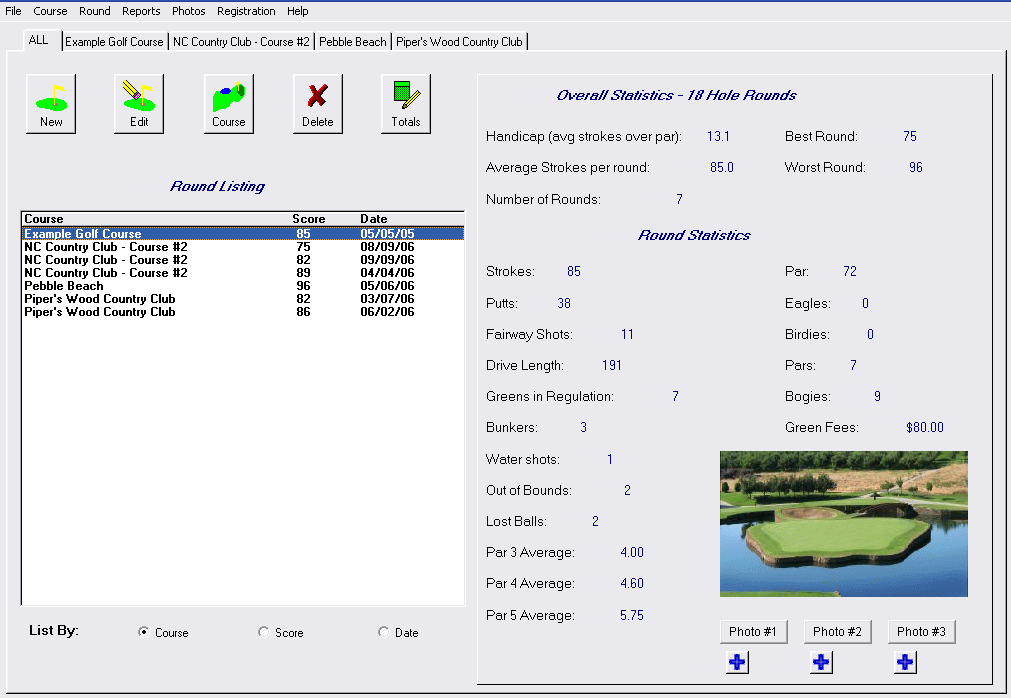 Golf Tracker is a free software program that helps keep track of your golf rounds as well as tons of statistics to see how your game is progressing. With Golf Tracker software you can enter each round of golf. The application simple allows you to compile as well as analyze different kinds of statistics of your game. For each round of golf you play you can track stats like putts, drive length, greens in regulation, water balls, lost balls, bunkers, fairways hit, handicap, and more. Golf Tracker is a free software program that helps keep track of your golf rounds as well as tons of statistics to see how your game is progressing. With Golf Tracker software you can enter each round of golf. The application simple allows you to compile as well as analyze different kinds of statistics of your game. For each round of golf you play you can track stats like putts, drive length, greens in regulation, water balls, lost balls, bunkers, fairways hit, handicap, and more.
It will give you stats like how you are performing on par 3s vs. par 4’s vs. par 5’s. Overall averages for each golf statistic are compiled and can be shown as an overall average or per golf course. This enables you to see how you are scoring on one golf course versus another. Your overall handicap is compiled as well.
Golf Tracker has a picture feature where you can store multiple pictures of a golf course or round played. The program’s main screen includes a list of rounds that can be sorted by golf course, score, as well as date. The statistics, as well as any picture, are displayed for the round which is currently selected.
Want to check it out? Visit DuckSoftware.
Posted in Main | No Comments »
Thursday, October 20th, 2011
 SEO PowerSuite is about the most complete free SEO toolkit; and comprises of four powerful SEO tools, each covering its specific area of SEO activities. Rank Tracker unearths hundreds of traffic-productive keyword variants for your website optimization and monitors your website’s positions in any of 600 supported search engines. The WebSite Auditor features helps you optimize your website’s structure and HTML coding and creates search engine friendly content for its separate pages. This version of the program also requires java runtime environment 1.5 to be installed, and also comes with updates such as the following; 14 brand new SEO reports introduced in beta, proxy status identification process made more accurate, several new sources for finding free proxy lists added, and the number of supported search engines also increased to 750. SEO PowerSuite is about the most complete free SEO toolkit; and comprises of four powerful SEO tools, each covering its specific area of SEO activities. Rank Tracker unearths hundreds of traffic-productive keyword variants for your website optimization and monitors your website’s positions in any of 600 supported search engines. The WebSite Auditor features helps you optimize your website’s structure and HTML coding and creates search engine friendly content for its separate pages. This version of the program also requires java runtime environment 1.5 to be installed, and also comes with updates such as the following; 14 brand new SEO reports introduced in beta, proxy status identification process made more accurate, several new sources for finding free proxy lists added, and the number of supported search engines also increased to 750.
SEO PowerSuite Free comes with key features that include the following; easy and fast, tested and used by a few individuals with vast experience in the area of search engine optimization or search engine ranking, has a lot of features just like a premium program, frequently updated, compatible with Windows, Mac, OS X as well as Linux.
One unique thing about this program is that it is easy to use, and does not require a very long time to get used to.
Want to check it out? Visit Link-assistant.com.
Posted in Main | 1 Comment »
Thursday, October 20th, 2011
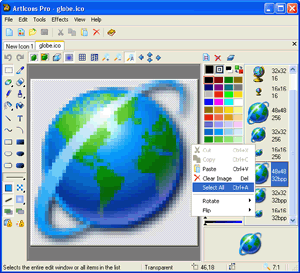 ArtIcons is an advanced icon-specific utility created for Windows. It allows both professional and amateur graphic artists alike to create and edit icon images and manage icon files and libraries. This version, which is pro allows you to do virtually everything in the standard version including importing GIF, Adobe Photoshop PSD, WMF, XPM, XBM and WBMP images, CUR and ANI cursor files. ArtIcons Pro also allows you to export images to GIF, Adobe Photoshop PSD, RC, XPM, XBM, WBMP and CUR files, import and export icon colour palettes, work with image lists in BMP and PNG formats, export library items into one single image, split icon libraries into individual icon files, and Split icons into sub-icons. ArtIcons is an advanced icon-specific utility created for Windows. It allows both professional and amateur graphic artists alike to create and edit icon images and manage icon files and libraries. This version, which is pro allows you to do virtually everything in the standard version including importing GIF, Adobe Photoshop PSD, WMF, XPM, XBM and WBMP images, CUR and ANI cursor files. ArtIcons Pro also allows you to export images to GIF, Adobe Photoshop PSD, RC, XPM, XBM, WBMP and CUR files, import and export icon colour palettes, work with image lists in BMP and PNG formats, export library items into one single image, split icon libraries into individual icon files, and Split icons into sub-icons.
ArtIcons Pro has experienced a lot of significant improvement over the past couple of years. Some of its important features include the following; create and edit icons in either standard or custom sizes, in colour depths up to 16 million colours, create and edit icons for Windows XP in 32-bit colour depth with 8-bit alpha channel, create and store images containing several layers, paint images with gradient and chess fill, create and manage icon libraries for better and more efficient storage, replace image colours, and lots of others.
Want to check it out? Visit Aha-soft.com.
Posted in Main | 1 Comment »
Tuesday, October 18th, 2011
 Cherbox is password management software that features quite convenient automatic password generation function, and can also be used to manage password information. That aside, Cherbox is also a type of fully functional personal management software. You can manage desktop icons of the operating system, application programs, files, folders, notes, URLs, etc. with it. Cherbox is password management software that features quite convenient automatic password generation function, and can also be used to manage password information. That aside, Cherbox is also a type of fully functional personal management software. You can manage desktop icons of the operating system, application programs, files, folders, notes, URLs, etc. with it.
The program provides a function similar to win+r in the Windows Operating System. Users can rapidly start an application program, URL or data entry with defined abbreviated characters by pressing the shortcut key CTRL+Q (default, set optionally). A good example is the fact that Firefox can be rapidly started by inputting something like “ff”. Even though you haven’t defined an abbreviation, you can also run it by inputting the title of the application program (such as “Firefox”).
Cherbox can be used as a virtual desktop when managing your files or folders. To make this happen, all you need do is simply drag or add them in Cherbox. The software integrates the context menu of the Windows Operating System, with which file operations can be conveniently fulfilled. Worthy of mention is the fact that it also has an automatic image browse function that enables convenient image management.
Want to check it out? Visit Bainsoft.com.
Posted in Main | No Comments »
Tuesday, October 18th, 2011
 DEKSI Shield is one of the most advanced, yet powerful applications with lots of key features rich enough to protect your computer system. The program is designed to hide files, folders, and drives, and set access rules using flexible security combinations for your most valuable data. One unique feature of DEKSI Shield is the combination of data hiding and encrypting. Version 2.2 already includes a wizard as well as the option of restricting personal folders and settings, files/folders/drives protection, a hiding expert, and a data encryption master. DESKI Shield gives you a lot of options when it comes to security and this also include the opportunity to password-protect your date, program start-up or even program uninstall among others. DEKSI Shield is one of the most advanced, yet powerful applications with lots of key features rich enough to protect your computer system. The program is designed to hide files, folders, and drives, and set access rules using flexible security combinations for your most valuable data. One unique feature of DEKSI Shield is the combination of data hiding and encrypting. Version 2.2 already includes a wizard as well as the option of restricting personal folders and settings, files/folders/drives protection, a hiding expert, and a data encryption master. DESKI Shield gives you a lot of options when it comes to security and this also include the opportunity to password-protect your date, program start-up or even program uninstall among others.
DESKI Shield comes with some notable features that include the following; ability to hide files, folders or drives from all other users (including the administrator), encrypt files and folders, a mask that enables you to hide file groups, ability to set permissions for any file, folder and drives, access lock on your private folders and settings, protection wizard, password protection for files, folders and drives, use of hotkeys to start DESKI Shield and to change the protection mode from other Windows application, unlimited number of objects to protect, and a few others.
Want to check it out? Visit Deksoftware.
Posted in Main | No Comments »
Monday, October 17th, 2011
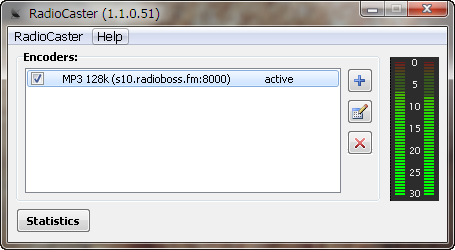 RadioCaster takes any type of audio, including analog recordings, from devices which are connected to the computer. The program can also broadcast any audio being played on the computer, and thereafter broadcast them online for your Internet radio station. RadioCaster allows you to stream this audio on an unlimited number of servers from your computer. You can easily use old audio sources from playback devices connected to the computer and have them seamlessly converted to high-quality streaming radio stations on the web for the world to hear. RadioCaster takes any type of audio, including analog recordings, from devices which are connected to the computer. The program can also broadcast any audio being played on the computer, and thereafter broadcast them online for your Internet radio station. RadioCaster allows you to stream this audio on an unlimited number of servers from your computer. You can easily use old audio sources from playback devices connected to the computer and have them seamlessly converted to high-quality streaming radio stations on the web for the world to hear.
RadioCaster includes a lot of key features such as the following; ability to broadcast any audio that you have on your PC (this is due to support for audio capture from any computer input or playback device), support for ASIO devices, full Windows 7 support, 32 and 64 bits, works with Icecast, Shoutcast and compatible services (such as Live365), metadata support, broadcast statistics, select your station’s bitrate, audio source (device or URL) and song title source, simple and easy to use interface and as well as easy user configuration, etc.
RadioCaster is a shareware program, but has a 30 day trial period for users. With the price put at $39.95, users shouldn’t have problem going for it.
Want to check it out? Visit Djsoft.net.
Posted in Main | No Comments »
|
|
|




