Author Archive
Sunday, September 25th, 2011
 Tweaking.com – Simple Performance Boost is a simple program designed to bring only the safest tweaks to your system to increase speed and stability. Windows is setup in a default configuration’ and by fine tuning your configuration you can increase the speed and snappiness of the operating system. These tweaks are the ones that are safe and shown to cause no side effects with any programs. Each tweak only gives a small performance boost; however, they all add up, so the more tweaks you do the more performance you get. Tweaking.com – Simple Performance Boost is a simple program designed to bring only the safest tweaks to your system to increase speed and stability. Windows is setup in a default configuration’ and by fine tuning your configuration you can increase the speed and snappiness of the operating system. These tweaks are the ones that are safe and shown to cause no side effects with any programs. Each tweak only gives a small performance boost; however, they all add up, so the more tweaks you do the more performance you get.
You can achieve a faster boot & shutdown times, including a faster network file sharing, snappier feel to opening Windows and programs, and more stability. With Tweaking.com, your system in all should feel smoother.
Users without much experience should be a bit cautious when using this program as it may require a bit of technical skill to use it. However, once you run Tweaking.com-Simple Performance Boost on your system for the first time, it will backup all the regkeys it changes into a backup.reg file. This way if you ever want to put things back the way they where a double click of that reg file and your good to go.
Want to check it out? Visit Tweaking.
Posted in Main | No Comments »
Saturday, September 24th, 2011
 Panda Batch File Renamer is an easy to use utility for changing the names of multiple files. The program’s intuitive interface provides a flexible way to quickly alter file names. The current and final file names are shown side-by-side on the screen and any changes are displayed on screen immediately. Information taken directly from the ID tags of photo and music files can be inserted into the file name. Multiple renaming options can be queued up to make very detailed changes to file names if required. Panda Batch File history of changes is kept, allowing them to be undone if a mistake is made; renaming options can be saved so that you do not have to repeatedly recreate them. Panda Batch File Renamer is an easy to use utility for changing the names of multiple files. The program’s intuitive interface provides a flexible way to quickly alter file names. The current and final file names are shown side-by-side on the screen and any changes are displayed on screen immediately. Information taken directly from the ID tags of photo and music files can be inserted into the file name. Multiple renaming options can be queued up to make very detailed changes to file names if required. Panda Batch File history of changes is kept, allowing them to be undone if a mistake is made; renaming options can be saved so that you do not have to repeatedly recreate them.
Many renaming options are now available in this version of Panda Batch File, and these include the following: change case, reverse text, trim text; remove characters, numbers, letters, symbols, all text; Replace block of text, section of text, accented characters, regex, etc; insert text, sequential number, date and time, music tags, photo tags, file info, image info, etc, and a host of others. The program is also available in a couple of languages that include the following; Italian, Spanish, English, French, and many more.
Want to check it out? Visit Animal-Software.
Posted in Main | No Comments »
Saturday, September 24th, 2011
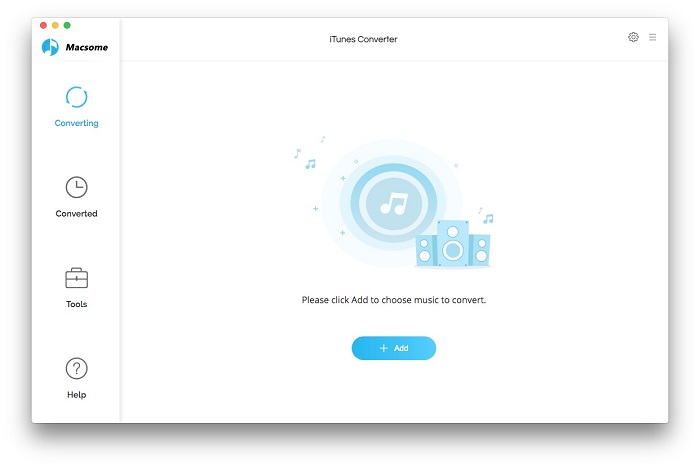 Macsome iTunes Converter is created with features that can easily help you convert DRM protected music and various audio files to unprotected MP3, AAC formats playable on any iPod, iPod Touch, iPhone, Zune, PSP, Creative Zen and other MP3 players at high speed and CD quality. The program is a powerful, but very simple audio conversion tool to bypass DRM control with a virtual audio recording method. Using batch operation, Macsome iTunes Converter plays protected music tracks silently in the background and record audio files with top digital quality at speeds up to five times. Macsome iTunes Converter is created with features that can easily help you convert DRM protected music and various audio files to unprotected MP3, AAC formats playable on any iPod, iPod Touch, iPhone, Zune, PSP, Creative Zen and other MP3 players at high speed and CD quality. The program is a powerful, but very simple audio conversion tool to bypass DRM control with a virtual audio recording method. Using batch operation, Macsome iTunes Converter plays protected music tracks silently in the background and record audio files with top digital quality at speeds up to five times.
Macsome iTunes Converter is a powerful iTunes converter to convert any audio files that could be played on iTunes. The conversion is five times speed fast, and output could be CD Quality. Macsome iTunes Converter is an M4P to MP3 converter, .aa to MP3 converter, audio book to MP3 converter. The publisher has been able to fix bug may crash iTunes when converting audiobook file.
Some of the key features of Macsome iTunes Converter include the following; convert it to MP3 or AAC format, very fast conversion process, five times speed to convert M4P music file to MP3, convert DRM protected M4P, AA, AAC to unprotected MP3, etc.
Want to check it out? Visit Macsome.
Posted in Main | No Comments »
Friday, September 23rd, 2011
 Microsoft Visual Studio is an integrated development environment that seamlessly spans the entire life cycle of software creation. Some of these software creation include; architecture, user-interface design, code creation, code insight and analysis, code deployment, testing and validation. This version adds support for the most advanced Microsoft platforms, including the next version of Windows (code-named “Windows 8”) and Windows Azure, and enables you to target platforms across devices, services and the cloud. Integration with Team Foundation Server allows the entire team, from the customer to the developer, to build scalable and high-quality applications to exacting standards and requirements. Microsoft Visual Studio is an integrated development environment that seamlessly spans the entire life cycle of software creation. Some of these software creation include; architecture, user-interface design, code creation, code insight and analysis, code deployment, testing and validation. This version adds support for the most advanced Microsoft platforms, including the next version of Windows (code-named “Windows 8”) and Windows Azure, and enables you to target platforms across devices, services and the cloud. Integration with Team Foundation Server allows the entire team, from the customer to the developer, to build scalable and high-quality applications to exacting standards and requirements.
Microsoft Visual Studio 11 Developer Preview enables you to test updates and improvements made since Visual Studio 2010. Some of these include the following: support for the most advanced platforms from Microsoft, which include Windows 8 as well as Azure, and a lot of other language enhancement; new features that include code clone detection, code review workflow, enhanced unit testing, lightweight requirements, production intelliTrace, exploratory testing, and fast context switching.
You can install this preview to run side by side with an existing Visual Studio 2010 installation. It also provides an opportunity for developers to use the software and provide feedback before the final release.
Want to check it out? Visit Microsoft.
Posted in Main | No Comments »
Thursday, September 22nd, 2011
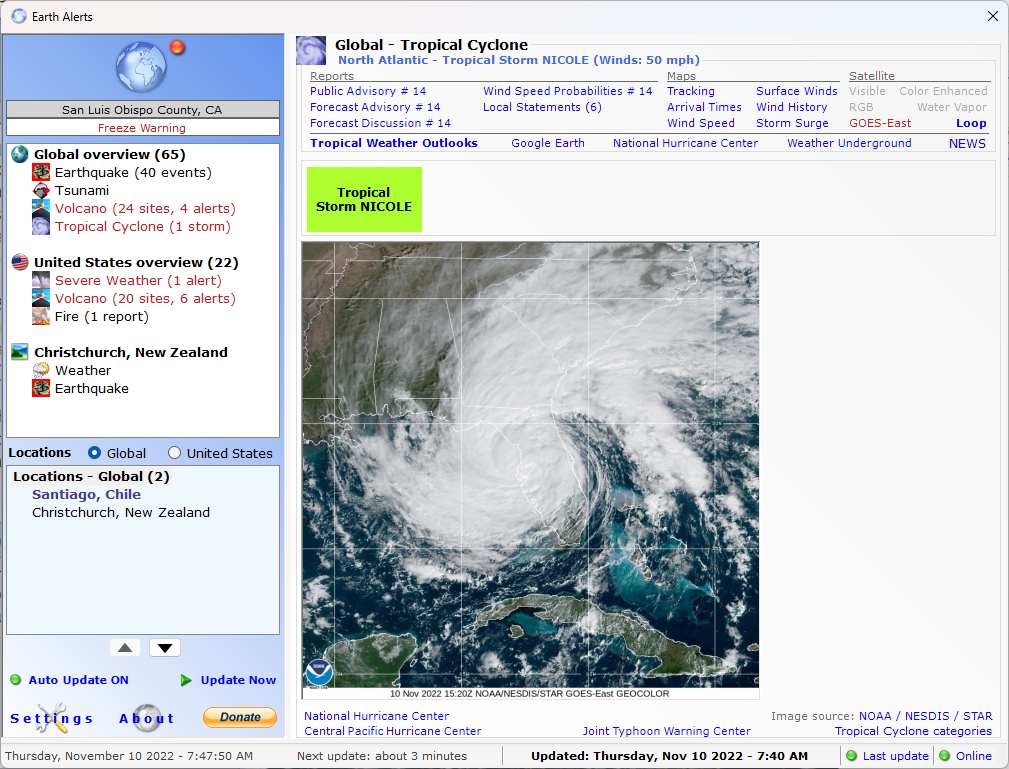 Earth Alerts is an application that allows you to monitor in near real-time a variety of natural hazard events that are occurring anywhere around the world. Alert notifications, reports, and imagery provide you with a convenient way to view natural phenomenon as they occur, whether close to home or some far-flung corner of the globe. The program is designed to use a variety of online resources provided by organizations such as the National Weather Service, U.S. Geological Survey and Smithsonian Institution (just to name a few), to identify what sort of activities “Mother Earth” is currently dishing out on the planet. Earth Alerts is an application that allows you to monitor in near real-time a variety of natural hazard events that are occurring anywhere around the world. Alert notifications, reports, and imagery provide you with a convenient way to view natural phenomenon as they occur, whether close to home or some far-flung corner of the globe. The program is designed to use a variety of online resources provided by organizations such as the National Weather Service, U.S. Geological Survey and Smithsonian Institution (just to name a few), to identify what sort of activities “Mother Earth” is currently dishing out on the planet.
Earth Alerts is designed with basic weather tracking features that include the following; National Weather Service alerts, current conditions, local forecasts and radar/satellite imagery. However, you may need to check out something else if all you want is an extensive weather data or weather related imagery compared to what is available online. What this means is that you will certainly get more than you expected when using Earth Alert because the publisher included more advanced features that will give you more than just weather alerts.
For users who love nature and wants a program that takes only a small space on the system, Earth Alerts is worth checking out.
Want to check it out? Visit EarthAlerts.
Posted in Main | No Comments »
Thursday, September 22nd, 2011
 Camino is a web browser optimized for Mac OS X; and comes with a Cocoa user interface as well as a powerful Gecko layout engine. It is a simple, secure, and fast browser for Mac OS X, and practices the art of simplicity with an uncluttered user interface, but with the features you expect from a modern browser like tabbed browsing and pop-up blocking settings. Mozilla Camino is integrated with Google; as its Google search field allows you find what you need faster. The browser also comes with advanced cookie settings and also helps you recognize when entering and leaving secure web sites. The power behind Camino is basically derived from the Gecko rendering engine. Camino is a web browser optimized for Mac OS X; and comes with a Cocoa user interface as well as a powerful Gecko layout engine. It is a simple, secure, and fast browser for Mac OS X, and practices the art of simplicity with an uncluttered user interface, but with the features you expect from a modern browser like tabbed browsing and pop-up blocking settings. Mozilla Camino is integrated with Google; as its Google search field allows you find what you need faster. The browser also comes with advanced cookie settings and also helps you recognize when entering and leaving secure web sites. The power behind Camino is basically derived from the Gecko rendering engine.
Mozilla Camino 2.1 Beta 2 features a couple of additions and updates that include innovative Tab Overview, phishing and malware protection, safer, as well as a couple of others. The publishers of this open source program have also improved upon many familiar staples that include; flash animations, tabs that can now be rearranged by simply dragging within the tab bar, as well as optional growl notification for downloads among others.
While it may be a bit difficult switching browsers; the publishers of Camino have created a page pointing out the common difference between Camino and Firefox and helps make Camino feel right at home on your desktop and in your Dock.
Want to check it out? Visit Caminobrowser.
Posted in Main | No Comments »
Wednesday, September 21st, 2011
 PicturesToExe Deluxe is designed to create self-running slide shows of images as an EXE file. It has a simple and intuitive interface, which makes creating of a presentation very easy. All you need to do is choose some pictures, while the program produces a single EXE file, which contains all images inside. No additional programs are needed to run resulting presentation – only that stand-alone EXE file. If your demands are a bit higher, PictureToExe Deluxe allows you to make much more attractive presentations, than simply changing slides. You can customize each slide by specifying background colour or picture, adding comments, sounds, objects. Moreover, it’s possible to use different cinematographic transition effects between slides, add background music. PicturesToExe Deluxe is designed to create self-running slide shows of images as an EXE file. It has a simple and intuitive interface, which makes creating of a presentation very easy. All you need to do is choose some pictures, while the program produces a single EXE file, which contains all images inside. No additional programs are needed to run resulting presentation – only that stand-alone EXE file. If your demands are a bit higher, PictureToExe Deluxe allows you to make much more attractive presentations, than simply changing slides. You can customize each slide by specifying background colour or picture, adding comments, sounds, objects. Moreover, it’s possible to use different cinematographic transition effects between slides, add background music.
PicturesToExe Deluxe is built with capacity to exactly synchronize show of slides to music, placing points on the time-line. If it is necessary, you are able to protect your presentation by password and assign expiration date. Presentations can be automatic (by timer) or controlled manually, run once or continuously. If you prefer, you can create SCR files, and use your presentations as a standard Windows screen savers.
PicturesToExe is a shareware program, and is compatible with Windows 2000, Windows 2003, 9x, as well as XP.
Want to check it out? Visit Wnsoft.
Posted in Main | No Comments »
Wednesday, September 21st, 2011
 DipTrace is a PCB design software application that comes with a PCB Layout module, a powerful auto-router, schematic capture and component/pattern editors to design your own component libraries. Besides being very simple to learn, which, is quite an accomplishment for an engineering software application, DipTrace has an intuitive user interface and many innovative features. This version of DipTrace has a couple of new additions that include the following; availability of D PCB Preview, 2580 standard package models, redesigned libraries, net classes, via style, oval (slotted) holes, as well as improved manual routing. DipTrace is a PCB design software application that comes with a PCB Layout module, a powerful auto-router, schematic capture and component/pattern editors to design your own component libraries. Besides being very simple to learn, which, is quite an accomplishment for an engineering software application, DipTrace has an intuitive user interface and many innovative features. This version of DipTrace has a couple of new additions that include the following; availability of D PCB Preview, 2580 standard package models, redesigned libraries, net classes, via style, oval (slotted) holes, as well as improved manual routing.
DipTrace lets you design a schematic by simply selecting and placing components onto your document and connecting them together using the wire and bus tools. The program also supports multisets and hierarchical schematics. Other features you can enjoy in this version include the following; Smart placement and auto-placement, easy to use manual and powerful automatic routing, advanced Verification, the PCB Layout module includes 3D preview, which shows you how your completed project will look like, spice support, support for a number of different manufacturing output formats, allows you to export edge polylines to DXF, DipTrace package includes component and pattern libraries which contain 100,000+ components from different manufacturers, and a host of others.
Want to check it out? Visit Diptrace.
Posted in Main | No Comments »
Tuesday, September 20th, 2011
 FindGraph is comprehensive, feature-rich graph editor as well as a curve fitting and digitizing tool for engineers, scientists and graduate students. With FindGraph, you can convert plots back to X,Y data from any published report for later processing and manipulations. The software offers 10 generic fits, including Linear Regression, Logistic Functions, Fourier approximation, Neural Networks, SSA, Extract cyclic, B-splines, parametric curves, plus a library of over 200 industry-specific formulas. Last version includes the peak fitting features, SSA and ARMA. You can take any graph or data from any source (Web or PDF document, for example), add your comments, and perform any manipulations, like nonlinear regression or curve fitting. You can then go ahead to print your results or export them to Excel or other database. FindGraph is comprehensive, feature-rich graph editor as well as a curve fitting and digitizing tool for engineers, scientists and graduate students. With FindGraph, you can convert plots back to X,Y data from any published report for later processing and manipulations. The software offers 10 generic fits, including Linear Regression, Logistic Functions, Fourier approximation, Neural Networks, SSA, Extract cyclic, B-splines, parametric curves, plus a library of over 200 industry-specific formulas. Last version includes the peak fitting features, SSA and ARMA. You can take any graph or data from any source (Web or PDF document, for example), add your comments, and perform any manipulations, like nonlinear regression or curve fitting. You can then go ahead to print your results or export them to Excel or other database.
As an engineer or a scientist or a graduate student, it is sometimes necessary to compare the data obtained from independent sources to modern data. You can typically input data sources are line graphs or scatter diagrams from Internet pages, text files, Excel tables or personal raw data. Even if you want the ability to remove false points and add desirable points interactively; FindGraph gives you opportunity to do a lot of things without minimal effort on your part.
Want to check it out? Visit Uniphiz.
Posted in Main | No Comments »
Tuesday, September 20th, 2011
 The Recovery Toolbox for Address Book tool makes it possible to recover contact information from the Windows Address Book where data used by the mail clients Microsoft Outlook and Outlook Express (wab files) is stored. The publishers have designed this program in such a way that it takes only a very short time to recover contacts, even in case of a large Windows Address Book file. Recovery Toolbox for Address Book tool has a unique mechanism of smart information recovery making it possible to recover data that seem permanently lost. The amount of information recovered with this program mostly depends on how badly damaged the *.wab file is. However, Recovery Toolbox for Address Book tool reads Windows Address Book files (*.wab files), but neither modifies nor makes any records in the source file. The Recovery Toolbox for Address Book tool makes it possible to recover contact information from the Windows Address Book where data used by the mail clients Microsoft Outlook and Outlook Express (wab files) is stored. The publishers have designed this program in such a way that it takes only a very short time to recover contacts, even in case of a large Windows Address Book file. Recovery Toolbox for Address Book tool has a unique mechanism of smart information recovery making it possible to recover data that seem permanently lost. The amount of information recovered with this program mostly depends on how badly damaged the *.wab file is. However, Recovery Toolbox for Address Book tool reads Windows Address Book files (*.wab files), but neither modifies nor makes any records in the source file.
Contact data recovered with Recovery Toolbox for Address Book is easily exported into the Business Card format (vCard); as a matter of fact, most personal information managers (PIM) support this standard. A few other things you can do with this program include the following; quickly recover data deleted from the Address Book by mistake, view the history of changes in the Address Book, effectively recover data from the Address Book corrupted by a virus or by an antivirus program while checking and fixing the Windows Address Book file, and a few others.
Want to check it out? Visit RecoveryToolBox.
Posted in Main | No Comments »
|
|
|




