Author Archive
Friday, September 9th, 2011
 Microsoft WCF RIA Services simplifies the traditional n-tier application pattern by bringing the ASP.NET and Silverlight platforms together. RIA Services provides a pattern to write application logic that runs on the mid-tier and controls access to data for queries, changes and custom operations. The Microsoft WCF RIA Services also provides end-to-end support for common tasks such as data validation, authentication and roles by integrating with Silverlight components on the client and ASP.NET on the mid-tier. WCF RIA Services is a framework that provides a pattern to write application logic that runs on the mid-tier and controls access to data for queries, changes and custom. Microsoft WCF RIA Services simplifies the traditional n-tier application pattern by bringing the ASP.NET and Silverlight platforms together. RIA Services provides a pattern to write application logic that runs on the mid-tier and controls access to data for queries, changes and custom operations. The Microsoft WCF RIA Services also provides end-to-end support for common tasks such as data validation, authentication and roles by integrating with Silverlight components on the client and ASP.NET on the mid-tier. WCF RIA Services is a framework that provides a pattern to write application logic that runs on the mid-tier and controls access to data for queries, changes and custom.
Microsoft WCF RIA Services require registration before installation can be carried out. It runs on the following Operating systems; Windows 7, Windows Server 2003, Windows Server 2008, Windows Server 2008 R2, Windows Vista, and Windows XP. Once you install version 1.0 SP2 RC on your system, any previous version of the WCF RIA Services will be automatically uninstalled from your system.
Microsoft WCF RIA Services is a freeware program that can be downloaded and installed at no cost; however, registration is required before you can proceed to download it.
Want to check it out? Visit Microsoft
Posted in Main | No Comments »
Thursday, September 8th, 2011
 POP Peeper is an email notifier application that runs in Windows task bar and alerts you when you have new email on any of your POP3, Hotmail, MSN, Yahoo, Mail.com, MyWay, Excite, Lycos.com, or RediffMail accounts. You can send email using your SMTP server or through your webmail account directly from POP Peeper. POP Peeper supports HTML email; and can help you see all your email the same way as you would in your email client. There are lots of options available to decrease or eliminate the risks of reading your email (viruses, javascript, bugs, etc). If you share your computer, you can password-protect your accounts or password-protect access to POP Peeper. POP Peeper is an email notifier application that runs in Windows task bar and alerts you when you have new email on any of your POP3, Hotmail, MSN, Yahoo, Mail.com, MyWay, Excite, Lycos.com, or RediffMail accounts. You can send email using your SMTP server or through your webmail account directly from POP Peeper. POP Peeper supports HTML email; and can help you see all your email the same way as you would in your email client. There are lots of options available to decrease or eliminate the risks of reading your email (viruses, javascript, bugs, etc). If you share your computer, you can password-protect your accounts or password-protect access to POP Peeper.
Version 3.8 of POP Peeper contains a lot of new additions that include the following; new capability to access remote folders for certain protocols (IMAP, some webmail-based protocols); requires Premium Add-on Pack, new option to forward message as attachment, new option for Voice Notifier allows messages (and/or headers) to be read using speech synthesis, new option for tray icon to represent unread messages instead of new messages (only affects tray icon: Options / Tray Icon), and many more.
POP Peeper also include a host of features such as; sound notification, tray icon notification, flashing scroll lock LED, Windows popup indicating which account(s) received new email, and many more.
Want to check it out? Visit Poppeeper.
Posted in Main | No Comments »
Thursday, September 8th, 2011
 Physion is a 2D Physics simulation software that can be used to easily create a wide range of interactive physics simulations and educational experiments. Teachers may find Physion particularly useful since it can be used as a virtual physics laboratory through which they can demonstrate some basic physics concepts in the classroom. The publisher has added translations for five languages as well as fixed a couple of bugs to enhance the performance of the program. Physion is a 2D Physics simulation software that can be used to easily create a wide range of interactive physics simulations and educational experiments. Teachers may find Physion particularly useful since it can be used as a virtual physics laboratory through which they can demonstrate some basic physics concepts in the classroom. The publisher has added translations for five languages as well as fixed a couple of bugs to enhance the performance of the program.
With Physion, you can create various physical objects (circles, polygons, gears, etc.) and joints (eg. springs, pulleys etc.) that obey the laws of Physics. You can experiment by creating various scenes/scenarios which can either simple physics experiments or complex structures/mechanisms. You can also execute your own scripts/programs in JavaScript. This way Physion can be a nice and friendly tool for introduction to programming since the results of the commands are immediately visualized.
Physion is a freeware application and has been translated into the following languages; English, Japanese, German, Indonesian, as well as Spanish. The program runs on Windows XP, Vista, Windows 7, as well as Linux x86 and x86 64 operating systems. You are going to find this program very interesting and easy to use; and the fact that it is a freeware makes it worth checking out.
Want to check it out? Visit Physion.
Posted in Main | No Comments »
Thursday, September 8th, 2011
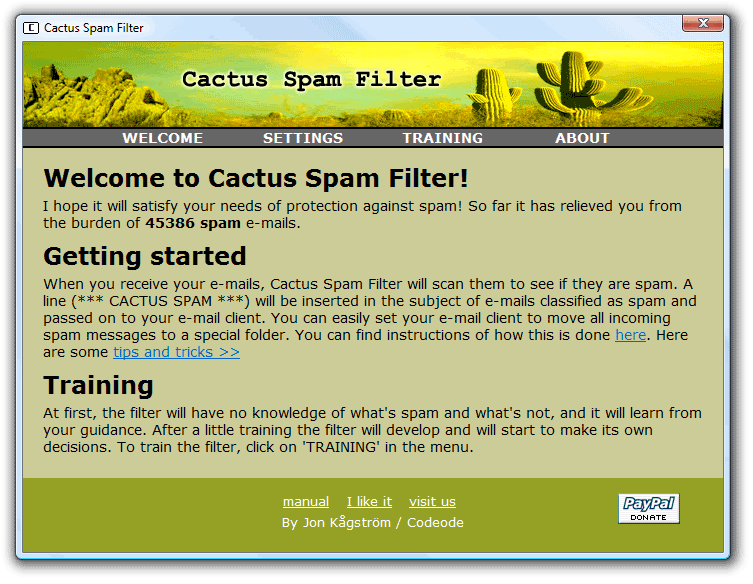 Cactus Spam Filter is a free easy-to-use spam blocker that protects your inbox by learning to detect spam. The program is designed to adapt to your personal mailbox and blocks out most of the junk email. Since the filter becomes personal, spammers will not be able to fool it. Cactus Spam Filter is a brutal, merciless spam killer that will not let you lose any of your emails except you delete them. Cactus Spam Filter is a free easy-to-use spam blocker that protects your inbox by learning to detect spam. The program is designed to adapt to your personal mailbox and blocks out most of the junk email. Since the filter becomes personal, spammers will not be able to fool it. Cactus Spam Filter is a brutal, merciless spam killer that will not let you lose any of your emails except you delete them.
The program does not require an installation in your email client because it integrates seamlessly with all email clients that use POP3. Cactus Spam Filter has been successfully tested with Microsoft Outlook, Microsoft Outlook Express, Netscape, Opera, Mozilla, Mozilla Thunderbird, Eudora, Pegasus Mail, IncrediMail, Foxmail, POP Peeper, Command Line POP Client, The Bat!, and Phoenix Mail.
Users can easily setup the email client to automatically move spam messages into a junk folder or directly to the recycle bin. Cactus Spam Filter learns to detect spam as it is being used; and it is a fast learner. After a few emails it will start to make its own decisions to relieve you from the spam burden. You are not going to have much problems getting used to this program that is absolutely free for users.
Want to check it out? Visit ?odeode.
Posted in Main | No Comments »
Tuesday, August 30th, 2011
 HTML Guard is a security program that offers easy-to-use Internet copyright protection for anyone who wants to protect his website’s intellectual property from pilfering and unauthorized copying. Be it HTML source code, text or graphics; HTML Guard helps prevent people from saving your website’s content wholesale or in part. The application is capable of encrypting your HTML source code, preventing text selection, disabling right mouse saving, and the print function within a browser. By employing a couple of insider tricks with it, you can make it difficult for general Internet users to copy your Website content. HTML Guard is a security program that offers easy-to-use Internet copyright protection for anyone who wants to protect his website’s intellectual property from pilfering and unauthorized copying. Be it HTML source code, text or graphics; HTML Guard helps prevent people from saving your website’s content wholesale or in part. The application is capable of encrypting your HTML source code, preventing text selection, disabling right mouse saving, and the print function within a browser. By employing a couple of insider tricks with it, you can make it difficult for general Internet users to copy your Website content.
With HTML Guard installed on your system, you can encrypt the source code of your web pages and restrict browser functions to prevent unauthorized copying of your contents. All pages protected by this program retain their original look and feel and can still be viewed in any common JavaScript-enabled browser. There is no special installation required either on the client side or on your web server.
HTML Guard can effectively protect HTML files encoded in multi-byte character sets such as UTF-8 (Unicode), KOI8-R (Russian), BIG5 (Traditional Chinese), or Shift-JIS (Japanese). Users who install HTML Guard can always consult the comprehensive online help that is available by pressing F1 or clicking the Help button.
Want to check it out? Visit HTMLguard.
Posted in Main | No Comments »
Tuesday, August 30th, 2011
 BWMeter is a powerful bandwidth meter and monitor, which measures and displays all traffic on your network. This shareware application can analyze the data packets (where they come from, where they go which port and protocol they use); making it possible to distinguish between local and internet traffic for example. BWMeter can create statistics for all computers in your network, measuring and displaying all internal network traffic as well as download and upload from the internet. BWMeter is a powerful bandwidth meter and monitor, which measures and displays all traffic on your network. This shareware application can analyze the data packets (where they come from, where they go which port and protocol they use); making it possible to distinguish between local and internet traffic for example. BWMeter can create statistics for all computers in your network, measuring and displaying all internal network traffic as well as download and upload from the internet.
BWMeter also enables you to define filters which show your transfer with certain Internet addresses. The program is ideal for home users to get an overview of how much bandwidth they use, as well as small to large businesses, where one computer can maintain the statistics of downloaded / uploaded data of all computers in the network. The product is easy to configure and offers a rich set of options and features for beginners as well as experts and network administrators.
BWMeter may not really be up to the standard of other equally good programs out there; but surely you can still find some of its features very useful and easy to use. Some of its key features, which are very easy to handle include the following; graphical and numerical display of bandwidth, user definable filters for measuring bandwidth, user definable graphs to visualize bandwidth, and a host of others.
Want to check it out? Visit Desksoft.
Posted in Main | No Comments »
Monday, August 29th, 2011
 Bamboo is an intuitive file synchronization and backup software tool for Microsoft Windows environment. Bamboo automates copy, deletes, and comparison of computer files and backups located in different storage devices like hard disks, flash memory, network drives, removables, and many more. Bamboo is designed to simplify and automate the tedious works of modern computer users who consistently experience manual work of copying files back and forth among their personal and network storage devices. This version of Bamboo in review is a freeware and is designed for casual use; and of course, there is a professional edition for heavy users. Bamboo is an intuitive file synchronization and backup software tool for Microsoft Windows environment. Bamboo automates copy, deletes, and comparison of computer files and backups located in different storage devices like hard disks, flash memory, network drives, removables, and many more. Bamboo is designed to simplify and automate the tedious works of modern computer users who consistently experience manual work of copying files back and forth among their personal and network storage devices. This version of Bamboo in review is a freeware and is designed for casual use; and of course, there is a professional edition for heavy users.
Bamboo Free Edition comes with some of the following features that include; start or define any Folder Pair sync right inside Windows Explorer, facilitates automatic, filter-based file selection for complicated copy actions, instead of manual file/folder picking using Windows Explorer, better controls on large or complicated copy actions then Windows Explorer. Jobs can resume/restart from copy errors without having to start all over again, backup as a mirror copies, not as un-viewable backup files, automates your routine manual file copying actions (set once, use everyday, avoid tedious manual selection, comparison, examination every time), and a host of other features that you can find when you install and start using this program.
Want to check it out? Visit Haxar.
Posted in Main | No Comments »
Monday, August 29th, 2011
 EF Commander is a complete file manager for the Windows. For those who are already used to Norton Commander, EF Commander is a program worth checking out. It comes complete with bubble and online help; and you can search directory trees and directories and perform actions, including Run, on files. You can also check file attributes and edit files with search-and-replace and drag-and-drop. Use the internal editor or associate one of your choosing to edit files, easily view files and configure the buttons to suit your needs, and get system and disk information with a click of the mouse. EF Commander is a complete file manager for the Windows. For those who are already used to Norton Commander, EF Commander is a program worth checking out. It comes complete with bubble and online help; and you can search directory trees and directories and perform actions, including Run, on files. You can also check file attributes and edit files with search-and-replace and drag-and-drop. Use the internal editor or associate one of your choosing to edit files, easily view files and configure the buttons to suit your needs, and get system and disk information with a click of the mouse.
EF Commander has very easy to understand interface and features that include the following; modern interface helps you to have full control over your files and folders, versatile function for comfortable renaming of numerous files in a processing step, you can run any number of different operations at the same time, or several instances of the same operation, you can handle your data in the same way as on your desktop or laptop computer, pack files or whole folders in any of the common archive formats. No external programs are required; enlarge the number of available formats to 400 or more, and many more.
Want to check it out? Visit Efsoftware.
Posted in Main | No Comments »
Monday, August 29th, 2011
 Ashampoo Core Tuner enables you to use the full power of all your cores. In order to get instant results, all you need is to select Auto-Optimize to optimize all the programs you are running or Boost to give more power to a single program. Ashampoo Core Tuner enables you to use the full power of all your cores. In order to get instant results, all you need is to select Auto-Optimize to optimize all the programs you are running or Boost to give more power to a single program.
Basically, most modern computers have at least two processors that are generally referred to as “cores”. As a matter of fact, some even have as many as four. Unfortunately, Windows often doesn’t manage multiple cores very well, so you are not actually getting the full multi-processor power you paid for. Ashampoo Core Tuner also allows you to fine-tune individual processes, display a live view of the current workloads of all your processor cores and enhance the overall performance of your system with additional tools. Ashampoo Core Tuner comes with additional tools that include a startup manager, and services manager.
The StartUp manager lists all the programs and utilities that are started automatically every time you run Windows and lets you disable them if you don’t need them. Many applications automatically install such auto-start programs without asking or telling you and they then just run in the background all the time, wasting processor power and memory. While the services manager on the other hand, lists the background programs (“services”) that Windows starts automatically even though most users don’t need them.
Want to check it out? Visit Ashampoo.
Posted in Main | No Comments »
Monday, August 29th, 2011
 CDex is an application with features that is able to record audio tracks from a CD-ROM, and save the files to disk in a standard WAV file. CDex can extract the data directly from an Audio CD, which is generally a called an Audio CD Ripper or CDDA utility. The application reads the digital audio data directly from the disc, which can be stored in either a WAV file or a MP3 sound file. This version of CDex has a couple of bug fixes, and features many internal and encoder updates. CDex is an application with features that is able to record audio tracks from a CD-ROM, and save the files to disk in a standard WAV file. CDex can extract the data directly from an Audio CD, which is generally a called an Audio CD Ripper or CDDA utility. The application reads the digital audio data directly from the disc, which can be stored in either a WAV file or a MP3 sound file. This version of CDex has a couple of bug fixes, and features many internal and encoder updates.
CDex can extract the data directly (digital) from an Audio CD, which is generally called a CD Ripper or a CDDA utility. The resulting audio file can be a plain WAV file (useful for making compilation audio CDs) or the ripped audio data can be compressed using an audio encoder. CDex is an open source program and supports the following encoders; lame MP3 encoder, internal MP2 encoder, APE lossless audio, Ogg Vorbis encoder, the Windows MP3 encoder (Fraunhofer MP3 encoder), NTT VQF encoder, FAAC encoder, and Windows WMA8 encoder.
CDex supports a variety of features that include the following; direct encoding or multiple tracks, read/store album information from/to the cdplayer.ini file, read/store album information from/to a local and remote CD database (CDDB), support CD-Text (if your CD-drive supports it), normalization of audio signal, and many more.
Want to check it out? Visit ?dexos
Posted in Main | No Comments »
|
|
|




