Author Archive
Thursday, January 20th, 2011
 Solar FTP Server is a handy FTP server for any user with some basic computer skills. The application has an easy-to-understand user-interface and allows you to share your file (photo, music, and more) as quickly as possible. Some of its features include; virtual directories that allows you to map virtual directories, online real-time activity monitoring and management, server logs for detailed logs of FTP sessions and server errors, friendly and intuitive user-interface that allows you to share your files quickly, and others. Solar FTP Server is a handy FTP server for any user with some basic computer skills. The application has an easy-to-understand user-interface and allows you to share your file (photo, music, and more) as quickly as possible. Some of its features include; virtual directories that allows you to map virtual directories, online real-time activity monitoring and management, server logs for detailed logs of FTP sessions and server errors, friendly and intuitive user-interface that allows you to share your files quickly, and others.
This version has an improved FTP server stability and performance; and is indeed an improvement over previous edition. Also added to this edition is a web server for add user accounts, user-interface bug issue that was fixed by the publishers, an improved CPU performance and stability, and the inclusion of an uninstaller. Also fixed are bugs such as; bugs with RETR command sent by FireFox browser, solved the UI bug when adding/editing directories, and others.
Solar FTP Server 2.1 runs on the following operating systems: Windows 7; Windows 2000; Windows 2003; Windows Vista; and Windows XP.
Solar FTP Server 2.1 is a shareware application or program that costs $19.95 per download.
Want to check it out? Visit http://solarftp.com/blog/
Posted in Main | No Comments »
Thursday, January 20th, 2011
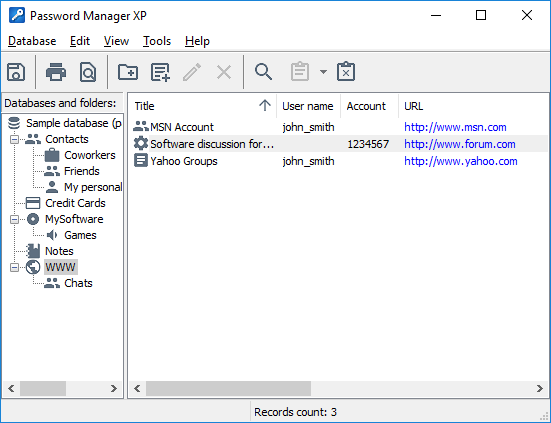 Password Manager XP is an application that will help you protect any secret information stored on your computer. In other words, Password Manager XP is for people who want to keep their passwords and secrets keeper. It helps you to overcome all password loss worries, access codes, bank codes, bank accounts, and other vital information. This version supports the following browsers: FireFox 4; Google Chrome; Opera Support; Better support for Windows Vista and Windows 7. The publishers have also fixed Internet Explorer integration stability issues. Password Manager XP is an application that will help you protect any secret information stored on your computer. In other words, Password Manager XP is for people who want to keep their passwords and secrets keeper. It helps you to overcome all password loss worries, access codes, bank codes, bank accounts, and other vital information. This version supports the following browsers: FireFox 4; Google Chrome; Opera Support; Better support for Windows Vista and Windows 7. The publishers have also fixed Internet Explorer integration stability issues.
The program rids your PC of any headaches caused by lost passwords, forgotten access codes and other sensitive information. All your passwords, login information, PIN codes, credit card numbers, access codes, files, and any other personal or confidential information in just a single place or location.
Password Manager XP is also an ideal program for workgroup use; it lets several users get access to password databases. Access rights and privileges can be regulated just by configuring some of the features of this program. All changes inside the database are logged, giving you or the system administrator complete access or control over user actions.
Password Manager XP can also be installed to your Windows Mobile Device, which allows you to access your data easily.
Want to check it out? Visit CP-Lab.
Posted in Main | No Comments »
Thursday, January 20th, 2011
 Panoweaver Professional for Windows is a panorama switching program that supports stitching single row/multiple rows images taken by normal lens, wide lens, and fisheye lens. You can use Panoweaver Professional to automatically create both spherical and cylindrical panoramas. Besides stitching panoramas, this program also exports 360 panoramic images into standalone SWF, Flash VR, QuickTime VR, and Java-based VR Tours. Panoweaver Professional for Windows is a panorama switching program that supports stitching single row/multiple rows images taken by normal lens, wide lens, and fisheye lens. You can use Panoweaver Professional to automatically create both spherical and cylindrical panoramas. Besides stitching panoramas, this program also exports 360 panoramic images into standalone SWF, Flash VR, QuickTime VR, and Java-based VR Tours.
This version includes a couple of features such as; tripod removing that allows you to convert panorama to cubic one and then remove tripod from your panorama, background music, output six cube faces for cubic panorama, context menu website link, SWF progress bar, tool bar setting, hotspot panorama, and HTML 5 format support.
Also in this version, a user can batch stitch up to 100 groups of images into panoramas, batch publish panoramas to multiple players such as Flash, QuickTime, and Java, batch convert cubic panoramas to spherical panoramas and vice versa, and an uninstaller.
Panoweaver Professional for Windows is a shareware program, and is compatible with Windows 2000/2003 9x/9XP. The program has a limited trial period; with the price put at $499.95 per download. At current price, Panoweaver Professional for Windows is a bit on the high side.
Want to check it out? Visit EasyPano.
Posted in Main | No Comments »
Tuesday, January 18th, 2011
 FileInternals Word Recovery is a program that shows or displays only those documents recently created or modified. It relieves you the pain or difficulty of dealing with thousands of old files. Every document found by this application can be sorted by sizes, date of creation or date of modification. FileInternals Word Recovery also has a feature (preview window) that displays the content of any non-corrupted Word document from the scanning results list. The recovery engine algorithm has now been improved; this was one a bug that affected the previous version. FileInternals Word Recovery is a program that shows or displays only those documents recently created or modified. It relieves you the pain or difficulty of dealing with thousands of old files. Every document found by this application can be sorted by sizes, date of creation or date of modification. FileInternals Word Recovery also has a feature (preview window) that displays the content of any non-corrupted Word document from the scanning results list. The recovery engine algorithm has now been improved; this was one a bug that affected the previous version.
Users do not need any special skill to understand or use FileInternals Word Recovery because of its simple user-interface. From download to installation and configuration; this program is one of the easiest in its category. Once you create or modify a document, this application makes it easier to find them. The feature tagged, “Find and recover documents” button helps you to choose what kind of physical drives or partitions to scan.
Its key features include: clear and convenient interface, support for all Windows editions, ability to recover Word files after accidental deletion, hard drive formatting, partition formatting or deletion, file system corruption, document preview features, and many more.
Want to check it out? Visit FileInternals.
Posted in Main | No Comments »
Tuesday, January 18th, 2011
 With East-Tec Eraser, you can protect your data and privacy, and remove all traces of your computer online activity. East-Tec eraser has the ability to permanently erase digital information and removes every trace of sensitive data from your computer. The following data can be easily erased from your computer: internet history; web pages; pictures; unwanted cookies; chat room conversations; confidential documents; past deleted emails; floppy disks; and many more. With East-Tec Eraser, you can protect your data and privacy, and remove all traces of your computer online activity. East-Tec eraser has the ability to permanently erase digital information and removes every trace of sensitive data from your computer. The following data can be easily erased from your computer: internet history; web pages; pictures; unwanted cookies; chat room conversations; confidential documents; past deleted emails; floppy disks; and many more.
This version of East-Tec Eraser is designed to help you erase all traces in most of the latest browsers, which include; Internet Explorer, Mozilla Firefox, Google Chrome, AOL, MSN, Explorer, Opera, and Safari. East-Tec Eraser also erases evidences on other programs that include; Yahoo Messenger, Mozilla Thunderbird, Limewire, Eudora, Morpheus, Windows Media Player, RealPlayer, Winamp, Google Toolbar, and a host of others.
Some of its features include: an intuitive interface and wizards, automatic cleaning of your computer at specified intervals, anti-surprise (anti-boss/panic) to protect your privacy in emergency situations, support for custom privacy needs, user-defined erasure methods, built-in safety features that prevent you from accidentally removing important files or folders, password protection, etc.
East-Tec Eraser has a 15 day trial period for any customer that is interested in installing it.
Want to check it out? Visit East-Tec.
Posted in Main | No Comments »
Tuesday, January 18th, 2011
 Advanced Time Report is an intuitive time-tracking and project management solution that is built to help you increase your billable hours and improve managing all your projects, clients and working hours. The program is built for professionals and project-oriented businesses. The goal is to help you carry out important functions, which include timesheet reporting and project management. Advanced Time Report is an intuitive time-tracking and project management solution that is built to help you increase your billable hours and improve managing all your projects, clients and working hours. The program is built for professionals and project-oriented businesses. The goal is to help you carry out important functions, which include timesheet reporting and project management.
With Advanced Time Reports Web Premier, you can manage your projects, receive updates, create reports, and view team schedules (remotely from any place in the world). The program has advanced functionality, web access and reports, calendar, rounding rules, comparing professionals, departments, client and projects to each other.
For organizations and companies with special interest in cutting cost and increasing profits; Advanced Time Reports Web Premier is not a bad program. It will help you prevent hour slippage and speed up project report for your clients in order to get paid faster. It gives remote internet secure access timelogs to all professionals on your team. Furthermore, you can appoint administrators and project managers to be able to view schedule information for the whole firm. You can also keep your project history; a feature that allows you retrieve it when you need it again. You can also create detailed project reports so you can compare your schedules to initial project estimates.
You can download and try this program for 30 days before actual purchase, which costs $69.95. It is not actually a bad program; and you may give it a try; especially when you want to make your projects more predictable.
Want to check it out? Visit AdvancedTimeReports.
Posted in Main | No Comments »
Monday, January 17th, 2011
 LeaderTask Company Management is an application for managing the activity of a group of people; these include small teams and large organizations. For the head of an organization that wants quick information, LeaderTask Company Management provides you quick information about the current affairs regarding projects, tasks, and employees. LeaderTask Company Management is an application for managing the activity of a group of people; these include small teams and large organizations. For the head of an organization that wants quick information, LeaderTask Company Management provides you quick information about the current affairs regarding projects, tasks, and employees.
LeaderTask Company Management is also a network multi-set organizer for teamwork. It contains features such that help you achieve the following; comfortable employee management, giving and controlling assignments, working over the local area network and the internet, working in the autonomous mode, shared access to documents and contacts for employees, instant messaging (chat), e-mail, viewing employees’ calendars, centralized file storage, mobile version for PDA, etc.
Employees within an organization can communicate with one another quickly and easily, reliable and easy to use application that correspond with the company’s business, and access any company information as needed.
Organizations and other users that installed this application on their computers can also solve the following problems: managing tasks, managing projects, CRM: customer database, history of relationships, controlling delegated tasks, corporate information space (centralized place for storing documents, files reports, contacts, and more). They can also fight time hogs, prevent loss of corporate data, increase productivity of the team, and many more.
LeaderTask Company Management is a shareware, and can be downloaded for $99.95.
Want to check it out? Visit LeaderCommand.
Posted in Main | No Comments »
Monday, January 17th, 2011
 PassMark BurnInTest Professional is an application that simultaneously exercises all of the major components of a computer in order to test for endurance and reliability. You can select the hardware components to test and individually adjust the load placed on each one via slide bars. The publishers have designed this program in a way that allows each test to report its result to its own window, and results are summarized along with any errors detected in the main program window. PassMark BurnInTest Professional is an application that simultaneously exercises all of the major components of a computer in order to test for endurance and reliability. You can select the hardware components to test and individually adjust the load placed on each one via slide bars. The publishers have designed this program in a way that allows each test to report its result to its own window, and results are summarized along with any errors detected in the main program window.
This version includes the following features: Serial port loop back testing; Parallel port loop back testing; USB port testing using the PassMark USB Loop back plug or the PassMark USB 2.0 loop back plug; Tape drive testing; CPU affinity selection; Advanced RAM testing with page locking and testing beyond the 4GB barrier; Scrolling ‘H’s for Electromagnetic Compliance (EMC) testing to ANSI standard C63.4-1992; and Addition options for video card testing.
PassMark BurnInTest Professional is one of the most complete CPU Burn in tools around; and contains a lot of quality features as mentioned above. The program runs on Windows Vista/XP/2000/2003/2008. PassMark BurnInTest Professional is a shareware, with a 30 days trail period; and with a download price put at $49.00.
Want to check it out? Visit Passmark.
Posted in Main | No Comments »
Monday, January 17th, 2011
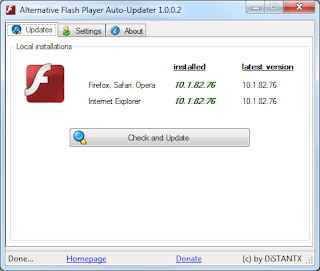 With Alternative Flash Player Auto-Updater software, you can download and install the Flash Player without any need to download Adobe download manager. What it does is that it downloads the latest version and asks you if it should be installed on your system or not. During installation, you can choose to configure it to run at Windows startup; and as a matter of fact, this is the only way you can be sure your system will never run an outdated and harmful version of the Flash Player. With Alternative Flash Player Auto-Updater software, you can download and install the Flash Player without any need to download Adobe download manager. What it does is that it downloads the latest version and asks you if it should be installed on your system or not. During installation, you can choose to configure it to run at Windows startup; and as a matter of fact, this is the only way you can be sure your system will never run an outdated and harmful version of the Flash Player.
The present version of Alternative Flash Player Auto-Updater requires the .NET Framework 3.5+ to be installed on your system. The key features of this software include: working capabilities with Windows x86 and x64 (32-bit, 64-bit), German & English interface (automatically detecting system language), able to work completely hidden (except notifications when updates are available), a user can choose to let it start with Windows automatically, and works even without installing a Flash Player on the system (offers download). Version 1.0.0.4 also includes the following bug fixes and additions; bug fixing of application is shown when double clicking the tray icon, bug fixing of form minimizes to tray when minimized, and addition of a new feature that automatically check every 2 hours for users who do not reboot their systems.
Alternative Flash Player Auto-Updater is a freeware program.
Want to check it out? Visit Wecode.
Posted in Main | No Comments »
Monday, January 17th, 2011
 Joy RingTone Converter enables you to create your personal ringtones by converting your MP3, WAVE files and CD tracks to the most common Ringtone format including MMF, AMR, MP3, MIDI, WIDI, WAV, AAC, and MP4. The program includes a CD Ripper extracts digital audio CD tracks to audio formats WAV and MP3 with excellent output quality and high ripping speed, and the MP3 Compressor can reduce the MP3 file size up to 30%-70% save valuable space on your Mobile Phone. Joy RingTone Converter also has a batch conversion function for converting MP3 or WAV files to ringtones automatically. Joy RingTone Converter enables you to create your personal ringtones by converting your MP3, WAVE files and CD tracks to the most common Ringtone format including MMF, AMR, MP3, MIDI, WIDI, WAV, AAC, and MP4. The program includes a CD Ripper extracts digital audio CD tracks to audio formats WAV and MP3 with excellent output quality and high ripping speed, and the MP3 Compressor can reduce the MP3 file size up to 30%-70% save valuable space on your Mobile Phone. Joy RingTone Converter also has a batch conversion function for converting MP3 or WAV files to ringtones automatically.
Some of its key features include: fast and Perfect quality very easy to use interface; direct convert selected part audio to Mobile Ringtone as MMF AMR, MIDI, MP3, WAV, AAC, MP4, and 3GP; convert CD to MP3/WAV; convert AVI, MPEG, MPG, 3GP, MP4 and RMVB video to MP3, AMR, MMF, Ringtone; setup AMR quality; save and transmission copy status settings and sampling frequency settings for MMF; professional MIDI converter with extended option; volume controller; and many more.
Joy RingTone runs on Internet Explorer 5.0+, and comes with an uninstaller. Users who are interested can download a limited trial version.
Want to check it out? Visit Joyringtone.
Posted in Main | No Comments »
|
|
|




