Author Archive
Wednesday, December 22nd, 2010
 This is definitely a jumbo price program, but with so many wonderful features to go with it. TwistedBrush Pro Studio has a very powerful brush engine, and is a bit easy for those already used to photography. The program has an amazing number of brushes; coupled with regular features loved by different artistes and photographers. Some of these features include the following; layers, photo cloning, tracing, masks, script recording, scripts to AVI, realistic media, particles, filters, masks, drawing tablet support, brush shapes, textures, integrated scanner support, image brushes, drawing guides, patterns, and a lot more. This is definitely a jumbo price program, but with so many wonderful features to go with it. TwistedBrush Pro Studio has a very powerful brush engine, and is a bit easy for those already used to photography. The program has an amazing number of brushes; coupled with regular features loved by different artistes and photographers. Some of these features include the following; layers, photo cloning, tracing, masks, script recording, scripts to AVI, realistic media, particles, filters, masks, drawing tablet support, brush shapes, textures, integrated scanner support, image brushes, drawing guides, patterns, and a lot more.
TwistedBrush Pro Studio is a bit clumsy; perhaps due to its over five thousand (5,000) brushes and features. Virtually every artist would love this program because of its features and brushes, which simplifies their works, and brings out the beauty in each task. TwistedBrush Pro Studio is compatible with Adobe plug-in, integrated scanner support, image brushes, drawing guides, reference image views, dirty brushes, scratch layer, dynamic palettes, script recording, and many more.
TwistedBrush is a shareware program, and can be downloaded for $119.00 per copy. The downside to this program is that the trial period is a bit too short, considering the incredible amount of features it carries. On the whole, it is a wonderful program, and professional artists in particular are going to love it.
Want to check it out? Visit Pixarra.
Posted in Main | No Comments »
Wednesday, December 22nd, 2010
 SoftPerfect Network Scanner is a multi-threaded IP and NetBIOS scanner that can be used by both a system administrator and users who have interest in computer security. SoftPerfect Network Scanner pings computers, scans for listening TCP ports and shows what type of resources are being shared on a network; and this includes system and hidden. With this program, you can mount shared resources that are found by SoftPerfect Network Scanner as network drives. All you need to do is to simply browse them by using Windows Explorer and the likes of it. SoftPerfect Network Scanner is a multi-threaded IP and NetBIOS scanner that can be used by both a system administrator and users who have interest in computer security. SoftPerfect Network Scanner pings computers, scans for listening TCP ports and shows what type of resources are being shared on a network; and this includes system and hidden. With this program, you can mount shared resources that are found by SoftPerfect Network Scanner as network drives. All you need to do is to simply browse them by using Windows Explorer and the likes of it.
Among the very latest changes made to SoftPerfect Network Scanner 5.1.0 include the following: addition of auto-open the most recent file option; addition of noncontiguous IP address range mode; addition of monitor vendor, model and serial number retrieval; shared resources are no longer automatically exported unless specified explicitly with the /cols switch; and others.
Among the old features SoftPerfect Network Scanner is well-known for include: detects hardware MAC-addresses, even across routers; detects your internal and external IP address; ability to launch third party applications; supports Wake-On-LAN, remote shutdown and sending network messages; scans for listening TCP ports, some UDP and SNMP services; and many more.
This is an outstanding freeware program with extra features to give out better performances than other freeware programs in its category.
Want to check it out? Visit Softperfect.
Posted in Main | No Comments »
Wednesday, December 22nd, 2010
 FlashFXP is a popular FTP and FXP Client that has a lot of built-in features for your delight. The program has an intuitive user-interface, which makes it even easier to become familiar with. You can use the FTP protocol to transfer files from a remote server to your computer; and if you like, to another remote server of your choice. FlashFXP is a popular FTP and FXP Client that has a lot of built-in features for your delight. The program has an intuitive user-interface, which makes it even easier to become familiar with. You can use the FTP protocol to transfer files from a remote server to your computer; and if you like, to another remote server of your choice.
With FlashFXP, you can easily update your website, download files from the server of your organization, and probably download files straight from the internet; of course, downloading files from these places have always been a big challenge to a lot of people. You can enjoy a great feature that enables you to resume any incomplete downloads, another feature that lets you synchronize directories, schedule multiple tasks, and do so many other things.
FlashFXP also allows you to publish and maintain your website, upload and download files; which include documents, videos, photos, and music. You can also transfer or backup local and remote files; including server to server FTP transfers. You can share files with all your friends who have the FTP server with a lot of ease.
FlashFXP 4.0.0 Build 1513 Final comes in seventeen different languages, which include; English, French, German, Italian, Hungarian, and many others. The program is a shareware, and allows for a 30 days trial period.
Want to check it out? Visit Flashfxp.
Posted in Main | No Comments »
Wednesday, December 22nd, 2010
 TrueTTY is a program that is built to receive and then transmit RTTY (radioteletype) and PSK31 (BPAK and QPSK modes) via a sound card. The program does not require any additional hardware or installation in order to work effectively on your system; and as a matter of fact, you only need a transceiver and a computer (5×86-133, Pentium-75, and possibly something much better) with sound card. You also have the option to use a simple circuit PTT-control. TrueTTY 2.85 makes very easy and convenient frequent control, and has a lot of macros used for transmitting; and most importantly, the program can cooperate with RZ4AG AAlog logger. TrueTTY is a program that is built to receive and then transmit RTTY (radioteletype) and PSK31 (BPAK and QPSK modes) via a sound card. The program does not require any additional hardware or installation in order to work effectively on your system; and as a matter of fact, you only need a transceiver and a computer (5×86-133, Pentium-75, and possibly something much better) with sound card. You also have the option to use a simple circuit PTT-control. TrueTTY 2.85 makes very easy and convenient frequent control, and has a lot of macros used for transmitting; and most importantly, the program can cooperate with RZ4AG AAlog logger.
TrueTTY 2.85 comes with some additional changes for enhanced performance. These new addition and changes include: changes made to the PTT interface settings, which were rewritten; improvement on the DTMF decoder; right mouth button click (or left mouse button with shift key pressed) make TrueTTY to do fast decoding of one-minute prehistory of signal at selected frequency; and “Ctrl U” hotkey switches tuning Rig by state on/off.
TrueTTY is a shareware program, and cost $39.00 to purchase and download from the publisher’s website. I find nothing wrong with that price, and users are in for an enhanced version of TrueTTY this time around.
Want to check it out? Visit Dxsoft.
Posted in Main | No Comments »
Thursday, December 16th, 2010
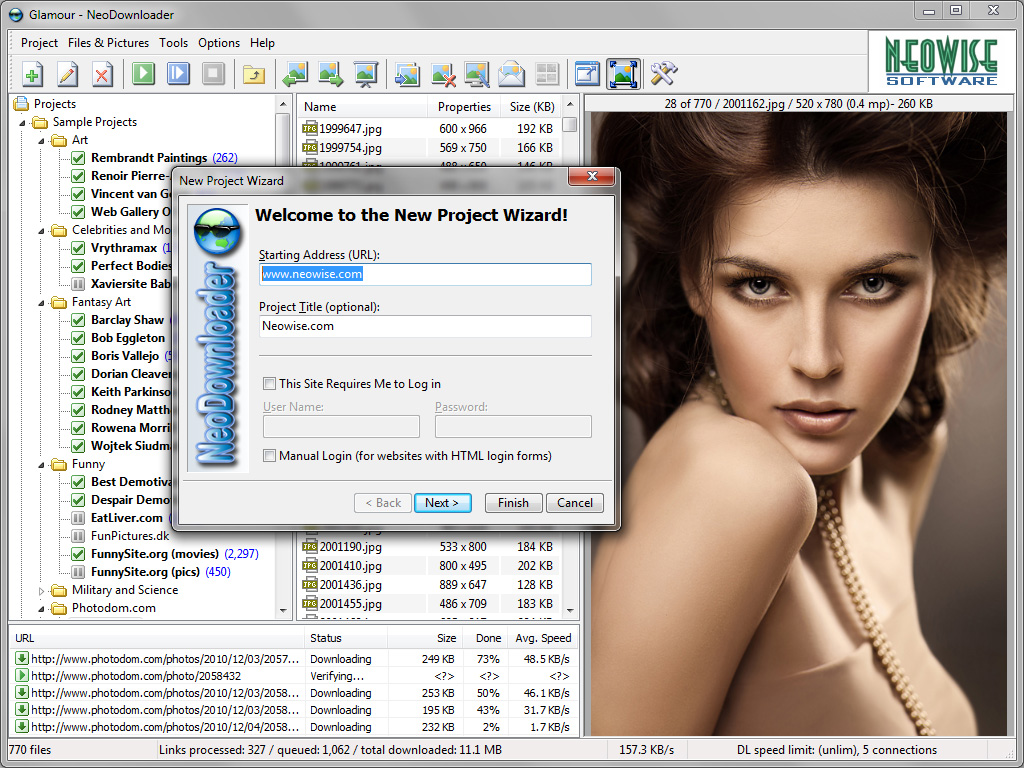 NeoDownloader Lite is a download program that enables you to download picture, audio, and video files. Once you drag-n-drop the URL to the drop basket; you can expect NeoDownloader Lite to scan the entire website and download files found during the scan straight into your computer hard drive. One of the benefits of using this program is that you can set it to explore the entire website and retrieve only the images you want; and of course, you can see and delete every unwanted downloads. NeoDownloader Lite is a download program that enables you to download picture, audio, and video files. Once you drag-n-drop the URL to the drop basket; you can expect NeoDownloader Lite to scan the entire website and download files found during the scan straight into your computer hard drive. One of the benefits of using this program is that you can set it to explore the entire website and retrieve only the images you want; and of course, you can see and delete every unwanted downloads.
Some of the features you can enjoy from installing NeoDownloader Lite on your computer system include; image filtering, built-in image viewer, option for every user to set selected pictures as Windows wallpaper, and image preview. This version of NeoDownloader Lite (2.6) comes with additional new features, and improved spider engine and some bug fixes.
NeoDownloader Lite runs on the following operating systems; Windows 7/2003/XP/2008 Server/NT/Vista/ME/2000.
The downside of this program include; it does not support a built-in media player just like the full or commercial version, cannot download from password-protected websites, does not support HTML login forms, annoying ads, does not support more than three simultaneous connections, and does not support ZIP/RAR archives.
Want to check it out? Visit Neowise.
Posted in Main | No Comments »
Wednesday, December 15th, 2010
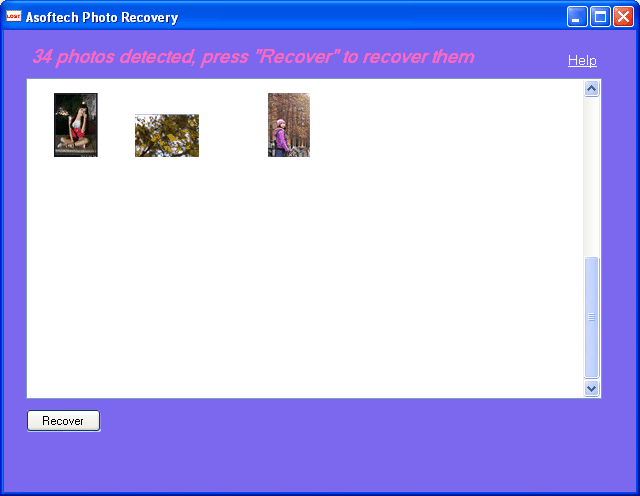 Asoftech Photo Recovery works virtually with every type of digital card reader appearing as a drive letter in your computer. The program helps to recover lost, deleted and formatted digital photos on your removable media. Not a bad concept when you consider how it is able to help you recover those lost pictures of yours. Asoftech Photo Recovery works virtually with every type of digital card reader appearing as a drive letter in your computer. The program helps to recover lost, deleted and formatted digital photos on your removable media. Not a bad concept when you consider how it is able to help you recover those lost pictures of yours.
Asoftech Photo Recovery recovers deleted or formatted digital photos from removable media, and hard drives. The good thing with this version is that it is able to recover videos, audios, documents, and many other files. Though, Asoftech Photo Recovery may sound a bit technical; the truth is that you can find your way around its features without any technical skill or knowledge. Once you have your fingers on your keyboard, you can start the process of recovering your lost files. What makes it safe and reliable is that it can read your disk.
Some of the key features of Asoftech Photo Recovery include: restores photos after deletion, disk format, and partition correction; repair half gray pictures; safe read only to target drive; previews recoverable photos; retrieves almost all types of photos; supports FAT12, FAT16, FAT32, and NTFS File system; and many more.
Want to check it out? Visit Asoftech.
Posted in Main | No Comments »
Wednesday, December 15th, 2010
 This is a complete video converter for MPEG, DVD and AVI program that is capable of moving videos between various kinds of formats. Need4Video Converter can convert and move videos into formats such as: avi; dvd; divx; xvid; vob; mpeg; mp4; 3gp; 3gpp; h.264; flv; mov; qt; rm; wmv; and others. Besides being able to convert and move various files around; Need4 Video Converter has a very high conversion speed that can compete among the best in the market. This is a complete video converter for MPEG, DVD and AVI program that is capable of moving videos between various kinds of formats. Need4Video Converter can convert and move videos into formats such as: avi; dvd; divx; xvid; vob; mpeg; mp4; 3gp; 3gpp; h.264; flv; mov; qt; rm; wmv; and others. Besides being able to convert and move various files around; Need4 Video Converter has a very high conversion speed that can compete among the best in the market.
Besides files with copy protection which Need4 Video Converter cannot copy; you can convert unprotected video and DVD movies using ready-made presets for various devices such as: iPod; PSP; iPhone (including iPhone4); BlackBerry; Zune; Archos; Creative ZEN; PDA; cell phones (including Nokia, LG, Sony Ericsson, HTC, Samsung, PlayStation 3, Xbox, iPad, Motorola, Google Nexus One, etc); and many more.
Some of the features of this video converter include: convert video and DVDs (both personal and copyrighted); convert video in HD formats (choose from ready-made presets for all popular HD video formats or adjust the setting manually); RIP unprotected DVDs to watch the movies right on your computer or mobile devices (including opportunity to set your DVD source options such as audio track and subtitles); burn all added videos to DVD and Blu-ray discs (to burn the videos straight from the video converter, one may need to have Need4DVD Burner installed on his computer; and convert unprotected video and DVDs using ready-made presets for various devices and portable media players.
Definitely not a bad program; and comes with a 60 days trial period before actual purchase becomes necessary.
Want to check it out? Visit Need4Video.
Posted in Main | No Comments »
Wednesday, December 15th, 2010
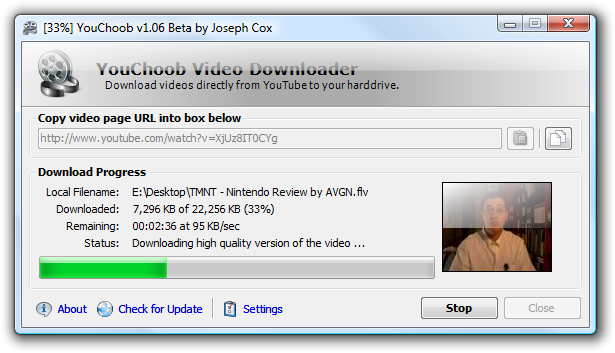 If you are a fan of YouTube videos; this is program probably offers you a big chance to download your favorite videos and have them saved to your system. These videos can be downloaded directly from the YouTube website straight to any location of your choice on your computer; and all you need is the URL address of the page containing the video. It has the capacity to download in various language versions of YouTube and will automatically download the highest quality version of all videos as long as they are available. If you are a fan of YouTube videos; this is program probably offers you a big chance to download your favorite videos and have them saved to your system. These videos can be downloaded directly from the YouTube website straight to any location of your choice on your computer; and all you need is the URL address of the page containing the video. It has the capacity to download in various language versions of YouTube and will automatically download the highest quality version of all videos as long as they are available.
Among the latest changes and features added by the publishers of YouChoob include: support for videos linked from profile pages; improved video title-to-filename conversion; fixing of bug that has to do with minimizing YouChoob sent it to the system tray if minimized to tray was disabled; etc.
Installation of YouChoob requires the Microsoft .NET Framework 2.0 to be able to work on your system effectively. Some users would be willing to pay for some shareware or commercial YouTube downloaders out there, yet may not be able to get some of the kind of features this freeware has. YouChoob is one of the best freeware YouTube video download; and I am sure it is going to give some programs a run for their money.
Want to check it out? Visit Bootblock.co.uk.
Posted in Main | No Comments »
Wednesday, December 15th, 2010
 Microsoft Giano is a framework for the full-system simulation of arbitrary computer systems, with emphasis on the hardware-software co-development of system software Real-time embedded applications. The program includes both software models for CPU, I/O, buses and memories, and HDL simulators. Also included is a full source and a number of full-systems examples. Microsoft Giano is a framework for the full-system simulation of arbitrary computer systems, with emphasis on the hardware-software co-development of system software Real-time embedded applications. The program includes both software models for CPU, I/O, buses and memories, and HDL simulators. Also included is a full source and a number of full-systems examples.
Giano allows the simultaneous execution of binary code on a simulated microprocessor and of Verilog code on a simulated FPGA within a single target system capable of interacting in Real-time with the outside world. The program has a graphical user-interface that uses Visio to create the interconnection graph of the user-provided simulation modules in PlatformXML, and XML-based configuration description language. The essence of creating this program is to maximize the tool’s extensibility and to leverage other existing tools to the optimum level.
This freeware tool from Microsoft is highly effective in reducing the development and maintenance time for system software and for embedded applications; with the most visible being a shorter modify-compile-test cycle, and better support for performance tuning. Among the latest addition to version 3.0 include; checkpoint/restore facility, new modules, among others.
Microsoft Giano is a bit technical; and may take some time for you to understand how to use it. The download size is also big (34.92 MB in size); which may not really take much of your download time if you have a fast internet connection.
Want to check it out? Visit Microsoft.
Posted in Main | 1 Comment »
Monday, December 13th, 2010
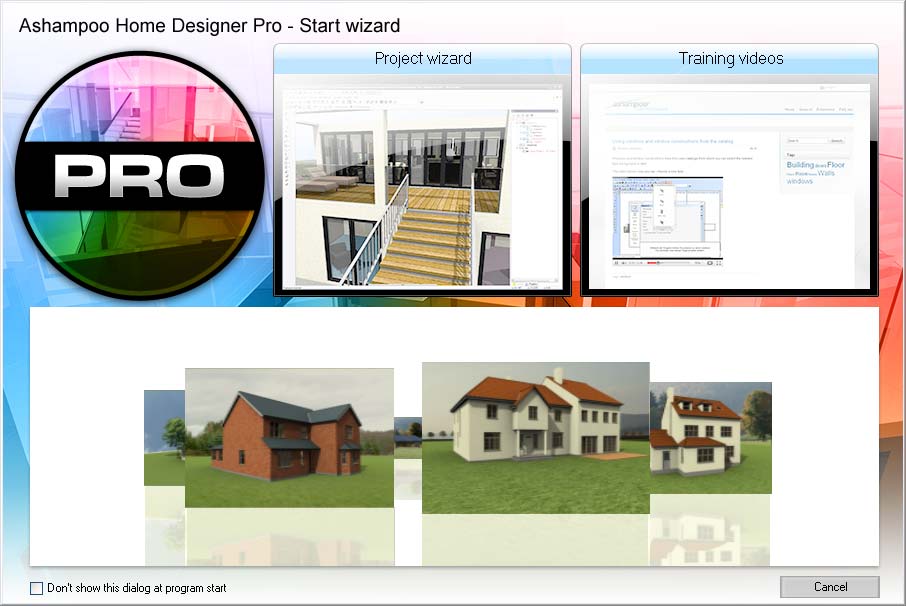 Ashampoo Home Designer Pro is 3D planning software for those who have a bit technical knowledge on how to plan and furnish their apartments. With this program, your building project becomes so easy, and designs come just as perfect as you want it to be. It comes with a lot of features that enables you to edit and shape the terrain, add a terrace, paths or beds, and many more. Ashampoo Home Designer Pro is 3D planning software for those who have a bit technical knowledge on how to plan and furnish their apartments. With this program, your building project becomes so easy, and designs come just as perfect as you want it to be. It comes with a lot of features that enables you to edit and shape the terrain, add a terrace, paths or beds, and many more.
Ashampoo Home Designer turns you into an instant architect; helping you to design that home of your dream with features such as the following: create and furnish rooms or even a multi-story house; design a garden with realistic terrain forms; print or save results in different image formats; realistic visualization with ray tracing, antialiasing, ‘smooth’ shadows and ambient occlusion; interior furnishing with large catalogs containing objects, textures and materials; 2D and 3D views; import Ashampoo Home Designer projects; including a start wizard and project wizard.
Ashampoo Home Designer Pro is a shareware program that comes with some very attractive features. The program can be tried for a period of 40 days; but can be extended for a price that is put at $29.99 per download. Ashampoo Home Designer is not a bad program, but requires a bit of technical knowledge on how to use some of its features.
Want to check it out? Visit Ashampoo.
Posted in Main | 1 Comment »
|
|
|




