Author Archive
Monday, November 1st, 2010
 ICE Book Reader Professional 9.0.3a is an ultimate e-book reader that can also be used as a teleprompter. It comes with support for native support; and LIT files, which do not use any Microsoft Reader components. The program can read the following formats: TXT; RTF; HTML; MS Word documents; Palm books (PDB and PRC); and Microsoft Reader Books (.LIT). Users can also enjoy features such as: ultra smooth scrolling with the exact control of scroll speed; automatically adjusted scroll speed; full text antialising super scrolling with subpixel precision, wave scrolling; complete support Unicode and all known codepages; automatic text reformatting; automatic text coloring; and a host of others. ICE Book Reader Professional 9.0.3a is an ultimate e-book reader that can also be used as a teleprompter. It comes with support for native support; and LIT files, which do not use any Microsoft Reader components. The program can read the following formats: TXT; RTF; HTML; MS Word documents; Palm books (PDB and PRC); and Microsoft Reader Books (.LIT). Users can also enjoy features such as: ultra smooth scrolling with the exact control of scroll speed; automatically adjusted scroll speed; full text antialising super scrolling with subpixel precision, wave scrolling; complete support Unicode and all known codepages; automatic text reformatting; automatic text coloring; and a host of others.
There are also a couple of few changes in version 9.0.3a, which include; addition of append clipboard, addition of possibility to delete recent library or index from recent list, restoration of selecting text in scroll mode with skins, disabling of clipboard monitoring by default, and a few other fixes.
It is a kind of good program for people who do not wish to strain their eyes while reading. It gives you that ability to read form a distance because there is no need to keep scrolling or changing pages.
ICE Book Reader Professional is a shareware, and goes for $96.00; that to me is huge, but the benefits too are huge.
Want to check it out? Visit Ice-graphics.
Posted in Main | No Comments »
Monday, November 1st, 2010
 My Money for Windows is a personal financial software written from ground up to work with online bank statements. What you need to do is download details of your financial transactions from your bank’s website and they are entered automatically into electronic register. This is one way of bringing all your financial information in a single place; helping you to efficiently organize your financial information data, simplify taxes and grow your net worth at the same time. My Money for Windows is a personal financial software written from ground up to work with online bank statements. What you need to do is download details of your financial transactions from your bank’s website and they are entered automatically into electronic register. This is one way of bringing all your financial information in a single place; helping you to efficiently organize your financial information data, simplify taxes and grow your net worth at the same time.
With 60 days to try how this program works, users can enjoy some newly added features and fixes to some minor bugs like; addition of new option to better control bank post dates resolution, fixing of OFX issues with missing currency definitions, fixing of fidelity investments OFX “accounts-up-to-date,” fixing of synchronization issues with fifth third bank, and fixing of spiking balances in account forecast. These were some of the complaints and weaknesses noticed in previous version of My Money for Windows.
When you download the trial version of this program, you get to benefit from the same quality features people who have the unlimited version enjoy. However, this is only for a limited period. The unlimited version goes for $39.95 per download; at least fair enough for all the things you can do with it.
Want to check it out? Visit Mthbuilt.
Posted in Main | No Comments »
Monday, November 1st, 2010
 Task List Guru is a portable to do list program that is ideal for both personal and small project management. The program features built-in reminder support, hierarchical to do list tree with icons, clipboard support, undo/redo, print, customize priorities, reorder tasks and order task lists using drag and drop, reminders with snooze features, multi-column sorting, global hotkey to activate the program, global hotkey to add new tasks, easy database backup, highlight tasks with today and expired due dates, and many more. Task List Guru can also be copied to a USB flash disk. Task List Guru is a portable to do list program that is ideal for both personal and small project management. The program features built-in reminder support, hierarchical to do list tree with icons, clipboard support, undo/redo, print, customize priorities, reorder tasks and order task lists using drag and drop, reminders with snooze features, multi-column sorting, global hotkey to activate the program, global hotkey to add new tasks, easy database backup, highlight tasks with today and expired due dates, and many more. Task List Guru can also be copied to a USB flash disk.
Users can choose from a total of forty eight different colorful icons for their to-do lists; making it a lot easier and much fun to organize things. You also have the additional benefits of specifying your priorities, due date, type, reminder and notes for each task. Perhaps, one of the most fascinating parts of this program is that you can carry it with your USB flash disk. This is one aspect I like so much about this program; it just makes things easier for me wherever I go with it.
Task List Guru is a freeware program, and can be downloaded and installed without limitations. It is a fine program, with some of the best features, especially when you consider that it is a freeware.
Want to check it out? Visit Dextronet.
Posted in Main | No Comments »
Friday, October 29th, 2010
 ATI Tray Tools is a program that runs in the system tray, providing easy right-click access to all of your ATI video cards’ main settings. Some of its features allow you to change anisotropic filtering+antialiasing levels in Direct3D and OpenGL, adjust image quality, turn on/off special driver features, or simply play around with clock settings. The program uses only very minimal system resources and is not intrusive. ATI Tray Tools is a program that runs in the system tray, providing easy right-click access to all of your ATI video cards’ main settings. Some of its features allow you to change anisotropic filtering+antialiasing levels in Direct3D and OpenGL, adjust image quality, turn on/off special driver features, or simply play around with clock settings. The program uses only very minimal system resources and is not intrusive.
This freeware program comes with support for the following features: ATI Control Center; Game profiles with desktop shortcut creation; Direct3D settings with templates, GUI form and tray pop-up menu; System wide Hot keys, (load profiles any profile/work with colours/run any application); Support for TV Out and displays with profiles; options to change Theater mode together with TV out; overclocking with templates including FAN Control; automatic overclocking when application required 3D mode; temperature monitoring; artifact tester with ability to find maximum stable clocks for GPU and memory; Radeon information show information about memory type, active rendering pipe lines and more; hardware tweaks, setting PCI latency timer; and many more.
ATI Tray Tools is very light, and amazes me with the tremendous amount of features the publishers have been able to include in it. For a freeware program to contain such quality features; I think it is a fine program.
Want to check it out? Visit Guru3d.
Posted in Main | No Comments »
Friday, October 29th, 2010
 Red button is a program for Windows optimization, and is licensed as a free ware. The program can be used for the following: to reduce the space occupied by a system on a disk; to switch off and remove unnecessary, disturbing to work components; to increased speed of loading, work, turn off of system; in time to clean “junk” files; to raise safety and convenience of system; to reduce degree of influence on environment; and to lower system charges. Apart from the features included in previous version of Red Button, users can also find additional changes in version 3.96 which include; some bug fixes, improved disk cleaner wildcards features, improved safety of the program, addition of a feature removal of invalid shortcuts, and GUI improved. Red button is a program for Windows optimization, and is licensed as a free ware. The program can be used for the following: to reduce the space occupied by a system on a disk; to switch off and remove unnecessary, disturbing to work components; to increased speed of loading, work, turn off of system; in time to clean “junk” files; to raise safety and convenience of system; to reduce degree of influence on environment; and to lower system charges. Apart from the features included in previous version of Red Button, users can also find additional changes in version 3.96 which include; some bug fixes, improved disk cleaner wildcards features, improved safety of the program, addition of a feature removal of invalid shortcuts, and GUI improved.
Besides the new features and changes, users still have the benefits of enjoying some of its old features which include: ease of use; light size; easy to understand user-interface; support for all latest client versions of Windows; portability; increase gaming performance on computer; increase system security; improve energy efficiency; clean registry; and many more.
Users can activate hundreds of hidden Windows settings to get the most out of your Windows, and turn off and increase the speed of Windows shutdown with Red Button.
Want to check it out? Visit Pothos.
Posted in Main | 1 Comment »
Friday, October 29th, 2010
 Registry First Aid Standard is a program that scans your computer system for orphan file/folder references. The program also finds files or folders on your drives that may have been moved from their initial locations, and makes all necessary corrections in your registry entries in order to match the located files or folders. Registry First Aid Standard program also has the ability to delete or remove invalid entries that have links to deleted applications in your registry. That means your system can regain its speed just as it was when you purchased it. Registry First Aid Standard is a program that scans your computer system for orphan file/folder references. The program also finds files or folders on your drives that may have been moved from their initial locations, and makes all necessary corrections in your registry entries in order to match the located files or folders. Registry First Aid Standard program also has the ability to delete or remove invalid entries that have links to deleted applications in your registry. That means your system can regain its speed just as it was when you purchased it.
Some of the latest changes that can be easily noticed in this version include; Windows 32 & 64 bit support, full Unicode support, new interface, new enhanced registry scan engine, and speed of registry snapshot comparison is much increased, default excluded registry keys are now internal-only user exclusions will be shown in the settings dialog. I must commend the publishers for a job well done on the new user interface, which has a new help menu among other changes and additions.
A good program to help you system up and running once again; possesses great features to fix errors and delete unwanted application files. Registry First Aid Standard 8.0.0 is a shareware program.
Want to check it out? Visit Rosecitysoftware.
Posted in Main | No Comments »
Friday, October 29th, 2010
 DFX is a sound enhancement, sound improvement and dsp effect program for digital music. Users who have this program installed on their system might just have their opportunities to finally able to experience superior high fidelity. DFX enhanced version of this player transforms the sound of an average computer into that of an expensive stereo system placed in a highly designed listening environment. DFX is a sound enhancement, sound improvement and dsp effect program for digital music. Users who have this program installed on their system might just have their opportunities to finally able to experience superior high fidelity. DFX enhanced version of this player transforms the sound of an average computer into that of an expensive stereo system placed in a highly designed listening environment.
DFX Audio Enhancer gives your media player more vibrant sound by improving the sound quality of MP3, AAC, Windows Media, Internet Radio, DivX videos, and other popular media files. DFX Audio Enhancer also helps to renew stereo depth, add 3D surround sound, restore sound clarity, boost your audio levels, and produce deeper and richer bass sounds. Some other features in this version include: optimization for headphones usage; audio spectrum analyzer; finely-tuned music presets; free stylish skins; and a powerful music and speech audio modes.
DFX Audio Enhancer is a freeware program, and is fully compatible with Windows XP, Vista, and Windows 7. Users are also allowed a free fully-featured trial version to see and have a feel of what this latest version has to offer. The full version of DFX Audio Enhancer goes for $19.99 per program.
Want to check it out? Visit FXSound.com.
Posted in Main | No Comments »
Wednesday, October 27th, 2010
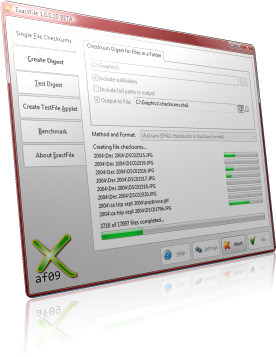 ExactFile 1.0.0.15 Beta is a program that has the combined functions of programs like; Fsum, Md5sum, ssfv, and sfalsum. Since it is multi-threaded, all those extra CPU cores on your system will actually get used to make checksum calculation of multiple files much faster. All versions of ExactFile (the console and the GUI) fully support Unicode; which is very unlike many other tools that may or never work on files names with non-ANSI characters. Version 1.0.0.15 is still in Beta version, and some few noticeable changes include; installer that offers associate ExactFile with extensions like exf, md5, sha1, and sfv; and completes the Windows “open with support.” ExactFile 1.0.0.15 Beta is a program that has the combined functions of programs like; Fsum, Md5sum, ssfv, and sfalsum. Since it is multi-threaded, all those extra CPU cores on your system will actually get used to make checksum calculation of multiple files much faster. All versions of ExactFile (the console and the GUI) fully support Unicode; which is very unlike many other tools that may or never work on files names with non-ANSI characters. Version 1.0.0.15 is still in Beta version, and some few noticeable changes include; installer that offers associate ExactFile with extensions like exf, md5, sha1, and sfv; and completes the Windows “open with support.”
Some of the things you can use ExactFile for include: using it to make sure files copied to CD-ROM are bit-perfect copies; using it to make sure backups copied from one drive to another are just right; and using it to make sure files haven’t been changed or damaged over time. Some of the features include: supports multiple checksum routines; supports recursive directory scanning; compatible with popular checksum digest format; and many others.
ExactFile 1.0.0.15 is a freeware program, and is still in Beta stage. One may have to wait a while to see what becomes of it after this stage. However, it is still a great program all the same.
Want to check it out? Visit Exactfile.
Posted in Main | No Comments »
Wednesday, October 27th, 2010
 If you are looking for a game optimizer for your gaming experience and delight, check this program out. Game Booster is designed to help optimize your computer for an even smoother responsive game play in the latest computer games with the touch of a button. It can enable you achieve the performance edge formerly available only to highly technical game lovers. The program works by helping you to temporarily shut down background processes, cleaning RAM, and also intensifying processor performance. The result of this is that you can always keep all the features of Microsoft Windows XP, Vista, and Windows 7 ready whenever you need them; and still be able to turn them off when you are also ready to get down to work or serious business. Game Booster 2.0 Beta 1.1 is a fine program to help you take your gaming experience to a whole new dimension. If you are looking for a game optimizer for your gaming experience and delight, check this program out. Game Booster is designed to help optimize your computer for an even smoother responsive game play in the latest computer games with the touch of a button. It can enable you achieve the performance edge formerly available only to highly technical game lovers. The program works by helping you to temporarily shut down background processes, cleaning RAM, and also intensifying processor performance. The result of this is that you can always keep all the features of Microsoft Windows XP, Vista, and Windows 7 ready whenever you need them; and still be able to turn them off when you are also ready to get down to work or serious business. Game Booster 2.0 Beta 1.1 is a fine program to help you take your gaming experience to a whole new dimension.
Definitely one of the best optimizers I have seen around; it just enhances the responsive game play in any latest computer game play. Game Booster is fully compatible with PunkBuster, Cheating-Death, VAC, and any other anti-cheat software.
Some of the key features of this freeware include: more CPU and RAM to your games, making it load and run even faster than ever; defragment game directory and files; boost the stability of your game; and, many more.
Want to check it out? Visit Iobit.
Posted in Main | No Comments »
Monday, October 25th, 2010
 Gadwin PrintScreen is a screen capturing program that allows you to capture the contents of the screen with just a single keystroke. Users can save captured screen to disk as a file in six different graphics file format or send it to the printer. When the hot key is pressed by a user, Gadwin is capable of capturing the whole screen, the active window or specified area. The program allows you to set or define other key features to initiate a capture. Gadwin PrintScreen is a screen capturing program that allows you to capture the contents of the screen with just a single keystroke. Users can save captured screen to disk as a file in six different graphics file format or send it to the printer. When the hot key is pressed by a user, Gadwin is capable of capturing the whole screen, the active window or specified area. The program allows you to set or define other key features to initiate a capture.
Gadwin PrintScreen can works for people who would love to show off their products on the web, enhance technical documents, and embed captures into presentations. It also works for users who would love to capture and print or perhaps save computer screen data. On most Windows computers, a full screen of data can be put on the clipboard by pressing the PrintScreen key. Whatever is sent by you is seen on the clipboard that must be edited in a different graphics programs to cut the right size and image format.
I am absolutely impressed by this program, and I have great respect for the publishers who have put together a wonderful job. No crash recorded yet during use, and I doubt if any is going to be recorded.
Want to check it out? Visit Gadwin.
Posted in Main | No Comments »
|
|
|




