Author Archive
Thursday, August 5th, 2010
 Nomad.NET has come to take over from Nomad (it is a powerful file manager written a couple of years ago). Nomad.NET completely rewrites Nomad (no single line of code was taken from previous one) using best ideas and algorithms and implementing everything in a completely new way. Nomad.NET has come to take over from Nomad (it is a powerful file manager written a couple of years ago). Nomad.NET completely rewrites Nomad (no single line of code was taken from previous one) using best ideas and algorithms and implementing everything in a completely new way.
Nomad.NET is developed with multi-threading in mind, so that almost all long operations can take advantage of multi-core CPU (comparing, copying, searching, detecting archive format and much more).
Nomad.NET comes with unique new features that stand it out from the old version. Some of these features include: full Unicode support; tabbed interface; powerful bookmarks system which enable users to bookmark favorite folders, ftp sites or even searches; it can be used to create very difficult encoding; it has powerful filtering system that is based on the same core as search; it is very much easier and simpler to use; customizable visual themes; ability to customize selected folders views and options; very powerful toolbar; and FTP folder support.
Nomad.NET is the only and first files manager that is written on .NET. The major idea behind the development of this tool is to provide users with the opportunity of doing the same things in more correct and beautiful way.
Want to check it out? Visit Nomad.
Posted in Main | No Comments »
Thursday, August 5th, 2010
 If you need a nice tool to create virtual tours with great effects, you may want to check out Tourweaver Professional. If you need a nice tool to create virtual tours with great effects, you may want to check out Tourweaver Professional.
Tourweaver Professional is a professional virtual tour creating tool that helps create virtual tours with really cool effects like interactive maps, radar and hotspot, movie, links, description components, walkthrough and lots more.
A new version, Tourweaver Professional 6.00 BETA was released recently with the following feature updates:
- Support Google maps;
- Support publishing standalone SWF format;
- Support flash thumbnail;
- Support lens flare, weather effects like snow, rain;
- Support perspective transform of video;
- Support customization of right-click menu of player;
- Support adjusting rotation speed of scenes;
- Support 3D sound effect.
Tourweaver Professional 6.00 works supports all versions of Windows from 98 till date but works best on XP, Vista and Windows 7.
Want to check it out? Visit EasyPano
Posted in Main | No Comments »
Thursday, August 5th, 2010
 Few days ago, the new version of Graphic Workshop Professional – Graphic Workshop Professional 4.0 Beta 2 hit the software market. For those not familiar with this tool, it is an image management package for Windows that features: Few days ago, the new version of Graphic Workshop Professional – Graphic Workshop Professional 4.0 Beta 2 hit the software market. For those not familiar with this tool, it is an image management package for Windows that features:
- Batch processing
- Drag And drop
- Multiple browser windows
- Pentium-optimized functionality
- Thumbnails
Graphic Workshop Professional comes in handy in browsing your image collection and viewing pictures. It also helps in converting between formats. With this tool you can easily print your graphics as hard copy, maintain a sophisticated keyword database, amongst other things.
The latest changes in the latest version includes:
- It now validates correctly under 64-bit versions of Windows
- The sneaky Move bug is history
The software works best on XP, Vista And Windows 7.
Want to check it out? Visit MindWorkShop
Posted in Main | No Comments »
Thursday, August 5th, 2010
 Swift To-Do list can also be describe as great to-do list software with reminder and to-do lists organized using unique tree structure with icons. The Swift-To-do list application is suitable both for personal and business use. It can be exported to Excel or HTML. All tasks of this software can have customized priority level, due date, task type, and reminder. Swift To-Do list can also be describe as great to-do list software with reminder and to-do lists organized using unique tree structure with icons. The Swift-To-do list application is suitable both for personal and business use. It can be exported to Excel or HTML. All tasks of this software can have customized priority level, due date, task type, and reminder.
There are daring claims about Swift-To-Do list which are: it is very powerful, simply and easy to use at the same time; it is the ultimate to-do list software for Windows; it is designed to be extremely efficient; it has all the features that a user will ever need; it makes managing of tasks and notes to be very pleasant; it is quite unique; and it can make users be become as organized as they would have wanted to be.
This software makes it easy for users to among other things: choose more than 40 icons for their to-do lists; create reminders and never forget anything again; create recurring tasks; reorder everything using mouse; cut, copy and paste; print and export their tasks and to-do lists; archive deleted tasks, restore them anytime; sort and filter tasks, create custom filters; edit or add multiple tasks at once; and carry Swift-To-Do list 7 on a USB thumb-drive.
Want to check it out? Visit Dextronet
Posted in Main | No Comments »
Wednesday, August 4th, 2010
 XYplorer at best can be described as a multi-tabbed dual pane file manager for Windows that features a powerful file search, a high customizable interface, and a large array of extremely unique ways to efficiently automate recurring tasks. It’s folder Tree can now be optionally retained sessions, so that when reopening XYplorer users can find their tree exactly (all expanded nodes, selected node, scroll position) as users left it the last time. XYplorer at best can be described as a multi-tabbed dual pane file manager for Windows that features a powerful file search, a high customizable interface, and a large array of extremely unique ways to efficiently automate recurring tasks. It’s folder Tree can now be optionally retained sessions, so that when reopening XYplorer users can find their tree exactly (all expanded nodes, selected node, scroll position) as users left it the last time.
XYplorer supports Windows 7, Windows Server 2003, Windows 2008, Windows XP, Windows Vista, Windows 2000, Windows NT, Windows Me, Windows 98; x64/x32. it does not require any installation or changes to users system or registry making it portable file manager.
Other noticeable features of this software are; tabbed browsing, dual pane, queue file operations, Undo/Redo file operations, powerful file search with amazing speed, folder view settings (that enables users to save and auto-restore the view settings of any particular folder), mini Tree, folder sizes, tags and comments, scripting, one-click preview, portable file association and customizable keyboard shortcut.
XYplorer is very fast and user-friendly. It also comes with thumbnails caching which helps to improve cache management. Its color filters can help users optionally apply the color filter patterns to files only and thus avoid that folders are colored when they match a pattern
Want to check it out? Visit XYplorer
Posted in Main | No Comments »
Wednesday, August 4th, 2010
 CodeTwo Exchange Sync is application software that enables automatic synchronization of selected data between folders of Microsoft Exchange server. The synchronized data referred to here is data that can be of any type like mail, calendar, contacts, and tasks and so on. This program allows users to synchronize data in two ways as well as filter the items before syncing or modify synced items on the fly. CodeTwo Exchange Sync is application software that enables automatic synchronization of selected data between folders of Microsoft Exchange server. The synchronized data referred to here is data that can be of any type like mail, calendar, contacts, and tasks and so on. This program allows users to synchronize data in two ways as well as filter the items before syncing or modify synced items on the fly.
The two ways that CodeTwo Exchange synchronizes folder data are: one-way synchronization and two-way synchronization. While one-way synchronization allows synchronizing data in one direction from the source folder to the target folder, the two-way synchronization changes mode in any folder propagated to all the remaining folders in a given sync group, the so-called “folder Ring”.
The good thing about this software is the fact that the synchronization of data between Exchange Server folders is real time. What this means is simply that each change that occurs to an item in a folder is instantly synchronized to the remaining folders.
Would-be users of this software should know that they will not need to install the software directly on Exchange server. Users can install the application on another machine that is connected to Exchange server via network to the program. And the installation and set-up is quite easy.
Want to check it out? Visit CodeTwo
Posted in Main | No Comments »
Wednesday, August 4th, 2010
 TrueCrypt is a program that is capable of creating a virtual encrypted disk within a file and also mounts it as a real disk, or better still an entire hard disk partition or a device, such levels of security which are a hidden volume, and a volume cannot be identified (no part of volume can be distinguished from random data). TrueCrypt is a program that is capable of creating a virtual encrypted disk within a file and also mounts it as a real disk, or better still an entire hard disk partition or a device, such levels of security which are a hidden volume, and a volume cannot be identified (no part of volume can be distinguished from random data).
TrueCrypt the uses the following encryption as USB memory stick, floppy disk, etc. TrueCrypt works by simply providing two algorithms: AES (256-bit key), Blowfish (448-bit key), CAST5 (128-bit key), Serpent (256-bit key), Triple DES, and Twofish (256-bit key). This utility supports cascading (e.g., AES-Serpent-Twofish). It is based on Encryption for the Masses (E4M) 2.02a, conceived in 1997.
TrueCrypt main features include but mot limited to: capacity to creates a virtual encrypted disk within a file and mounts it as a real disk; encrypts an entire partition or storage device such as USB flash drive or hard drive; encrypts a partition or drive where Windows is installed; automatically encrypts; it has parallelization and pipelining which allows data to be read and written as fast as if the drive was not encrypted; it can encrypt hardware-accelerated on modern processor; and provides plausible deniability in case there is an adversary force that users may wish to reveal the password.
Want to check it out? Visit Truecrypt
Posted in Main | No Comments »
Wednesday, August 4th, 2010
 Orbit Downloader can be described as a full-featured download accelerator and manager that is based on P2P technology. Orbit Downloader is built with an advanced robust multithread download algorithm that is implemented with high quality. It can integrates easily into Microsoft Internet Explorer to automatically handle user’s downloads. With this software, user’s can easily download files from any remote server via RTSP, MMS, HTTP, or FTP. Orbit Downloader supports proxy servers, queue processor, download categories, enhanced virus protection on download completion and much more. Orbit Downloader can be described as a full-featured download accelerator and manager that is based on P2P technology. Orbit Downloader is built with an advanced robust multithread download algorithm that is implemented with high quality. It can integrates easily into Microsoft Internet Explorer to automatically handle user’s downloads. With this software, user’s can easily download files from any remote server via RTSP, MMS, HTTP, or FTP. Orbit Downloader supports proxy servers, queue processor, download categories, enhanced virus protection on download completion and much more.
Orbit Downloader comes with new features like; Software Updater, top downloader manager of Windows 7, tag that makes it easy for users to download files easily, Grab Pro-Downloader RTMP protocol video, download e-mail and forum attachments with high speed, download social music and video include Pandora, MySpace, and Youtube easily, maximum download speed possible, supports all popular browsers, and supports all streaming media protocol.
Orbit Downloader has a clear and easy user interface which makes it user-friendly. It is easy to use and configure for both professionals and non professionals alike.
On the sad part, Orbit Downloader’s software updater usually detects beta versions of products that are still been tested and even Pro-versions of functioning Freeware.
Want to check it out? Visit OrbitDownloader
Posted in Main | No Comments »
Tuesday, August 3rd, 2010
 Style Jukebox is believed to be the next generation media player for Microsoft Windows platform which most users will have come to accept. Style Jukebox supports streaming and playing of major audio and playlists formats like APE, MP3, AAC, FLAC, PLS, M3U, etc. Style Jukebox is believed to be the next generation media player for Microsoft Windows platform which most users will have come to accept. Style Jukebox supports streaming and playing of major audio and playlists formats like APE, MP3, AAC, FLAC, PLS, M3U, etc.
This software contains a lot of features to provide users with multi-media library organizing process faster. It auto-playlists feature can create playlists from the library based on users preferences and up-dates them continually so as to reflect users options.
Some other features that is contained in this software includes; Folder Watch, Smart Remove and External Search that makes access to users media files easier and faster so that they can listen to music in a more relaxed and enjoyable way, it can smartly detect all items in the library depending on clean criteria, and can maintain the library clean it automatically delete from the library the songs that does not exist anymore and so on. All this functionalities are available under a user interface that is easy to use and elegant.
Style Jukebox is very compatible with iPods and USB sticks, making it easier for users to copy music and videos from their iPods and USB to their computers.
Want to check it out? Visit StyleJukebox
Posted in Main | No Comments »
Tuesday, August 3rd, 2010
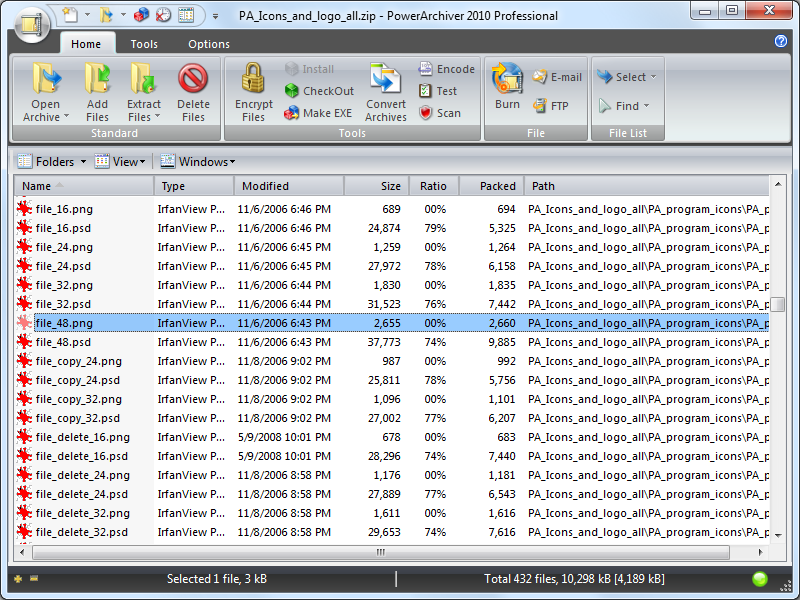 PowerArchiver 2010 is software that fully supports open source 7zip format which provides up to 50% stronger compression than zip and comes with some unique features. It comes with brand new ZIP engine features multcore optimizations which can lead up to 4x speed improvement if compared with others. The brand new ZIP engines supports ZIPX achieves and it is fully compatible with WinZip 12. PowerArchiver 2010 is software that fully supports open source 7zip format which provides up to 50% stronger compression than zip and comes with some unique features. It comes with brand new ZIP engine features multcore optimizations which can lead up to 4x speed improvement if compared with others. The brand new ZIP engines supports ZIPX achieves and it is fully compatible with WinZip 12.
PowerArchiver supports following formats: ZIP, 7-ZIP, CAB,RAR, HA (LZH), TAR, ACE, GZIP, BZIP2, XXE,BH, UUE, yENC, and MIME (Base 64), ARC, ARE, ACJ, ZOO plus ISO, BIN, IMG and NRG disc image formats. PowerArchiver has plugin system which can be used to add more formats support (msi, chm, etc) should users require more formats.
PowerArchiver features include the capacity to preview window where you can preview files, pictures, and archives without extracting them first, fully integrated shell extensions, and optional, modern ribbon interface. PowerArchiver fully supports Windows 7 with jump lists, taskbar progress and taskbar icon overlays, and other notable Windows operating systems from Win98 to Windows Vista.
Its professional level backup utility lets users backup their files to 3 destinations as well as ftp/email or burn to the disc. The low side of this software is that it very slow.
Want to check it out? Visit: PowerArchiver
Posted in Main | No Comments »
|
|
|




