Author Archive
Thursday, April 2nd, 2009
 Keeping your local network secure and stable could become a lot easier with the application named Lansweeper. As the name suggests, this application will scan the entire local network and report to the user the number of active users as well as their activities on their local gadget and with the network. Keeping your local network secure and stable could become a lot easier with the application named Lansweeper. As the name suggests, this application will scan the entire local network and report to the user the number of active users as well as their activities on their local gadget and with the network.
The above mentioned feature could also be found in other local network monitoring applications. But Lansweeper is more than simple software scanner. The application could also be used to monitor the hardware of each member of the local network. This will greatly help in troubleshooting. For example, the network administrator could monitor that the number of active CD-ROMs in the network and if one is missing it could mean that one of them is not working.
With regards to the interface, the reports are divided so that a general report of the network could be created. There is also a search option so that the administrator could target a specific user. Administrators could even monitor the number of unlicensed applications running in the network to prevent spyware and viruses since it is not properly licensed.
The best feature of the application is that it could be activated without the need of prior installation to other network members. As long as the administrator has the credentials to access each user, the application will be able to monitor almost everything about the member of the network.
A pro version is available for a fee. With the pro version, users could monitor the network in real time.
http://www.lansweeper.com/
Posted in Main | No Comments »
Thursday, April 2nd, 2009
 Teach2000 Light 8.31 is an easy to use application that helps teachers, parents or even those who just wants to memorize information or practice a language. This application creates flash cards that could become an interactive testing tool. The data could be uploaded by teachers and the data will be processed to become an interactive exam for students. Teach2000 Light 8.31 is an easy to use application that helps teachers, parents or even those who just wants to memorize information or practice a language. This application creates flash cards that could become an interactive testing tool. The data could be uploaded by teachers and the data will be processed to become an interactive exam for students.
But this application is not just a simple test creation tool. It comes with a variety of forms such as multiple choices, multiple answers, yes or no answers and even map tests. Almost every testing form could be created with this easy to use application.
After installing the application, you can start creating a test immediately by choosing which type of exam you want to create. The application has a notepad-like interface which means you can cut and paste the data freely. Below the notepad-like interface are the questions list and its corresponding answer. Users can add remarks on the answers to encourage or provide additional tips.
The best feature of this application is the recognition of Greek letters. This is very useful in complicated math formula. The symbols are placed in a separate toolbar and could be removed if you don’t want to use the letters in your tests.
Additional features in the application include integration of sounds on the answer and questions, variety of fonts and dictionaries from major languages for translation guide. Aside from the free version, there’s also a USB version that could be installed in your flash disk if you want to bring the application anywhere.
Check it out at teach2000.memtrain.com/
Posted in Main | No Comments »
Wednesday, April 1st, 2009
 TunnelEx 1.0.1 is a very simple application that will help network administrators control the network connections. It’s specifically built to control traffic for each members of the network wherein a member could be singled out as the target of the traffic while others will have limited access and vice versa. This could also be used to set up rules for bandwidth connectivity so that each user will have the same bandwidth to avoid abuse. TunnelEx 1.0.1 is a very simple application that will help network administrators control the network connections. It’s specifically built to control traffic for each members of the network wherein a member could be singled out as the target of the traffic while others will have limited access and vice versa. This could also be used to set up rules for bandwidth connectivity so that each user will have the same bandwidth to avoid abuse.
Direct FTP (file transfer protocol) connectivity is even possible with this application. No proxy needed – the transfer could be done directly from one server to the specified server. Even if the server is member of vast network, the traffic could be redirected to the specific server for faster transfer.
With regards to interface, you can expect that the application is a little bit confusing at first. The application will try to connect to every available network and will assist the network administrator set up rules. Basically, these rules will limit the network speed of its members. This application is also smart to redistribute network speed if one of the users is down. A tool that specifies network rules for each member of the network is also available. The endpoints could also be renamed for personalization of connection and familiarity.
Finally, the application also comes with extensive log wherein each action and data transfer is recorded. Although it needs a little bit of practice at the start, the application will eventually be very useful once all the tools are harnessed.
Want to give it a shot? Go to http://www.tunnelex.net
Posted in Main | No Comments »
Wednesday, April 1st, 2009
 Kids Web Menu is a free browser for kids that provide an entertaining and interactive use of the web browser. Exploring the browser is very easy even for kids who can’t read since it’s based on pictures. First time computer users could easily interact with the web browser and access the information they like. Kids Web Menu is a free browser for kids that provide an entertaining and interactive use of the web browser. Exploring the browser is very easy even for kids who can’t read since it’s based on pictures. First time computer users could easily interact with the web browser and access the information they like.
This form of browser is highly secured since the application is not just an open browser. Parents and those who control the browser can select the websites to be associated with the photo links in the browser. The links in the browser can be selected from the secured online directory. There is also an option for more links which is interpreted as a recommendation to other users worldwide.
A unique feature in Kids Web Menu is the photo function. Although it’s not really relevant to the browser’s main function, it’s still an entertaining function which will surely be enjoyed by kids. As a kid’s browser, the browser themes are also changeable and equally entertaining. The themes are continuously updated so you can download more themes for your kids to choose from.
Because it’s a controlled browser, certain features have been disabled – the address box is not included in the browser and automatic block is provided if the website accessed is not on the list of the approved website. Links and ads from external websites that’s not on the list of approved websites are also blocked.
Kids Web Menu 1.5 is a very easy to use and configure browser for kids. Its selective access to websites makes it one of safest browsers available.
More info and download at http://www.webbowser.com/
Posted in Main | No Comments »
Friday, March 27th, 2009
 Security should always be on top of the list of considerations every user should have while browsing. The advancement of technology has made it possible for hackers to snoop into your account by recording your keystrokes. By recording your keystrokes, your username and password will be detected. Without you knowing it, your personal information has already been used illegally. Security should always be on top of the list of considerations every user should have while browsing. The advancement of technology has made it possible for hackers to snoop into your account by recording your keystrokes. By recording your keystrokes, your username and password will be detected. Without you knowing it, your personal information has already been used illegally.
Fortunately, securing your online presence will not cost you. The application called KeyScrambler Personal is a freeware that scrambles your keyboard entry. This makes it impossible for hackers to monitor your keystrokes since the data you entered will be scrambled in their end. Entering your username and password in very sensitive websites will be secured.
This application is an add-on to browsers. This means that it will not be installed as a separate application in your device. This will be installed to your browser and will automatically work as soon as you use your keyboard in your browser. But aside from browser security; this small application is also integrated in security enabled applications such as instant messengers. As you encode your username and password, the KeyScrambler will show the scrambled counterpart of the password.
KeyScrambler Personal is a freeware that could be used at home and other personal transactions. But this could be updated into KeyScrambler Pro wherein it will provide security support to hundreds of applications and support for business transactions. This is practically the downside of the application since the toolbar that prompts the scrambled keystroke advertises the pro version. But even with this small inconvenience, it’s an application that could easily increase security in your online transactions.
More info at http://www.qfxsoftware.com/
Posted in Main | No Comments »
Thursday, March 26th, 2009
 Networx is a lightweight application used to monitor your Internet activity in terms of bandwidth usage. This is very useful for some users who are using the Internet with “data cap” or your ISP is limiting the data downloads per month. It’s also used to monitor the bandwidth of your connection so that you’ll know if the speed you are experiencing is actually what you really pay for. Networx is a lightweight application used to monitor your Internet activity in terms of bandwidth usage. This is very useful for some users who are using the Internet with “data cap” or your ISP is limiting the data downloads per month. It’s also used to monitor the bandwidth of your connection so that you’ll know if the speed you are experiencing is actually what you really pay for.
There are other bandwidth monitoring applications out there just like Networx. But what makes it different from other applications is in its ability to be used even in dial-up connection. In fact, most of the tools that you can use are geared towards specific control of your bandwidth. You can limit each website’s download speed and monitor which website is eating too much of your bandwidth. The application also has an alert feature if a website is automatically downloading data which could be a spyware.
There are versions of Networx – you can download the standard application which is less than 1mb in size or you can use the portable version which is even lighter. You can store the folder with the executable file in your portable storage device and use the application anywhere you go.
One of the biggest concerns with regards to this type of application is on intrusion. Although it will monitor the bandwidth without using it, the application might use a lot of RAM which means it could slow down the device. Networx solves that problem by minimizing the functions and placing the application in system tray (lower right hand side of desktop) to prevent taking up space and resources in your computer.
Check it out at http://www.softperfect.com/products/networx/.
Posted in Main | No Comments »
Thursday, March 26th, 2009
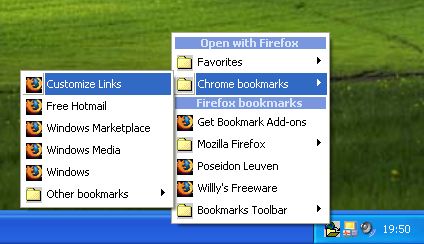 The bookmark is probably one of the most important features in a browser. This tool could help users mark the website by storing the URL in the browser. Although they do not save any data from the webpage, the URL should be more than enough to help the users retrieve the website they want to access. The bookmark is probably one of the most important features in a browser. This tool could help users mark the website by storing the URL in the browser. Although they do not save any data from the webpage, the URL should be more than enough to help the users retrieve the website they want to access.
But bookmarks are only stored per browser. If you have two or more browsers that you actively use, you’ll find it hard going from browser to another just to find the bookmark. Exporting and importing the bookmarks are a practice in syncing this type of data but they are just inconvenient and even confusing for those who are not familiar with this operation.
That’s where Links2Tray is handy. Instead of syncing those bookmarks, the application will automatically detect your bookmarks and launch them on your preferred browser. The links to your bookmarks will be placed on the system tray (lower right side of the desktop) so you don’t need the browser to access the bookmarks. Just right click on the application icon and the name of the bookmarks per browser will show up.
The interesting feature of Links2Tray is that you can launch the specific bookmark in any browser you prefer. For example, your bookmark is located in Internet Explorer but even if the bookmark was made by IE, you can still launch it in Firefox.
There’s a little configuration needed to be done at first (for Firefox and IE users) but they are very easy and the instructions are complete in the official website.
Check it out at http://www.wv-be.com/Links2tray.asp
Posted in Main | No Comments »
Thursday, March 26th, 2009
 If your ISP (Internet Service Provider) only gives you limited hours in using the internet per month, you are forced to browse as fast as possible. That means there will be times that you can’t use the internet and retrieve the data you need. Of course, you can save the webpages you want to read offline but you can’t save the entire information on that webpage you need. If your ISP (Internet Service Provider) only gives you limited hours in using the internet per month, you are forced to browse as fast as possible. That means there will be times that you can’t use the internet and retrieve the data you need. Of course, you can save the webpages you want to read offline but you can’t save the entire information on that webpage you need.
If you’re in this situation, you need PageNest. In gist, this application let’s you save the webpage for offline access. The data will be stored in your hard disk which could be accessed anytime.
Some would refute the need of this type of application since you can save the data you need online by saving the webpage. But PageNest is not just a way of saving data; it will also save the process on the webpage. This is very important for JavaScript based websites wherein the URL does not change even if the browser has changed its interface.
The uniqueness of PageNest is based on its focus on dial-up users. Dial-up users are usually the ones that needs this application because their time in using the internet is limited and could be cut off. Users can limit the download speed of the application so that the rest of the bandwidth could be used for other purposes.
The webpages saved by PageNest could be accessed either through the built-in browser of PageNest or through your favorite browsers. Even individual files in the webpage could be accessed through PageNest as the files are saved to be available offline.
More info available at http://pagenest.com/
Posted in Main | No Comments »
Wednesday, March 25th, 2009
 Internet Explorer, Firefox, Opera and other major browsers have something that users like and do not like. For example, users like IE because of its adaptability to practically every website created; Firefox is probably the fastest of the major browsers and; Opera features skin which customizes the look of the browser. Internet Explorer, Firefox, Opera and other major browsers have something that users like and do not like. For example, users like IE because of its adaptability to practically every website created; Firefox is probably the fastest of the major browsers and; Opera features skin which customizes the look of the browser.
What if all these features could be found in one browser? That is practically the aim of a relatively unknown browser called Acoo. Although the name of the browser may not ring any bells for most users, it’s gaining in popularity everyday because of its features. Acoo is based on IE but doesn’t have the clutter like the popular browser. The browser’s skin could also be customized like Opera and its lightweight (even lighter) compared to Firefox.
But aside from collecting the good things from major browsers, it has developed features that makes it unique compared to other browsers. There are two impressive features of the browser: first, it has the ability to completely wipe out the browsing history. Although other browsers could also clean their records, they are not as easy as Acoo. The second unique feature is the mouse-enabled commands. Instead of clicking, you can command your browser through mouse movements.
Unfortunately, the popularity of the website has not reached to a point wherein different websites could be launched in this browser. Some websites (especially the security-enabled) will require major browsers to be read. Still, this is a great alternative if you’re looking for a lightweight browser that you can use for regular browsing.
Check it out at http://www.acoobrowser.com/
Posted in Main | No Comments »
Wednesday, March 25th, 2009
 Ka Firetask is a software package that is best described as being something that is for intermediate to advanced users of their computers. People that are within these two categories tend to have different tasks that they try to complete on a daily basis and the main thing about these particular tasks is that they can be repetitive and annoying, such as moving different files around. Ka Firetask is a software package that is best described as being something that is for intermediate to advanced users of their computers. People that are within these two categories tend to have different tasks that they try to complete on a daily basis and the main thing about these particular tasks is that they can be repetitive and annoying, such as moving different files around.
This freeware package allows you to install different hotkeys or regular procedures on the computer and define them through scripting. The scripting will then take care of the tasks for you once it has been defined, leaving you free to devote your time to other tasks on your computer.
Many computer users will not have need of such a tool, but if you are a reader of this particular blog, chances are that you have tasks that if automated would save you a lot of time. This software package can help you get that done and the fact that it is available as freeware makes it that much more valuable to the people that have need of its services.
More information about this particular piece of software is available through the publisher’s website at http://www.konradp.com/products/firetask/.
Posted in Main | No Comments »
|
|
|




