Author Archive
Wednesday, November 6th, 2013
 Do you want a free, but unique application that enables you rename files and other things on your system? Well, you have one in ReNamer because it has a lot of wonderful features to help you achieve all your renaming with a bit of ease. Do you want a free, but unique application that enables you rename files and other things on your system? Well, you have one in ReNamer because it has a lot of wonderful features to help you achieve all your renaming with a bit of ease.
What’s ReNamer all about?
ReNamer is a small, yet very flexible and powerful file renaming tool that offers all the standard renaming procedures including prefixes, suffixes, replacements, case changes, as well as remove contents of brackets, add number sequences, change file extensions, etc. For advanced and experienced users, there is a PascalScript rule that allow users program their very renaming rule.
ReNamer is a program that also allows you to combine multiple renaming actions as a rule set, applying each action in logical sequence, which can be saved, loaded and managed within the program. In addition, ReNamer supports Meta Tags, such as: ID3v1, ID3v2, EXIF, OLE, AVI, Hashing and more; has an ability to rename folders, can process Regular Expressions, and supports Unicode filenames.
Some new features and updates have been made to this version, and they include; added hint to run as administrator when failed to apply system settings, added “Save” option for directly saving the currently loaded preset, fixed issue that caused incorrect limitation on number of presets, etc.
Any downside?
This free version is limited in terms to 5 presets and 5 rules, which may be a major concern for a lot of users.
Want to check it out? Visit .
Posted in Main | No Comments »
Tuesday, November 5th, 2013
 Are you searching for a multi-application that lets you do a lot of things including work with the Editor or Slideshow or Search separately from the main viewer? Then it is important that you continue reading this review on WildBit Viewer. Are you searching for a multi-application that lets you do a lot of things including work with the Editor or Slideshow or Search separately from the main viewer? Then it is important that you continue reading this review on WildBit Viewer.
What’s the deal with the WildBit Viewer?
WildBit Viewer is compact & fast image viewer with slideshow and editor. WildBit Viewer has an eye catching interface within blazing fast folder, file list and thumbnail viewer. Slide Show includes now multi-monitor support for fast switching between two monitors. WildBit Viewer supports all major graphic formats including BMP, JPEG, JPEG 2000, GIF, PNG, PCX, TIFF, WMF and TGA (over 70 formats).
WildBit Viewer includes Image Info with Image EXIF meta data JPEG and TIFF support and IPTC (IIMV4) information (like Photoshop file info) from JPEG and TIFF, Thumbview has changeable views, sorting and thumbnail predefined sizes for fast thumbnail size setting. Viewer also includes shell toolbar; you can drop your favorite folder there and use it as an organizer.
Some of its key features include the following: Explorer-style file handling with customizable headers; file List Generator which generates html, csv, rtf, uni and txt files; Normal Show with multiple folders setup or Custom Show with individual slide setup (Style, Step, Delay, Show the next image after, hms, Background Color with (Manual, Average and Dominant Color settings), Frame Width and Frame Color values for each image); and many more.
Any downside?
The program takes a long time to load even though some minor improvements have bee made to it.
Want to check it out? Visit Wildbit-Soft.
Posted in Main | No Comments »
Tuesday, November 5th, 2013
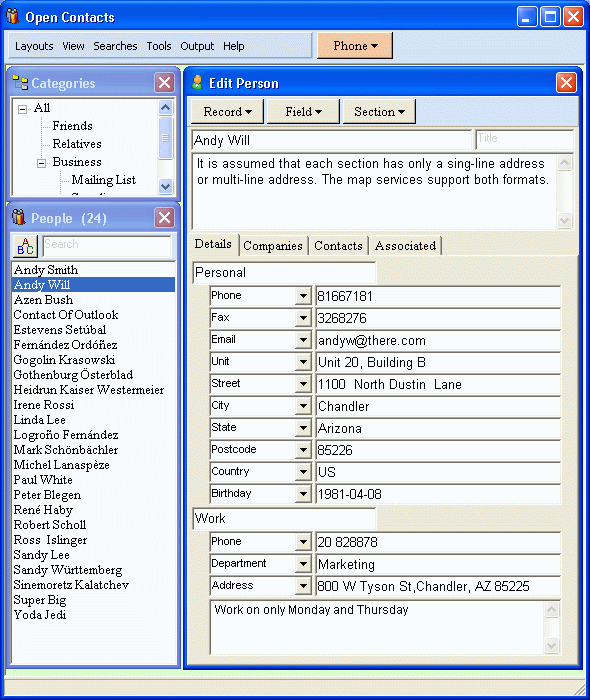 Do you want an address book that somehow different and unique to some of the ones you have used before? Do you want an application that can be easily customize to suit your peculiar needs? Then a program like Open Contacts might be of great interest to you. Find out more about the program by reading the review below. Do you want an address book that somehow different and unique to some of the ones you have used before? Do you want an application that can be easily customize to suit your peculiar needs? Then a program like Open Contacts might be of great interest to you. Find out more about the program by reading the review below.
What‘s Open Contact all about?
Open Contacts is an address book program with CRM features providing unified, flexible and intuitive interfaces for you to manage and lookup contact info of individuals and organizations. It displays only data fields with data. You can seamlessly customize what can be stored in your address book.
The database engine of this version of Open Contacts in review has been upgraded by the publisher from Firebird 2.1 to Firebird 2.5. Also, the default database file extension is now FDB rather than GDB.
Some of its major features include the following: print contact info and labels on papers of different sizes; unlimited data fields to store any contact info. Along with predefined fields, you may add unlimited data fields grouped by section; manage relationships between individuals, organizations and departments; import from MS Outlook, Outlook Express (WAB), Eudora, Netscape/Mozilla Thunderbird, XML (xCard), CSV, LDIF, Windows Contacts and vCard; export to indented text, CSV, Excel, vCard, XML (xCard), HTML, hCard and XFN (XHTML Friends Network); etc.
Any downside?
Open Contacts needs additional works in the GUI department.
Want to check it out? Visit Fonlow.com.
Posted in Main | No Comments »
Tuesday, November 5th, 2013
 Have you always wondered how you can get or install an application on your system that will help you remember or save you the stress of remembering all your passwords all the time? Do you want an application that will remember all your log information and simply log you in each time the need arises? Then you might want to check LastPass. Have you always wondered how you can get or install an application on your system that will help you remember or save you the stress of remembering all your passwords all the time? Do you want an application that will remember all your log information and simply log you in each time the need arises? Then you might want to check LastPass.
What’s the big deal about LastPass?
LastPass automatically is a program that fills in saved log-ins and forms with the click of a button. This handy Web freebie and browser plug-in also syncs your data to any computer that you use regularly.
The publisher has made a lot of changes to this version to include the following: LastPass icon in input fields can now be clicked, which replaces notification bar to fill; Chrome UI gets a complete redesign; Android app has a modern ‘holo’ UI, multitab support, clickable icons, better search; iOS app also now has a multitab browser, clickable icons, better search; LastPass Family Feature – premium users get 1 shared folder that they can share with up to 5 family members; immediate syncing for all users; and many more.
LastPass contains some nice features you will like this app for.
Want to check it out? Visit LastPass.
Posted in Main | No Comments »
Monday, November 4th, 2013
 How about installing a program that enables you to download files from different One Click Hosting sites and from various BitTorrent end eMule? Well, the good thing is that a lot of applications are now being developed that enables you to do a lot of things online with so much ease. How about installing a program that enables you to download files from different One Click Hosting sites and from various BitTorrent end eMule? Well, the good thing is that a lot of applications are now being developed that enables you to do a lot of things online with so much ease.
What’s NeoLoader?
NeoLoader is a download manager / filsharing client designed to work across network borders. It can download files from various One Click Hosting sites as well as from BitTorrent and eMule/eDonkey2000. In addition to that Neo provides an own anonymous filesharing Network, based on a TOR-like packet routing in its own Next Generation Kademlia network. NeoLoader supports a large amount of hosting sites. Both its BitTorrent as well as eMule support is state of the art, it supports all mainstream protocol extensions.
Some of its features include the following: download of the same file form multiple networks at the same time; supports trackerless torrents (using the Mainline kademlia DHT protocol) with some DHT extensions (BEP 5); file sharing can be performed in direct transfer mode (typical anonymous P2P) or push mode (Freenet style), as well as in a hybrid caching mode for optimized performance; and many more.
Want to check it out? Visit Neoloader.com.
Posted in Main | No Comments »
Wednesday, October 30th, 2013
 One of the many features a good Instant Messenger should have is the ability to enable you send messages or chat securely. No one wants an application or IM that exposes him to a third-party interference; and that is why it is important to read reviews or hear from others before installing one. It does look like a program or Instant Messenger like GoldBug has that kind of feature and more. One of the many features a good Instant Messenger should have is the ability to enable you send messages or chat securely. No one wants an application or IM that exposes him to a third-party interference; and that is why it is important to read reviews or hear from others before installing one. It does look like a program or Instant Messenger like GoldBug has that kind of feature and more.
What’s GoldBug?
GoldBug is a secure Instant Messenger. You can be sure with using GoldBug (GB), that no third party can look into your chat communication. Private user-to-user communication remains private. GoldBug (short: GB or GBIM) therefore uses multi-encryption with different layers of modern encryption Technologies (libgcrypt). It offers as well decentral and encrypted Email and decentral public E*IRC-Chat.
With GoldBug, you can enjoy the following features: create a group chat to all your friends just by selecting all; GoldBug uses public/private RSA keys. The public key must be exchanged between friends; GoldBug offers you serverless p2p Email without data retention; GoldBug encrypts your private chat to a friend with RSA-Keys, SSL and end-to-end encryption; Public Chat is provided with e*IRC, which is echo-ed IRC: Groupchat on AES Channels; MELODICA Button provides instant forward secrecy; and many more.
Any downside?
Great free program, with handy features that doesn’t seem to have any downsides.
Want to check it out? Visit GoldBug at SourceForge
Posted in Main | No Comments »
Tuesday, October 29th, 2013
 Want a program with lots of unique features? Want a program that offers multiple language support, search file comparison, directory synchronization, quick view panel with bitmap display, and many more? Then you might want to read this review to learn or find out more about Total Commander. Want a program with lots of unique features? Want a program that offers multiple language support, search file comparison, directory synchronization, quick view panel with bitmap display, and many more? Then you might want to read this review to learn or find out more about Total Commander.
What’s the big deal about Total Commander?
Total Commander is a file manager replacement that offers multiple language support, search, file comparison, directory synchronization, quick view panel with bitmap display, ZIP, ARJ, LZH, RAR, UC2, TAR, GZ, CAB, ACE archive handling plus plugins, built-in FTP client with FXP, HTTP proxy support, and more.
Total Commander has a lot of features including the following: multiple language and Unicode support; two file windows side by side; improved search function; compare files (now with editor) / synchronize directories; quick View panel with bitmap display; ZIP, ARJ, LZH, RAR, UC2, TAR, GZ, CAB, ACE archive handling + plugins; built-in FTP client with FXP (server to server) and HTTP proxy support; parallel port link, multi-rename tool; Tabbed interface, regular expressions, history+favorites buttons; Unicode names almost everywhere, long names (>259 characters), password manager for ftp and plugins, synchronize empty dirs, 64 bit context menu, quick file filter (Ctrl+S); and many more.
Want to check it out? Visit ?hisler.com?
Posted in Main | 1 Comment »
Tuesday, October 29th, 2013
 Malware programs have become some of the biggest daily threats to online security and comfort. Internet users have had to cope with all kinds of potentially dangerous software, which does not allow users of the internet the security they need to visit or use any application of their choice. However, that can be a thing of the past with a program like Microsoft Malicious Software Removal Tool. Malware programs have become some of the biggest daily threats to online security and comfort. Internet users have had to cope with all kinds of potentially dangerous software, which does not allow users of the internet the security they need to visit or use any application of their choice. However, that can be a thing of the past with a program like Microsoft Malicious Software Removal Tool.
What’s the deal about this tool?
Microsoft Malicious Software Removal Tool checks your computer for infection by specific, prevalent malicious software (including Blaster, Sasser, and Mydoom) and helps to remove the infection if it is found.
Microsoft Malicious Software Removal Tool will help to get rid of specific, prevalent malicious software from infected systems. Because computers can appear to function normally when infected, Microsoft advises you to run this tool even if your computer seems to be fine. In addition to using this tool, you should use an up-to-date antivirus product to help protect your computer from other malicious software.
The publisher (Microsoft) releases new updates of the tool every second Tuesday of each month; which means the application is always updated at least once every month to keep it up with latest security threats.
Any downside?
May not really be as effective as some other tools I have seen; but it is not a bad program all the same.
Want to check it out? Visit Microsoft.com.
Posted in Main | No Comments »
Tuesday, October 29th, 2013
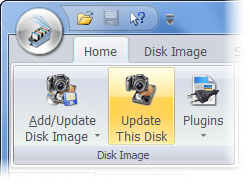 Looking for a program to help you maintain and organize a catalog of your computer media collection such as CD-ROMs and DVDs, audio CDs, diskettes, removable drives, hard drives, network drives, remote file servers, etc? Maybe you should pay close attention to this review to find out some more about a program called Where Is It? Looking for a program to help you maintain and organize a catalog of your computer media collection such as CD-ROMs and DVDs, audio CDs, diskettes, removable drives, hard drives, network drives, remote file servers, etc? Maybe you should pay close attention to this review to find out some more about a program called Where Is It?
Where Is It? is designed to be one of the best media cataloging tool available on the shareware available on the internet today. It is a successor of the very popular and successful DOS program Floppy Master, extending its capabilities to new and larger media storage devices and providing even more comprehensive access to stored data.
This version of the program has been improved upon by the publisher including the one caused by UnRAR.dll when handling certain kinds of RAR archives.
Where Is It? is designed to provide access to the contents of cataloged disks, even when they are unavailable on the system or even when they are not yours. It means you can browse their contents, search for files or folders you need, use imported descriptions and thumbnails, organize your data using categories flags, and many more.
Any downside?
Not a bad program especially if you can quickly find your way around it.
Want to check it out? Visit WhereIsIt-Soft.com.
Posted in Main | No Comments »
Tuesday, October 29th, 2013
 Some games are highly addictive, but not a lot of people will consider that a problem as long as they get what they want. With Pretty Good Solitaire, you can enjoy a collection of very interesting games. Some games are highly addictive, but not a lot of people will consider that a problem as long as they get what they want. With Pretty Good Solitaire, you can enjoy a collection of very interesting games.
What’s the bid deal about Pretty Good Solitaire?
Pretty Good Solitaire is a collection of solitaire games, including classic games like Klondike, FreeCell, and Spider, to original games found nowhere else. Pretty Good Solitaire features lush graphics, large easy-to-read cards, sound, in-depth statistics, and a wizard that allows you to create your own solitaire games. You can waste your day with easy, mindless games, or difficult, strategic ones.
Pretty Good Solitaire also includes full undo and redo, statistics for multiple players, full history of all games played, selectable card backs, background colors, and images, automatic game saving, and much more. You can submit your statistics to the Web site and see how you rank against other players.
Pretty Good Solitaire contains a solitaire game for every mood you find yourself. Whether you want an easy, mindless game or an intellectual challenge, you will find it here. It also features a lush background and large easy-to-read cards that make playing solitaire a visual delight.
Any downside?
Pretty Good Solitaire has a 30 day trial limitation and full version would cost you pretty good $24.95.
Want to check it out? Visit Goodsol.com.
Posted in Main | No Comments »
|
|
|

 Do you want a free, but unique application that enables you rename files and other things on your system? Well, you have one in ReNamer because it has a lot of wonderful features to help you achieve all your renaming with a bit of ease.


