Author Archive
Thursday, June 20th, 2013
 Do you want a program that is capable of running advanced check on your system? Then you might want to read the review below to find out just how RunScanner can help you out. Do you want a program that is capable of running advanced check on your system? Then you might want to read the review below to find out just how RunScanner can help you out.
What is RunScanner?
RunScanner is a completely free windows system utility that scans your system for all configured running programs. You can use the application to detect autostart programs, spyware, adware, homepage hijackers, unverified drivers, and a host of other issues. With RunScanner, you can also import and export your results and let other people help you to solve your problems.
With a couple of changes made to this software, users can now enjoy RunScanner better than they are used to in the past. The publisher has been able to fix bugs in 64 bit software scanning. RunScanner is also useful when it comes to detecting changes and misconfigurations in your system caused by spyware, viruses or human errors.
RunScanner can work in a lot of ways including the following; online malware analysis, import and export of run files, powerful process killer, save to text log file, powerful file filtering, host file editor, history backup/restore, explorer jump, analysis of file certificates, beginner, expert mode, Bit9 FileAdvisor MD5 lookup, and a host of others.
Downside:
RunScanner is an application that requires some kind of technical experience. It is important not to delete items without having any knowledge about the system as this could lead to some other problems that might affect the performance of your computer.
Want to check it out? Visit RunScanner.
Posted in Main | No Comments »
Thursday, June 20th, 2013
 It can be quite tasking when you have to use several document viewers to view your documents simply because the documents are in different formats. But now with STDU Viewer, you no longer have to go through that ordeal. It can be quite tasking when you have to use several document viewers to view your documents simply because the documents are in different formats. But now with STDU Viewer, you no longer have to go through that ordeal.
What is STDU Viewer?
STDU Viewer is a document viewer for multiple file formats that aims at replacing the multiple document viewers with a single simple application. It supports following document formats: DjVu, TIFF, PDF, XPS, CBR, CBZ, FB2, TXT PalmDoc(PDB), MOBI, AZW, EPub, DCX and image (BMP, PCX, JPEG, GIF, PNG, WMF, EMF, PSD) files. You can also create your own named bookmarks for easy access to part of document. Select and copy image and text. Search text in document.
It has tabbed interface with all the standard features. It comes in English, Russian or French languages and you could to translate STDU Viewer’s interface into your language by changing strings in xml external resource.
Some of the main features of this application are: view all your popular documents formats in one program, and its shows the content of documents for quick jumping from one section to another. Some extended features of this application includes: exporting a page or part of a page into an image file, creating your own bookmarks, setting an action for tap screen and some else others.
Downsides?
None that I as bothered about. Works as it was described.
To learn more, please visit Stdutility.
Posted in Main | No Comments »
Wednesday, June 19th, 2013
 Looking for a good option to download your favorite videos from video sharing websites like Youtube, Dailymotion? Check out Freemake Video Downloader. Looking for a good option to download your favorite videos from video sharing websites like Youtube, Dailymotion? Check out Freemake Video Downloader.
What is Freemake Video Downloader?
Freemake Video Downloader is a freeware that allows you to videos from video sharing websites like Youtube, Veoh, Dailymotion, etc and convert them from one format to another. It has a very simple download procedure that reduces the whole job of downloading to just a few mouse clicks. You could define the quality you want which could be either a FLV or an MP4, with different resolutions and sizes, so choose the one that’s more appropriate for you.
You have the option of either downloading the file, extracting the original soundtrack or convert the download video to one of the supported formats. You can use a password to lock adult sites or sites with inappropriate content as well as turn on parental control.
Some of the main features of this program are: download videos from video sharing sites without any audio without quality loss, Grab any web video from thousands of sites: Facebook, Vimeo, TubePlus, Dailymotion, Veoh, Megavideo, Vevo, adult sites. Rip any embedded video no matter where it’s hosted, Convert video directly to AVI, MKV, 3GP, MP3, iPod, iPhone, iPad, PSP, Android. Use ready-made intuitive profiles for portable devices.
Ellora Assets Corporation has added a few changes to this version. The changes are: Added the support forglobotv.globo.com, Fixed the issue with Dailymotion video download, Fixed the issue with VK.com (Vkontakte) video download, and Fixed the issue with YouTube download buttons.
Downsides?
It contains adware. It is a great downloader with a cool interface.
To know more about this program, please visit Freemake.com.
Posted in Main | No Comments »
Tuesday, June 18th, 2013
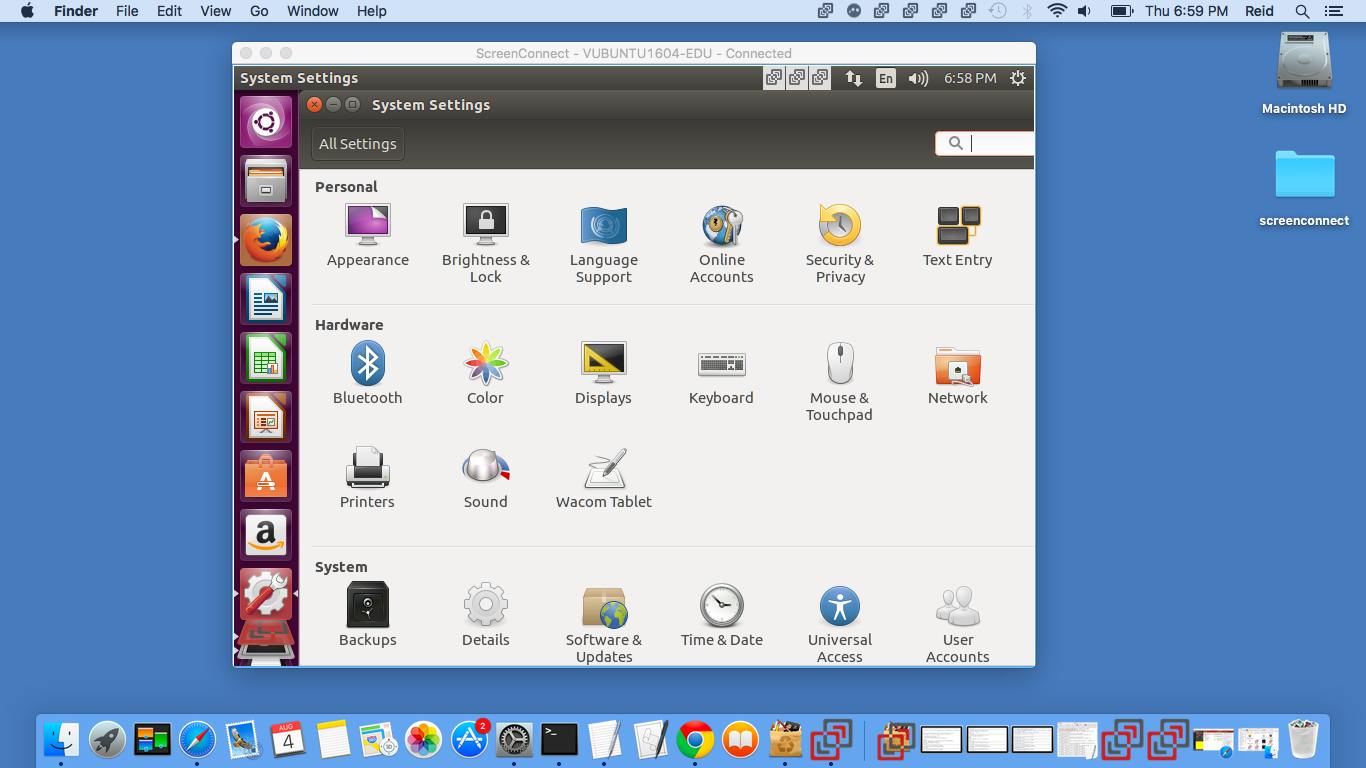 Want remote access to users’ PC screen? One of the best applications that would help you achieve that is ScreenConnect? Want remote access to users’ PC screen? One of the best applications that would help you achieve that is ScreenConnect?
What is ScreenConnect?
You could use this program to repair computers, provide updates, and manage machines. With just a single click you would be able to: Remote control any computer over the internet; Access unattended computers; Share your own screen with other people; Support Windows, Mac, and Linux users; and Support with Android and iOS phones and tablets. It is it is self hosted which allows users to support their own sessions instead of using a 3rd party, and there is a one time fee that is much cheaper than most of the other solutions.
Some of the main features of this program are: Lightning-quick remote screen, keyboard, and mouse control performs great on any connection, Blank the remote monitor for privacy from your guest, Share a screen with your support clients or meeting participants or vice-versa, Clipboard transfer allows seamless cut and paste to and from remote desktop, Remotely reboot and automatically reconnect to normal mode or safe mode, Multiple monitor support provides ability to view one or all monitors of the guest desktop, Save screen as file or copy screen to clipboard allows easy documentation of support sessions, Run shortcuts and utilities quickly on the remote desktop with the custom toolbox and so much more.
To know more, please visit ScreenConnect.
Posted in Main | No Comments »
Tuesday, June 18th, 2013
 Need a comprehensive English thesaurus and dictionary, then get WordWeb. Need a comprehensive English thesaurus and dictionary, then get WordWeb.
What is the big deal about this program?
This is a handy program that that gives you the definition, synonyms, and antonyms of any given word without requiring you to go online, though it can connect to the Internet for expanded functionality should you want it.
The interface is similar to any major word processing app’s dictionary function, so you would find it very familiar. It gives you the definition of the word, along with tabs that link to various wiki functions. At the bottom of the pane, you will find items such as synonyms, antonyms, and related words. A big plus for this application is its hot key support; you simply use a hot key combination when the cursor is pointed over any word, and WordWeb will pop up onscreen with all the relevant information.
You could change the database to one of several English variations, altering the text size, and disabling WordWeb from recognizing offensive words. Some of the main features of Wordweb are: definitions and synonyms, proper nouns, related words, pronunciations, 140,000 root words, 115,000 synonym sets, and look up words in almost any program. It does not contain any adware or spyware. What’s more this program is completely free.
If you want to find out more about wordWeb, please visit WordWeb.info.
Posted in Main | No Comments »
Tuesday, June 18th, 2013
 Feeling frustrated because you don’t seem to be able to view and use important information you’ve saved in your database while you’re working in Outlook or Exchange? You can now quit worrying as there is now a solution – GeniusConnect. Feeling frustrated because you don’t seem to be able to view and use important information you’ve saved in your database while you’re working in Outlook or Exchange? You can now quit worrying as there is now a solution – GeniusConnect.
What is the big deal about this program?
GeniusConnect, true to its name, will help you turn Outlook into a more powerful information management tool through database connectivity. It works well with any of the popular database systems. It will synchronize Outlook® data with any relational database that supports ODBC (MS Access, MySQL, SQL Server, Oracle etc.) You can link Calendar, your Contact, Mail, Task, Journal and Note to a database table or view. You could use GeniusConnect on multiple Outlook or Exchange folders and multiple databases. It supports a two way sync and attachments.
Some of the main features of this program are: Select your database table or view and link the columns to outlook fields, Load database data for selected outlook item(s) into the outlook folder and update the outlook item(s) data, Store selected outlook item(s) data in the database, This option enables last modification time compare. Based on the timestamp, GeniusConnect can decide direction of the update, Ignore all outlook items that are marked as private and Import or export information about link (mapping) between an Outlook field and database table field from/to a file among several other features.
To familiarize yourself with this application, please visit GeniusConnect.
Posted in Main | No Comments »
Monday, June 17th, 2013
 There are several threats that confront us as we use our PC. They range from malware and spyware to the annoying adware. These all have harmful effect on our PC. So if you want an application that would clean your PC and restore it to an optimal level, then getAdwCleaner. There are several threats that confront us as we use our PC. They range from malware and spyware to the annoying adware. These all have harmful effect on our PC. So if you want an application that would clean your PC and restore it to an optimal level, then getAdwCleaner.
What is AdwCleaner?
This freeware searches for and deletes Adware, Toolbars, PUP (Potentially Unwanted Programs), Hijackers, toolbars, browser add-ons installed with or without one’s consent and more. AdwCleaner is very light and easy to use. It works with a Search and a Deletion Mode.
It does not require any installation and can be deployed from any storage device, most suitable for portable usage. Once launched, it immediately goes to work searching for and detects all traces of unwanted components or remnants of former installations that should be cleaned.
It is capable of detecting a broad range of of undesirable programs (PUP/LPI), can fend off advertisements and reverse the effects of hijacking malware which might have taken over your browser’s homepage. A very common use of this application is browser toolbar removal. It comes with an uninstaller.
Please take note that to use this application, you’ll have to close all applications that are running on your system. So you would have to save your work before using it.
Downsides?
I have none at all. It is fast, portable, easy to use and really works.
If you want to find out more about this application, please go to AdwCleaner.
Posted in Main | No Comments »
Monday, June 17th, 2013
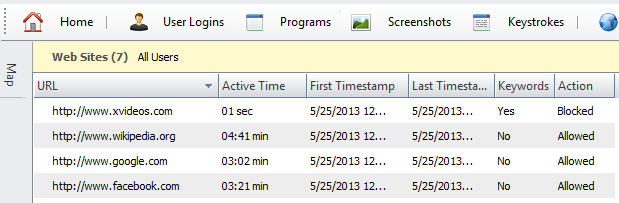 Worried about what your kids may be viewing online when you’re not around? No need to worry any more. With HomeGuard, you can now monitor and control your children online viewing content. Worried about what your kids may be viewing online when you’re not around? No need to worry any more. With HomeGuard, you can now monitor and control your children online viewing content.
What is the big deal about HomeGuard?
HomeGuard is an advanced parental control and activity monitoring tool for family and child safety online and offline. Upon installation on your computer, HomeGuard will quietly and automatically block all pornographic and inappropriate content online and record detailed website activity including time of visit and time spent on each website. Every website visited, program started, chat message sent and received, keystrokes typed, etc will be recorded in addition to activity based screen shots displayed in gallery view for quickly flipping through many shots and full view for focusing on specific shots.
It can also show warnings to users when blocking an activity and can send you notifications by Email when blocking. Plus individual programs usage time limiting and internet usage time limiting. It is absolutely impossible to tamper with, it cannot be bypassed using proxy servers and it cannot be closed or uninstalled unless the administrative password (provided during installation) is used.
Some of the features of this program includes: automatic filtering of web content and websites, built in keylogger, time and activity based screenshots capturing, chat and email monitoring and filtering, program/games blocking and time restrictions, Internet and computer usage time restrictions, email notifications and more.
Any downsides?
None at all. Completely blocks out all adult content from your computer. HomeGuard is a very good program to have if you care about the viewing content of your family.
To learn more about this program, please visit Veridium.net.
Posted in Main | No Comments »
Monday, June 17th, 2013
 If, like me, you have several login details for your various online/offline accounts then you may need an application to help you organize, manage and secure your passwords. This is what Password Memory helps you to achieve. If, like me, you have several login details for your various online/offline accounts then you may need an application to help you organize, manage and secure your passwords. This is what Password Memory helps you to achieve.
What is the big deal about Password Memory?
This program helps you to organize and manage all your passwords in a single location and securely too. You could sort your login details (username, password, etc.) very fast with this application. You can also use it to tack your credit card information for secure and fast access.
With Password Memory you can: Get all your password and login details secured in no time. Passwords are encrypted using several different algorithms for maximum security. You only have to remember one password, the one that opens Password Memory. Keep extremely secure passwords for everything since they no longer need to be remembered. Bring your password database with you and run Password Memory from a USB memory stick. You can easily copy the login details to the clipboard and insert them in
Some of the key features of this application are: Your passwords are encrypted using several different algorithms for maximum security, Sorting your database is as easy as clicking a button, Export your database to XML, HTML, textfile and Excel, Password Memory is built on a solid client/server database which means your collection can grow to virtually any size, and Password Memory can be installed and run from a USB memory stick which means you can safely bring your database wherever you go.
Code: Aero Technologies, the author of this application , has made the following changes to this version: New Office 2013 interface, Touch gesture support, Updated database access layer, Updated icon set, and Updated QuickFilter.
Downsides?
Its not free. A good application and is easy to install and works well.
To know more please visit CodeAero.com.
Posted in Main | No Comments »
Monday, June 17th, 2013
 Are you a programmer thinking of how to convert your programming codes into HTML, XHTML, RTF, LaTeX, TEX, SVG and BBCode files? Now with HighLight you can. Are you a programmer thinking of how to convert your programming codes into HTML, XHTML, RTF, LaTeX, TEX, SVG and BBCode files? Now with HighLight you can.
What is HighLight?
Highlight is a universal source ode converter that that converts programming code to HTML, XHTML, RTF, LaTeX, TEX, SVG and BBCode files with syntax highlighting. The user interface of this program consists of the normal window with a well-defined layout. You could use either the file browser or “drag and drop” function to load files into the workspace. It supports customizable color theme and language descriptions with regular expressions.
This program is capable of multitasking so you can add as many files as you want. Highlight boasts of several configurations options- color theme configuration, reformatting mode, keyword case, line wrapping, font name, size and others, as well as add line numbers, omit the header and footer, select the encoding method and add plugins. The file can also be directly copied to the Clipboard.
Some of the features of this program are: colored output in HTML,XHTML, RTF, TeX, LaTeX, SVG and BBCode format, Syntax elements are defined as regular expressions or plain string list, Customizable keyword groups, Reformatting and indentation of C, C++, C# and Java source code, Plug-In interface to tweak syntax parsing and coloring, CLI, GUI and Lib builds available and Platform independent.
Andre Simon, the author of this program, has added a few changes to this version. The changes are: added HeaderInjection and FooterInjection variables for syntax plug-ins, replaced single data directory by a dynamic config file search, added plug-ins outhtml_parantheses_matcher.lua, outhtml_keyword_matcher.lua, and a few others.
To find out more about this freeware, please visit Andre-Simon.de.
Posted in Main | No Comments »
|
|
|





