Author Archive
Friday, June 14th, 2013
 Want an program that allows you view all your documents in various formats? Then try out Sumatra PDF. Want an program that allows you view all your documents in various formats? Then try out Sumatra PDF.
What is Sumatra PDF?
SumatraPDF is a useful tool that helps you view documents in the PDF, CHM, DjVu and XPS formats, as well as comic books. It has a plain user interface that allows for seamless navigation. You can import a document by using the file browser (it does not support “drag and drop” method).
You can also view document properties (file path, date of creation, application, PDF producer and version, file size, number of pages, page size), rotate the page left or right, go to a particular page number, zoom in and out (up to 6400%) as well as create a favorites list, presentation, full screen, and others. The program uses a low-to-moderate amount of system resources and comes with a comprehensive manual.
some of the main features of Sumatra PDF are: open PDF files via menu, page up and ‘p’ for going to previous page, page down and ‘n’ for going to next page, ‘q’ to quit and you could also set different zoom levels via menu.
Krzysztof Kowalczyk, the author of this program, has added some changes to this version. The changes are: Fix changing a language via Settings/Change Language.
Downsides?
None that are worth writing about. This is a portable and nice PDF reader you should have on your PC.
To find out more about this program, please go to SumatraPDF.
Posted in Main | No Comments »
Friday, June 14th, 2013
 Want a software that offers you a secure login and data transfer with a dependable Windows terminal emulator? What you need is a SecureCRT. Want a software that offers you a secure login and data transfer with a dependable Windows terminal emulator? What you need is a SecureCRT.
What is SecureCRT?
It is an application that blends combines the secure login and data transfer capabilities of Secure Shell (SSH) with the reliability, usability and configuration of a proven Windows terminal emulator. It delivers secure remote access, file transfer, and data tunneling-all with the strong encryption, authentication options, and data integrity of the Secure Shell protocol. SecureCRT provides secure remote access, file transfer, and data tunneling for everyone in your organization.
It allows you to access all your network devices via SSH2, SSH1, Telnet, Telnet/SSL, serial, and other protocols and authentication via password, public key, X.509 (Windows) including Smart Cards, and Kerberos v5 via GSSAPI. Its user interface is multi-tabbed, is customizable, and includes key maps, button bar, fonts, cursors, and color schemes, as well as named sessions and firewalls.
Some of the main features fo this program are: Script recorder, Quickly create a script to automate routines using the new script recorder, which records keystrokes, including function keys, and then generates a VB script, Improved auto session, With “Use auto session” enabled, you can now select a single session, multiple sessions, or folders of sessions to automatically connect on startup, Cache passwords, SSH2 session passwords can be cached like pass-phrases. SecureCRT and SecureFX can share passwords while either application or the Activator utility is running, Improved ANSI color with color schemes, and Expanded logging options with custom data.
VanDyke Software, the author of this software, has made some changes in this version. The changes are: fixed a bug where SecureCRT crashed if a connected session was cloned and the terminal protocol of the cloned session was changed and then the original session was cloned again.
Downsides?
Pricy. But trust me, it is worth every dime you invest in it. It’s truly every professional’s delight.
To learn more about this software, please visit VanDyke.com.
Posted in Main | No Comments »
Thursday, June 13th, 2013
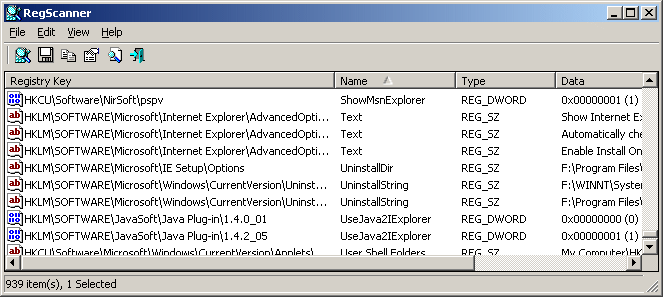 There are several applications that you could use if you want to search and scan your computer registry. One of the best you’ll ever get is RegScanner. There are several applications that you could use if you want to search and scan your computer registry. One of the best you’ll ever get is RegScanner.
What is the big deal about RegScanner?
RegScanner is a utility that allows you to scan the Registry, find the desired Registry values that match to the specified search criteria, and display them in one list. After you’ve found the Registry values, you can jump to the right value in RegEdit, by double-clicking the desired Registry item. While this freeware is easy to use, inexperienced should be extremely careful in editing Registry values. RegScanner can also save and export .reg files that RegEdit can open.
This program allows you to choose base keys to scan, limit the display to certain values, exclude keys from the scan, and make other choices, save, copy, and export selected values or whole lists, view the properties of any entry, create reports. RegScanner reveals a lot of information about your Registry and finds things fast when you need to make changes.
NirSoft. The publisher of this program, has made some changes to this version. These changes include: RegScanner now remembers the last 20 find strings you used and allows you to easily choose them again from a combo-box and fixed the flickering occurred while scrolling the Registry items.
System Requirements
This utility works in any version of Windows, from Windows 98 to Windows 7. A separated download for x64 systems is also available.
Downsides?
No cons. It worked great.
To familiarize yourself with this application, please visit NirSoft.
Posted in Main | No Comments »
Thursday, June 13th, 2013
 Are you a DJ or a home-user looking for the most efficient way to catalog your music collection? Then look no further. Music Label 2013 is the answer to your problems. Are you a DJ or a home-user looking for the most efficient way to catalog your music collection? Then look no further. Music Label 2013 is the answer to your problems.
What is it about Music Label 2013?
This application allows you to catalog your entire music collection (CDs, vinyl’s, MDs, MP3s etc). you do not have to do any typing as Music Label 2013 CDDB2 and ID3 technology. It helps you to organize your entire music collection in no time – simply insert CDs or type titles and all information about your music will be instantly downloaded.
Its ultra fast but very easy-to-use search engine helps you to find all those golden oldies you’ve always enjoyed very fast, it helps you save money by not purchasing duplicate CDs and by keeping track of CDs on loan, export your collection and save it on your mobile device to carry it along at all times. Music Label exports to a variety of formats and Catalog any kind of media ranging from CD and vinyl to MP3 files on your hard drive, or even cassettes if you still have those. You can even add your own media types, making Music Label future proof.
Some of the main features of Music Label 2013 are: Quickly get your music library organized by scanning CDs or typing the title, Catalog any type of media (CD, vinyl, SACD, MP3, WMA, OGG, etc), Scan your hard drive to find music files and add them to your collection, Keep track of CDs on loan with the built-in loan manager, Search and sort your collection with one click, Print reports and watch a variety of statistics, Export to various formats (HTML, XML, PDF, Excel, etc), Export to iPhone/iPod/iPad (Netwalk Music HD) and so much more.
Code Aero Techonlogies, the publisher of this program, has made some changes to this version. These changes are: Touch gesture support, Album cover art image read from audio files, improved views, improved ribbon, Updated database access layer and other various enhancements and fixes.
Downsides?
This program is too slow and crashes too often.
To know more, please visit CodeAero.
Posted in Main | No Comments »
Thursday, June 13th, 2013
 There are many applications out there that allow you to convert PDF files to MS Word. Some of them are even free. But there is one I’d like to tell you about. It is called PDF Shaper. There are many applications out there that allow you to convert PDF files to MS Word. Some of them are even free. But there is one I’d like to tell you about. It is called PDF Shaper.
What is the big deal about PDF Shaper?
PDF Shaper is a user-friendly application that comes in handy to those who want to convert PDF files to other formats. It is a free PDF to MS Word converter with easy-to-use user interface and many useful features such as multipage and batch PDF conversion, tab formatting, extraction of specified elements.
PDF Shaper allows you to specify the page you want to process; you can also use to batch convert i.e convert several documents at the same time. You can use it to remove tables, shapes and images from the source PDF file so that the file that is extracted only stores the needed contents. Some of the features of this program are: Fast PDF processing algorithm, Supports password protected PDFs, Supports Unicode text, super easy-to-use user interface, Small installation file size and it’s Free for personal and commercial use.
Glorylogic, the publisher of PDF Shaper, has made some little changes to this version. The changes are: improved PDF loading speed, improved the detection of horizontal lines and text breaks and fixed minor bugs.
Downsides?
None that I’ve experienced. This is a useful and handy application.
To learn more about PDF Shaper, please go to .
Posted in Main | No Comments »
Monday, June 10th, 2013
 Did you know you can do more with your PDF file just by downloading a simple application? Did you know you can do more with your PDF file just by downloading a simple application?
What’s Nitro PDF Reader?
Nitro PDF Reader is an application that lets you create PDF files, comment and review, save PDF forms, extract text and images, type text directly onto the page, and more. Start working with PDF files the way you have always wanted to. The program allows you to do anything you expect to do with a PDF reader. You can also create PDF files from any source without stress. Other things you can do with Nitro PDF Reader include the following; sign PDF easily, collaborate with anyone, anywhere, and many more.
Though, this is a free version of the program; nothing is to be taking away from the program because it has a lot of key features. It has a familiar interface, some of the key features that you ever wanted in a PDF reader and smooth functionality combining them into an eminently usable program that doesn’t come or act as a stumbling block between you and your documents.
The publisher has been able to turn this free version of something that is a bit closer in standard to the business or pro version with some features that were never there before. However, you may choose to step up to the pro version if you want some more advanced features.
Downside:
Nitro PDF Reader is no doubt a fine program with some key features. However, advanced users may feel the need to use some key features that are not made available in this version; and that is why the pro version comes to mind.
Want to check it out? Visit NitroReader.
Posted in Main | No Comments »
Sunday, June 9th, 2013
 Certainly, an open source or free program that is designed to provide an operating system that is binary compatible with Windows will always be a welcome addition to your collection. That is why an open source program like ReactOS is so highly rated by those that have used it before or are still using it on their systems. Certainly, an open source or free program that is designed to provide an operating system that is binary compatible with Windows will always be a welcome addition to your collection. That is why an open source program like ReactOS is so highly rated by those that have used it before or are still using it on their systems.
What is ReactOS?
ReactOS is a free open source operating system based on the best design principles found in the Windows NT architecture (Windows versions such as Windows XP, Windows 7, and Windows Server 2012 are built on Windows NT architecture). Written completely from scratch, ReactOS is not a Linux based system, and shares none of the UNIX architecture.
The major objective of the ReactOS project is to provide an operating system which is binary compatible with Windows. This will allow your Windows applications and drivers to run as they would on your Windows system. Additionally, the look and feel of the Windows operating system is used, such that people that are used to the familiar user-interface of Windows would find using ReactOS very simple.
This is an amazingly popular and highly rated program; rated by a lot of users for its effectiveness. ReactOS does not have a downside.
Want to check it out? Visit: Reactos.
Posted in Main | No Comments »
Saturday, June 8th, 2013
 Are you looking for an advanced and fully-featured freeware that contains a lot of tools to enable you carry out multiboot without stress? YUMI (Your Universal Multiboot Installer) is an advanced application that uses syslinux to boot extracted distributions stored on your USB device. Are you looking for an advanced and fully-featured freeware that contains a lot of tools to enable you carry out multiboot without stress? YUMI (Your Universal Multiboot Installer) is an advanced application that uses syslinux to boot extracted distributions stored on your USB device.
What’s YUMI (Your Universal Multiboot Installer)?
YUMI (your Universal Multiboot Installer), is the successor to MultibootISOs. The program can be used to create a Multiboot USB Flash Drive containing multiple operation systems, antivirus utilities, disc cloning, diagnostic tools, and many more. Contrary to MultiBootISO’s which used grub to boost ISO files directly from USB, YUMI uses syslinux to boot extracted distributions stored on the USB device, and reverts to using grub to Boot Multiple ISO files from USB, if necessary.
A few fixes and updates have been made to this software to include the following; updated to now support Ubuntu Server 12.04, Ubuntu Server 12.12, and Clonezilla raring alternative distributions. The publisher has also made a couple of fixes including; fixing of problems adding Debian 7 i386.
YUMI is like Universal USB Installer; however, it can be used to install more than one distribution to run from your USB. Distribution can also be uninstalled using the same tool.
A couple of fixes have been made to this version, which makes the program more stable.
Want to check it out? Visit Pendrivelinux.
Posted in Main | No Comments »
Saturday, June 8th, 2013
 There are so many programs designed to enhance your video and audio applications; but only a handful of them are actually great. With K-Lite Mega Pack, you have a tool that has so many useful features. There are so many programs designed to enhance your video and audio applications; but only a handful of them are actually great. With K-Lite Mega Pack, you have a tool that has so many useful features.
What’s K-Lite Mega Codec Pack?
K-Lite Codec Pack is a collection of components needed for audio and video playback in DirectShow players such as Windows Media Player, Media Centre, and Media Player Classic. K-Lite Mega Codec Pack contains everything you need to play all common audio and video file formats. It also provides additional functionality such as thumbnail generation in Explorer. The pack has a very advanced installer that is highly flexible and has unique problem solving capabilities.
Latest changes include the following: updated MPC-HC to version 1.6.8.7378; updated LAV Filters to version 0.57-11-g02c9d31; updated ffdshow 1.3.4513; updated codec tweak tool to version 5.6.4; updated GraphStudioNext to version 0.6.0.206; and updated MediaInfo Lite to version 0.7.63.
K-Lite Mega Pack is not only easy to use; but also very easy to install even if you are a newbie. Other features of this software include the following; very user-friendly, updated frequently with newest and best components, provides and excellent out of box experience for inexperienced users, provides several options for experienced users, provides a high level of flexibility, easy to configure even for a newbie, combines effectively with Windows Media Player, and Media Centre, works with other popular DirectShow Players, lightweight, and many more.
Any downside?
K-Lite Mega Codec Pack is a great program that is designed with advanced features. The program is easy to use, and does not have any major issue to worry about.
Want to check it out? Visit CodecGuide.
Posted in Main | No Comments »
Friday, June 7th, 2013
 Want to find out more about what the weather has in store for your environment or city in the next couple of days or months? All you need to do is check out a couple of popular weather applications online. However, you can check out Earth Alerts, which is one of very few reliable weather applications being used these days. Want to find out more about what the weather has in store for your environment or city in the next couple of days or months? All you need to do is check out a couple of popular weather applications online. However, you can check out Earth Alerts, which is one of very few reliable weather applications being used these days.
What’s Earth Alerts?
Earth Alerts allows you to monitor in near real-time a variety of natural hazard events that are occurring anywhere around the world. Alert notifications, reports, and imagery provide the user with a convenient way of viewing natural phenomenon as they occur, whether close to home or some far-flung corner of the globe.
Earth Alerts is an application that uses a variety of online resources provided by organizations such as the National Weather Service, U.S Geological Survey and Smithsonian Institute, and many others. This is aimed at identifying what sort of activities “Mother Earth” is currently dishing out on the planet.
Earth Alerts has some basic features that include the following; National Weather Service Alerts, Current Conditions, local Forecasts and Radar/Satellite Imagery, and many more amazing and easy to use features.
Any downside?
Earth Alerts has no downside; and its ability to deliver useful and up to the minute data and images are highly impressive.
Want to check it out? Visit EarthAlerts.
Posted in Main | No Comments »
|
|
|




