Author Archive
Wednesday, March 27th, 2013
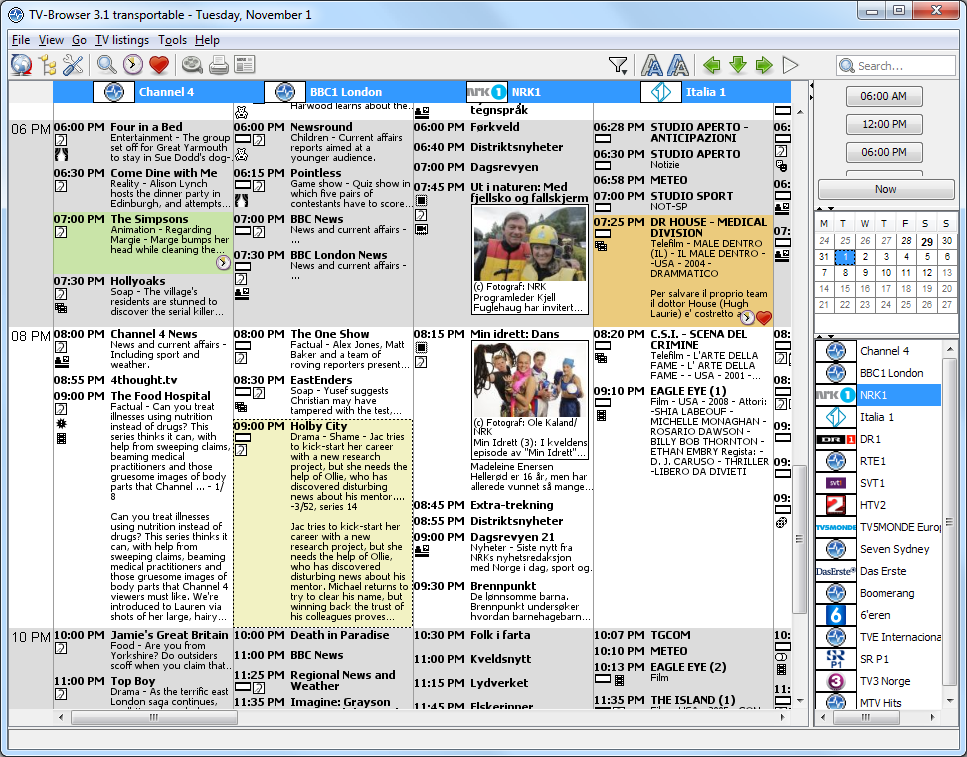 Take your entertainment to a whole new level by installing some of the web based TV-browsers you can find online these days. Television viewing doesn’t have to be in same old way of viewing it; things have to change sometimes. Take your entertainment to a whole new level by installing some of the web based TV-browsers you can find online these days. Television viewing doesn’t have to be in same old way of viewing it; things have to change sometimes.
What is TV-Browser All About?
TV-Browser is a java-based TV guide which is easily extensible using plugins. It is designed to look like your paper TV guide. TV-Browser is an advanced Windows TV guide that downloads information from the Internet and displays it in a well-organized interface. Minor adjustment will be required on the main settings of the application, including network options, plugins and TV channels to check as soon as installation is completed.
TV-Browser users can update the program not only for the current day, but also for tomorrow, with options allowing a download for up to the next 3 weeks. Automatic update can also be enabled, again from the settings screen. TV-Browser only supports a limited number of countries including the United States, Germany, France, Italy or Spain. The software also support plugins on the other hand, so you can add new features by installing separate add-ons. First time users can use the wizard to get assistance on the main preferences.
Downside?
TV-Browser has very limited channels and countries.
Want to check it out? Visit TV Browser.org/.
Posted in Main | No Comments »
Tuesday, March 26th, 2013
 There are times you need to get the meaning of a particular word in a different language or you’re required to translate some selected text into a different language. There is a software that can help you that quite easily. It is Lingoes. There are times you need to get the meaning of a particular word in a different language or you’re required to translate some selected text into a different language. There is a software that can help you that quite easily. It is Lingoes.
What is Lingoes?
It is an easy and smart dictionary and text translation software. It has look-up dictionaries, full text translation, capture word on screen, translates selected text and pronunciation of words in over 80 languages. These languages are English, French, German, Italian, Spanish, Portuguese, Russian, Greek, Swedish, Turkish, Chinese, Japanese, Korean, Polish, Arabic, Hebrew, Vietnamese, Thai and more. Its creative cursor translator helps in word recognition and definition.
Some of the key features of this application include: translation in over 80 languages, text translation in over 34 languages, cursor translation which allows you to translate words with just the cursor translation function, and words and texts pronunciation. Others include open management of dictionaries and free dictionaries and thesaurus downloads among several other features.
Lingoes Project, the author of this program, has added a few changes to this version. The changes are: Support Windows 8, Support cursor translation in IE10, Support cursor translation in Firefox 19 and Support cursor translation in Chrome 25.
Downsides?
It’s okay. Neat dictionary and translator.
To familiarize yourself with this software, go to Lingoes.
Posted in Main | No Comments »
Monday, March 25th, 2013
 Haven’t you considered the significance of installing a content management software on your system? A lot of content managers ignore the significance of some of these applications; and that sounds strange considering the overwhelming benefits of such programs. Joomla is a world renown content application that can be easily installed and managed. Haven’t you considered the significance of installing a content management software on your system? A lot of content managers ignore the significance of some of these applications; and that sounds strange considering the overwhelming benefits of such programs. Joomla is a world renown content application that can be easily installed and managed.
What’s Joomla?
Joomla! is a powerful Open Source Content Management System that is being used all over the world for everything from simple websites to complex corporate applications. It is easy to install, simple to manage, and reliable. Joomla keeps track of every piece of content on your Web site, much like your local public library keeps track of books and stores them.
Joomla is used by reputable wesbites across the world; and is renowned for its simplicity. Some of the things you can use the application for include the following: corporate Web sites or portals; corporate intranets and extranets; online magazines, newspapers, and publications; government applications; E-commerce and online reservations; small business Web sites; Non-profit and organizational Web sites; community-based portals; schools and church Web sites; and personal or family homepages. Joomla is designed to be easy to install and set up even if you’re not an advanced user.
Joomla is easy to install even for the beginner; however, a newbie requires a few days to actually understand all its features.
Want to check it out? Visit Joomla.org. (more…)
Posted in Main | No Comments »
Sunday, March 24th, 2013
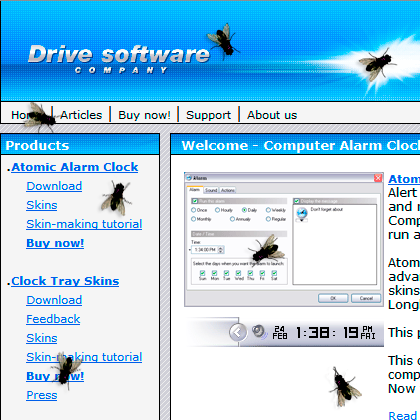 A program doesn’t have to be a paid or shareware to be rated as good; and that is one of the ways to assess a top quality program. Fly on Desktop appears to be a program that falls in this category, and the publisher truly deserves a part on the back for a job well-done. A program doesn’t have to be a paid or shareware to be rated as good; and that is one of the ways to assess a top quality program. Fly on Desktop appears to be a program that falls in this category, and the publisher truly deserves a part on the back for a job well-done.
What is Fly on Desktop?
Fly on Desktop is a small, simple, easy to use application, specially designed to put a realistic fly on your desktop. This utility will fully simulate the behavior of a real fly. Launch of 5-10 units, and you will believe that these are true flies. Fly on Desktop has settings, where you can enable it to startup, place on top of other windows and specify the number of flies. To remove a fly from the screen, just double click on it.
Click the right mouse button on the fly to access the menu, where you can enable it to startup, place on top of other windows or even add another fly on the desktop. In order to remove a fly from the screen, all you need to do is just double click on it.
Any Downsides?
The program is sort of fun, and is very easy to use. The only possible downside is, well you know, flies on your desktop
Want to check it out? Visit Drive-Software.
Posted in Main | No Comments »
Saturday, March 23rd, 2013
The interne is crowded with loads of applications or programs that can simplify most of the things we spend time doing in the past. Did you knwo you can install a video and audio player that lets you do a lot of things? That is what you get for downloading this application; PotPlayer has some of the features that makes your audio and video viewing experience very easy.
What’s the big deal about PotPlayer?
PotPlayer is a video and audio player that also supports TV channels, subtitles and skins. It is a much improved/faster version of KMP, including ffdshow and some other stuff to connect to a Korean-only video/chat network. It supports seamless playback, auto-resume on the last 200 opened files, has fully configurable XML skin files, and D3D exclusive mode.
PotPlayer supports a wide range of audio (including, but not limited to WAV, WMA, MP3, OGG, M4A, AAC, RA, FLAC and MOD, and video (such as AVI, WMV, ASF, MPEG, M2V, MTS, DPG, WebM, AMV or DivX) formats, but it also recognizes several playlist formats (like M3U, ASX, PLS, WVX or CUE). PotPlayer gives you control over its functions, allowing modification of the video speed, adjusting the audio volume, decrease or increase contrast and brightness.
Downsides?
Nice piece of application; and its free as well!
Want to check it out? Visit DvbSupport.
Posted in Main | No Comments »
Saturday, March 23rd, 2013
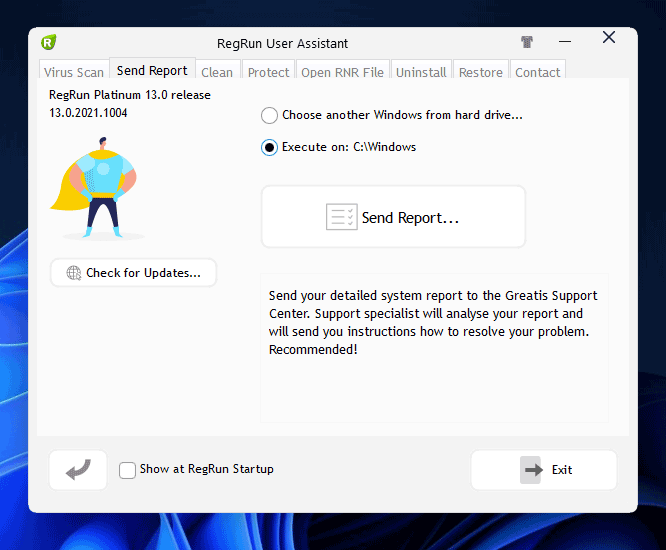 Using a freeware program as your main tool against Trojans or adware or spyware poses a lot of dangers. The same can also be said of a program like RegRun Reanimator; but of course, the good thing about it is that you can run or install it along with other antivirus programs on you system. Using a freeware program as your main tool against Trojans or adware or spyware poses a lot of dangers. The same can also be said of a program like RegRun Reanimator; but of course, the good thing about it is that you can run or install it along with other antivirus programs on you system.
What’s RegRun Reanimator?
RegRun Reanimator is an application designed to add an extra layer of security to your computer, providing advanced tools to remove multiple malware files. The program works without any problem with other security applications; which is an extra edge.
The RegRun Assistant seems to be a bit complicated at first run, but a few days learning how to use it should be enough to get familiar with just how to use it. All features are nicely organized in tabs listed at the bottom of the main window, while the center of the screen provides access to the scanning features.
The virus scan tool is a bit effective in searching the computer for malicious files and removing them either on the spot or after a computer reboot. RegRun Reanimator also gives you the option to scan another target, such as a network computer, by providing the path to the Windows operating system.
Any Downsides?
A lot of false positives have been reported by a few users.
Want to check it out? Visit: Greatis.
Posted in Main | No Comments »
Friday, March 22nd, 2013
 If you need a full-featured file manager for Windows, then XYplorer might be a right choice for you. If you need a full-featured file manager for Windows, then XYplorer might be a right choice for you.
What is XYplorer?
This is a multi-tabbed file manager for Windows which features a powerful file search, a versatile preview, a highly customizable interface, optional dual pane, and a large array of unique ways to efficiently automate frequently recurring tasks. It’s fast and light, it’s innovative, and it’s portable.
It has a user-friendly interface and is very similar to Windows Explorer so it it is very easy to get acquainted with the features. With this application, you can open a location in a new tab or pane, copy a selected row to clipboard and renames files in several ways (e.g. batch, set extension, edit item names).
Some of the key features of this program include the following: advanced file management using a multi-tabbed interface, Tabsets that allow you to easily store and load entire workspaces, a new 6 key navigation that allows you to navigate the whole file system using just 6 keys, a fast file search that supports Boolean Logic, Regular Expressions, Content Search etc, queued file operations with background processing and a tab-based file management system that supports assigning individual labels, tags, and comments to any file and folder.
Donald Lessau, the author of this application, has added the following new changes to this version. They are Latest Changes Type Stats and Filter. Pops a menu of all file types contained in the current folder or search results, ordered by count. Click any of the types to filter the list by this type. Killer feature and Recent File Operations. Pops a menu by which you can apply recent file operations (Copy and Move) to the currently selected files, using the same operation and target path as recently.
Downsides?
Initial nag screen, Image preview has “Trial Version” printed in top-left corner and the main window’s title bar cannot be customized (in the Free Trial Version). Apart from these, it is a very good alternative to explorer. The license for a full version might be a bit pricy – $29.95.
To learn more abut this, please visit XYplorer.
Posted in Main | No Comments »
Friday, March 22nd, 2013
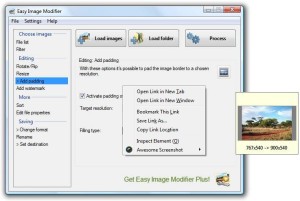 Most of us have images we want to edit, resize, rename, sort, realign, change format or add a watermark. The problem is there are very few simple image editing tools around. If this describes you, you have no need to worry. Easy Image Modifier is all you need. Most of us have images we want to edit, resize, rename, sort, realign, change format or add a watermark. The problem is there are very few simple image editing tools around. If this describes you, you have no need to worry. Easy Image Modifier is all you need.
What is easy Image Modifier?
This is a light weight, easy-to-use application that helps you resize, rename, sort, realign, change format or add a watermark to your images. It is very portable and does not require any installation, and can easily be set up with a few mouse clicks. This program allows you to modify batches of images quickly and send them via email, post them online or just for archiving purposes.
Some of the main features of this program are: You can change the dimension of your images (fixed value for width and height or by percent), flip or rotate them, rename the file, add a watermark text and also choose to convert the file format. You can easily set up advanced options such as removal of personal identifiable meta information, filtering after certain conditions, disproportional resizing, customizable image quality, and sorting. It has a small user interface. Best of all, it is free!
Kelvin Schneider, the author of this application, has added a few changes to this version. They are: added loading support for the IFF image format and reworked French translation.
Downsides?
None. The developers are quite responsive, so they have adapted the software to people’s needs over time.
To know more, please visit Inspire-Soft.
Posted in Main | No Comments »
Friday, March 22nd, 2013
 Bopup Observer provides you a secure one-way instant messenger designed to receive messages and documents over LAN, business-size networks and Internet. Bopup Observer provides you a secure one-way instant messenger designed to receive messages and documents over LAN, business-size networks and Internet.
What is Bopup Observer?
It is an easy to use, light weight utility for fast and efficient IM and alerts. It is designed to receive messages and documents over LAN, enterprise-size networks and Internet. It is built on a fully managed client/server platform which provides a full IM and file transfer logging, user grouping, offline and scheduled messaging. It supports Terminal Server/Citrix environment.
Some of the key features of this program are: support for several authentication modes- Simple, Windows Authentication or private login ID and password pair, Messaging and File Transfer are encrypted with strong algorithms so that personal and group conversations are safe and secure even if you receive messages and files via the Internet and it does not require any user experience. It is so simple to use that even new users would find it easy to navigate through it.
You can import user accounts from your Active Directory (LDAP) and start an efficient instant messaging and real-time communication system immediately. Its offline messaging and file transfer allows you to deliver important and urgent messages even if the recipient is offline.
B Labs, the authors of this application has added a few changes to this version. They are: Added support for new “DisableRememberMeOption” hidden option which disables the “Remember me on this computer” checkbox on “Log in” screen on messenger startup and Address of the IM server is shown in Setup Wizard interface if it is specified in setup.ini file located in the same folder with MSI file.
Downsides?
None that I‘ve experienced.
To learn more about this program, please visit Bopup.
Posted in Main | No Comments »
Friday, March 22nd, 2013
 Did you know you can now control your desktop using just your browser? Well, that goes to show just how easy things have become with some of the advance programs being developed these days. A program like OnlineVNC gives you the opportunity to control your desktop just by using your browser. Did you know you can now control your desktop using just your browser? Well, that goes to show just how easy things have become with some of the advance programs being developed these days. A program like OnlineVNC gives you the opportunity to control your desktop just by using your browser.
What’s OnlineVNC?
OnlineVNC Server is a quality and easy-to-use program that allows you to control your desktop from the web-browser from Windows, Linux or Mac OS X. Viewer for the server is written using Adobe Flash technology and requires no installation at all. You just to go to our website and pass server address to the login dialog.
The main window of OnlineVNC includes the control panel, where you can view a list of all the connected users. Also, you can scale the remote desktop picture on the server side, thus optimizing traffic.
Viewer for the server is written using Adobe Flash technology that requires no installation. All you have to do is go to the publisher’s website and pass server address to the login dialog. It is fully compatible with the RFB protocol. This solution enables you to use your desktop from anywhere – from home, from work, from internet cafes, hotels, everywhere where there is internet and a web browser.
Possible downsides
Users are likely to have issues with the fact that no mention was made of encryption when credentials are passed over 3rd party severs.
Want to check it out? Visit OnlineVNC.
Posted in Main | No Comments »
|
|
|





