Author Archive
Friday, January 11th, 2013
 This is a very powerful open source defrag tool for Windows NT. This is a very powerful open source defrag tool for Windows NT.
What is the big deal about UltraDefrag?
The defragmentation is very fast because it is done by kernel mode driver. It has 3 interfaces: graphical, console and native. The graphical user interface is very cool because it represents your file system visually as a color coded cluster map. Users that prefer going through the command line will find its console interface very helpful. It allows you to run UltraDefrag from the task scheduler and scripts.
Some of the key features of this program are: driver features – Currently FAT, exFAT and NTFS are supported, Defragmentation of files and folders including system files and file system meta files and Filtering of files to process by name, fragment count and size; new GUI features are Graphical display of the drives cluster map, The current progress and all important information are displayed in the drives list and Color coding of the usage of the cluster map. It new command line tool has the following features are Useful for automation through scheduled tasks or batch scripts and Integrated into Explorer’s context menu.
Downsides?
A nice update on a cute little program. Does the defrag work real good.
To learn more about this program, please visit Ultradefrag.
Posted in Main | No Comments »
Friday, January 11th, 2013
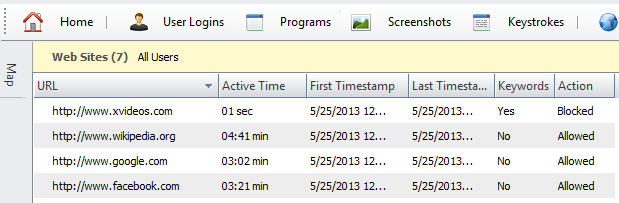 Need an application that will help to monitor and control your child’s online activities? Get HomeGuard. Need an application that will help to monitor and control your child’s online activities? Get HomeGuard.
What does HomeGuard really do?
It is a powerful parental control and activity monitoring tool for family and child safety online and offline. Upon installation on your computer, HomeGuard will quietly and automatically block all pornographic and inappropriate content online and record detailed website activity including time of visit and time spent on each website. Every website visited, program started, chat message sent and received, keystrokes typed, etc will be recorded in addition to activity based screen shots displayed in gallery view for quickly flipping through many shots and full view for focusing on specific shots.
It can also show warnings to users when blocking an activity and can send you notifications by Email when blocking. Plus individual programs usage time limiting and internet usage time limiting. It is absolutely impossible to tamper with, it cannot be bypassed using proxy servers and it cannot be closed or uninstalled unless the administrative password (provided during installation) is used.
Some of the features of this program includes: automatic filtering of web content and websites, built in keylogger, time and activity based screenshots capturing, chat and email monitoring and filtering, program/games blocking and time restrictions, Internet and computer usage time restrictions, email notifications and more.
Any downsides?
Completely blocks out all adult content from your computer. A very good program to have if you care about the viewing content of your family.
To learn more about this amazing software, please do visit Veridium.net
Posted in Main | No Comments »
Friday, January 11th, 2013
 Need an application for editing, processing and recording sounds, wav and mp3 files? Why not check out Wavosaur Need an application for editing, processing and recording sounds, wav and mp3 files? Why not check out Wavosaur
What is the big deal about this program?
Wavosaur is a freeware sound editor, audio editor, wav editor software for editing, processing and recording sounds, wav and mp3 files. It has all the features you need to edit audio files (cut, copy, paste, etc.) produce music loops, analyze, record, batch convert. Not only odes it support WAV formats, it also supports MP3, AIF, OGG and others.
It is a very portable application and does not require any installation. It does not interfere with your Windows registry keys. Its user interface is very plain and easy to navigate. It offers you several effects to choose from. It is very light on system resources. Some of the main features of this program are: Multiple Document Interface for working with many files in one session, Many processing options: mute, channel convert (stereo-mono, mono-stereo), insert silence, change volume, normalize level, fade in/out, invert/flip, undo and so on, Accurate waveform representation, fast zoom in/out, clean easy to use interface Right mouse to scroll/display context menu. It also has a skinable editor look.
Wavosaur team, the publisher of this program, has added a few changes to this version: New memory manager: different type of curves (channel, buffer size) are displayed, Windowing, data size, et FFT buffer size are configurable in a new dialog, New high performance filter added: with new dialog box for customizations of frequency, type and precision and Band pass and notch recursive filter with new dialog box for property choice.
Downsides?
The publisher should do something about its plain interface. Apart from that, it is one of the best tools for editing audio files.
To learn more about this program, please go to Wavosaur.
Posted in Main | No Comments »
Friday, January 11th, 2013
 EmEditor is a professional lightweight, text editor for Windows. EmEditor is a professional lightweight, text editor for Windows.
What is the deal with EmEditor?
It supports Unicode (which allows for multi-language support). It also supports JavaScript or VBScript macros, syntax highlighting (including embedded scripts in HTML, ASP, and PHP files), drag-and-drop, and menu and keyboard customizations. This version of EmEditor not only offers support for JavaScript and VBScript, for the text editing macros, but also PerlScript, PHPScript, Python, Ruby, and other languages as long as script engines you want to use are installed.
It allows you to quickly and easily open or edit very huge files with the aid of a large file controller and it is optimized for speed and reliability. Some of the key features of this program include: JavaScript or VBScript macros, text encoding support (automatic encoding detection, Byte Order Mark support, file reload with a different encoding, detection of encoding errors), plug-ins, syntax highlighting (including embedded scripts in HTML, ASP, and PHP files), drag-and-drop, and menu and keyboard customizations.
Emurasoft, Inc., the author of this program has added a few changes to this version: they have improved “Find in Files” in very large files and adjusted the default Ruby auto indent regular expressions.
Downsides?
This is a very impressive software. This powerful text editor has several features that make it very good for editing large files.
To find out more about this program, please do visit Emeditor.
Posted in Main | No Comments »
Thursday, January 10th, 2013
 aTunes is a robust, full-featured audio player and audio manager that allows you to listen to your favorite songs, edit tags, organize music and rip Audio CDs. aTunes is a robust, full-featured audio player and audio manager that allows you to listen to your favorite songs, edit tags, organize music and rip Audio CDs.
What is it about this program?
This program can be executed on different platforms because it is designed using Java programming, using Swing. Thus it is a very portable piece of software. Presently, it supports mp3, ogg, wma, wav, flac, mp4 and radio streaming. It also has ripping and encoding tools.
Some of the main features of this program include: Mp3, Ogg player, Reads Ogg, ID3v1, ID3v1.1 and ID3v2 tags, Show pictures of song: pictures inside ID3v2 tag, or in the same folder. Load / save play list in m3u format. Navigate through songs sorted by tag information or by folder. Filters for fast find what you want. Songs, albums or artists can be marked as favorites, and viewed through a special view. They also added full view with all controls and multiple window view amongst several other changes.
aTunes Team, the authors of this program, have added a few changes to this version: Error when importing folders after canceling repository load was fixed, Add random songs fails if repository not loaded or empty was fixed, Disabled rounded corners with Substance as seem to cause problems with early 1.6.0 virtual machines (3.0.1 fix not working) was fixed and Problem when importing files from a Windows system folder with no childs was also fixed.
Downsides?
It is a very good alternative to iTunes.
To know more about this program, go to Atunes.
Posted in Main | No Comments »
Wednesday, January 9th, 2013
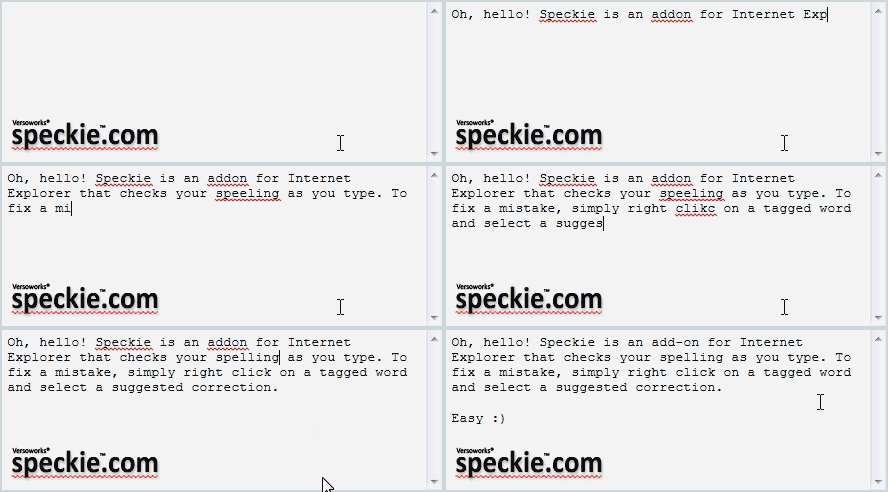 Speckie is the first and only dedicated real-time spell check for Internet Explorer and is fully compatible with the latest Internet Explorer 9. Speckie is the first and only dedicated real-time spell check for Internet Explorer and is fully compatible with the latest Internet Explorer 9.
What is the big deal about Speckie?
Ever since Internet Explorer was created, it has lacked an essential feature; Real Time spell check. This useful add-on suggests you the correct spelling. All you have to do is to choose the correct word. It offers an inline spell checking capability similar to that found in other web browsers such as Firefox. It supports Windows XP, Vista and 7 running Internet Explorer versions 6, 7 or 8. It is available for both the 32 bit and 64 bit versions of Internet Explorer.
Speckie is a great concept that can save a lot of wasted time and confusion by checking your spelling in IE as you type. It’s great for searches, data entry fields, and other daily business, but just think about how great it is to be able to check your spelling in online forums and similar postings before you hit the Send button. Speckie’s spell-checking capability is great, and its Updates and other functions all worked fine, too.
The author of this program, Versoworks Pty Ltd, has added a few changes to this version: Fixed a bug which showed ‘Evaluation Expired’ in the dictionaries list within the Speckie Settings and
Added a workaround for a bug in IE 8 and older that could cause a crash under specific circumstances.
Downsides?
This application is a great spell checker for IE. Of the entire web browsers available, IE was the only one without a built-in spell checker. Thanks Speckie for correcting Microsoft error.
To know more about Speckie, please go to Speckie.
Posted in Main | No Comments »
Tuesday, January 8th, 2013
 Actual Multiple Monitors is a program that is specifically designed to enhance the usability of Windows user interface when working with multi-monitor configurations. Actual Multiple Monitors is a program that is specifically designed to enhance the usability of Windows user interface when working with multi-monitor configurations.
What is the big deal about this program?
This intelligent application simulates standard Windows services on secondary monitors and offers new window management services to free you from routine clicking and let you concentrate on your work undisturbed. This easy-to-use but powerful program imitates the original Windows Taskbar on the secondary displays, allowing you to manage windows in your usual manner. Such Taskbar can work in the individual mode, displaying only the tasks running on the same monitor, or in the mirror mode, displaying all the tasks running on all monitors in your setup.
You can also use this application to create Desktop Profiles, such as display properties, including screen resolution, refresh rate, color depth, monitor status (primary or secondary), the type of wallpaper and screensaver (shared or individual for each desktop).
Some of the main features of this program include multi-monitor taskbar and task switcher, background wallpaper, screen saver, desktop management tools and desktop mirroring tools, and advanced multi-monitor window management.
The publisher of this program, Actual Tools, has added a few changes to this version: Registration codes for the version 4.x did not get accepted as correct codes for the version 5.x and Actual Multiple Monitors has no free version anymore.
Downsides?
There is some instability and lag in internet explorer when using this program. Apart from this, it is very easy to install and use, works great. The Pro version is really a good value for money.
To learn more about this application, visit ActualTools.
Posted in Main | No Comments »
Tuesday, January 8th, 2013
 Need an application that allows you to monitor all your hard drive activities in real time. Well, I think you just check out Free HDD LED. Need an application that allows you to monitor all your hard drive activities in real time. Well, I think you just check out Free HDD LED.
What is the big deal about this program?
Free HDD LED is a small, light utility. It displays all your hard drive activities all in real time either in the systray area or on the keyboard. It also monitors all physical hard disk drives connected to your computer. It has a free disk space monitor (works also for pendrives, network drives and TrueCrypt drives). It allows you to set the HDD refresh interval.
My Portable Software, publisher of this program, has added quite a few changes to this version. They include: Floppy disk drive (disk letter A 🙂 is no more scanned (believe it or not, there are some computers that still has floppy drive!). This will prevent “floppy noise” to be reproduced. Shorter time for system scan: when plugging an USB drive the system is scanned for the new drive letter for 20 seconds instead of 1 minute and Internal code updates.
Any downsides?
This is a cool piece of little application everyone should have on their computer. This light weight utility serves its purpose real good and is very promising. It requires Admin rights though which could make the startup process a bit of a pain. The publishers also should come up with an option that allows you to select specific drives.
To learn more about this program, please visit FreeHDDLED.
Posted in Main | No Comments »
Sunday, January 6th, 2013
 If you are searching for an application that allows you to manage your personal finances, then you don’t need to look any further. Get AceMoney! If you are searching for an application that allows you to manage your personal finances, then you don’t need to look any further. Get AceMoney!
What is the big deal about this product?
It allows you to track your cash flow in multiple accounts. It helps you keep an eye on how you spend money by categories. It is easy to use; it is designed for regular people that don’t have special accounting skills or banking techniques. It supports all the features required for home or even small-business accounting needs.
You can use this application to generate any home budget report by categories or payors/payees and present the result in a pie chart if you wish. It shows you at a glance how much money you spend on each category. You could also use it to find all your withdrawals and deposits by any parameter. If you choose to, you can set up budget limits for each category and monitor the difference between actual and budgeted values.
It could take control of your bills and notify you when they should be paid. It has a loan calculator to enable you plan your debt repayment. It is very light on your system resources using only 8MB of your memory. It is available in several languages.
Downsides?
None so far. However it should be noted that you are limited to just two accounts. This program is very good for personal finance management.
To find more about this program, please visit Mechcad.
Posted in Main | No Comments »
Wednesday, January 2nd, 2013
 Need an application that allows you to publish, organize and manage web content? Drupal is it! Need an application that allows you to publish, organize and manage web content? Drupal is it!
What is the big deal about this program?
This open source ware allows you to easily publish, manage and organize a wide variety of content on a website. Several people have used this application to power scores of different web sites including Community web portals, Discussion sites, corporate web sites, and Personal web sites or blogs.
This program can be used to build everything from personal blogs to enterprise applications. It has several thousands of add-on modules and designs that allow you to build any site you can imagine. Drupal is very easy to configure, easy to set up and use. It has many easy, clean and nice themes to choose from and they are easily customizable. Its CMS is very flexible and Drupal has a large community of active users. It also has an uninstaller.
Downsides?
It is too complicated for newbies. It requires far more knowledge than a beginner would know. Sometimes their websites will be slow too. However it is feature rich and the best application out there for creating a personal blog.
To learn more about this program, please do visit Drupal
Posted in Main | No Comments »
|
|
|




