Archive for the 'Main' Category
Sunday, September 16th, 2012
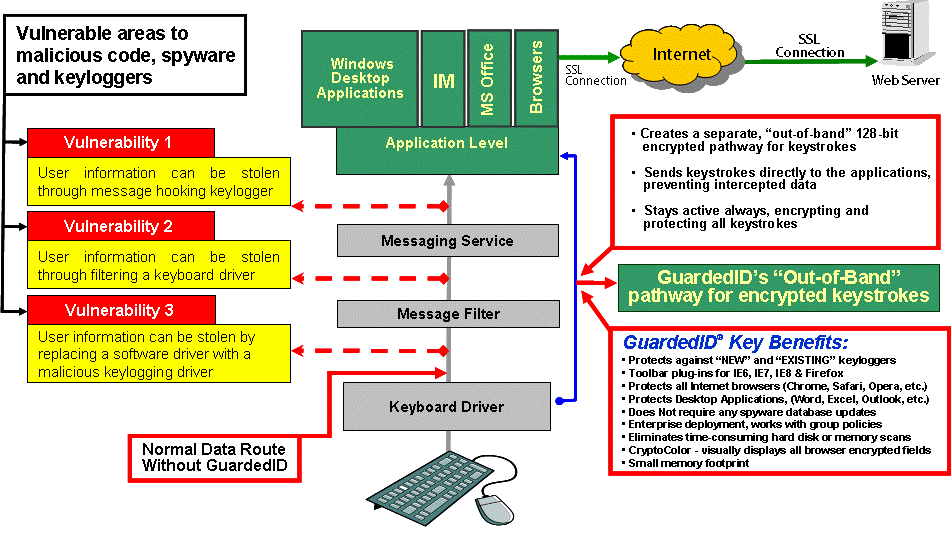 So much of our lives involves doing things online, such as communicating with friends and business colleagues, booking hotels or flights, purchasing goods, online banking and other important things. These activities always involve some degree of security risk, as the very real possibility of passwords, credit card details, and other personal information falling into the wrong hands is always there. Many malware or cyber theft incidents employ the use of keyloggers, malicious programs that intercept your keystrokes and send that information to the bad guys.You certainly don’t want your login credentials, credit card information or other sensitive information falling into the hands of these people. So much of our lives involves doing things online, such as communicating with friends and business colleagues, booking hotels or flights, purchasing goods, online banking and other important things. These activities always involve some degree of security risk, as the very real possibility of passwords, credit card details, and other personal information falling into the wrong hands is always there. Many malware or cyber theft incidents employ the use of keyloggers, malicious programs that intercept your keystrokes and send that information to the bad guys.You certainly don’t want your login credentials, credit card information or other sensitive information falling into the hands of these people.
Many of the antivirus programs are unable to detect the latest keyloggers until they have already been around doing their evil deeds for quite a while.
One way to guard against this is to use GuardedID. It encrypts everything you type, in a way, it’s assuming that your computer is already infected, and proactively protects users against any typing they do on virtually any program being of any use to anyone. It works on websites, chat programs, instant messengers, financial programs, virtually any program you can type into will now be a whole lot safer. It also lets you know if the GuardedID keyboard driver is ever changed (such as by malicious keyloggers and spyware). If something is changed, the software displays an “Unknown Driver Warning” to alert you about the problem.
 GuardedID highlights text fields of web pages in green, so you know that anything that you type in here is encrypted and safe. It also has an “anti-clickjack” feature, which detects if a website has any hidden frame elements that could fool users into clicking on malicious links. If the software finds frame elements, it draws a red box around them. GuardedID highlights text fields of web pages in green, so you know that anything that you type in here is encrypted and safe. It also has an “anti-clickjack” feature, which detects if a website has any hidden frame elements that could fool users into clicking on malicious links. If the software finds frame elements, it draws a red box around them.
The browser add-on components of the program ensure that Firefox and IE are safe, while other browsers such as Opera are also protected as is any other application that can be typed into.
Basically, this software offers peace of mind to anyone who uses their computer for financial matters such as online banking, as well as anyone who just wants to make sure they are the only ones seeing their chats and emails.
Check out full details of the program here at Guardedid.
Posted in Main | No Comments »
Sunday, September 16th, 2012
 Adobe Photoshop Touch is more or less the usual thing we’ve all come to expect from Photoshop, except this version has been made specifically for the iPad. Adobe Photoshop Touch is more or less the usual thing we’ve all come to expect from Photoshop, except this version has been made specifically for the iPad.
Given the complexity of its desktop cousin, you might be surprised at just how much has made it into this particular version. For example, it includes clone stamp, curves, magic wand and lets you work with layers. It comes with several tutorials ready for you to jump straight into, such as how to remove a background person from a photo and how to make drop shadow text.
Although an iPad has somewhat limited screen space when compared to a desktop or laptop, Adobe have managed to make the user interface quite uncluttered, while still offering quite a variety of different tools. It has toolbars along the screen edges, which can be hidden when not in use. These also contain icons which fly out to offer more options when tapped. Image layers are to the right as usual and can also be hidden if necessary. You can add pictures from the internet from inside the program, for example from Facebook or Google images, or take a photo directly with your iPad camera and then it’s ready for you to go to work on immediately.
This program is a nice addition for anyone who owns an iPad and wants to do some graphic work when on the road or away from their main computer. You can check it out at Adobe.com.
Posted in Main | No Comments »
Friday, September 14th, 2012
 If you’re looking to manage your photo collection, it might be worth checking out what the latest edition of ACDSee has to offer. Whether you have a large collection of holiday or family snapshots you need to manage, or whether you’re looking to liven up some photos with various effects, it has a few features that might be what you’ve been looking for, all in an intuitive, user friendly interface. If you’re looking to manage your photo collection, it might be worth checking out what the latest edition of ACDSee has to offer. Whether you have a large collection of holiday or family snapshots you need to manage, or whether you’re looking to liven up some photos with various effects, it has a few features that might be what you’ve been looking for, all in an intuitive, user friendly interface.
As well as including tools to let you quickly sort, find, and organize your image files, it also includes over 20 special effects which you can use on a specific area or the whole photo. It lets you preview each one before you make your final decision, and your original pictures are always saved, so go ahead and experiment.
This latest edition also includes map view and GEOtagging support, (if you are using a GPS enabled camera or camera phone) or you can also input this data manually. It then becomes easy to select an area of a map and it pulls up all the photos you took there.
They’ve also included access to a feature called ACDSee Online, which gives 10GB of online space to share your photos.
While it’s no match for programs such as Photoshop, it may still suit the casual hobbyist photographer or anyone who likes to take a lot of snapshots and play around with them on the computer without having to learn for hours.
For further details and to compare it with the other ACDSee products to see which one might be right for you, you can check it out at ACDSee.
Posted in Main | No Comments »
Thursday, September 13th, 2012
 Are you searching for a program that will help you to get rid of any unwanted software? Then you should check out FreeFixer 0.64. Are you searching for a program that will help you to get rid of any unwanted software? Then you should check out FreeFixer 0.64.
FreeFixer 0.64
This tool helps to delete unwanted software such as adware, spyware, Trojans, viruses and worms. It scans various programs on your computer such as programs that run on your computer, the programs that starts when you reboot your computer, your browser’s plug-ins, your home page setting, etc. these are favorite locations for such unwanted software, adware etc. after the scan, it presents the results and prompts you to delete the unwanted software.
The publisher, Roger Kalsson, has added some new features to this version [FreeFixer 0.64].
These new features include support for Windows 8 Consumer and Release Preview, increased the file upload to 2 MB fixed bug where FreeFixer caused booting from hibernation file to fail under some conditions. So its users now have a chance to enjoy improved rootkit detection, improved the capabilities to delete unwanted files.
Any downsides?
The program is not really newbie friendly, you must have a good idea of what you are doing or you will mess up your system. But if you take your time to study the program well before use, you shouldn’t have any issues.
To learn more about this software, please do visit FreeFixer.
Posted in Main | No Comments »
Wednesday, September 12th, 2012
 Orbit Downloader is a feature-rich download accelerator and manager. Designed with p2p and multi-downloading technology, it boosts your internet connection by making it faster and more reliable. It also provides you a more comfortable way to download Youtube videos, streaming content and even files from free hosting sites. It integrates seamlessly into Microsoft Internet Explorer to automatically handle your downloads Orbit Downloader is a feature-rich download accelerator and manager. Designed with p2p and multi-downloading technology, it boosts your internet connection by making it faster and more reliable. It also provides you a more comfortable way to download Youtube videos, streaming content and even files from free hosting sites. It integrates seamlessly into Microsoft Internet Explorer to automatically handle your downloads
So what’s it about Orbit Downloader 4.1.1.2 that makes it different?
It uses very little of your system resources and is seamlessly embedded into your favorite web browsers. Orbit Downloader supports HTTP/FTP/HTTPS/RTSP/MMS/RTMP protocols and provides a total solution to download rich media. It has a simple and clear user interface. It is easy to use and configure for both newbies and professionals. It is very light using less than 2 MB of your system resources. What’s more it is 100% free and no registration is required.
Any downsides?
Some users complained that it does not integrate or work properly with Firefox v12. Some said it add-ons were completely useless, it crashes constantly in Win 7 and the downloads breaks very often.
To learn more about this program, please do visit OrbitDownloader
Posted in Main | No Comments »
Wednesday, September 12th, 2012
 Need an application to help your computer run at maximum performance? Then there is just one program that can help you deal with that – SysCheckUp! Need an application to help your computer run at maximum performance? Then there is just one program that can help you deal with that – SysCheckUp!
What Does This Tool Do?
SysCheckUp is supposed to be an advanced tool that can help you fix multiple issues such as missing desktop icons, missing taskbars, missing drives, denied access to the manager and so on. Its registry cleaner can detect and remove obsolete file extensions, context menu items, installer info and so on from your system registry. This helps to boost your computer performance. The registry compactor also shrinks your registry and free up more space thus improving registry access times. The startup optimizer attempts to find and disable unused functions in Windows to decrease boot time and free up RAM.
The manufacturers’, Epiphany Software LLC, added the following changes to this version: bug fixed in registry cleaner that detected false positives, bugs fixed in empty folder that prevented saved folders from being loaded.
Downsides?
To be sincere, this software appears too buggy for my liking.
To be fair to the publishers, it is still in the beta phase so it’s a work in progress. The latest version SysCheckUp 4.0.0 Beta 4 has just been released with some bug fixes, but this tool can be so much better.
To find out more about this program, please do visit SysCheckup.
Posted in Main | No Comments »
Tuesday, September 11th, 2012
 Do you sometimes find yourself often repeating the same actions on your computer over and over again? Wouldn’t it be great if there was a way to automate these tasks? Do you sometimes find yourself often repeating the same actions on your computer over and over again? Wouldn’t it be great if there was a way to automate these tasks?
Winparrot is a program which can record your key-presses and mouse actions for replaying at a later time. It is a small program to download and requires no installation, simply unzip it and run it.
It works by simply clicking Record, doing your actions, and then pressing the End key when you’ve finished.
This is very useful if you wanted to, for example, save files from a web page, plus much more. It can also load your data from an Excel spreadsheet. You also have the ability to schedule your tasks.
A lot of similar macro programs can tend to be complicated with a steep learning curve. The difference with Winparrot is it’s ease of use and simplicity in comparison to some of those other more difficult programs. For users seeking more options, it does include lots of other commands in its (optional) mini programming language though.
Also, the program doesn’t even require admin rights, making it easy for beginners to use.
Check out the full details at WinParrot.
Posted in Main | 1 Comment »
Tuesday, September 11th, 2012
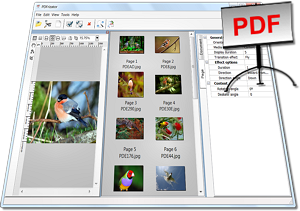 If you’re looking for a feature filled way to create a professional looking PDF presentation from text and pictures, take a look at PDFrizator. The program can open and import the usual common image formats such as JPG, GIF and PNG, as well as less common formats like CBR and CBZ. It can also acquire from TWAIN sources. If you’re looking for a feature filled way to create a professional looking PDF presentation from text and pictures, take a look at PDFrizator. The program can open and import the usual common image formats such as JPG, GIF and PNG, as well as less common formats like CBR and CBZ. It can also acquire from TWAIN sources.
A very cool feature is the ability to find images from Google Images, Picasa, and more, right from inside the program. It then lets you further sort the image results by size, file format and more, you can then add them to your presentation in a couple of clicks. If text and pictures aren’t enough, you can also easily add audio to your presentation, either from an audio file or by searching SoundCloud.
You can automate the changing of each image on screen so that it changes after your desired period of seconds, or simply when clicked on. To make things even more interesting, it has several transition effects to choose from such as fades, dissolves, etc.
As an easy way to create presentations, this is a program definitely worth checking out. It’s freeware and available from Rttsoftware.
Posted in Main | No Comments »
Sunday, September 9th, 2012
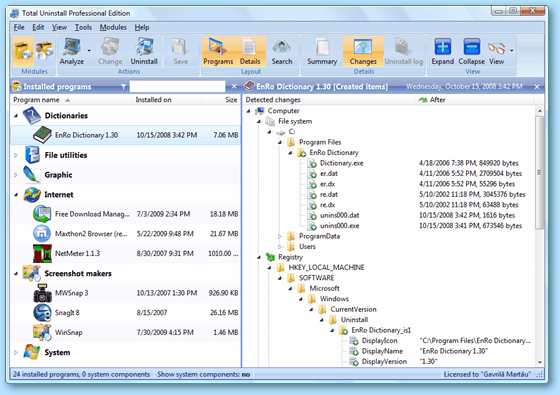 If your PC is running slow it is probably due to registry key problems. This simply means that some uninstalled programs may just be lurking somewhere in your system. What you really need is a complete uninstaller. A utility that helps you uninstall a program completely. And now you have it – Total Uninstall 6.2.1. If your PC is running slow it is probably due to registry key problems. This simply means that some uninstalled programs may just be lurking somewhere in your system. What you really need is a complete uninstaller. A utility that helps you uninstall a program completely. And now you have it – Total Uninstall 6.2.1.
Total Uninstall
With the aid of this program you could use it to uninstall programs without having to go through Add/Remove program. Uninstalling programs from the Add/Remove sometimes leaves files or changes behind on your PC. With time, this clogs your system and reduces its performance. But with Total Uninstall, all your programs are completely uninstalled.
Gavrilla Martau, the publisher of this software, has added the following changes in this version: it is now Win8 compatible and Chinese language has been updated. Also it now has a new wordwrap option for toolbar buttons, new file system and registry locations analyzed and a faster cleaning process. Should a crash occur when you are trying to extract the program icon from a locked file, it is now able to fix the crash and continue the extraction.
Downsides?
Some people complain that the license unregisters itself. You do not get any warning when your license is about to expire. They simply pull the rug under your feet suddenly.
To familiarize yourself with this utility, visit Martau.
Posted in Main | No Comments »
Sunday, September 9th, 2012
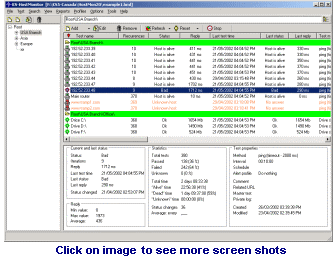 Advanced Host Monitor is a very versatile and scalable network monitoring program that is ideal for both small and enterprise level networks. Advanced Host Monitor is a very versatile and scalable network monitoring program that is ideal for both small and enterprise level networks.
With this software, you’ll be able to check any TCP service, ping any host server, retrieve an URL, check the available disk space, and more. It checks the various network servers at regular intervals and if there is no response from the device, it can initiate pre-defined actions. It can help you to monitor size of a file or folder, check integrity of your files and web site; it tests your SQL servers, monitors network traffic and much, much more. This helps you to detect and respond to a problem ever before your clients begin to complain.
This program can generate different log files in different file formats – Text, HTML, DBF and ODBC all of which can be customized to meet your needs. You can use it to perform tasks at fixed intervals or on a schedule. It does this either directly or by using Remote Monitoring Agents that are installed on remote servers. Task can also be organized into customized groups with each group having its unique appearance and features.
It can access remote hosts either directly or through Remote Monitoring agents installed in another network. Using the Remote Monitoring Agents significantly increases security of the network, decreases network traffic, simplifies network administration, and allows you to monitor systems that are impossible to monitor directly from HostMonitor.
Advanced HostMonitor has been around for years now and it is considered one of the leading tools in monitoring server availability and performance. It’s won numerous awards from different software review firms and has proven a consistent and reliable tool.
Any downsides?
Most users of this software are quite satisfied with it. The few that had issues has such issues quickly resolved by their round the clock and efficient customer care. And at $99, it really does what it was created to do and it does it beautifully.
To learn more about this program, go to Ks-Soft.net.
Posted in Main | No Comments »
|
|
|




