Archive for the 'Main' Category
Tuesday, March 13th, 2012
 You can now easily take absolute control of your inventory and invoicing with an application that puts you ahead of your competitors. iMagic is an inventory application that enables you to create invoices within a very short time. Packed with lots of advanced features, this shareware application is designed for advanced and experienced users. Some of its features include the following; it provides you quick access to your inventory and customer details, an intelligent reordering system that gives you complete control, easily analyze your invoices and track your sales with the reporting feature, track long term trends and remove dying stock before it becomes a burden, track sales over time, making market analysis simple, find the optimum layout for storing stock and then use the Picking List feature to save more time, build up your client database over time and use it as a valuable marketing tool, Mailmerge into Word or send out special offers via Email, and a couple of others. You can now easily take absolute control of your inventory and invoicing with an application that puts you ahead of your competitors. iMagic is an inventory application that enables you to create invoices within a very short time. Packed with lots of advanced features, this shareware application is designed for advanced and experienced users. Some of its features include the following; it provides you quick access to your inventory and customer details, an intelligent reordering system that gives you complete control, easily analyze your invoices and track your sales with the reporting feature, track long term trends and remove dying stock before it becomes a burden, track sales over time, making market analysis simple, find the optimum layout for storing stock and then use the Picking List feature to save more time, build up your client database over time and use it as a valuable marketing tool, Mailmerge into Word or send out special offers via Email, and a couple of others.
iMagic Inventory is also available for use with Microsoft’s SQL Server, which can support 524,272 Terabytes; and that means you don’t have to worry about changing your inventory system as your business continue to expand or grow. The price is a bit on the high side, but that actually explains why it comes with lots of features as well.
Want to check it out? Visit: iMagicInventorySoftware
Posted in Main | No Comments »
Tuesday, March 6th, 2012
 Ezvid is about the best Windows Movie Maker alternative for free video editing and slideshow creation. It can be used to import still images and to upload videos to Youtube. What’s more, it’s totally free requiring no registration to download or use. It works beautifully well on a wide range of Windows platforms, including Vista, XP, and 7. Gamers frequently use Ezvid to upload videos captured with software like Fraps, Hypercam, and Camstudio, Ezvid is an excellent alternative to other software like Wondershare, Photodex, Magisto, Animoto, Roxio, Adobe, Camtasia, Magix, and Arcsoft, AVS, and Cyberlink that are quite complex and expensive. Ezvid is about the best Windows Movie Maker alternative for free video editing and slideshow creation. It can be used to import still images and to upload videos to Youtube. What’s more, it’s totally free requiring no registration to download or use. It works beautifully well on a wide range of Windows platforms, including Vista, XP, and 7. Gamers frequently use Ezvid to upload videos captured with software like Fraps, Hypercam, and Camstudio, Ezvid is an excellent alternative to other software like Wondershare, Photodex, Magisto, Animoto, Roxio, Adobe, Camtasia, Magix, and Arcsoft, AVS, and Cyberlink that are quite complex and expensive.
Ezvid is a free video editor software which is often used to make RPG videos, slide shows and photo videos from JPG, PNG, GIF, and other still images, and it imports all mainstream video formats including AVI, WMV, and MOV. It is very ideal for school computer projects and computer activities. The Ezvid video maker is a free to use and very fast download like a breeze.
It comes fitted with a free music from 009 Sound System and Aalborg Soundtracks to help users make, upload and download Youtube videos which are guaranteed to be copyright-clean.
Want to find out more? Please do visit Ezvid.
Posted in Main | No Comments »
Saturday, March 3rd, 2012
 Trace11 lets you organize your videos, images, files and data inside notebooks. Easy to use; flexible and above all capable. You can collect data in one way and display them in an truly infinite number of other ways. The program is also ideal for work, home, school, holidays, hobby and sport. Though this program may pose a bit of a difficult work for users with little or no technical experience; nonetheless, it becomes easy as they get used to it. You will almost certainly love the program as soon as you start getting familiar with it; and that is one of the best parts of it; and not to forget the fact that it helps you organize your data very easily. Trace11 lets you organize your videos, images, files and data inside notebooks. Easy to use; flexible and above all capable. You can collect data in one way and display them in an truly infinite number of other ways. The program is also ideal for work, home, school, holidays, hobby and sport. Though this program may pose a bit of a difficult work for users with little or no technical experience; nonetheless, it becomes easy as they get used to it. You will almost certainly love the program as soon as you start getting familiar with it; and that is one of the best parts of it; and not to forget the fact that it helps you organize your data very easily.
Trace enables you to do a lot of things including the following; record data in one way and you can watch them in a truly infinite number of other ways, search data to easily retrieve just what you need and nothing more, export and import data, in this way you can easily share them with your friends, which will help you to see how you are performing in sport, school or weight loss or muscle gain for example.
Want to check it out? Visit Trace11.
Posted in Main | 1 Comment »
Saturday, March 3rd, 2012
 ImBatch is a batch image processor with a nice graphical user interface. It will allow you to edit multiple image files at the click of a button by using scripts. The script will be created by combining Tasks. ImBatch can batch resize and convert images in minutes instead of hours or days if you do it manually. With added features, and a couple of other updates here and there, ImBatch program is a bit more stable than it used to be with past editions. The newly added features include the following; set tag task, remove tags task, shift time task, a lot new template parameters for ‘file name parameter,’ new template parameters for ‘folder parameter,’ and a host of others. ImBatch is a batch image processor with a nice graphical user interface. It will allow you to edit multiple image files at the click of a button by using scripts. The script will be created by combining Tasks. ImBatch can batch resize and convert images in minutes instead of hours or days if you do it manually. With added features, and a couple of other updates here and there, ImBatch program is a bit more stable than it used to be with past editions. The newly added features include the following; set tag task, remove tags task, shift time task, a lot new template parameters for ‘file name parameter,’ new template parameters for ‘folder parameter,’ and a host of others.
ImBatch can handle a lot of popular image formats including the following; BMP, DIB, RLE, TIF, TIFF, FAX, G3N, G3F, XIF, GIF, JPG, JPEG, JPE, JIF, PCX, PNG, TGA, TARGA, VDA, ICB, VST, PIX, PXM, PPM, PGM, PBM, WBMP, JP2, J2K, JPC, J2C, DCX, DAT, PSD, WDP, and HDP. ImBatch is different from a couple of other programs out there because of its “Task Structure.” You can combine Tasks to make processing sequence that will give you exactly what you want. ImBatch offers many imaging functions (Tasks) like converting or resizing.
Want to check it out? Visit HighMotionSoftware.
Posted in Main | No Comments »
Friday, March 2nd, 2012
 Hardware Helper’s custom device identification engine automatically determines the exact components and peripherals installed on your PC or laptop and quickly pings our Smart Update software update location system to successfully search for available stability and performance updates for your particular hardware. Hardware Helper backs up every driver installed on your PC or laptop, compressing the backup drivers to a zip file that is easy to export and reinstall with once you have completed your reinstall or upgrade. Save hours on searching for and reinstalling device driver software. Hardware Helper’s custom device identification engine automatically determines the exact components and peripherals installed on your PC or laptop and quickly pings our Smart Update software update location system to successfully search for available stability and performance updates for your particular hardware. Hardware Helper backs up every driver installed on your PC or laptop, compressing the backup drivers to a zip file that is easy to export and reinstall with once you have completed your reinstall or upgrade. Save hours on searching for and reinstalling device driver software.
With lots of users spending a lot of hours just trying to get devices such as webcams, printers, scanners, video cards, and a host of others working properly; and actually there has to be a better way to this. Helper was designed to automate this process and do the heavy lifting for you, automatically installing and updating nearly any Windows device in minutes. Hardware Helper’s custom device identification engine automatically determines the exact components and peripherals installed on your PC or laptop and quickly pings our Smart Update software update location system to successfully search for available stability and performance updates for your particular hardware.
Want to check it out? Visit PChelpsoft.
Posted in Main | No Comments »
Friday, March 2nd, 2012
 tunXten is an OpenVPN GUI client for the Windows platform. Usability is the most important concern when dealing with multiple OpenVPN connections at the same time, and this is the main reason why this software was designed. This is a great program to use if you have ever used multiple Open VPN connections all at once; of course, you know that can be very challenging. With tunXten, you can use multiple Open VPN connections without all that challenges or issues that usually come with it. tunXten is an OpenVPN GUI client for the Windows platform. Usability is the most important concern when dealing with multiple OpenVPN connections at the same time, and this is the main reason why this software was designed. This is a great program to use if you have ever used multiple Open VPN connections all at once; of course, you know that can be very challenging. With tunXten, you can use multiple Open VPN connections without all that challenges or issues that usually come with it.
tunXten enables you to do a lot of things including the following; you don’t need to install .NET, Java or any other runtime. Consequently, it has a very small memory footprint and performs really fast, extensive logging and information filtering capabilities, your credentials can be securely stored for later reuse to save you the trouble of entering them over and over again, you won’t have to navigate through multitudes of menus and property pages to do simple things, you can run it even under a restricted user account (although you still have to install it under an admin account), custom actions can be bound to any of your VPN connections, so that you can have your most frequently used shortcuts readily available within reach.
Want to check it out? Visit Tunxten.
Posted in Main | No Comments »
Friday, March 2nd, 2012
 Xfire is the instant messenger for gamers. See when your friends are playing online games; see what game they are playing; see where they are playing; and join their game with just one click. Unlike existing Instant Messengers, this one lets you receive IM’s without disrupting your game. Xfire finds the games you play and tracks how long you play them. We’ll also let your friends know what you’re playing so they can join you. Xfire is the instant messenger for gamers. See when your friends are playing online games; see what game they are playing; see where they are playing; and join their game with just one click. Unlike existing Instant Messengers, this one lets you receive IM’s without disrupting your game. Xfire finds the games you play and tracks how long you play them. We’ll also let your friends know what you’re playing so they can join you.
With Xfire, you can enjoy a lot of possibilities including chatting and playing games all at the same time without any problem. The program is designed to automatically update itself, and that is not the best part of it because you can also use it without paying a dime for it. amazingly too, Xfire supports lots of online PC games that include the following; server and non-server based First Person Shooters, Role Playing games, and Real Time strategy.
Xfire has a few and easy to use features that include the following; in game voice and IM that enables you to chat with other users of the programs as well as your friends on AIM, Google Talk, MSN Messenger, and Yahoo Messenger, screenshots and videos, live broadcasting, server browser, and groups.
Want to check it out? Visit Xfire.
Posted in Main | No Comments »
Wednesday, February 29th, 2012
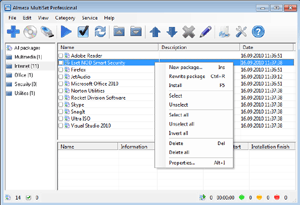 Almeza MultiSet Enterprise will allow you to reduce expenses on calling administrators for every client computer, save a lot of time for everyone and therefore provide more time for employees to spend on their direct duties. With the program, you can create a Windows installation disk or USB Flash Drive that will automatically install the operating Windows without asking questions about username, product key, time as well as locale settings. Your favorite applications are automatically installed, the necessary keys are entered into the registry, drivers are updated, new patches (service packs) from Microsoft are installed. It’s possible and you can do it easily with Almeza MultiSet. Almeza MultiSet Enterprise will allow you to reduce expenses on calling administrators for every client computer, save a lot of time for everyone and therefore provide more time for employees to spend on their direct duties. With the program, you can create a Windows installation disk or USB Flash Drive that will automatically install the operating Windows without asking questions about username, product key, time as well as locale settings. Your favorite applications are automatically installed, the necessary keys are entered into the registry, drivers are updated, new patches (service packs) from Microsoft are installed. It’s possible and you can do it easily with Almeza MultiSet.
Almeza MultiSet will automatically install all the applications you require, either onto your original computer or onto a new one. It’s an ideal solution for rebuilding your systems quickly. Some of the features of the program include the following; create a bootable USB Flash Drive for automatic installing Windows and software onto a computer, create a universal disk for automatic installing software onto a computer using any media (CD/DVD/Flash/Hard Drive), install the programs in any location and as many times as you want – just insert the disk into the CDROM, DVDROM or FlashDrive, and MultiSet will undertake the complete installation procedure for you, and a few other things as well.
Want to check it out? Visit Almeza.
Posted in Main | No Comments »
Wednesday, February 29th, 2012
 Office Ribbon Editor is a small tool that will assist developers in the creation of these ribbons for the Office 2007 & 2010 programs, by providing access to the XML that generates the ribbons. This lightweight, but very effective tool is designed specifically to help you edit the RibbonUI for Excel, as well as PowerPoint. The reason behind this decision lies on the fact that the ribbonUI is managed with XML. The publisher of Office Ribbon Editor also includes a few changes such as the following; addition of functionality message to the bottom of the toolbox control, addition of Drag and Drop a container or control from the toolbox to editor window, fixing of application crashed when attempting to apply Option changes without a file open, and a few others. Office Ribbon Editor is a small tool that will assist developers in the creation of these ribbons for the Office 2007 & 2010 programs, by providing access to the XML that generates the ribbons. This lightweight, but very effective tool is designed specifically to help you edit the RibbonUI for Excel, as well as PowerPoint. The reason behind this decision lies on the fact that the ribbonUI is managed with XML. The publisher of Office Ribbon Editor also includes a few changes such as the following; addition of functionality message to the bottom of the toolbox control, addition of Drag and Drop a container or control from the toolbox to editor window, fixing of application crashed when attempting to apply Option changes without a file open, and a few others.
Office Ribbon Editor has a lot of features that simply makes it one of the most effective freeware tools in its category. Some of the features to find in this version of the program include the following; creating Office 2007 and 2010 documents without the requirement of having Office actually installed, syntax highlighting and Autocomplete capability, and access o all Office 2007 and 2010 features from the ribbon to the new Backstage feature found in Office 2010.
Want to check it out? Visit LeafCreations.
Posted in Main | No Comments »
Wednesday, February 29th, 2012
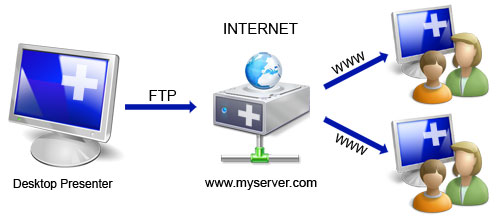 Online Desktop Presenter is a program that lets you present your windows desktop via Internet to any other user without any problems of firewalls or any other security related installations. The program also lets you transmit your screen content online via Internet or Intranet for presentations, trainings, sales conversations etc. to one or several remote Internet users. With Online Desktop Presenter, your screen content will be transmitted via FTP to your own web server or to free web space automatically and continuously. Your remote dialog partners such as customers, partners, colleagues and co-workers can follow your desktop presentation system-independent (Windows, Mac, Linux etc.) only by opening the corresponding web address in their browser; no additional installation of any kind is needed on their side. Online Desktop Presenter is a program that lets you present your windows desktop via Internet to any other user without any problems of firewalls or any other security related installations. The program also lets you transmit your screen content online via Internet or Intranet for presentations, trainings, sales conversations etc. to one or several remote Internet users. With Online Desktop Presenter, your screen content will be transmitted via FTP to your own web server or to free web space automatically and continuously. Your remote dialog partners such as customers, partners, colleagues and co-workers can follow your desktop presentation system-independent (Windows, Mac, Linux etc.) only by opening the corresponding web address in their browser; no additional installation of any kind is needed on their side.
Online Desktop Presenter has some nice and easy to use features that include the following; data transmission of your Windows desktop in rapid sequences (from about 1 second per image of 800×600 pixels without background image, depending on your Internet access speed and the one of the remote Internet user), start/pause/stop of transmission of your desktop, begin presentation automatically after program has started, setting of any possible subdirectory of a web server or web space accessible by FTP, use of free web space if no own web server is available, and a host of others.
Want to check it out? Visit Infonautics.
Posted in Main | No Comments »
|
|
|




