Archive for the 'Main' Category
Tuesday, February 28th, 2012
 EMDB is a small utility to keep track of your DVD collection. With an automatic import from the database of IMDB, export to csv, text or complete website, thumbnail cover preview, a loan tracker, search function and multi-language user interface. EMDB is written in C++ using Microsoft Visual Studio 2008 and doesn’t need a .NET framework or any other external libraries. EMDB is a small utility to keep track of your DVD collection. With an automatic import from the database of IMDB, export to csv, text or complete website, thumbnail cover preview, a loan tracker, search function and multi-language user interface. EMDB is written in C++ using Microsoft Visual Studio 2008 and doesn’t need a .NET framework or any other external libraries.
Users of this program can enjoy it because it is available in various languages including the following; English, Dutch, Danish, German, Italian, Portuguese, Slovak, Spanish, Hungarian Croatian, Swedish, Greek, Catalan, Czech, Norwegian, Japanese, French, Finnish, Polish, Russian, Turkish, Simplified Chinese, Serbian, Slovenian, Arabic and Portuguese (Brazil) translations are included in the setup.
EMDB 1.42 now includes a number of changes and fixes that include the following; directors that used to be mixed up now and then have now been fixed, when inserting a movie the new movie showed up twice in the list (although correctly saved in the database), addition of IMDB button in IMDB multiple results dialog to check IMDB for the selected title(s), unknown directors were included in the search results when searching for a specific director, popups with “No matches found” replaced by a logging message, and a host of others.
Want to check it out? Visit Heesakkers3.
Posted in Main | No Comments »
Tuesday, February 28th, 2012
 Bandizip is free archiver that can be used both at home and in the office. The program handles the most popular compression formats, including Zip, 7z, and Rar files for free. Bandizip also has support for ZIP, 7Z, RAR, ALZ, EGG, TAR, BH, LZH, GZ, BZ2, ISO, CAB, WIM, XZ, ARJ, and Z archives files and users can create self-extracting files (.EXE) and multi-volume (split) archives files. It is a nice freeware program that has a lot of amazing features that you can get used to without any difficulty. Bandizip is free archiver that can be used both at home and in the office. The program handles the most popular compression formats, including Zip, 7z, and Rar files for free. Bandizip also has support for ZIP, 7Z, RAR, ALZ, EGG, TAR, BH, LZH, GZ, BZ2, ISO, CAB, WIM, XZ, ARJ, and Z archives files and users can create self-extracting files (.EXE) and multi-volume (split) archives files. It is a nice freeware program that has a lot of amazing features that you can get used to without any difficulty.
Bandizip is built to support Unicode to display international characters which displays for influences in archives. Some of the amazing features included in Bandizip include the following; unpack ZIP, ZIPX, RAR, 7Z, ARJ, ALZ, EGG, LZH, TAR, BH, GZ, BZ2, JAR, ISO, CAB, WIM, XZ, Z, ACE, TXZ, TLZ, PMA, and J2J archives, create ZIP, ZIPX, EXE, TAR, and TGZ archives, bypass the bad compression files automatically by “High Speed Archiving” function, extract the files to the destination folder directly by “Fast Drag & Drop” function, create self-extracting file (.EXE) and multi-volume (split) archives, optional archive encryption using ZipCrypto, context menu access including “Preview Archive” function, create or extract multiple zip files simultaneously from windows explorer, and it is free for both home and office use.
Want to check it out? Visit Bandicam.com.
Posted in Main | 1 Comment »
Monday, February 27th, 2012
 Directory List & Print Pro is an application for Windows that enables listing and printing of a directory structure in a simplest way. By copying to the clipboard the directory listing can be exported into other programs or opened directly in Word and Excel. Directory List & Print Pro can directly be embedded in the context menu of Windows Explorer for immediate display of the requested directory structure. In addition, Directory List & print offers a wide variety of further useful functions such as; MP3 and video lists can be displayed with information about the length, the requested depth for subdirectories is freely selectable, and the set up and display of file lists can individually be defined by different selection and filter options. Directory List & Print Pro is an application for Windows that enables listing and printing of a directory structure in a simplest way. By copying to the clipboard the directory listing can be exported into other programs or opened directly in Word and Excel. Directory List & Print Pro can directly be embedded in the context menu of Windows Explorer for immediate display of the requested directory structure. In addition, Directory List & print offers a wide variety of further useful functions such as; MP3 and video lists can be displayed with information about the length, the requested depth for subdirectories is freely selectable, and the set up and display of file lists can individually be defined by different selection and filter options.
Directory List & Print Pro includes lots of features such as the following; selection of directories by entering the path as a text string, drag & Drop of directories (or a file) from Windows Explorer, integration of “Open in Directory List & Print” in the directory context menu of Windows Explorer, direct selection of important system directories as “My Documents” etc, listing of sub-directories and/or files and looping through sub-directories (recursion), update file list automatically or manually, display of last modification date, display of file size, and many more.
Want to check it out? Visit Infonautics.
Posted in Main | No Comments »
Monday, February 27th, 2012
 iCopy is a free and open source software that lets you combine your scanner and printer into a powerful, yet easy to use photocopier by only pressing a button. The program has a simple user interface that lets you manage scanner and printer options, like brightness, contrast, number of copies in a couple of seconds. You can run iCopy by just pressing the button of your scanner!! Its simple user interface lets you manage scanner and printer options, like brightness, contrast, number of copies in a couple of seconds. As a matter of fact, iCopy requires no installation and is also suitable for USB pen drives. iCopy is a free and open source software that lets you combine your scanner and printer into a powerful, yet easy to use photocopier by only pressing a button. The program has a simple user interface that lets you manage scanner and printer options, like brightness, contrast, number of copies in a couple of seconds. You can run iCopy by just pressing the button of your scanner!! Its simple user interface lets you manage scanner and printer options, like brightness, contrast, number of copies in a couple of seconds. As a matter of fact, iCopy requires no installation and is also suitable for USB pen drives.
Some of the key features included in the program by its publishers include the following; modify image settings such as brightness, contrast, resolution and enlargement, directly print or save your documents with a single click, acquire multiple pages and print them all together, various options and actions under control in a small and simple window, select copies, colour, paper size and image settings with a few click and then press the big Copy Button, modify image settings such as brightness, contrast, resolution and enlargement, install a free PDF printer or use Acrobat Distiller and set it as the default printer for iCopy, and many more.
Want to check it out? Visit iCopy.SourceForge.
Posted in Main | No Comments »
Saturday, February 25th, 2012
 IObit Game Booster is an application that is designed to help optimize your PC for smoother, more responsive game play in the latest PC games with the touch of a button. IObit Game Booster also helps achieve the performance edge previously only available to highly technical enthusiasts. The program works by temporarily shutting down background processes, cleaning RAM, and intensifying processor performance. That means you can keep all the features of Microsoft Windows 7, Vista and XP ready for when you need them, but turn them off when you are ready to get down to serious business – gaming. Game Booster makes it simpler to enjoy the latest games and take your experience to a new level. IObit Game Booster is an application that is designed to help optimize your PC for smoother, more responsive game play in the latest PC games with the touch of a button. IObit Game Booster also helps achieve the performance edge previously only available to highly technical enthusiasts. The program works by temporarily shutting down background processes, cleaning RAM, and intensifying processor performance. That means you can keep all the features of Microsoft Windows 7, Vista and XP ready for when you need them, but turn them off when you are ready to get down to serious business – gaming. Game Booster makes it simpler to enjoy the latest games and take your experience to a new level.
IObit is easily customizable to close anything you want to, and also has the capacity to reload them as soon as you are done with playing your game. The program doesn’t take a lot of space on your system; and you can download it faster than a couple of other similar programs. IObit Game Booster is great for those big games that slow down the performance of your system; and one of its greatest points is that it if a freeware.
Want to check it out? Visit IObit
Posted in Main | No Comments »
Saturday, February 25th, 2012
 Willing Webcam can upload images from a Web camera to any Web site, store to local disk, both in cycle, or on demand. It can also broadcast live video from its own HTTP server to World Wide Web and it comes equipped with a motion detection feature which is activated whenever something appears in your webcam’s field of vision. The publisher has made some minor changes to this version (5.5). The most important addition is the inclusion of a new video source called Program Window. This video source allows you to capture screenshots of a program window in real time, so you can use the Crop options to select video areas on the program window. Willing Webcam can upload images from a Web camera to any Web site, store to local disk, both in cycle, or on demand. It can also broadcast live video from its own HTTP server to World Wide Web and it comes equipped with a motion detection feature which is activated whenever something appears in your webcam’s field of vision. The publisher has made some minor changes to this version (5.5). The most important addition is the inclusion of a new video source called Program Window. This video source allows you to capture screenshots of a program window in real time, so you can use the Crop options to select video areas on the program window.
Willing Webcam is an application that uses a motion control detection sensor to wake your web camera up at the slightest movement. The sensor can trigger an action such as sending an e-mail, MMS image message or SMS text message, saving a video or picture, uploading a file to an FTP site, sounding an alarm, or starting another software application. Some of its features include the following; live video streaming, video surveillance, time lapse feature, babysitter or nanny supplement, video compatibility, remote management, and webcam gallery service.
Want to check it out? Visit: WillingSoftware.
Posted in Main | No Comments »
Tuesday, February 21st, 2012
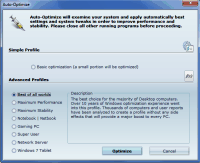
 Cacheman is a program which tweaks the Disk Cache settings and prevents frequent swapping of the data to hard drive leading to an improved performance, system reaction time, and stability. In addition, this Cacheman corrects also generic problems on systems with more than 512MB of RAM. Cacheman is a program which tweaks the Disk Cache settings and prevents frequent swapping of the data to hard drive leading to an improved performance, system reaction time, and stability. In addition, this Cacheman corrects also generic problems on systems with more than 512MB of RAM.
If you been experiencing computer slow downs with frequent rebooting and also having problems fixing it; then this is one application worth a try. Cacheman is very easy to use even for a newbie, yet powerful enough for advanced users. In addition it offers an automatic backup feature to keep you on the safe side. Cacheman is designed for speeding up Windows XP, Vista, and Windows 7. Cacheman program is available in English, German, French, Spanish, Japanese and 14 other languages.
Some of the latest features of this program includes: Cacheman will dynamically lower priority of applications that use a lot of processing power, New profile: Windows 7 Tablet optimization (improves several Windows 7 tablets like Asus Eee EP121, Samsung Sliding 7, Viliv X70, Lenovo U1 Hybrid.
Want to check it out? Visit Outertech.com.
Posted in Main | No Comments »
Sunday, February 19th, 2012
 ThunderSoft Flash Slideshow Factory is a program that is easy to use to create flash slideshow from your digital photos, complete with ready-to-use animated templates, stunning transition effect, text captions, music etc. You can publish your slideshows in local disk, as email sending to your friends, or embed your favorite published flash into your blog, MySpace, or other ordinary web pages to show off. With the power of Flash you can add transition effects, apply captions, play music, use clip art, and more. With over 70 different animated templates, there is no need to start from scratch, nor do you have to reinvent the wheel. You can even create an animated E-card to send to your friends and family. ThunderSoft Flash Slideshow Factory is a program that is easy to use to create flash slideshow from your digital photos, complete with ready-to-use animated templates, stunning transition effect, text captions, music etc. You can publish your slideshows in local disk, as email sending to your friends, or embed your favorite published flash into your blog, MySpace, or other ordinary web pages to show off. With the power of Flash you can add transition effects, apply captions, play music, use clip art, and more. With over 70 different animated templates, there is no need to start from scratch, nor do you have to reinvent the wheel. You can even create an animated E-card to send to your friends and family.
ThunderSoft Flash Slideshow Factory has a lot of amazing features including the following; make stunning animated photo slideshow in Flash format, add over 70 transition effects, get started quickly with over 50 different animated templates, construct albums with over 500 images and complete them with a thumbnail index page, supports .wav, .mp3, .wma format audio as a background music, publish your slideshow as Flash / HTML, EXE, Screensaver, or Video file, support all major video files, including iPod, PSP video, share your photo album or slideshow online, and a few others.
Want to check it out? Visit Make-slideshow
Posted in Main | No Comments »
Sunday, February 19th, 2012
 DownThemAll is a very easy-to-use Mozilla Firefox extension that adds new and advanced download capabilities to your browser. The program allows you to download various links or images contained in a webpage and lots more. With DownThemAll, you can refine your downloads by fully customizable criteria to get only what you actually want. The program is all you can desire from a download manager because it features an advanced accelerator that increases speed close to 400%; allowing you to pause and resume downloads at any time. DownThemAll is fully integrated into your favorite browser. DownThemAll is a very easy-to-use Mozilla Firefox extension that adds new and advanced download capabilities to your browser. The program allows you to download various links or images contained in a webpage and lots more. With DownThemAll, you can refine your downloads by fully customizable criteria to get only what you actually want. The program is all you can desire from a download manager because it features an advanced accelerator that increases speed close to 400%; allowing you to pause and resume downloads at any time. DownThemAll is fully integrated into your favorite browser.
DownThemAll includes a number of advanced and easy to use features such as the following; you can easily access it from the context menu, by right-clicking on any webpage, from ‘tools menu’, or simply by adding our cute handy icons to your toolbar, the dTa ‘Select links’ window lists every single link, image or embed object contained in a webpage, easily auto-rename according to your personal needs, smart download technique called ‘multipart download’ that splits files into multiple sections, which are downloaded simultaneously, pause and restart downloads at any time, without losing data, choose to close dTa automatically when all downloads are completed, and many more. The program appears to be a very good one, and also very easy to use even for a newbie.
Want to check it out? Visit Downthemall.net.
Posted in Main | No Comments »
Saturday, February 18th, 2012
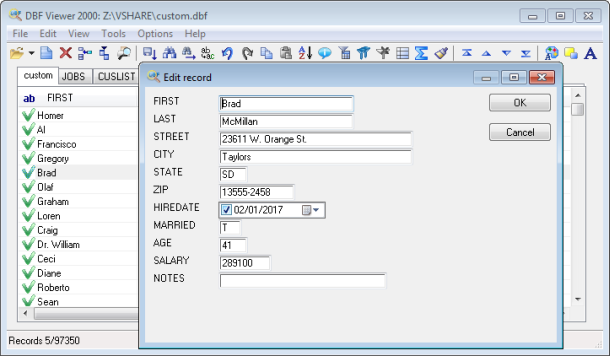 DBF Viewer 2000 is a quick and handy DBF viewer that has a modern multi-document tabbed interface. DBF Viewer also provides full editing capabilities, and enables you to edit or manage records as well as the table structure. You can edit or manage records as well as the table structure. DBF Viewer 2000 dynamically builds visual dialogs according to the DBF file structure. These dialogs allow you to edit records naturally as if you were using your database application. There are many advanced editing features including textual fields formatting and automated removal of duplicate records. Users of DBF Viewer can also convert data from dbf to a range of popular formats (XLS, XML, SQL, CSV, HTML). DBF Viewer 2000 is a quick and handy DBF viewer that has a modern multi-document tabbed interface. DBF Viewer also provides full editing capabilities, and enables you to edit or manage records as well as the table structure. You can edit or manage records as well as the table structure. DBF Viewer 2000 dynamically builds visual dialogs according to the DBF file structure. These dialogs allow you to edit records naturally as if you were using your database application. There are many advanced editing features including textual fields formatting and automated removal of duplicate records. Users of DBF Viewer can also convert data from dbf to a range of popular formats (XLS, XML, SQL, CSV, HTML).
The publisher has introduced a few changes that include the following; addition of exporting of statistical report, fixing of issue with importing Excel files, improved exporting of dbf to mysql script, improved exporting of dbf to csv, and lots of cosmetic improvements in dbf viewer and dbf editor. Some older features that you can also find in this version include the following; easy modification of DBF file structure in DBF Viewer 2000, import of data from a variety of formats in DBF Viewer 2000, advanced data export capabilities offered by DBF Viewer 2000, and many more.
Want to check it out? Visit DBF2002.
Posted in Main | No Comments »
|
|
|