Archive for the 'Main' Category
Saturday, February 18th, 2012
 WildBit Viewer is compact & fast image viewer with slide show and editor. The program has an eye catching interface within blazing fast folder, file list and thumbnail viewer. Viewer includes also Image Info with Image EXIF meta data JPEG and TIFF support and IPTC (IIMV4) information (like PhotoShop file info) from JPEG and TIFF, Thumbview has changeable views, sorting and thumbnail predefined sizes for fast thumbnail size setting. Viewer also includes shell toolbar; you can drop your favorite folder there and use it as an organizer. WildBit Viewer is compact & fast image viewer with slide show and editor. The program has an eye catching interface within blazing fast folder, file list and thumbnail viewer. Viewer includes also Image Info with Image EXIF meta data JPEG and TIFF support and IPTC (IIMV4) information (like PhotoShop file info) from JPEG and TIFF, Thumbview has changeable views, sorting and thumbnail predefined sizes for fast thumbnail size setting. Viewer also includes shell toolbar; you can drop your favorite folder there and use it as an organizer.
WildBit Viewer also comes with shell toolbar that enables you to easily drop your favorite folder there and use it as an organizer. Some of its features include the following; image compare, compare images side-by-side, save list of favorite images and load list later on and you can create custom show in to Slide Show also that list you can edit with Custom Show List Editor, Slide Show enables you to view images within 176 different transition effects. The Slide Show now includes multi-monitor support for fast switching between two monitors. WildBit Viewer supports all major graphic formats including BMP, JPEG, JPEG 2000, GIF, PNG, PCX, TIFF, WMF and TGA (over 70 formats).
Want to check it out? Visit Wildbit-Soft.
Posted in Main | No Comments »
Friday, February 17th, 2012
 PowerCHM lets you create professional CHM files from Html Files, Text Files, Microsoft Word Documents and Adobe Acrobat Document. The program is basically designed to help deliver web contents using Hypertext Markup Language (HTML). HTML Help is designed for authors or developers who create contents for software programs, multimedia titles, intranets, extranets, or for the Internet. HTML Help provides navigational controls that enable users to easily find and sort information. PowerCHM lets you create professional CHM files from Html Files, Text Files, Microsoft Word Documents and Adobe Acrobat Document. The program is basically designed to help deliver web contents using Hypertext Markup Language (HTML). HTML Help is designed for authors or developers who create contents for software programs, multimedia titles, intranets, extranets, or for the Internet. HTML Help provides navigational controls that enable users to easily find and sort information.
PowerCHM is a replacer of winhelp file system, and is also a very popular E-BOOK file format on the internet. The program is so little and with powerful search function that more and more people begin to recognize it and use it. Some of its key features include the following; enables you to create your CHM files automatically from Html Files (including .htm, .html and .mht), Text Files (.txt) and Microsoft Word Documents (.doc/.docx), import a prepared folder and all it’s sub folders to make CHM files. In the prepared folder, all the support files will be imported, directly open and save Microsoft HTML Help Workshop project (.hhp file). This will let PowerCHM can work together with other help authoring tools, edit a .htm or .html file directly. Such as highlight some important texts, change text color, change a link’s URL, etc. From now on, you can do such simple edit work without frequent switches between PowerCHM and other html editors, and many more.
Want to check it out? Visit Dawningsoft.
Posted in Main | No Comments »
Thursday, February 16th, 2012
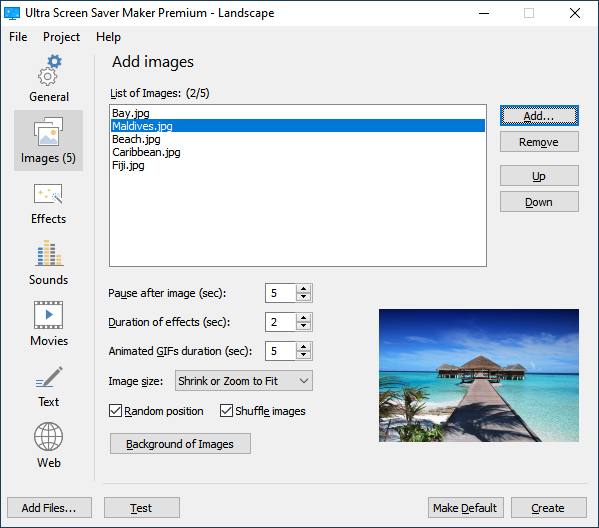 Ultra Screen Saver Maker is an application that merges your JPEG, GIF, PNG, TIFF, BMP, or TGA images, MP3, WAV and MID sounds, and WMV, MPEG or AVI video files into a compact screen saver. Just collect images, sounds, and video files, preview them, and add to your screen saver project with a point-and-click, easy to use, interface. You can also add text with different fonts and effects. Ultra Screen Saver Maker is also very easy to use, and requires no programming skills. The full support is provided for self-installing screen savers, and you can test the screen saver at any time. Also, all generated screen savers can be distributed for free. Ultra Screen Saver Maker is an application that merges your JPEG, GIF, PNG, TIFF, BMP, or TGA images, MP3, WAV and MID sounds, and WMV, MPEG or AVI video files into a compact screen saver. Just collect images, sounds, and video files, preview them, and add to your screen saver project with a point-and-click, easy to use, interface. You can also add text with different fonts and effects. Ultra Screen Saver Maker is also very easy to use, and requires no programming skills. The full support is provided for self-installing screen savers, and you can test the screen saver at any time. Also, all generated screen savers can be distributed for free.
Ultra Screen Saver Maker is available in two different versions; for home and business users: The home user version is great for displaying family, friend and personal photos, for use on your own computer and sharing with your friends and relatives. While the version for business users can act as an advertising tool by displaying corporate logos or showcasing products. It includes different text effects allowing you to display date, time, or a personal message, in any font or color.
Want to check it out? Visit Ultra-Screen-Saver-Maker.
Posted in Main | No Comments »
Thursday, February 16th, 2012
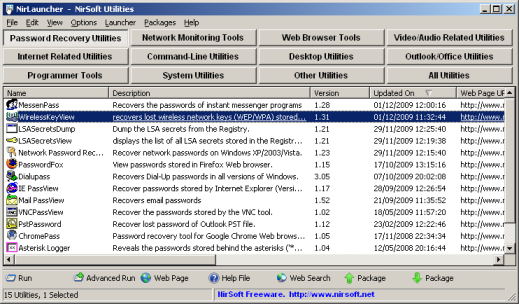 NirLauncher is a package of more than 100 portable freeware utilities for Windows, all of them developed for NirSoft Web site during the last few years. It combines a lot of wonderful features that continue to make it one of the best freeware programs that can be downloaded. NirLauncher works on any version of Windows, starting from Windows 2000 and up to Windows 7. NirLauncher is a package of more than 100 portable freeware utilities for Windows, all of them developed for NirSoft Web site during the last few years. It combines a lot of wonderful features that continue to make it one of the best freeware programs that can be downloaded. NirLauncher works on any version of Windows, starting from Windows 2000 and up to Windows 7.
NirLauncher has a lot of advanced features that include the following; it can be used from USB flash drive without need of any installation, all the utilities in the package are completely freeware, without any Spyware/Adware/Malware, the package includes variety of tools that you may need for your daily computer use, including utilities to recover lost passwords, to monitor your network, to view and extract cookies, cache, and other information stored by your Web browser, to search files in your system, every utility in the package, you can easily run it, view the help file, or jump to the Web page of the utility, when using it from USB flash drive, the configuration of every utility is saved into .cfg file on the flash drive, on x64 systems, NirLauncher automatically run the x64 version of the utility, when there is a separated x64 version, and a host of others.
Want to check it out? Visit Nirsoft.net.
Posted in Main | No Comments »
Wednesday, February 15th, 2012
 Fast DVD Ripper is a program that will help you rip and convert any DVD smoothly without limit into various video/audio formats compatible with specific mobile or play console. With Fast DVD Ripper, you can easy share your DVD movies on iPod, iPad/iPad2, iTouch, iPhone, PSP, iRiver, ARCHOS, Wii, PS, Xbox360, and more Portable Media Players (PMP), and many more. You can also rip and convert DVD movies within outstanding quality and speed. Fast DVD Ripper is a program that will help you rip and convert any DVD smoothly without limit into various video/audio formats compatible with specific mobile or play console. With Fast DVD Ripper, you can easy share your DVD movies on iPod, iPad/iPad2, iTouch, iPhone, PSP, iRiver, ARCHOS, Wii, PS, Xbox360, and more Portable Media Players (PMP), and many more. You can also rip and convert DVD movies within outstanding quality and speed.
Fast DVD Ripper is lightweight, and is easily customizable even for the newbie who doesn’t have any experience. Some of its key features include the following; rip any DVD movie directly without install any third-party control, rip DVD movies to all popular formats HD videos or SD videos, rip DVD movies to play well on iPod, iPad, iPad2, iPhone, iTouch, PSP, PS3, Xbox360, Android Phone, any HD video player, etc, output AVI, MKV formats supports Dolby/surround 5.1 in DTS, AC3, audio tracks and subtitles are selectable(You can select audio track and subtitle language for the output video on the premise that the Blu-ray supports this language.), rip main video or segments of DVD Movies(You can view DVD movie as consecutive titles so that you can convert them in batches. You also can rename the titles for your requirements. This function will keep the converted movies as integrated and consecutive as original ones.), etc.
Want to check it out? Visit Aepdvd.com.
Posted in Main | No Comments »
Wednesday, February 15th, 2012
 WinContig is an easy-to-use stand-alone defragmentation tool that doesn’t create any installation directories or Registry entries on your computer. The purpose of this program is to quickly defrag files without the need to defrag the whole disk. Its defragmentation and analysis engine is based on the standard Microsoft defragmentation API. In addition, it allows you to group files into profiles, and also it accepts a number of optional command-line switches that you can use to control how the program operates. WinContig is an easy-to-use stand-alone defragmentation tool that doesn’t create any installation directories or Registry entries on your computer. The purpose of this program is to quickly defrag files without the need to defrag the whole disk. Its defragmentation and analysis engine is based on the standard Microsoft defragmentation API. In addition, it allows you to group files into profiles, and also it accepts a number of optional command-line switches that you can use to control how the program operates.
WinContig is a standalone executable, and it doesn’t require any installation process or additional DLLs. In order to start using it, just extract the contents of the ZIP archive to any folder you like, and run it. The program is an application designed to run on Windows 2000, Windows XP, Windows Vista, Windows Seven operating systems.
WinContig may not have all the features included in a few other highly rated programs out there, but surely it is not a bad program. However, it remains a great program because it can defrag any directory of your choice instead of an entire partition. Version 1.05.02 is certainly an improvement on previous ones, and you can download and use it for free since it’s a freeware.
Want to check it out? Visit Wincontig.mdtzone.it.
Posted in Main | No Comments »
Tuesday, February 14th, 2012
 SpywareBlaster is a security application that is not built to scan and clean for spyware; however, it prevents it from ever being installed. By setting a “kill bit” for spyware ActiveX controls, the program can prevent the installation of any spyware ActiveX controls from a webpage. It does this while not interfering with “friendly” ActiveX controls – so your browser can work correctly and you can have peace of mind. With SpywareBlaster, you won’t get any more annoying “Yes/No” boxes popped up, asking you to install a spyware ActiveX control. In fact, Internet Explorer will never even download or run the spyware ActiveX control. In addition, it can prevent many of these spyware ActiveX controls from running, even if they are already installed on your system. SpywareBlaster is a security application that is not built to scan and clean for spyware; however, it prevents it from ever being installed. By setting a “kill bit” for spyware ActiveX controls, the program can prevent the installation of any spyware ActiveX controls from a webpage. It does this while not interfering with “friendly” ActiveX controls – so your browser can work correctly and you can have peace of mind. With SpywareBlaster, you won’t get any more annoying “Yes/No” boxes popped up, asking you to install a spyware ActiveX control. In fact, Internet Explorer will never even download or run the spyware ActiveX control. In addition, it can prevent many of these spyware ActiveX controls from running, even if they are already installed on your system.
Though, a lot of a couple of individuals and groups may frown at this program because it is freeware; the truth is it is a bit reliable compared to a few other programs out there. However, you do have a chance to choose between the home version, which is free, and the enterprise version, which costs some money. In case you decided on downloading the freeware or home version; then you can look forward to a program that is not only powerful, but able to perform a lot of tasks. SpywareBlaster is able to protect your system against spyware, adware, browser hijackers, dialers, and other potentially dangerous programs.
Want to check it out? Visit JavaCoolSoftware.
Posted in Main | No Comments »
Tuesday, February 14th, 2012
 G-Lock Email Processor is a powerful program built to automatically process and parse incoming Internet email such as bounced/undeliverable messages, subscribe/unsubscribe requests, and a host of others. The application is easy to use and provides a wide range of features that enable you to process email you receive, automatically extract data and perform other actions based on the message content. Email Processor can work with multiple POP3 internet mailboxes, filter incoming messages by different conditions, and extract any data from the message body and message header and save it to a file of user definable format. G-Lock Email Processor is a powerful program built to automatically process and parse incoming Internet email such as bounced/undeliverable messages, subscribe/unsubscribe requests, and a host of others. The application is easy to use and provides a wide range of features that enable you to process email you receive, automatically extract data and perform other actions based on the message content. Email Processor can work with multiple POP3 internet mailboxes, filter incoming messages by different conditions, and extract any data from the message body and message header and save it to a file of user definable format.
G-Lock Email Processor also enables you to send a text or HTML message to your recipients as well as forward the message you received to another email address. The program can be easily set up to automatically perform various operations with a selected database including; insert data into a database, delete data from a database, update a database or extract fields from a database. In addition, and also allows you to execute MS Windows Script (VBScript and JScript) when processing incoming messages.
G-Lock Email Processor includes a few new changes including some minor bug changes such as fixing of System Error Code: 126 the specified module could not be found.” error during the program installation on the computers with the User Account Control (UAC) enabled.
Want to check it out? Visit Glocksoft.
Posted in Main | No Comments »
Tuesday, February 14th, 2012
 Web Link Captor takes a list of plain-text items, and builds an output document containing a list of URL-linked results based on web searches for the items. It is a way to quickly build a clickable list of items from just their names, suitable for posting on your blog or a forum, etc. Donationware donations requested but not required. Web Link Captor has a friendly GUI that lets you build flexible sets of processing steps to parse plain-text input lists and perform search and output functions. You can also save and load projects and script configurations for easy re-use. Web Link Captor takes a list of plain-text items, and builds an output document containing a list of URL-linked results based on web searches for the items. It is a way to quickly build a clickable list of items from just their names, suitable for posting on your blog or a forum, etc. Donationware donations requested but not required. Web Link Captor has a friendly GUI that lets you build flexible sets of processing steps to parse plain-text input lists and perform search and output functions. You can also save and load projects and script configurations for easy re-use.
Web Link Captor has a lot of key features that include the following; the included backend scripts are in Python (but other languages can be used), uses caching to avoid repeating web searches unnecessarily, comes with output formatters for HTML, BBCode, Markdown/Wikipedia, with searching engines for Google, and Bing/Opensearch (which can handle Amazon, Wikipedia, and many others), flexible scoring system lets you interactively or programmatically tweak your results to get the best list of links, comes with searching engines for Google, and Bing/OpenSearch (which can handle Amazon, Wikipedia, and many others), uses a set of standalone utility scripts that can be run without the windows front end GUI, and can be easily modified and expanded, etc.
Want to check it out? Visit Donationcoder.
Posted in Main | No Comments »
Tuesday, February 14th, 2012
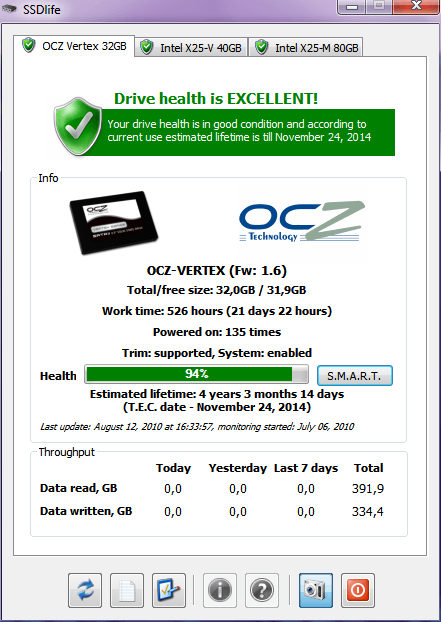 SSDlife is a small and intuitive SSD diagnostic tool that helps users obtain comprehensive information about their SSD drives and take timely action if any problems are detected. If you take SSD’s seriously and have replaced hard drives with SSD units, don’t forget that their life expectancy is considerably shorter than that of regular hard drives. So if you want to know the approximate time frame for the swap, this is the program that is a perfect choice. SSDlife also includes a few changes such as; support for AData S596, Corsair Force, Force GT, Performance Pro, Plextor PX-M2P, PX-M3S, SanDisk P4, fixed support for MacBook Air, web-report function is temporarily disabled, etc. SSDlife is a small and intuitive SSD diagnostic tool that helps users obtain comprehensive information about their SSD drives and take timely action if any problems are detected. If you take SSD’s seriously and have replaced hard drives with SSD units, don’t forget that their life expectancy is considerably shorter than that of regular hard drives. So if you want to know the approximate time frame for the swap, this is the program that is a perfect choice. SSDlife also includes a few changes such as; support for AData S596, Corsair Force, Force GT, Performance Pro, Plextor PX-M2P, PX-M3S, SanDisk P4, fixed support for MacBook Air, web-report function is temporarily disabled, etc.
Each tab displays the name and logo of the drive manufacturer, the size of the drive and the amount of free disk space. You can also see the total time the drive has been working in the system, the number of device starts, its total throughput, as well as other drive-related information. Users of SSDlife can see a health bar that visually represents the state of the SSD drive and its calculated lifetime. SMART parameters and the drive health bar can be refreshed by clicking the corresponding button. The program also has a pro version that has more features than the freeware version.
Want to check it out? Visit SSD-Life
Posted in Main | No Comments »
|
|
|




