Archive for the 'Main' Category
Thursday, March 31st, 2011
 RetroShare is a program that lets you communicate and share files securely and privately. The program is a cross-platform private p2p sharing program. It lets you share securely with your friends, using a web-of-trust to authenticate peers and OpenSSL to encrypt all communication. RetroShare for Linux provides filesharing, chat, messages and channels. RetroShare is an open source application and is also a secure and decentralized communication platform. Its major features include the following; serverless, encrypted chat and filetransfer, multiple simultaneous downloads/upload, search friends, messages, forums, GnuPG Authentication, supports plugins, graphical user-interface written with Qt4 toolkit, openSSL Encryption, and many more. RetroShare is a program that lets you communicate and share files securely and privately. The program is a cross-platform private p2p sharing program. It lets you share securely with your friends, using a web-of-trust to authenticate peers and OpenSSL to encrypt all communication. RetroShare for Linux provides filesharing, chat, messages and channels. RetroShare is an open source application and is also a secure and decentralized communication platform. Its major features include the following; serverless, encrypted chat and filetransfer, multiple simultaneous downloads/upload, search friends, messages, forums, GnuPG Authentication, supports plugins, graphical user-interface written with Qt4 toolkit, openSSL Encryption, and many more.
Basically, RetroShare is a reliable identification and authentication program that can be used to authenticate your friends. Its encrypted communication platform is known only to the user and peers; this ensures you stay secure. Definitely, everyone wants a kind of privacy and security when chatting or exchanging messages with friends; and that is one major advantage of installing this program on your system. The benefits of using this program are quite enormous. So, if you are worried about the data you exchange when using popular online chat tools; then you can simply install and start using RetroShare.
Want to check it out? Visit Retroshare.
Posted in Main | No Comments »
Thursday, March 31st, 2011
 Jokosher is a multi-track music editor. The user interface applies concepts that are well-known to musicians instead of counting on their understanding of multi-track recorders. Guitarists and other players who don’t desire to spend the cash or the time to learn the details of multi-tracking will value this program. The concept of Jokosher is to have the ability to ignore the program and be ready to focus on your music. Jokosher is a multi-track music editor. The user interface applies concepts that are well-known to musicians instead of counting on their understanding of multi-track recorders. Guitarists and other players who don’t desire to spend the cash or the time to learn the details of multi-tracking will value this program. The concept of Jokosher is to have the ability to ignore the program and be ready to focus on your music.
You are not constricted to only one instrument with Jokosher. You are able to add an audio file of your own or somebody else’s, drums, bass, cello, cymbals etc merely by clicking it in the selection box. It’s also possible to solo the instruments or mute them. It has the capability of moving and trimming and splitting throughout the editing process. VU sliders control the volumes during mixing. And you may import audio in WAV, MP3, FLAC or Ogg Vorbis formats. It’s also possible to export your completed project back to any of these.
Within the edit mode, the audio is broken into sections that you can split and move by dragging around, it is easy to trim and discard blocks or replicate them and put them where you wish. You may also copy and paste them for repetitive riffs or fills wherever required.
And because Jokosher is open source, what you see is just what you get at the moment. New contributions from musicians and coders around the world are added as they are developed. When you download Jokosher you can easily check occasionally for all the enhancements and new features being added or maybe even make some yourself.
Check it out at http://www.jokosher.org/
Posted in Main, Music | 1 Comment »
Thursday, March 31st, 2011
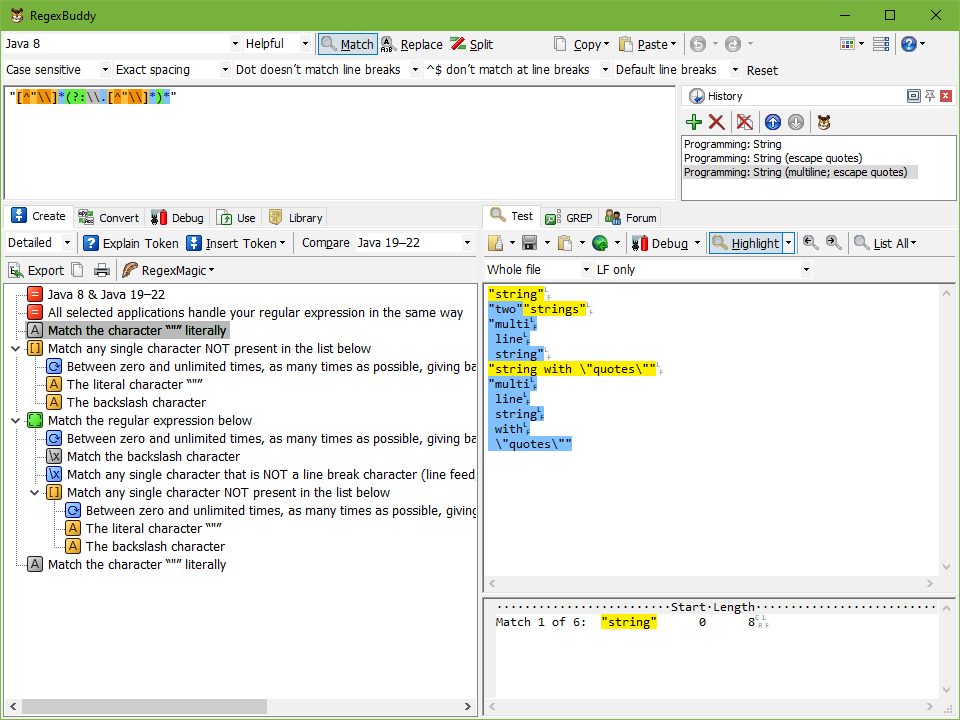 RegexBuddy is one of the programs you need if you want a companion for working with regular expressions. With RegexBuddy, you can easily create regular expressions that precisely match what you want. You can also easily and without any problem understand complex regexes written by others, use plain English building blocks instead of, or in addition to, the standard regex syntax. Version 3.5.1 is definitely an improvement on previous versions; and that is one reason the program remains one of the most popular among users. The publishers have made a couple of updates and additions to this version; and this may further improve the way RegexBuddy already works. You can download and install the seven days trial period to find out a couple of changes that have been made by the publishers. RegexBuddy is one of the programs you need if you want a companion for working with regular expressions. With RegexBuddy, you can easily create regular expressions that precisely match what you want. You can also easily and without any problem understand complex regexes written by others, use plain English building blocks instead of, or in addition to, the standard regex syntax. Version 3.5.1 is definitely an improvement on previous versions; and that is one reason the program remains one of the most popular among users. The publishers have made a couple of updates and additions to this version; and this may further improve the way RegexBuddy already works. You can download and install the seven days trial period to find out a couple of changes that have been made by the publishers.
RegexBuddy allows you to use regular expressions with minimum hitch; it also enables you to automate tedious tasks with regular expressions. Furthermore, you can collect and document libraries of regular expressions for future reuse. You can use the regex with source code snippets automatically adjusted to the particulars of your programming language. If you are a new user who still needs a few tips on how to use this program, you can watch self-running demo right from your browser.
Want to check it out? Visit Regexbuddy.
Posted in Main | No Comments »
Wednesday, March 30th, 2011
 Advanced CSV Converter is an application used by a lot of people to import files to data because it provides a handy way of loading large amounts of data. Users may however, need to convert their CSV files into a file of some other popular formats, such as XLS or RTF. This always a major challenge; however, with Advanced CSV Converter installed on your system, things become easier for you. It is an easy way of converting CSV files into a multitude of other file formats, including DBF (Dbase III, Dbase IV, Visual Foxpro), TXT, HTML, PRG (Clipper, Foxpro), XML, XLS (Excel files), SQL and RTF. Advanced CSV Converter is an application used by a lot of people to import files to data because it provides a handy way of loading large amounts of data. Users may however, need to convert their CSV files into a file of some other popular formats, such as XLS or RTF. This always a major challenge; however, with Advanced CSV Converter installed on your system, things become easier for you. It is an easy way of converting CSV files into a multitude of other file formats, including DBF (Dbase III, Dbase IV, Visual Foxpro), TXT, HTML, PRG (Clipper, Foxpro), XML, XLS (Excel files), SQL and RTF.
All you need to use this program after downloading and installing it on your system is to simply understand its interface. The interface gives you a lot of details on how to use Advanced CSV Converter. That means you are not going to run into any problem once you become follow all relevant steps as described in the step-by-step user guide. With the wizard, you can select the input file, choose the target format and folder; then set the conversion filter by example and select columns you wish to exclude from the process. As soon as the conversion starts, the program extracts data from CSV file and ports it into a list of data fields, which are saved into the formats specified.
Some of its key features include; convert CSV to 9 formats, batch conversion, command line support, convert CSV in three simple steps, and many more.
Want to check it out? Visit CSV-converter.
Posted in Main | No Comments »
Tuesday, March 29th, 2011
 CCEnhancer is a small tool that adds support for more than 270 new programs into the program CCleaner. The tool uses the WinApp2.ini system built into CCleaner to easily add new rules and definitions for programs. The rules were sourced mainly from the Piriform Support Forum, with several sourced from other places around the internet. The basic file containing the definitions is not included with the program; however, the program takes care of the actual download. All you need is to simply press or click the ‘download latest’ and the tool automatically downloaded the most recent version definitions. On the other hand, a user can open the dialog box; select the page and simply do the download all by yourself. CCEnhancer is a small tool that adds support for more than 270 new programs into the program CCleaner. The tool uses the WinApp2.ini system built into CCleaner to easily add new rules and definitions for programs. The rules were sourced mainly from the Piriform Support Forum, with several sourced from other places around the internet. The basic file containing the definitions is not included with the program; however, the program takes care of the actual download. All you need is to simply press or click the ‘download latest’ and the tool automatically downloaded the most recent version definitions. On the other hand, a user can open the dialog box; select the page and simply do the download all by yourself.
CCEnhancer just makes you love the ever popular CCleaner program the more; and it doesn’t matter if you are using the paid or free version. CCEnhancer is also one of the best addons for any application around. CCEnhancer is fully compatible with the .NET Framework 3.5, and also runs on the following operating systems: Windows 7, Windows 2000, Windows 2003, Vista, and XP. Using this program with or without the CCleaner itself creates no problem for the user.
Want to check it out? Visit CCenhancer.
Posted in Main | No Comments »
Tuesday, March 29th, 2011
 Chris PC-Lock is a Windows application with keyboard locking functions or features. Users who install this program on their systems can enjoy their spare time without any worry that any unauthorized access will be allowed into their computers. Chris PC-Lock also ensures that users’ works remain unaltered; even while kids are using their computers for other things that are beneficial to them. Basically, a lot of people get worried about alteration to their files while they are away from the home or office; and that is where a program like this comes in. Though, Chris PC-Lock is a shareware Windows application, it gives you respite from a lot of worries. Chris PC-Lock is a Windows application with keyboard locking functions or features. Users who install this program on their systems can enjoy their spare time without any worry that any unauthorized access will be allowed into their computers. Chris PC-Lock also ensures that users’ works remain unaltered; even while kids are using their computers for other things that are beneficial to them. Basically, a lot of people get worried about alteration to their files while they are away from the home or office; and that is where a program like this comes in. Though, Chris PC-Lock is a shareware Windows application, it gives you respite from a lot of worries.
Just like most programs on the internet, Chris PC-Lock comes with a lot of features that include: easy setting/change of your unlock password from the configuration screen; entering the correct password will unlock the computer; locks the keyboard of your laptop or desktop or PC, and prompts a dialog box for password; the lock screen can be set to any custom wallpaper or slideshow, by a simply setting the picture path or the picture’s folder; this version comes with a new set of original and beautiful photos that can be used as wallpapers for your desktop; and many more.
Want to check it out? Visit Chris-PC.
Posted in Main | No Comments »
Tuesday, March 29th, 2011
 Platinum Hide IP is a security or privacy application that keeps your real IP address hidden; which means you can surf anonymously, secure all the protocols on your computer, and have access to a total encryption of all your activity while working online. A lot of people these days rely on different applications to stay anonymous while they visit certain websites; and this has really helped in no small ways to secure their personal identities. With Platinum Hide IP application, all you need to remain anonymous online is a click of a button without any configuration; it is that simple. Platinum Hide IP is a security or privacy application that keeps your real IP address hidden; which means you can surf anonymously, secure all the protocols on your computer, and have access to a total encryption of all your activity while working online. A lot of people these days rely on different applications to stay anonymous while they visit certain websites; and this has really helped in no small ways to secure their personal identities. With Platinum Hide IP application, all you need to remain anonymous online is a click of a button without any configuration; it is that simple.
There are certain antivirus programs that may tag Platinum Hide IP as malware or virus; that means you may have to check compatibility. Platinum Hide IP is able to shield you from various hacking activities being reported on the internet these days. Some of its key features include: you can choose from among a list of different IP addresses or locations; anonymous web surfing that shields and protect your identity online; send and receive anonymous emails; and many more.
Platinum Hide IP software has a trail period of 3 days; but users can download the unlimited version after the trial period elapses.
Want to check it out? Visit Platinumhideip.
Posted in Main | No Comments »
Tuesday, March 29th, 2011
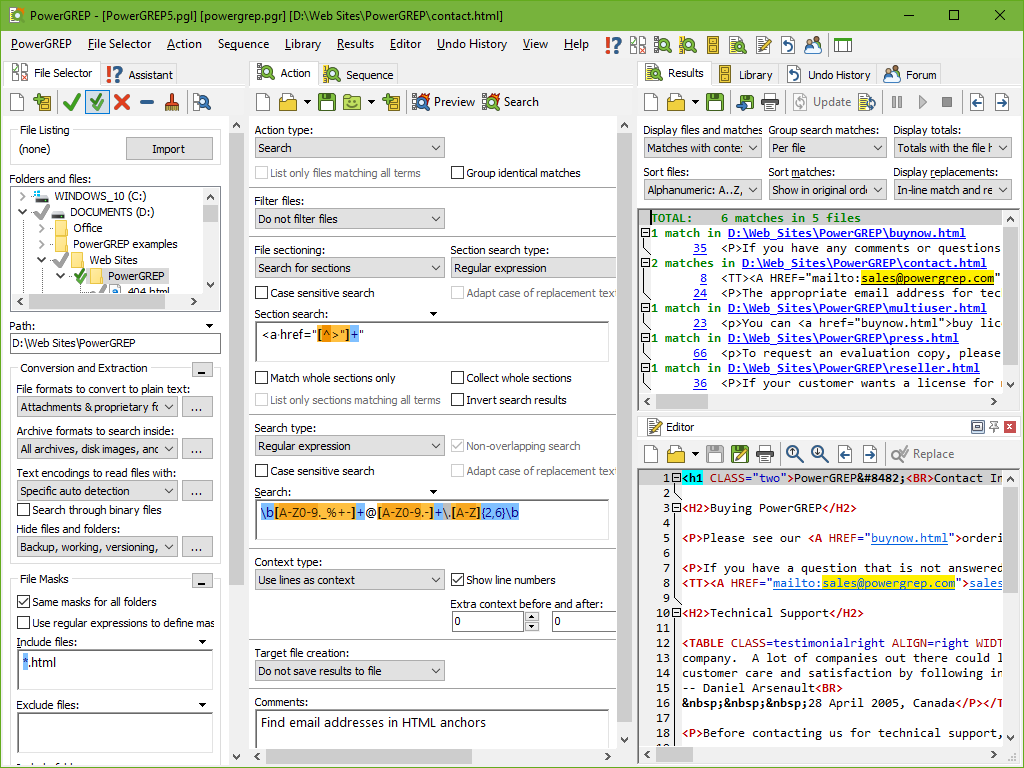 PowerGREP is a powerful grep tool that can be used by anyone to quickly search for a piece of information through files and folders on a computer. These may include the following; software source code, letters and correspondence, server or system logs, reference texts, historic archives, and many more. PowerGREP allows you carry out your search even if you do not have knowledge of what precisely you are looking for. When you are faced with a situation where you simply did not know in advance, PowerGREP’s ‘rich Perl-compatible regular expression support’ allows you search for virtually anything. All you need is to specify what you want in any form, and let it find the actual text matching that form; it is that simple. PowerGREP is a powerful grep tool that can be used by anyone to quickly search for a piece of information through files and folders on a computer. These may include the following; software source code, letters and correspondence, server or system logs, reference texts, historic archives, and many more. PowerGREP allows you carry out your search even if you do not have knowledge of what precisely you are looking for. When you are faced with a situation where you simply did not know in advance, PowerGREP’s ‘rich Perl-compatible regular expression support’ allows you search for virtually anything. All you need is to specify what you want in any form, and let it find the actual text matching that form; it is that simple.
This new version of PowerGREP comes with a lot of changes and additions that include the following: the rich text is no longer placed on the clipboard for selections larger than 1Mb; layout configuration now lists printer fonts as soon as it is activated from the print preview and “allow bitmapped fonts” is turned on; and a few others.
However, the price may be a bit of a problem for users; the features and benefits notwithstanding. At $159.00, a lot of users may have a problem downloading it for the first time.
Want to check it out? Visit Powergrep.
Posted in Main | 1 Comment »
Tuesday, March 29th, 2011
 CrosswordJet is a tool for designing crossword grid and automatic construction of words and clues. The application is an all-in-one solution for professional crossword constructors and publishers. CrossswordJet is also the ultimate solution for professional crossword constructors, publishers; and is highly useful for lovers of crossword. It comes with more than 1500 fords/clues for teachers, friends, and linguists. The program is intuitive, and easy to use. CrosswordJet is a tool for designing crossword grid and automatic construction of words and clues. The application is an all-in-one solution for professional crossword constructors and publishers. CrossswordJet is also the ultimate solution for professional crossword constructors, publishers; and is highly useful for lovers of crossword. It comes with more than 1500 fords/clues for teachers, friends, and linguists. The program is intuitive, and easy to use.
Some of the key things you can do with CrosswordJet include the following: create crossword grids up to 40 x 40 cells; insert secrets into the grid and make crossword solving funny and full of fun and surprises; release your fantasy and design various non-rectangular shapes; add your own words, exclude unwanted automatically generated words and edit default clue; let the automat do the job by means of a diligent algorithm and a large structured dictionary of word/clue pairs; print crossword or export it to files or clipboard; at any stage open existing crossword or save changes to a file; adjust crossword content generation parameters such as difficulty, shuffle, prediction, and many more; proceed in stages: design, verify, fine-tune, enjoy your crossword, and many more.
CrosswordJet is a shareware program, and is available for $69.00 per download. However, users can download a 30 days trail version before actual download is made.
Want to check it out? Visit Crosswordjet.
Posted in Main | No Comments »
Tuesday, March 29th, 2011
 MPEG Streamclip is a powerful freeware video converter that includes a player and an editor. MPEG Streamclip for Windows can play different kinds of movie files. It can convert MPEG files between muxed/demuxed formats for authoring; MPEG Streamclip for Windows can encode movies to many formats, including iPod; it can cut, trim and join movies. You can also download videos from YouTube and Google by simply entering the page URL. MPEG Streamclip is a powerful freeware video converter that includes a player and an editor. MPEG Streamclip for Windows can play different kinds of movie files. It can convert MPEG files between muxed/demuxed formats for authoring; MPEG Streamclip for Windows can encode movies to many formats, including iPod; it can cut, trim and join movies. You can also download videos from YouTube and Google by simply entering the page URL.
MPEG Streamclip is a converter for QuickTime files, MPEG-1/2/4 files and transport streams. It provides high-quality conversion of movies and MPEGs into several useful formats; and is also compatible with most editing applications and DVD authoring tools. MPEG Streamclip requires Windows XP or Vista or Windows 7; you may also have to download and install QuickTime on your system to enjoy this program. Even if you already have Apple QuickTime on your system, you may have to replace it with QuickTime alternative.
Some of the features in this version include; convert MPEG-2 transport streams into muxed MPEG-2 files, for immediate burning, it can handle files that are larger than 4GB (split into different segments), file preview is also possible with this version of MPEG Streamclip, and many more.
MPEG Streamclip for Windows is a freeware program with some unique features. It is not a bad program; though, it is still in the Beta stage.
Want to check it out? Visit Squared5.
Posted in Main | No Comments »
|
|
|




