Archive for the 'Main' Category
Wednesday, May 19th, 2010
 OpenOffice.org for Windows 3.2.1 RC is an open source program from Sun Microsystems technology. The program works with different kinds of platforms, providing access to all functionality and data via open-component based APIs and XML-based format. OpenOffice.org for Windows 3.2.1 RC is an open source program from Sun Microsystems technology. The program works with different kinds of platforms, providing access to all functionality and data via open-component based APIs and XML-based format.
I do have some little problems with this program, especially in terms of the functionality and calculator. The Calculator functions are a bit too weak especially in terms of using the formulae part of it. When you of course compare this side by side with Excel produced by Microsoft, you can’t, but express displeasure. Excel is more compact in this area than OpenOffice.org. That might just be all in terms of what I have some problems with.
The developers really took their time while working on this program. At least it took nothing less than twenty years to have OpenOffice.org for Windows 3 to get to this stage. The good thing about the OpenOffice.org software is that it is not difficult for a user to get adjusted to using it. Anybody who is used to Microsoft Office should not have any problem using this program.
Anyone who wants to have a shot at this can have it downloaded for free since it is an open source program. There is no limitation for those who are interested in downloading it for their personal or office use.
You can check it out at OpenOffice.org
Posted in Main | No Comments »
Wednesday, May 19th, 2010
 Operating system, system files, and installed programs should really be stored separately from important files and back-up data to keep it safe in case your computer ever becomes infected by a computer virus or your system files get corrupted. That’s the reason why it’s recommended you partition your hard drive; to separate those important files and documents from system files so that if you need to format the drive that contains the operating system there’s no need to worry about losing those important files. However, partitioning your hard drive is a cumbersome task especially if you’re not cautious in partitioning and managing your hard drive. If you’re not that confident on managing your drive, you don’t have to worry as Partition Assistant Home Edition will do the job for you. Operating system, system files, and installed programs should really be stored separately from important files and back-up data to keep it safe in case your computer ever becomes infected by a computer virus or your system files get corrupted. That’s the reason why it’s recommended you partition your hard drive; to separate those important files and documents from system files so that if you need to format the drive that contains the operating system there’s no need to worry about losing those important files. However, partitioning your hard drive is a cumbersome task especially if you’re not cautious in partitioning and managing your hard drive. If you’re not that confident on managing your drive, you don’t have to worry as Partition Assistant Home Edition will do the job for you.
Disk partitioning and managing is what Partition Assistant does best. It offers lots of features when it comes to partitioning. Its features are divided into 3 groups; first is the basic partitioning, second is the advanced partitioning, third is the additional features. Partition Assistant Home Edition offers fundamental partitioning tasks like create, edit, and delete partition, converting partition’s file system from FAT32 to NTFS, changing drive letters, hide and unhide partitions for safety and other basic partitioning tasks.
Advanced Partitioning tasks also can be performed; Advanced partitioning includes resizing partition to increase disk space. This management task is very important especially for partitions containing the system files to accommodate for programs and applications. Other tasks include merging many partitions to create a larger partition, shrinking partition size, transferring partition to other location, and repartitioning your current partition without thinking of data loss. But before performing advanced features, you must back-up your files first just to make sure in case advanced partitioning failed.
Additional features include support for multiple file formats (NTFS, FAT32), support for multiple hard drive technologies (IDE, SATA) and other external storage (USB, FireWire), support for RAID, and support for large hard drive capacity and number of disks (32).
Though Partition Assistant offers drag and drop functionalities, the user interface in general is not user friendly. Some functionality is not that easy to find, instructions are not clear. But a help file is provided for FAQs and definitions of the tasks offered. Read instructions carefully to understand everything about partitioning.
Partition Assistant Home Edition is a freeware product from Extend-partition
Posted in Main, Utilities | No Comments »
Tuesday, May 18th, 2010
 Avast! Free Antivirus 5.0 is a perfect antivirus for people who frequently send out e-mails or visit popular websites. it is a new package of applications that has the main responsibility to protect computers from possible virus attack or other malware threats. When used correctly with the combination of other relevant programs like data backup utilities, it really reduces the risk of a computer system attack. Avast! Free Antivirus 5.0 is a perfect antivirus for people who frequently send out e-mails or visit popular websites. it is a new package of applications that has the main responsibility to protect computers from possible virus attack or other malware threats. When used correctly with the combination of other relevant programs like data backup utilities, it really reduces the risk of a computer system attack.
Avast antivirus 5.0 contains numerous features that is synonymous modern day antivirus program. Such features include anti-spyware technology, as well as anti-rootkit and strong self-protection capabilities, with a more advanced scanning detection ability that is faster then it used to be. Avast! Antivirus 5.0 comes with real-time Shields that have the capacity to continuously monitor e-mail; internet connections; check computer files as frequently as required.
Some of the key features of Avast! Antivirus 5.0 are; Antivirus and anti-spyware engine (provides reliable protection against viruses, spyware and other forms of malicious software); Code emulator; Heuristics engine; Boot-time scanner; Behavior Shield (Monitors activity on your computer using a number of sensors and reports or blocks any suspicious behavior); Smart virus definition updates and Real-time graphic scanning reports.
The only bad-side of avast! Antivirus 5.0 is the memory usage which unfortunately is 10MB.
Want to check it out? Visit Avast.com
Posted in Main | 2 Comments »
Tuesday, May 18th, 2010
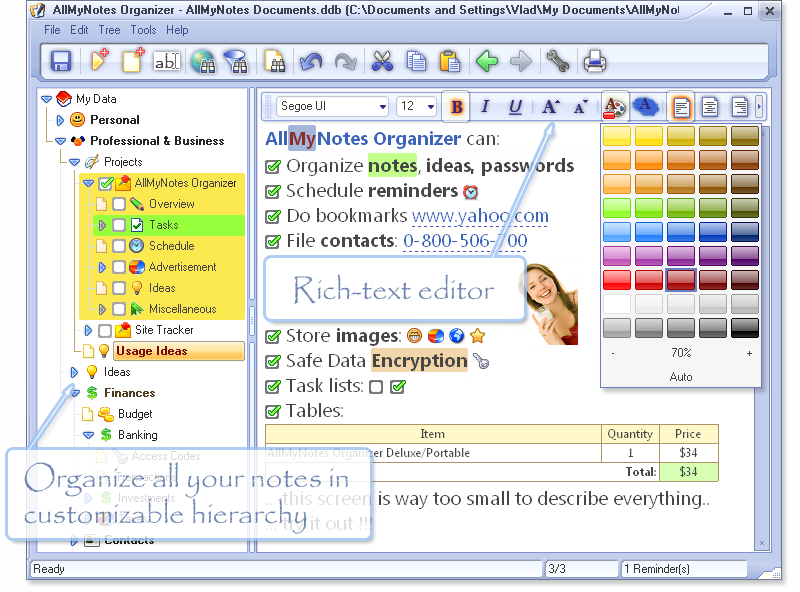 Storing important data onto your computer is the simplest and most organized way of dealing with those precious files of yours. Diaries and journals, school, business and medical records are too important to be lost or misplaced. Moreover, saving data in single files could be a burden especially if there’s plenty of them, or typing daily journals in separate documents would take you an eternity to organize them. Also organizing such huge number of separated documents is a troublesome task. Well, in reality there’s no reason in doing such cumbersome things when you could achieve these things in just a single program. Storing important data onto your computer is the simplest and most organized way of dealing with those precious files of yours. Diaries and journals, school, business and medical records are too important to be lost or misplaced. Moreover, saving data in single files could be a burden especially if there’s plenty of them, or typing daily journals in separate documents would take you an eternity to organize them. Also organizing such huge number of separated documents is a troublesome task. Well, in reality there’s no reason in doing such cumbersome things when you could achieve these things in just a single program.
Organizing such important data will be very easy using AllMyNotes Organizer. The program has rich features for creating and organizing notes from a wide variety of fields; business, medical, finance and personal. If you’re concerned about privacy, using this program, they can be password protected using a 1800-bit cipher! The good thing about this program is that it supports multiple users so each user can create their own journals, keep track of their medical records and can even store their favorite websites and portals. There are more tools available in in it than you could imagine. You can even store contact information and manage financial stuff like your bank account balance. Teachers can create their lesson plans, quizzes and exams. Searching for notes within the program is very powerful. You only search a text or a word and AllMyNotes Organizer will display all contents containing such phrase or text. To put it simply, it organized everything you have, either the most personal and confidential or those fun things that interests you. It is just a complete organizer package.
Interface wise it has a user friendly interface. Tasks are organized in hierarchical structure for easy access to different tasks. Cool image for icons are being used for easy identification of what does what. Though fonts used are quite small but it’s enough to be read. Performance wise installing and running the program neither slows down your computer nor interferes with the other programs being installed. The program only consumes about 11 MB disk space when installed and doesn’t hog memory resources. AllMyNotes Organizer is a good piece of software for those users who don’t have state of the art hardware specifications.
AllMyNotes Organizer comes in both free and deluxe versions, available for download from Vladonai
Posted in Main | No Comments »
Monday, May 17th, 2010
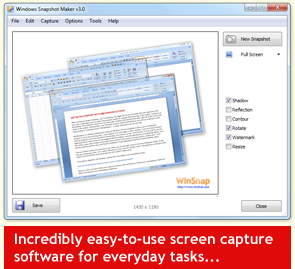 WinSnap is a very potable enhancement utility that is used for taking screenshots and editing them. It provides simply smooth workflow and, most importantly, it accurately captures alpha blending and consequently produces true alpha blended PNG files without necessarily having any background, this is definitely contrary to most current freeware. WinSnap is a very potable enhancement utility that is used for taking screenshots and editing them. It provides simply smooth workflow and, most importantly, it accurately captures alpha blending and consequently produces true alpha blended PNG files without necessarily having any background, this is definitely contrary to most current freeware.
It can effortlessly capture windows that are of non-rectangular form and offers you the option of picking the background of your choice. WinSnap has the capacity to automatically perform simple but complex canvas transformations and coloring effects. It provides professional smoothing shadows in Photoshop style and so much more. Furthermore, WinSnap supports different variety of image formats and provides advanced auto-save options for would be users.
One other strong point of WinSnap when it comes to its file size is the obvious fact that it runs with only the EXE file, this makes it very easy for it to snap difficult transparent objects, and the simple GUI.
The disadvantage of WinSnap becomes noticeable when one tries to watermark, as it renders screenshots only marginally useful, thereby contradicting the developer’s assertion. Another weak point is fact that print function is either a Ctrl-P or it is mouse to File-Print-Print.
Want to check it out? Visit Winsnap
Posted in Main | No Comments »
Saturday, May 15th, 2010
 What makes a program thick and widely acceptable to majority of users on the internet? Though people’s answer may vary, but there are certainly going to be a general view. Whether a program is freeware, opensource, or shareware is not what matters these days. People want programs that can add values to their systems. What makes a program thick and widely acceptable to majority of users on the internet? Though people’s answer may vary, but there are certainly going to be a general view. Whether a program is freeware, opensource, or shareware is not what matters these days. People want programs that can add values to their systems.
PostgreSQL for Windows 9.0 Beta 1 may still be a Beta application, but it certainly has prospect of doing well in the future. It is a relational database application, and has been around for a while. The program runs on major operating systems, and is scalable in terms of the quantity of data it can manage, as well as the number of concurrent users it can contain.
PostgreSQL for Windows 9.0 Beta 1 has some new additions in terms of features and applications. Some of these include: support for Python 3 in PL/python and a lot of PL/ Perl improvement; anonymous procedure blocks with the DO statement; new Binary application and a few others.
In 2008, PostgreSQL was named as the product of the year by Developer.com; that speaks volume of what this program is all about. I think the publishers have done a great job and they should just keep it up.
Want to check it out? Visit PostgreSQL.org
Posted in Main | No Comments »
Friday, May 14th, 2010
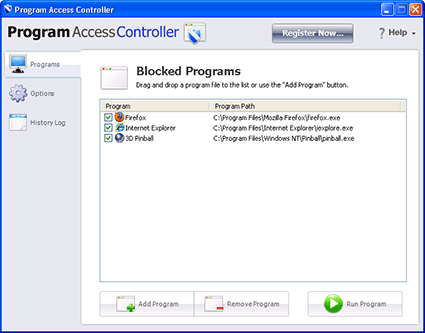 Chances are, you are not the only one using your desktop or laptop computer at home. Every user of your computer has their own programs they like; games, chat, and other applications which might have the potential to compromise computer security. Being the power user owning the administration rights, this program gives you the power to control what applications are allowed to run on your computer. If you’re a parent, you can disallow your children from installing games. If you’re a company manager, you can disallow employees from installing programs that are not work related. You can do all of these things by using Program Access Controller. Chances are, you are not the only one using your desktop or laptop computer at home. Every user of your computer has their own programs they like; games, chat, and other applications which might have the potential to compromise computer security. Being the power user owning the administration rights, this program gives you the power to control what applications are allowed to run on your computer. If you’re a parent, you can disallow your children from installing games. If you’re a company manager, you can disallow employees from installing programs that are not work related. You can do all of these things by using Program Access Controller.
Blocking programs from being installed from your computer is the forte of Program Access Controller . The program is very useful in restricting specific applications from being installed in a particular computer. When you first run the program, you’re required to create a password to lock the computer from installing unwanted programs. A user can only install or access a program if he or she knows the password entered by the administrator.
Program Access Controller is perfect for parents for disallowing their children from playing computer games, watching movies or chatting during school days when they should be doing homework first for example. The program is also very useful for companies where employees need to use computer in their jobs. By prohibiting installation of unwanted programs, the manager ensures that employees focus on their work and not on other non productive matters. The program provides a friendly user interface for users to perform needed tasks in a short span of time.
Program Access Controller is highly recommended for users who need to prohibit installing unwanted programs and access to programs that only you have the rights to use. The program runs smoothly on Windows 2000 or later and doesn’t require much in the way of hardware resources.
Check it out at Gearboxcomputers.com
Posted in Main, Security, Utilities | No Comments »
Friday, May 14th, 2010
 A good and well-packaged program from start to finish; DownloadStudio 6.0.3.0 is an ideal download accelerator for your all your download. The program is very fast in terms of downloading different kinds of files anywhere on the internet. It contains more than twelve different specialized downloading tools, which include: file downloader; file range downloader; video downloader; website downloader; streaming media downloader; blog and podcast downloader; audio and video recorder; URL Sniffer among others. A good and well-packaged program from start to finish; DownloadStudio 6.0.3.0 is an ideal download accelerator for your all your download. The program is very fast in terms of downloading different kinds of files anywhere on the internet. It contains more than twelve different specialized downloading tools, which include: file downloader; file range downloader; video downloader; website downloader; streaming media downloader; blog and podcast downloader; audio and video recorder; URL Sniffer among others.
It is one of the easiest download tools around, and users are unlikely to have any difficulty in trying to get used to it. DownloadStudio is an easy-to-use application, and lets you download different types of your favourite contents from the web. Such contents include: flash; podcast; blogs documents; complete websites; RSS feeds and videos.
The publishers have been able to introduce some new changes into this version, and users can even have a richer experience than before. Some of these new changes are: %30-%50 faster downloading algorithm; addition of Download high definition video from YouTube, Metacafe and more; support for Mezzmo DLNA media server; automatic video and audio converter; etc.
DownloadStudio 6.0.3.0 is not a shareware; and users can have a feel of it for 15 days before they buy it.
Want to check it out? Visit Downloadstudio
Posted in Main | No Comments »
Friday, May 14th, 2010
 Your hard drive is an important hardware component of your computer system. But as more and more programs and software are installed in your hard drive, your disk becomes prone to errors. Other factors that contribute to hard disk errors include frequent deletion of files, uninstalling, and installing malicious programs. Your hard drive is an important hardware component of your computer system. But as more and more programs and software are installed in your hard drive, your disk becomes prone to errors. Other factors that contribute to hard disk errors include frequent deletion of files, uninstalling, and installing malicious programs.
Hard Drive containing errors might affect the overall performance of your computer, or worse may damage your hard drive. If you want to diagnose your disk for possible errors, CheckDrive software is the program that you need.
CheckDrive is a utility program for diagnosing and identifying errors from your hard drive.The good thing about CheckDrive is that it is freeware and available for free download with a file size of 7.64 MB, so you can have it with less than 1 minute without spending a cent for a license. Installation of CheckDrive requires little space from your hard drive and does not hog system resources particularly your computer RAM when running the program.
The main functionality of CheckDrive is to check your hard drive for possible errors and then try its very best in attempting to correct those errors. However, it is important to note that there are errors that are impossible to correct so there are limits of the performance of this program. The programs works like the check disk command in Windows, but CheckDrive provides a much better user interface than check disk. Aside from checking and correcting errors, It also displays information of your hard drive such as its model and serial number, and displays fragmentation details of your hard drive. It also allows you to defragment your hard disk to increase performance.
CheckDrive is useful for checking and correcting errors from your hard drive because it’s free to use, needs minimal hardware, and does not affect performance of your computer.
You can get the latest version from Abelssoft.net.
Posted in Main | No Comments »
Wednesday, May 12th, 2010
 The past few years have witnessed one of the most intensive periods of development in Slackware. This has led to the release of Slackware Linux 13.1. Slackware comes with it a lot of changes from previous version, which also includes a completely reworked collection of X packages. What this means is that a configuration file for X is no longer needed in most cases. The past few years have witnessed one of the most intensive periods of development in Slackware. This has led to the release of Slackware Linux 13.1. Slackware comes with it a lot of changes from previous version, which also includes a completely reworked collection of X packages. What this means is that a configuration file for X is no longer needed in most cases.
Slackware Linux can best be described as a complete 32-bit multitasking system. It is modeled around the GNU C Library version 2.3.4 (libc6) and the 2.4 Linux kernel series. It also comes with a menu-driven package system and; extensive online documentation. A complete installation provides a user with the X Window System; C/C++ development environments; news server; networking utilities; mail server; Perl; web server; GNU Image Manipulation Program; FTP server; Netscape Communicator, and so much more.
It is designed to run on 486 systems even as far as the latest x86 machines. Though it uses –mcpu=i686 optimization to provide users with the opportunity to experience its best performance on i686-class machines like the P3, P4, and Duron/Athlon.
The major setback of Slackware Linux 13.1 is the complexity of installation. It would have come highly rated had it not been for the complexity of installing it.
Want to check it out? Visit Slackware.com
Posted in Main | No Comments »
|
|
|




