Archive for the 'Main' Category
Thursday, June 26th, 2014
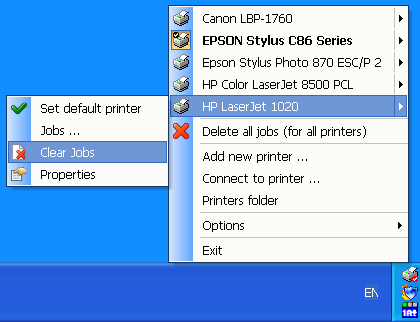 Did you know you don’t need to spend a lot of time trying to access the location of your printer on the system? For those with multiple printer on the system, one way to avoid wasting time when it comes to choosing or switching from one printer to another is by using Fast Printer Chooser. Did you know you don’t need to spend a lot of time trying to access the location of your printer on the system? For those with multiple printer on the system, one way to avoid wasting time when it comes to choosing or switching from one printer to another is by using Fast Printer Chooser.
What is the Fast Printer Chooser?
Fast Printer Chooser can be used to quickly and conveniently switch the active printer using a tray popup menu. The program can work with all printers installed in the system including local and network printers. You can not only change the active printer in a single mouse click, but also quickly cancel printing tasks for any printer.
There is a multitude of configuration options, which allows you to configure the program to your needs. Fast Printer Chooser will also be useful to inexperienced users, who will be able to switch between their printers more easily. If you often have to print your documents on different printers in the office, this program is for you! The tiny size of the program will not affect the performance of your system at all.
Does it have any downside?
Fast Printer Chooser has a 30 day trial limitation. If you decide to buy a license it would cost you $35 (for a single PC).
Want to check it out? Visit Al-soft.com.
Posted in Main | No Comments »
Thursday, June 26th, 2014
 Technology is improving every day, and the need for a more stable and easy to use applications like browser for example is becoming increasingly important. One browser that is very easy to use, and does not take up a lot of space on your system is SlimBrowser. Technology is improving every day, and the need for a more stable and easy to use applications like browser for example is becoming increasingly important. One browser that is very easy to use, and does not take up a lot of space on your system is SlimBrowser.
What is SlimBrowser Portable Version?
SlimBrowser is a fast and secure internet browser for Windows fully loaded with powerful features. It starts up quickly and opens web pages right in front of you with minimum delay. It is designed to let you browse the Internet carefree by guarding your personal information and protecting your privacy. SlimBrowser offers various functions and options so that you can go where you want and get whatever from you want from the Internet with as few clicks as possible and as little distraction as possible.
SlimBrowser has some nice and attractive features that make it slightly different from others. Some of these features include: easy integration with online virus scanners, securely manage passwords, safely erase all traces; very high download speed; lightning fast; does not use too much resources on your system; integrates with social media sites like twitter and Facebook; various number of skins available; and a few others.
Does it have any downsides?
SlimBrowser is a nice browser with no side effect.
Want to check it out? Visit SlimBrowser.net.
Posted in Main | No Comments »
Thursday, June 26th, 2014
 Did you know that every time you use the internet or visit a website your activities are being monitored? Websites use this to gather information about their visitors. However, you can erase your tracks as soon as you have finished using the internet with an easy-to-use program called Tracks Eraser. Did you know that every time you use the internet or visit a website your activities are being monitored? Websites use this to gather information about their visitors. However, you can erase your tracks as soon as you have finished using the internet with an easy-to-use program called Tracks Eraser.
Tracks Eraser Pro will protect you by cleaning up all the tracks of Internet activities on your computer. With only one click, Tracks Eraser allows you to erase the cache, cookies, history, typed URLs, autocomplete memory, index.dat from your browser, and temp folder, run history, search history, open/save history, recent documents, etc.
With its free plugins, you can easily erase the tracks of up to 50 popular applications, such as playlist of Realplayer, Mediaplayer, QuickTime, recent files of Office, Acrobat, WinZip, etc. The plugins are adding every week. Tracks Eraser Pro also has the Custom Item, which lets you to erase the file(s) and registry entry(s) that you want to erase.
The publisher has fixed a couple of issues with this program. Some updates or changes made to Tracks Eraser include the following: support for Internet Explorer 11 now available; Firefox 28 support; Google Chrome 33 support; and a few other tweaks.
Want to check it out? Visit Acesoft.net.
Posted in Main | No Comments »
Thursday, June 26th, 2014
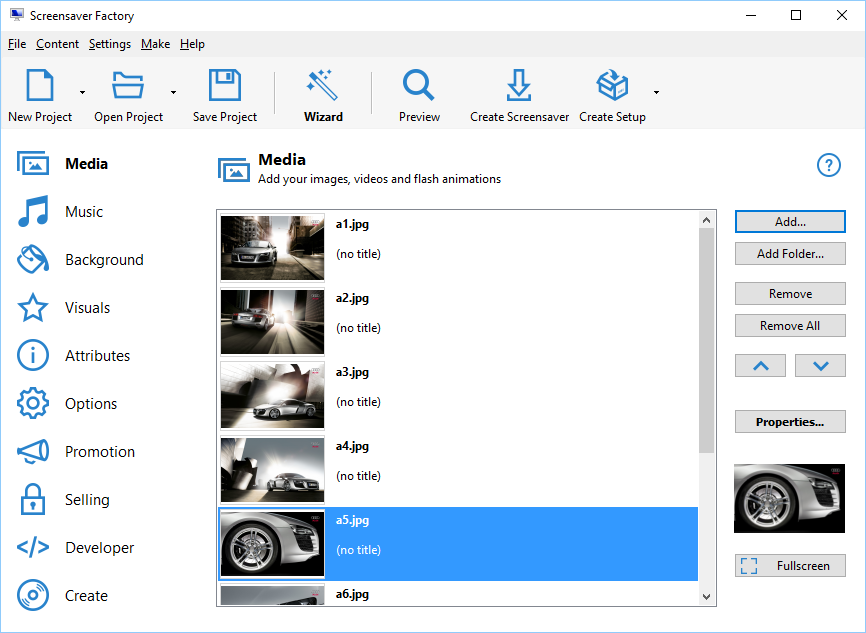 Did you know you can create tons of amazing screensavers for yourself? Did you also know that these screensavers are royalty-free and can be used for promotion and commercial distribution? That is what having an application like Screensaver Factory can help you to achieve. Did you know you can create tons of amazing screensavers for yourself? Did you also know that these screensavers are royalty-free and can be used for promotion and commercial distribution? That is what having an application like Screensaver Factory can help you to achieve.
What’s the deal about Screensaver Factory?
Create amazing screensavers for yourself, for promotion or unlimited royalty-free commercial distribution. Make screensavers from images, video and flash animation, add background music and smooth picture display and transition effects. You can even create clock, calendar and RSS screensavers. Screensaver Factory is very easy to use, and it enables you to make standalone self-installing screensaver files and CDs for easy setup and distribution.
You can make screensavers for sale using special features for shareware authors – registration keys (single and per-customer), functionality limitations (image count, trial period), customizable nag-screen, readme information file and license agreement. With Screensaver Factory you can start your very own screensaver business right now.
Version 6.6 already includes a number of changes and updates that include the following: improved flash support; improved video support; Windows 8.1 Support; and fixing of various bugs.
Like the most of the other ‘creative’ tools, Screensaver Factory is quite pricey. So if you want to create a fantastic masterpiece for your sleep-screen you should be ready to spend $39.95.
Want to check it out? Visit Blumentals.net.
Posted in Main | No Comments »
Wednesday, June 25th, 2014
 Did you know you can avoid being out bided on eBay? Of course, you can, but that is by downloading a program known as Myibidder. Find out more about what Myibidder can do for you by reading this review. Did you know you can avoid being out bided on eBay? Of course, you can, but that is by downloading a program known as Myibidder. Find out more about what Myibidder can do for you by reading this review.
You can use automatic eBay bid sniper to let it bid on your behalf on last seconds and win item you need at the price you want. You just set a maximum limit and myibay sniper tool will do the rest. You never pay more than your maximum, myibay will try to get it as low as possible. It supports Group bidding, eBay US, Canada, Australia, UK and many other eBay sites and different currencies.
With a couple of changes already made to this program, Mybidder is now one of the best snipers available. Issues recently fixed by the publishers include the following: fixed issue with prolonged idle connections; fixed issue with default snipe time, and update of internal certificate.
Does it have any downside?
Mybidder has a 30 day trial limitation. This version does not have support for Yahoo! Mail. It means that users may have to create another email address to use it.
Want to check it out? Visit: Myibidder.com.
Posted in Main | No Comments »
Wednesday, June 25th, 2014
 Having a platform or an opportunity to share your feelings can make a lot of difference for a lot of people. That is why a lot of chat applications are being downloaded daily by a lot of people. With a program like mIRC you can do just that with ease. Having a platform or an opportunity to share your feelings can make a lot of difference for a lot of people. That is why a lot of chat applications are being downloaded daily by a lot of people. With a program like mIRC you can do just that with ease.
What is mIRC?
mIRC is a full featured Internet Relay Chat client for Windows that can be used to communicate, share, play or work with others on IRC networks around the world, either in multi-user group conferences or in one-to-one private discussions.
mIRC has a clean, practical interface that is highly configurable and supports features such as buddy lists, file transfers, multi-server connections, SSL encryption, proxy support, UTF-8 display, customizable sounds, spoken messages, tray notifications, message logging, and more. It also has a powerful scripting language that can be used both to automate mIRC and to create applications that perform a wide range of functions from network communications to playing games.
One of the best parts of this application is that it stacks windows in a tight, overlapping layout. This ensures that you do not have any problem locating a specific page when you need it. Every window has its name across the top, and that is clearly visible whether they are stacked or not.
Does it have any downside?
mIRC interface is not that attractive especially for starters.
Want to check it out? Visit: mIRC.com.
Posted in Main | No Comments »
Monday, June 23rd, 2014
 Do you need a multi-featured program with easy to use features? If you have answered yes to that question, then what you need is XYplorer. Find out more what the software is all about by reading the review below. Do you need a multi-featured program with easy to use features? If you have answered yes to that question, then what you need is XYplorer. Find out more what the software is all about by reading the review below.
What the XYplorer is?
XYplorer is a tabbed file manager for Windows. It features a powerful file search, a versatile preview, a highly customizable interface, optional dual pane, and a large array of unique ways to efficiently automate frequently recurring tasks. It’s fast and light, it’s innovative, and it’s portable.
It is a portable program that requires no installation or changes to your system or registry. You can take it with you and start it from a USB stick, along with your personal configuration. XYplorer is packed with a lot of features that include the following: Dual Breadcrumb Bars show the path of each pane that lets you navigate the entire file system; Queued File Operations with background processing; Custom Copy, an alternative copy method featuring verification, safe overwrite, detailed reporting and logging, and more; Branch View lets you see the contents of all subfolders of a folder in one list; and many more.
Does it have any downside?
XYplorer has a 30 day trial limitation and a hefty chunk of a pricetag – $79.95 (but at the moment you can grab a copy with a 40% discount).
Want to check it out? Visit: http://www.xyplorer.com/index.php
Posted in Main | No Comments »
Sunday, June 22nd, 2014
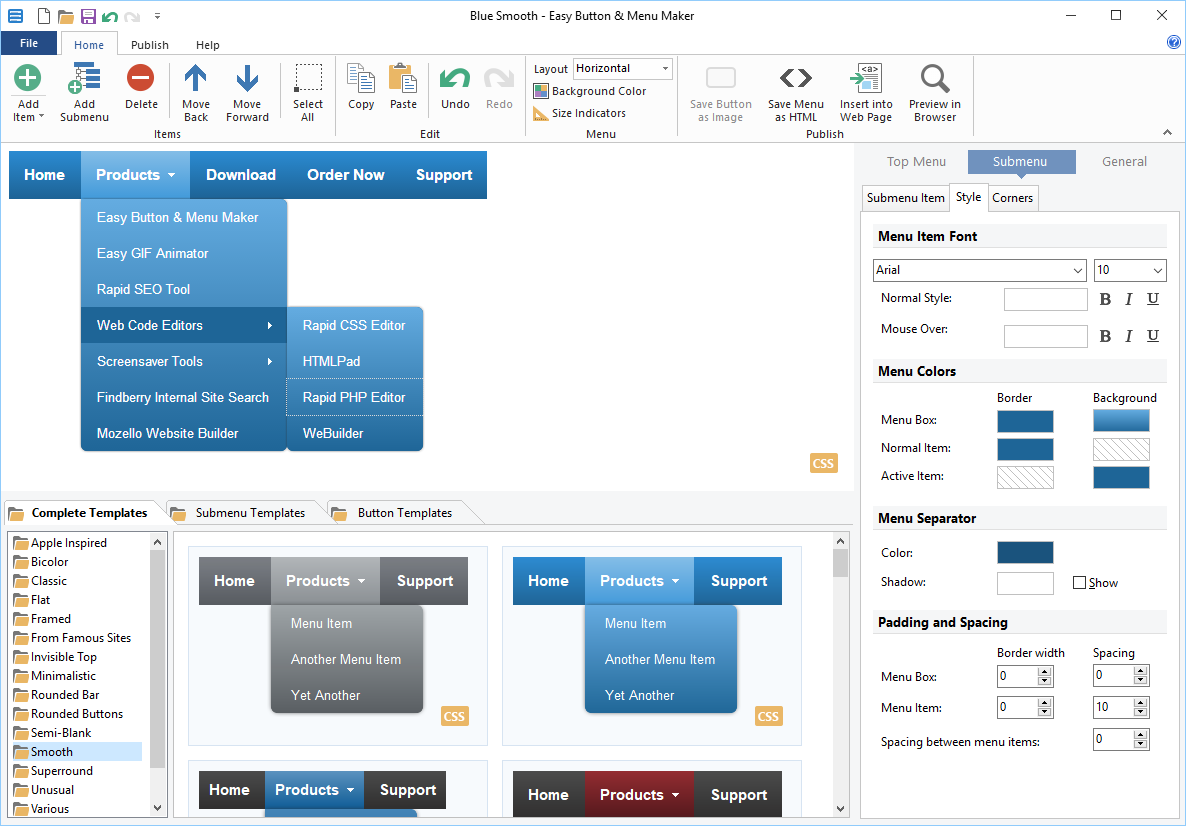 Making a website more attractive and beautiful is always the dream and desire of most people. This is however, achievable with Easy Button & Menu Maker. With improved user interface and improved performance, this easy to use program is now more stable than it used to be in previous versions. Making a website more attractive and beautiful is always the dream and desire of most people. This is however, achievable with Easy Button & Menu Maker. With improved user interface and improved performance, this easy to use program is now more stable than it used to be in previous versions.
What’s Easy Button & Menu Maker all about?
Easy Button & Menu Maker lets you easily create sophisticated buttons and beautiful dynamic menus for your website. More than 200 elegant design templates are available, including so called Glass and Vista styles. Unlike most other menu tools, Easy Button & Menu Maker provides direct WYSIWYG visual menu editor, so it is much easier and pleasant to work with. Easy Button & Menu Maker gives you two solid tools – menu maker and button maker in one package. Now creates pure CSS menu code.
Easy Button & Menu Maker has a lot of features that set it ahead of several others. Some of these features include the following: direct visual menu and button editor is easy and pleasant to work with; supports all modern and all popular but old browsers; create menus that work on tablets and smartphones (new feature); and several others.
Does it have any downsides?
It requires a license agreement, in other words $29.95 out of your pocket. Free (trial) version would only give you a taste, while never helping to complete your task.
More info and download can be found at EasyMenuMaker.com.
Posted in Main | No Comments »
Tuesday, June 10th, 2014
 Do you want a program that can help you create a new document from scratch? Do you also need an application that supports a lot of features including supports for PDF and PS as output formats? Then maybe you should check out Scribus. Do you want a program that can help you create a new document from scratch? Do you also need an application that supports a lot of features including supports for PDF and PS as output formats? Then maybe you should check out Scribus.
What is the big deal about Scribus?
Scribus is an open-source program that brings award-winning professional page layout to Linux/Unix, MacOS X, OS/2 and Windows desktops with a combination of “press-ready” output and new approaches to page layout. Underneath the modern and user friendly interface, Scribus supports professional publishing features, such as CMYK color, separations, ICC color management and versatile PDF creation.
Scribus is a comprehensive application with a user-friendly interface, designed for desktop publishing (DTP), which supports PDF and PS (PostScript) as output formats. It caters to professional users.
With Scribus you can create a new document from scratch or template, as Scribus supports several options when it comes to brochures, regular and business cards, newsletters, packaging, PDF presentations, and posters. Starting a new project from scratch implies specifying the document layout (e.g. single page, double-sided), margins, bleeds, size, orientation, first page, total pages, default measurement unit, and text frame.
Want to check it out? Visit Scribus.net.
Posted in Main | No Comments »
Tuesday, June 10th, 2014
 Want to carry your music with you anywhere you go and listen to it from the cloud on your computer, iPhone, iPod Touch, Android or Windows Phone? Are you also thinking of how to manage your music content between your devices? Then what you need is Style Jukebox. Want to carry your music with you anywhere you go and listen to it from the cloud on your computer, iPhone, iPod Touch, Android or Windows Phone? Are you also thinking of how to manage your music content between your devices? Then what you need is Style Jukebox.
What is the big deal about Jukebox?
Style Jukebox is an easy to use, free app that lets you take your entire music collection and listen to it from the Cloud on your computer, iPhone / iPod Touch, Android or Windows Phone. Never worry about managing your music content between your devices again. You can stream or download your music playlists from the Cloud or play the songs you already have on your device. This new version comes with a couple of bug fixes and performance improvements.
You can upload up to 1,000 songs for free. All your music and playlist are all synced in the Cloud and instantly accessible for download or streaming from all your computers and mobile devices. You can your music playlists over 2G+/3G/Wi-Fi. Pin songs on your phone for offline playback or reduce data plan usage.
Does it have any downside?
A lot of bug fixes have been made, which makes the program more stable than it used to be.
Premium features of this handy mobile app would cost you $0,99 a month or $24,99 a year.
Want to check it out? Visit Get-Jukebox.
Posted in Main | No Comments »
|
|
|




