Archive for the 'Main' Category
Friday, November 29th, 2013
 Most of the time we receive some emails that fall far short of our expectations. Spam emails have become serious issues for most people, and some email accounts with spam filter features have not sufficiently dealt with the situation. That is why a program like Spamihilator is worth a look. Most of the time we receive some emails that fall far short of our expectations. Spam emails have become serious issues for most people, and some email accounts with spam filter features have not sufficiently dealt with the situation. That is why a program like Spamihilator is worth a look.
What’s Spamihilator?
Spamihilator examines your Emails while downloading from the server and deletes unwanted advertising messages. It works between your Email-Client-Software and the Internet. Every time you receive messages, they will be checked. Useless spam mails will be filtered out. This process works completely in the background. It runs with almost every Email-Software such as Outlook 2000/XP/Express, Eudora, Pegasus Mail, Phoenix Mail, Opera, Mozilla, Netscape, etc.
The software works between your email client and the Internet in order to examine every message that comes in. Useless and unsolicited spam mails will be filtered out. In the background, the program is able to work to snuff life out of any unwanted email. Spamihilator uses a number of different filters in order to achieve the highest spam recognition rate possible. The program is highly configurable and can be extended by plugins.
Some of the key features of Spamihilator include the following; able to filter important mails from spam, saves all recognized spam mail to the Spamihilator recycle bin, able to process the widely used mail protocols POP3 and IMAP, etc.
Nice tool that helps you quite a bit in a fight against spam messages and emails.
Want to check it out? Visit Spamihilator.
Posted in Main | No Comments »
Friday, November 29th, 2013
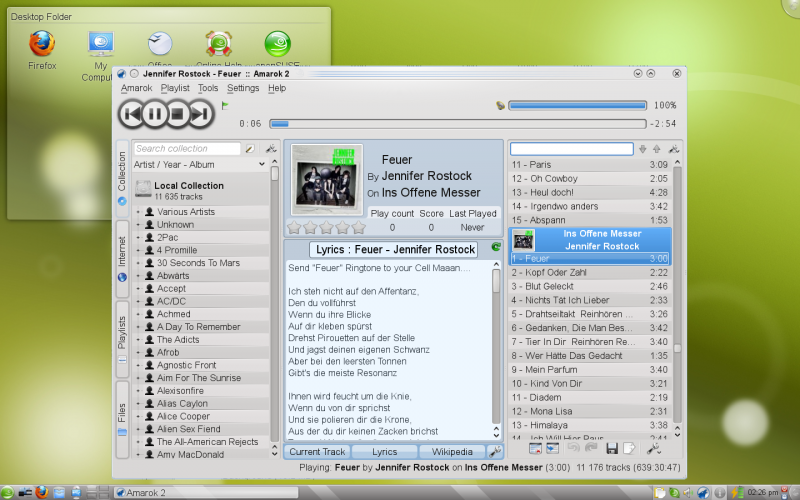 Do you want a high quality skin especially to give an original look to your favourite browser? Then you should read this review because it is going to tell you more about an application known as OpenSUSE. Do you want a high quality skin especially to give an original look to your favourite browser? Then you should read this review because it is going to tell you more about an application known as OpenSUSE.
What’s openSUSE?
OpenSUSE provides everything today’s Linux user needs for home computing and computing-on-the-go. This product includes a Linux operating system plus dozens of essential integrated tools that showcase the latest that open source has to offer.
It is aimed towards users and developers working on the desktop or server. It is great for beginners, experienced users and ultra geeks alike, in short, it is perfect for everybody! The latest release features new and improved versions of all useful server and desktop applications. OpenSUSE 13.1 comes with more than 1,000 open source applications.
Some of the features of OpenSUSE include the following: it allows you to play your music, podcasts, and videos with Banshee and Amarok; openSUSE works great on laptops and on personal handheld devices; openSUSE products are backed with software updates for 18 months; openSUSE products allow developers to retrieve the exact source code of each distributed binary package; and many more.
Want to check it out? Visit OpensUse.org.
Posted in Main | No Comments »
Friday, November 29th, 2013
 There are not too many applications that can make data processing very easy these days; but of course, it doesn’t mean you won’t find one if you are lucky enough. Well, GMDH happens to be one program that could be of great help in terms of data processing and predictive analysis. Read more as we review what this program is actually all about, and what it has to offer in terms of features. There are not too many applications that can make data processing very easy these days; but of course, it doesn’t mean you won’t find one if you are lucky enough. Well, GMDH happens to be one program that could be of great help in terms of data processing and predictive analysis. Read more as we review what this program is actually all about, and what it has to offer in terms of features.
What’s GMDH Shell?
GMDH Shell is an advanced but easy to use tool for predictive analytics and data mining. The software makes processing of data much easier in many aspects. It is able to automatically detect usable data inside a file, transform data according to a problem type, drop irrelevant inputs and, finally, construct a set of predictive models at the base of optimal complexity detection and self-organization principals.
This version of GMDH has been updated to include the following: [new] “File > revert to saved” in the menu allows dropping all unsaved changes to the current project; [new] The label “Model fit” replaces “Learning”; [improved] Less requirements for automatic generation of future timestamps; [improved] Now GS suggests to save the current project before loading a new one; [improved] “Model fit” replaces “Learning” in the titles; and many more.
Want to check it out? Visit Gmdhshell.
Posted in Main | No Comments »
Friday, November 29th, 2013
 Are you looking for a video editing and capturing program that costs almost nothing, and is also easy to understand? I suggest you go through this review to read what a program like SmartPixel has in stock for you. Are you looking for a video editing and capturing program that costs almost nothing, and is also easy to understand? I suggest you go through this review to read what a program like SmartPixel has in stock for you.
What’s SmartPixel?
SmartPixel video editor is a video capture software and video editing software for windows; it consists of two modules, SmartPixel Camera and SmartPixel Producer. The SmartPixel Camera has seamless integrated D3D recording mode inside which compatible with all the PC games video recording. With new patented technology the video editor could easily record and edit videos with high quality up to 1080P HD.
SmartPixel video editor has a PIP mode that allows user live comment via webcam and microphone during screen capturing. Besides, it also capture screen and webcam image such as game screenshots, desktop screenshots, etc. SmartPixel also brings you extreme easy and fun screen capture video recording experience but cost less CPU consumption and lower disk usage. Thus it is being seen as an ideal webcam recording tool and game recording tool. Also the publisher has fixed a bug where some users stuck at ‘accurate sampling 0%’ while exporting.
SmartPixel video editor is a shareware, and is only available for a limited time to users who wish to try it out.
Want to check it out? Visit SmartPixel.com.
Posted in Main | No Comments »
Thursday, November 28th, 2013
 Wise Reminder will provide you with your very own software assistant,it is designed specifically to notify you about your important events, tasks and appointments. It comes in useful in support of very busy people who require something that can help them organize their daily tasks easier, so they can improve their productivity and grow more effective with their work. Wise Reminder will provide you with your very own software assistant,it is designed specifically to notify you about your important events, tasks and appointments. It comes in useful in support of very busy people who require something that can help them organize their daily tasks easier, so they can improve their productivity and grow more effective with their work.
The theory which Wise Reminder is based upon is actually very simple. The application doesn’t deliver anything brand new to the table, however it will come in useful with regard to notifying users about day-to-day routines, making it simple for them to be able to manage a schedule.Wise Reminder has all the tasks classified within a couple of distinct groupings, specifically unfinished and completed, striving to help make the schedule much easier to manage. Together with its user-friendly user interface, this particular feature helps make it easy-to-use and suited for beginners.
Adding a completely new task is only a matter of a few clicks, as you merely have got to write a brief description of the task, set the time as well as the date and set up the repeating mode. All the actual active reminders are nicely shown inside the primary window, coupled with an accurate countdown timer for every single item.
The program operates silently in the system tray, with no interrupting your work. Whenever the time runs out for an entry, a popup window is shown, enabling you to disable the alarm as well as keep it in ‘snooze’ mode, which sets the program to remind you once more about it in a specific amount of minutes.
Despite the fact that it’s simple in its essence, Wise Reminder could be useful to people who may have a hectic schedule on a daily basis, making it possible for them to manage their tasks in a productive way. No matter whether it’s a daily activity, an anniversary, an errand as well as other events in your daily life, this application may help you ensure that you don’t forget about it.
Check it out at the homepage at WiseCleaner.com.
Posted in Main | No Comments »
Wednesday, November 27th, 2013
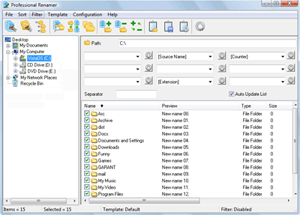 Are you looking for a professional renamer that has all the features to help you rename multiple files in one go? Then what you need is Professional Renamer because it has a lot of very nice features that cab be of real help to you. Are you looking for a professional renamer that has all the features to help you rename multiple files in one go? Then what you need is Professional Renamer because it has a lot of very nice features that cab be of real help to you.
What’s Professional Renamer?
Professional Renamer is a powerful tool to rename multiple filenames at once. It is designed to be very flexible and user friendly. Its features make it ideal for MP3 collectors, digital camera users, programmers, system administrators, or file collectors of any kind. Windows 7 users should make sure to run Professional Renamer with administrative rights. Otherwise, it will pop up several errors along the way.
Professional Renamer is a useful and powerful tool that can rename multiple files. Its user friendly and intuitive interface allows you to rename files easily. Unique visual templates system will helpfully assist you in renaming. All changes on new name immediately show in the file list.
As soon as you locate and select files, you can configure filters for the renaming process. You can edit the source name by removing symbols, finding and replacing text, as well as by changing the text’s format.
Want to check it out? Visit Miklsoft.com.
Posted in Main | No Comments »
Wednesday, November 27th, 2013
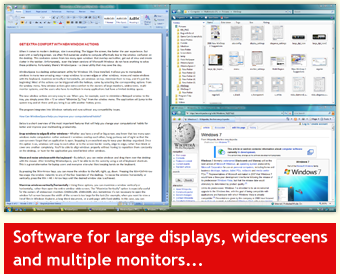 Did you know you can manipulate your windows in so many different amazing ways? You can even do a lot of things including; snap, windows to each other or to the screen neatly, edge to edge, move and resize windows with keyboard shortcuts, etc. That is what WindowSpace application has in stock for you. Did you know you can manipulate your windows in so many different amazing ways? You can even do a lot of things including; snap, windows to each other or to the screen neatly, edge to edge, move and resize windows with keyboard shortcuts, etc. That is what WindowSpace application has in stock for you.
What’s the big deal about WindowSpace?
WindowSpace allows you to manipulate windows in many new amazing ways. Now, you can snap windows to each other or to the screen neatly, edge to edge, move and resize windows with keyboard shortcuts, maximize vertically or horizontally, pin a window on top of the others, minimize it to tray or hide from view to reduce the clutter in the taskbar. WindowSpace makes it a pleasure to manage multiple windows on large screens and multi-monitor systems.
Current version of WindowSpace includes a couple of changes such as the following: added full support for Windows 8; no more support for Windows 2000, XP is minimum now; and a couple of minor improvements and bug fixes. As soon as you have finished installing this program on your system, it allows you to manipulate windows in many new amazing ways including snapping windows to the screen edges and other windows, moving and resizing them with keyboard shortcuts, maximizing vertically or horizontally, etc.
Any downside?
WindowSpace is no doubt a nice program, but it is a bit overpriced ($24.95).
Want to check it out? Visit: Ntwind.com.
Posted in Main | No Comments »
Wednesday, November 27th, 2013
 Are you searching for a professional folder manager tool that enables you to rename or delete specific files and folders? Then what you need is Mass Folder Manager Suite because it helps you detect and correct any unwanted changes and errors without compromising existing structures. Are you searching for a professional folder manager tool that enables you to rename or delete specific files and folders? Then what you need is Mass Folder Manager Suite because it helps you detect and correct any unwanted changes and errors without compromising existing structures.
What’s Mass Folder Manager Suite?
Mass Folder Manager Suite is a complete folder manager that allows you to copy, delete, rename existing, and create new multiple folders and folder structures automatically and reliably. Everything is visible and controllable in the system, so no unwanted results or errors remain hidden.
Some of the key features in the program include the following: automatically collect sub-folders from a given selected sub-folder level to an input folder list; easy communication between the program components, the program and other applications; automatically add multiple folder lists to the Include window, or use the import option; easily modify folder list(s) before or after the folder processing at any time; view the subfolder structure of the selected folder from the Include list; delete only the Files – retain empty Folder Structures; detailed statistics (total folders, subfolders and file sizes before and after the process) also indicate whether errors have occurred; and many more.
Any downside?
You can only add a folder structure with maximum 15 subfolders and/or 5 files. Full version would cost you quite a sum – $149.95.
Want to check it out? Visit Prognext.com.
Posted in Main | No Comments »
Tuesday, November 26th, 2013
 All Audio Converter is a good program which you can make use of to record and convert audio tracks in a variety of formats ( MP3,WMA,OGG and WAV format for example), it can record streaming audio, pc game audio, and not forgetting ripping an audio CD and burning tracks to disc. All Audio Converter is a good program which you can make use of to record and convert audio tracks in a variety of formats ( MP3,WMA,OGG and WAV format for example), it can record streaming audio, pc game audio, and not forgetting ripping an audio CD and burning tracks to disc.
The user interface of the application could be described as standard and user-friendly. Media files can be imported simply by utilizing the file browser only, simply because the “drag and drop” approach is not supported. Batch processing is also available.
Within the audio converter you can easily examine the source path and information, along with output format and status of each and every file. So, as soon as you specify the output destination and format, you’ll be able to proceed with the encoding procedure. Precisely the same basic principle is applicable to the audio ripper too.
Furthermore, you’ll be able to customize audio preferences for every output format with regards to the channel, sample frequency rate, bits per sample, encode method, minimum and maximum bit rate, and the like.
On top of that, you can define the default output and temporary directory, set up track grabbing settings (e.g. burst or synch mode, skip errors), query the CDDB and configure proxy settings, plus more.
This basic application needs a low-to-moderate amount of system resources, contains a well-written help file with which is good help for newbies, quickly completes a conversion task and manages to retain a good sound quality. This software is light on resources and is worth trying out for anyone who wants to quickly convert audio files between different formats.
Check it out at the homepage here Audio2x.com.
Posted in Main | No Comments »
Tuesday, November 26th, 2013
 Sometimes we delete some files accidentally, and feel like we may never get them back just as they should be. However, did you know that you can now recover those files that have you have deleted accidentally? Have you heard of Kickass Undelete? Well, you can read more about it in this review. Sometimes we delete some files accidentally, and feel like we may never get them back just as they should be. However, did you know that you can now recover those files that have you have deleted accidentally? Have you heard of Kickass Undelete? Well, you can read more about it in this review.
What’s Kickass Undelete all about?
Kickass Undelete is a free, fully featured, file recovery tool for Windows. Accidentally deleted a file? Never fear; the data is probably still on your drive and may be recoverable. Kickass Undelete finds all of the deleted files on your hard drive, flash drive or SD card and allows you to recover them.
Kickass Undelete now has a couple of new additions and updates including the following: better estimation of recovery chances for both FAT and NTFS; fixed a bug that was causing some FAT files to be recovered incorrectly; show the drive letter in file paths; replace paths that are clearly incorrect with a “?”; performance improvements in long lists of files; and this version now requires only the .NET 4.0 Client Profile.
Any downside?
Kickass Undelete works perfectly, and does not pose any problem even to a newbie.
Want to check it out? Visit KickassUndelete at SourceForge.
Posted in Main | No Comments »
|
|
|




