O. James Samson - September 8, 2011
 Physion is a 2D Physics simulation software that can be used to easily create a wide range of interactive physics simulations and educational experiments. Teachers may find Physion particularly useful since it can be used as a virtual physics laboratory through which they can demonstrate some basic physics concepts in the classroom. The publisher has added translations for five languages as well as fixed a couple of bugs to enhance the performance of the program. Physion is a 2D Physics simulation software that can be used to easily create a wide range of interactive physics simulations and educational experiments. Teachers may find Physion particularly useful since it can be used as a virtual physics laboratory through which they can demonstrate some basic physics concepts in the classroom. The publisher has added translations for five languages as well as fixed a couple of bugs to enhance the performance of the program.
With Physion, you can create various physical objects (circles, polygons, gears, etc.) and joints (eg. springs, pulleys etc.) that obey the laws of Physics. You can experiment by creating various scenes/scenarios which can either simple physics experiments or complex structures/mechanisms. You can also execute your own scripts/programs in JavaScript. This way Physion can be a nice and friendly tool for introduction to programming since the results of the commands are immediately visualized.
Physion is a freeware application and has been translated into the following languages; English, Japanese, German, Indonesian, as well as Spanish. The program runs on Windows XP, Vista, Windows 7, as well as Linux x86 and x86 64 operating systems. You are going to find this program very interesting and easy to use; and the fact that it is a freeware makes it worth checking out.
Want to check it out? Visit Physion.
Rating:  Loading... No Comments »
Ciaran Moore - September 8, 2011
 One of the first ever programs created to detect and remove malware and spyware. Since its release this program became one of the most preferred programs to keep personal computers clean and safe. The biggest step forward was in version 8.1 when the protection engine was changed with the much better and faster Genotype. One of the first ever programs created to detect and remove malware and spyware. Since its release this program became one of the most preferred programs to keep personal computers clean and safe. The biggest step forward was in version 8.1 when the protection engine was changed with the much better and faster Genotype.
In the latest version 9 this engine is supported by the so-called “Dedicated Detection”. It searches deep inside the files, analyzes the code, and creates a loose pattern for finding families of related malware. With this method of learning Lavasoft, the creators of Ad-Aware Pro Internet Security, think that a single dedicated detection will be able to stop hundreds of thousands of threats, and that it will reduce the number of false positives by creating more points of comparison.
The second new engine, MagmaShield, is proactive. It emulates processor instructions, comparing approved processor-level operations against those that are undefined in the application layer. This means that it aggressively looks at how a file interacts with the CPU and uses that to call out threats faster. Users can schedule Smart scans, Full scans, custom scans, and can set them to run daily, weekly, monthly, or at Windows startup to make sure their PCs are clean on every boot.
In addition to virus and malware scans, Ad-Aware 9 Pro offers a browser track sweeper. Accessible from the Extras button, it can wipe your cache, cookies, history, last-typed URLs, and tabs from Internet Explorer, Firefox, Chrome, and Opera. The Toolbox, a second tab under Extras, contains options such as additional process-protecting features that are restricted to the paid upgrade.
Check it out at http://www.lavasoft.com/products/ad_aware_pro.php
Rating: Loading... No Comments »
O. James Samson - September 8, 2011
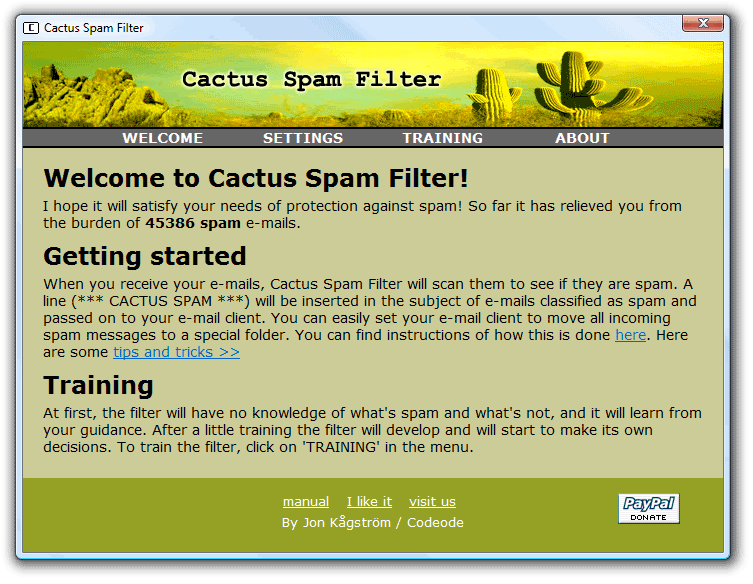 Cactus Spam Filter is a free easy-to-use spam blocker that protects your inbox by learning to detect spam. The program is designed to adapt to your personal mailbox and blocks out most of the junk email. Since the filter becomes personal, spammers will not be able to fool it. Cactus Spam Filter is a brutal, merciless spam killer that will not let you lose any of your emails except you delete them. Cactus Spam Filter is a free easy-to-use spam blocker that protects your inbox by learning to detect spam. The program is designed to adapt to your personal mailbox and blocks out most of the junk email. Since the filter becomes personal, spammers will not be able to fool it. Cactus Spam Filter is a brutal, merciless spam killer that will not let you lose any of your emails except you delete them.
The program does not require an installation in your email client because it integrates seamlessly with all email clients that use POP3. Cactus Spam Filter has been successfully tested with Microsoft Outlook, Microsoft Outlook Express, Netscape, Opera, Mozilla, Mozilla Thunderbird, Eudora, Pegasus Mail, IncrediMail, Foxmail, POP Peeper, Command Line POP Client, The Bat!, and Phoenix Mail.
Users can easily setup the email client to automatically move spam messages into a junk folder or directly to the recycle bin. Cactus Spam Filter learns to detect spam as it is being used; and it is a fast learner. After a few emails it will start to make its own decisions to relieve you from the spam burden. You are not going to have much problems getting used to this program that is absolutely free for users.
Want to check it out? Visit ?odeode.
Rating: Loading... No Comments »
Ciaran Moore - September 7, 2011
 Do you want to know how fast your CPU really is? CPU Speed Professional tests your PC’s processor power and compares the results against other users’ CPUs and systems online via a ranking website. Do you want to know how fast your CPU really is? CPU Speed Professional tests your PC’s processor power and compares the results against other users’ CPUs and systems online via a ranking website.
The program uses various tools to find and test the CPU’s strong and weak sides without overheating it or changing any settings and then shows them to you. All AMD and Intel processors are fully supported. The user interface resembles a car’s analog instrument cluster, with cool tachometer-style displays for both % CPU and MHz.
The test involves four metrics: CPU Ramp, Core, Deep Cycle, and Cool Off. The scan is very fast and once its done you have the option to submit your score and a web page opens with the latest global CPU benchmarks and world speed rankings displayed. Clicking CPU Details on the menu will display very accurate data about your processor.
The supported operating systems are Windows 2000 / XP / Vista / 7. And don’t be fooled by the word Professional in the name – this software is absolutely free without any limitations! Download it now and find out the real speed of your CPU.
More info at CPUSpeedPro
Rating: Loading... No Comments »
Ciaran Moore - September 6, 2011

There was Open Office, then there was Google docs, now Microsoft has joined the party with Office Web Apps. Better late than never, right?
Office Web Apps is Microsoft’s nod of the head to the world that is pinched for pennies both in business and in homes and schools. However you’d think that they would make sure that they had something to compete with? No..not really. Their Web Apps set has a few good sides, like the Office Ribbon, it’s very similar so those user who are familiar with the regular office ribbon will not be lost.
Also, it handles a lot like the full Office package, especially in Excel and PowerPoint. Unfortunately, their version of word seems to have a tendency to corrupt the text files to a point where they are unrecoverable and when you load files from your computer it lags so much that you could go and make a peanut-butter sandwich while waiting.
For those who are all about Microsoft products, you will probably find uses for this. It does give you access to 25 Gigs of space on their SkyDrive, their cloud based storage solution. Of course though it will require you to get a Hotmail or live account. For those of us who stayed as far away from that as possible, will not be able to use these solutions without getting one.
Also you will need to make sure that you remember to save your documents and other projects regularly…Office Web Apps does not have an auto-save feature. I have no idea how on earth they seem to think that this is a good thing, but there it is. They do very nicely warn you before navigating away from their site that “your work will not be saved, would you like to save it now? “ However, I feel that is really lacking in usefulness.
Generally speaking, I am sure that Office Web Apps will be great for those who absolutely love Microsoft’s products or who are uncomfortable leaving their software. However, for those of us who explore…there are better options.
Check out more info at http://office.microsoft.com/en-us/web-apps/
Rating: Loading... No Comments »
Ciaran Moore - September 6, 2011
 Each and every one of us has been through it. We take a typing test for an employer thinking that we are going to be just fine. We spend so much time on the internet chatting, social networking and all the rest that we should be a pro by now right? Until we fall below the employers guidelines for accuracy. Each and every one of us has been through it. We take a typing test for an employer thinking that we are going to be just fine. We spend so much time on the internet chatting, social networking and all the rest that we should be a pro by now right? Until we fall below the employers guidelines for accuracy.
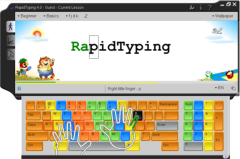
It’s unfortunately a common problem in the world right now, and something that a lot of people are seeking to fix. With Rapid Typing Tutor not only can you take advantage of the lessons that it already has built in, but if you happen to know an area that is particularly trying for you, like accuracy, you can take a lesson based on just that!
With its easy to use graphical interface and its tips and various tools you will be back on track quickly and easily. The program automatically saves your progress and accomplishments making it easy to look back and see how far you’ve come when you get disappointed and start thinking that you’ve not come very far at all. Rapid Typing Tutor will not only enhance your speed but also your style. Let’s face it most of us are “two finger typists” and unfortunately that does not add to speed at all.
With this program you will learn not only about how to be faster and more accurate, but also how to type correctly with a full two handed style. Many employers are looking for people who can not only type well but also who can type correctly, since it adds to a persons efficiency and with today’s economy that is not only just an added bonus for an employer, its a necessity.
So if you are looking to add to your skills and improve your typing, check out Rapid Typing Tutor at Rapidtyping
Rating: Loading... No Comments »
O. James Samson - August 30, 2011
 HTML Guard is a security program that offers easy-to-use Internet copyright protection for anyone who wants to protect his website’s intellectual property from pilfering and unauthorized copying. Be it HTML source code, text or graphics; HTML Guard helps prevent people from saving your website’s content wholesale or in part. The application is capable of encrypting your HTML source code, preventing text selection, disabling right mouse saving, and the print function within a browser. By employing a couple of insider tricks with it, you can make it difficult for general Internet users to copy your Website content. HTML Guard is a security program that offers easy-to-use Internet copyright protection for anyone who wants to protect his website’s intellectual property from pilfering and unauthorized copying. Be it HTML source code, text or graphics; HTML Guard helps prevent people from saving your website’s content wholesale or in part. The application is capable of encrypting your HTML source code, preventing text selection, disabling right mouse saving, and the print function within a browser. By employing a couple of insider tricks with it, you can make it difficult for general Internet users to copy your Website content.
With HTML Guard installed on your system, you can encrypt the source code of your web pages and restrict browser functions to prevent unauthorized copying of your contents. All pages protected by this program retain their original look and feel and can still be viewed in any common JavaScript-enabled browser. There is no special installation required either on the client side or on your web server.
HTML Guard can effectively protect HTML files encoded in multi-byte character sets such as UTF-8 (Unicode), KOI8-R (Russian), BIG5 (Traditional Chinese), or Shift-JIS (Japanese). Users who install HTML Guard can always consult the comprehensive online help that is available by pressing F1 or clicking the Help button.
Want to check it out? Visit HTMLguard.
Rating: Loading... No Comments »
O. James Samson - August 30, 2011
 BWMeter is a powerful bandwidth meter and monitor, which measures and displays all traffic on your network. This shareware application can analyze the data packets (where they come from, where they go which port and protocol they use); making it possible to distinguish between local and internet traffic for example. BWMeter can create statistics for all computers in your network, measuring and displaying all internal network traffic as well as download and upload from the internet. BWMeter is a powerful bandwidth meter and monitor, which measures and displays all traffic on your network. This shareware application can analyze the data packets (where they come from, where they go which port and protocol they use); making it possible to distinguish between local and internet traffic for example. BWMeter can create statistics for all computers in your network, measuring and displaying all internal network traffic as well as download and upload from the internet.
BWMeter also enables you to define filters which show your transfer with certain Internet addresses. The program is ideal for home users to get an overview of how much bandwidth they use, as well as small to large businesses, where one computer can maintain the statistics of downloaded / uploaded data of all computers in the network. The product is easy to configure and offers a rich set of options and features for beginners as well as experts and network administrators.
BWMeter may not really be up to the standard of other equally good programs out there; but surely you can still find some of its features very useful and easy to use. Some of its key features, which are very easy to handle include the following; graphical and numerical display of bandwidth, user definable filters for measuring bandwidth, user definable graphs to visualize bandwidth, and a host of others.
Want to check it out? Visit Desksoft.
Rating: Loading... No Comments »
O. James Samson - August 29, 2011
 Bamboo is an intuitive file synchronization and backup software tool for Microsoft Windows environment. Bamboo automates copy, deletes, and comparison of computer files and backups located in different storage devices like hard disks, flash memory, network drives, removables, and many more. Bamboo is designed to simplify and automate the tedious works of modern computer users who consistently experience manual work of copying files back and forth among their personal and network storage devices. This version of Bamboo in review is a freeware and is designed for casual use; and of course, there is a professional edition for heavy users. Bamboo is an intuitive file synchronization and backup software tool for Microsoft Windows environment. Bamboo automates copy, deletes, and comparison of computer files and backups located in different storage devices like hard disks, flash memory, network drives, removables, and many more. Bamboo is designed to simplify and automate the tedious works of modern computer users who consistently experience manual work of copying files back and forth among their personal and network storage devices. This version of Bamboo in review is a freeware and is designed for casual use; and of course, there is a professional edition for heavy users.
Bamboo Free Edition comes with some of the following features that include; start or define any Folder Pair sync right inside Windows Explorer, facilitates automatic, filter-based file selection for complicated copy actions, instead of manual file/folder picking using Windows Explorer, better controls on large or complicated copy actions then Windows Explorer. Jobs can resume/restart from copy errors without having to start all over again, backup as a mirror copies, not as un-viewable backup files, automates your routine manual file copying actions (set once, use everyday, avoid tedious manual selection, comparison, examination every time), and a host of other features that you can find when you install and start using this program.
Want to check it out? Visit Haxar.
Rating: Loading... No Comments »
O. James Samson - August 29, 2011
 EF Commander is a complete file manager for the Windows. For those who are already used to Norton Commander, EF Commander is a program worth checking out. It comes complete with bubble and online help; and you can search directory trees and directories and perform actions, including Run, on files. You can also check file attributes and edit files with search-and-replace and drag-and-drop. Use the internal editor or associate one of your choosing to edit files, easily view files and configure the buttons to suit your needs, and get system and disk information with a click of the mouse. EF Commander is a complete file manager for the Windows. For those who are already used to Norton Commander, EF Commander is a program worth checking out. It comes complete with bubble and online help; and you can search directory trees and directories and perform actions, including Run, on files. You can also check file attributes and edit files with search-and-replace and drag-and-drop. Use the internal editor or associate one of your choosing to edit files, easily view files and configure the buttons to suit your needs, and get system and disk information with a click of the mouse.
EF Commander has very easy to understand interface and features that include the following; modern interface helps you to have full control over your files and folders, versatile function for comfortable renaming of numerous files in a processing step, you can run any number of different operations at the same time, or several instances of the same operation, you can handle your data in the same way as on your desktop or laptop computer, pack files or whole folders in any of the common archive formats. No external programs are required; enlarge the number of available formats to 400 or more, and many more.
Want to check it out? Visit Efsoftware.
Rating: Loading... No Comments »
|
|
|





