O. James Samson - July 17, 2011
 Zentimo xStorage Manager is a USB device manager aimed to save time and extend user abilities on active work with flash-drives, portable drives, card readers and other gadgets. Zentimo xStorage Manager is a full-fledged tool that can be used to manage and save your portable drive data; as a matter of fact, it allows you to safely remove the drives displaying locking processes, has portable apps launch list, can automatically dismount TrueCrypt drives, lets you hide empty card reader slot drives, etc. Zentimo xStorage Manager is a USB device manager aimed to save time and extend user abilities on active work with flash-drives, portable drives, card readers and other gadgets. Zentimo xStorage Manager is a full-fledged tool that can be used to manage and save your portable drive data; as a matter of fact, it allows you to safely remove the drives displaying locking processes, has portable apps launch list, can automatically dismount TrueCrypt drives, lets you hide empty card reader slot drives, etc.
Zentimo xStorage Manager has a lot of outstanding features, which include the following; safely remove via hotkeys, it saves time, gives you ability to rename device, lets you hide devices you never need to stop, program autorun on device connection\disconnection, command line for safe removal, hiding drives of empty card reader slots, Card reader memory cards ejection one-by-one, Powers off devices in Vista and Win7, Returning back a device just stopped, and many more.
Zentimo xStorage Manager has a lot of features, but the problem users may find with this program is its price. The publishers may have to take a second look at the price placed on this program, which is a bit high when you consider what can be achieved with it.
Want to check it out? Visit SafelyRemove.
Rating:  Loading... No Comments »
O. James Samson - July 17, 2011
 CCCP (Combined Community Codec Pack) is a filter pack specifically built for playing anime; and one of the primary design goals is to play as much possible with as little as possible. It attempts to be as unintrusive on your system as possible. Users of Windows 7 can also download this version because this version supports it as well as other Windows versions. That aside, CCCP is without doubt a very effective codec packs available now. CCCP (Combined Community Codec Pack) is a filter pack specifically built for playing anime; and one of the primary design goals is to play as much possible with as little as possible. It attempts to be as unintrusive on your system as possible. Users of Windows 7 can also download this version because this version supports it as well as other Windows versions. That aside, CCCP is without doubt a very effective codec packs available now.
CCCP is not only one of the best codec packs available; it has the ability to function effectively without giving users any problem. It comes complete with a lot of quality features that a lot of other packs may not have. You can play back any file and also include bonus without messing things up in the process.
This freeware program downloads and installs easily on your system, and supports virtually every video formats in used today. CCC (Combined Community Codec Pack) is definitely one of my favorite codec packs; and users are definitely going to have a wonderful experience when it comes to enjoying their videos this time around. The publishers have done a wonderful job; and this is not even the first time because older versions have been fine too.
Want to check it out? Visit Cccp-project.
Rating: Loading... No Comments »
O. James Samson - July 17, 2011
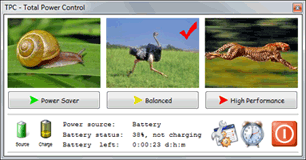 Total Power Control is a program that puts at your mouse and fingertips a well-designed tool to help you get your work done quickly and easily. TPC provides everything you need to fully control the power functions of your computer. With Power Control application, there is now more crawling around and clicking through layered menus. This latest version comes with the possibility to hide battery meter when used on desktop computers. The program also comes with some few features like the Timer Manager you can shut down your computer at midnight, the CPU Load Manager you can shut down your computer after your backup utility has completed, and the hotkey Manager you can shut down your computer with Ctrl-Alt-S (or any other keyboard shortcut). Total Power Control is a program that puts at your mouse and fingertips a well-designed tool to help you get your work done quickly and easily. TPC provides everything you need to fully control the power functions of your computer. With Power Control application, there is now more crawling around and clicking through layered menus. This latest version comes with the possibility to hide battery meter when used on desktop computers. The program also comes with some few features like the Timer Manager you can shut down your computer at midnight, the CPU Load Manager you can shut down your computer after your backup utility has completed, and the hotkey Manager you can shut down your computer with Ctrl-Alt-S (or any other keyboard shortcut).
Total Power Control is a shareware, but you can download and install it for free for 14 days. Other important key features of this program include the following: two clicks to shutdown, restart, hibernate, sleep, screen off, logoff, lock workstation, switch user, run screensaver and more; built-in web server allows sending commands over internet or local network to shutdown or restart computer; battery Charge State meter reports current charge state of laptop battery; always-on-top CPU load meter puts CPU load information on your desktop; access any power plan with two clicks – power saver, balanced, high performance or any custom power plan; and many more.
Want to check it out? Visit Acritum.
Rating: Loading... No Comments »
O. James Samson - July 16, 2011
 Bucharchiv is one fine application that simply lets you manage your personal library and eBooks (PDF-files) comfortably on your PC. You can also access extensive online-databases in English, German and French, which means you can find the desired book or books very quickly. Bucharchiv is offered in different Editions: Standard (one computer), Professional (three computers) and Enterprise (ten computers). Bucharchiv is one fine application that simply lets you manage your personal library and eBooks (PDF-files) comfortably on your PC. You can also access extensive online-databases in English, German and French, which means you can find the desired book or books very quickly. Bucharchiv is offered in different Editions: Standard (one computer), Professional (three computers) and Enterprise (ten computers).
Bucharchiv is easy to use, and all you have to do is enter title, author, publisher or EAN/ISBN-number by your barcode scanner and you get the results inclusive high resolution cover pictures. Bucharchiv also gives you the possible of adding a custom existing file of the cover picture; and that is just one more reason to give Bucharchiv is a try. As a matter of fact, you can make a selective search for Audio books, paperbacks, magazines, special bindings, sheet music etc. Apply the corresponding books into your personal database and all important information like title, author, publisher, cover picture, EAN/ISBN-number etc. are added automatically. Bucharchiv also includes a feature that you can use to apply filters to each book (like already read, novel, specialized, advisable) to use the filter-function. All filters are self-defined.
A few other key features carefully selected and included in Bucharchiv include the following; assign categories, printing of single books or lists, export as Excel-file, download of online-reviews or write your own review, enter quotations, etc.
Want to check it out? Visit Gbelectronics.
Rating: Loading... No Comments »
O. James Samson - July 15, 2011
 ChronoWall is an all-in-one desktop wallpaper manager. One of its main features is the ability to specify which wallpapers to use based on the time of day and time of year. Beyond that, ChronoWall offers many unique ways to view your photos on your desktop. The application is easy to use, and offers a lot of advanced features that can be easily understood after only a couple of uses by any user. ChronoWall is a shareware and users who have Windows 7 as their operating system can also install it because it supports it as well. ChronoWall is an all-in-one desktop wallpaper manager. One of its main features is the ability to specify which wallpapers to use based on the time of day and time of year. Beyond that, ChronoWall offers many unique ways to view your photos on your desktop. The application is easy to use, and offers a lot of advanced features that can be easily understood after only a couple of uses by any user. ChronoWall is a shareware and users who have Windows 7 as their operating system can also install it because it supports it as well.
ChronoWall desktop wallpaper manager’s underlying linear effect layering system allows users to change the way an image looks based on the time elapsed. Imagine being able to look at a green meadow and have it red-shift as the sun nears closer to sunset. Another possibility is that if you want something more out-of-this-world, you can colorize an image throughout the entire spectrum as time elapses. ChronoWall 0.91 Beta also features several effects that can be applied to an image; which means users have a lot to enjoy from this wallpaper manager.
ChronoWall is a shareware program, and comes with an uninstaller. Version 0.91 is still in Beta stage, but some of its features are a bit stable.
Want to check it out? Visit Chronowall.
Rating: Loading... No Comments »
O. James Samson - July 15, 2011
 Breaktru Payroll is one of those easy-to-use applications that make it easy to calculate & track your weekly or biweekly pay checks. All you have to do is enter the hours worked as well as overtime, holiday, sick leave, and other pay categories, then Breaktru Payroll will apply the withholding tax rates for federal tax, state tax, and city tax based on your exemptions claimed and marital status. You can also vary your K-plan deduction to see what percentage is right for you. Calculate Medicare, SDI, SUI, Cafeteria Plan and Social Security tax with this shareware program that costs just $24.95 per download. Version 11.42 is compatible with Windows 7, Windows 2000/2003/2008/9x/Home server/Vista/XP; and also comes with a few updates. Breaktru Payroll is one of those easy-to-use applications that make it easy to calculate & track your weekly or biweekly pay checks. All you have to do is enter the hours worked as well as overtime, holiday, sick leave, and other pay categories, then Breaktru Payroll will apply the withholding tax rates for federal tax, state tax, and city tax based on your exemptions claimed and marital status. You can also vary your K-plan deduction to see what percentage is right for you. Calculate Medicare, SDI, SUI, Cafeteria Plan and Social Security tax with this shareware program that costs just $24.95 per download. Version 11.42 is compatible with Windows 7, Windows 2000/2003/2008/9x/Home server/Vista/XP; and also comes with a few updates.
Breaktru Payroll supports a lot of quality features, which include the following; a year to date printout that shows your week by week earnings and deduction, export report to Excel, print employee pay checks and pay period report, simple to use, and affordable. Breaktru Payroll is available for a 10 day free trial for all users.
One interesting thing about Breaktru Payroll is that it is easy to install and setup on your system. You can set it up in just a couple of minutes; and this is highly commendable.
Want to check it out? Visit Breaktru.
Rating: Loading... No Comments »
O. James Samson - July 15, 2011
 CentOS is an Enterprise-class Linux distribution derived from sources freely provided to the public by a prominent North American Enterprise Linux vendor. The program conforms fully to the upstream vendors redistribution policy and aims to be 100% binary compatible. CentOS is a project of the CAOS Foundation. The core developers of CentOS are supported by an active user community including system administrators, network administrators, enterprise users, managers, core Linux contributors and Linux enthusiasts from around the world. CentOS is an Enterprise-class Linux distribution derived from sources freely provided to the public by a prominent North American Enterprise Linux vendor. The program conforms fully to the upstream vendors redistribution policy and aims to be 100% binary compatible. CentOS is a project of the CAOS Foundation. The core developers of CentOS are supported by an active user community including system administrators, network administrators, enterprise users, managers, core Linux contributors and Linux enthusiasts from around the world.
Some of the useful features and advantages over some of the other clone projects include; an active and growing user community, quickly rebuilt, tested, and QA’ed errata packages, an extensive mirror network, developers who are contactable and responsive, multiple free support avenues including IRC chat, Mailing lists, forums, and a dynamic FAQ. Users may have to install Javascript on their systems to use the publisher’s website; however, those who use FireFox browsers may not need to install java.
CentOS is a freeware program and mainly changes packages to remove upstream vendor branding and artwork. All Linux users should take a look at CentOS because of the enormous amount of work that have gone into it from those involved in bringing it to the public.
Want to check it out? Visit ?entos.org.
Rating: Loading... No Comments »
O. James Samson - July 14, 2011
 ThumbNailer is an application that allows you to create thumbnail images and HTML image galleries for use on the web or CDs. The program offers a lot of advanced features that allow you to customize the output (including templates), as well as features like text overlays, image fades, macro expressions, output naming styles and a lot more. Even if you are a newbie, Smaller Animals ThumbNailer also includes several wizards to get you started. In addition to thumbnail and gallery creation, you can use ThumbNailer to resize images, convert between graphic formats, change image color depth, create contact sheets and more. ThumbNailer is an application that allows you to create thumbnail images and HTML image galleries for use on the web or CDs. The program offers a lot of advanced features that allow you to customize the output (including templates), as well as features like text overlays, image fades, macro expressions, output naming styles and a lot more. Even if you are a newbie, Smaller Animals ThumbNailer also includes several wizards to get you started. In addition to thumbnail and gallery creation, you can use ThumbNailer to resize images, convert between graphic formats, change image color depth, create contact sheets and more.
As a newbie, you can follow the next few steps in order to use Smaller Animals ThumbNailer; set the source directory, browse, and type or drag a folder. Then you will have to set the output directory, browse, and type or drag a folder. Set the input image size, set the output file format, and finally you can press the start option.
Some of the key features of Smaller Animals ThumbNailer include the following; wizard to help you get up and running quickly, JPG, GIF, MPEG, PNM, JPEG-2000, PNG, TIFF, PCX, BMP, TGA, HTML page generator, with links, tables, HTML templates, and many more.
Want to check it out? Visit SmallerAnimals.
Rating: Loading... No Comments »
O. James Samson - July 12, 2011
 SysAdmin Anywhere makes it easier to administer Active Directory-based networks by providing a single tool to do whatever you need use it to manage domains, servers, computers, users, and groups. Requiring a .NET 4.0, SysAdmin Anywhere has a few changes that include the following; added a property load lists when navigate to management, and save settings in the right path. SysAdmin Anywhere program lets you make an inventory of all software and hardware installed on computers in the network, and can be used to easily generate various reports based on the collected information. SysAdmin Anywhere makes it easier to administer Active Directory-based networks by providing a single tool to do whatever you need use it to manage domains, servers, computers, users, and groups. Requiring a .NET 4.0, SysAdmin Anywhere has a few changes that include the following; added a property load lists when navigate to management, and save settings in the right path. SysAdmin Anywhere program lets you make an inventory of all software and hardware installed on computers in the network, and can be used to easily generate various reports based on the collected information.
With this program, computer management becomes a bit easier than usual. You can quickly search for a computer in the list of computers, and carry out the following; view and edit properties, view information about a remote computer’s disks (total space available, file system, and disk label), open a remote computer’s disk in Windows Explorer, shutdown a remote computer, reboot a remote computer, view the list of software installed on a remote computer, and many more.
Other key things you can use SysAdmin Anywhere for include the following; quickly search for group in the lists of groups, scan all software and hardware installed on remote computers in the network and add the data collected into a local database, print out various reports, and many more.
Want to check it out? Visit Ria-Media.
Rating: Loading... No Comments »
O. James Samson - July 11, 2011
 UltraFileSearch is a Search Utility which is able to help you find Files as quickly as possible. You can also find folders and text on your local, network, DVD, CD-ROM, USB Hard or Flash Drives. UltraFileSearch allows you to specify several File Mask and multiple Drives and/or Folders at the same time; it is able to sort out files and folders according to their properties (e.g. Modified Date) and find files which contain one or more specific words or sentences. A few changes have also been made to this version in review, and they include the following; ability to save and load search parameters, option to select which types of parameters to save and load, and option to select which types of items to save and load. UltraFileSearch is a Search Utility which is able to help you find Files as quickly as possible. You can also find folders and text on your local, network, DVD, CD-ROM, USB Hard or Flash Drives. UltraFileSearch allows you to specify several File Mask and multiple Drives and/or Folders at the same time; it is able to sort out files and folders according to their properties (e.g. Modified Date) and find files which contain one or more specific words or sentences. A few changes have also been made to this version in review, and they include the following; ability to save and load search parameters, option to select which types of parameters to save and load, and option to select which types of items to save and load.
The search results can be put in order by column (upward, downward or neither of them). The results window supports Windows Explorer functionality (such as icons, context menus). You can also carry out specific actions on the results, including Open Folder, Open Containing Folder); as a matter of fact, you can export in various formats (Plain TXT, Tabbed TXT, CSV, HTML, XML).
UltraFileSearch has a lot of features, but the key ones include the following; shows search statistics as found Files and Folders, Search Time, controlled Objects, Speed, full support to Unicode Characters, easy User friendly interface, and many more.
Want to check it out? Visit UltraFileSearch.
Rating: Loading... No Comments »
|
|
|





