O. James Samson - June 29, 2011
 Free TvDB is a TV series, anime and cartoons database software. Manage your personal collection of TV series, anime and cartoons with a simple and powerful software. Free TvDB software has new features and fixes that makes it a bit stable than previous versions. These new updates and fixes include the following; fixing of “on netbook the screen episode is set in a wring position”, fixing of on netbook when downloading fanart the progress bar is not visible, added an option to use a flat background, added an option to auto enable/disable proxy on startup, and a few others. Free TvDB is a TV series, anime and cartoons database software. Manage your personal collection of TV series, anime and cartoons with a simple and powerful software. Free TvDB software has new features and fixes that makes it a bit stable than previous versions. These new updates and fixes include the following; fixing of “on netbook the screen episode is set in a wring position”, fixing of on netbook when downloading fanart the progress bar is not visible, added an option to use a flat background, added an option to auto enable/disable proxy on startup, and a few others.
Some of the features of Free TvDB 0.9c include the following; automatic data download (info/cast/images) from thetvdb.org, multi-language series info (up to 23 languages), poster and fanart galleries (automatically downloaded!), proxy support, and automatic database backup. Besides, the publishers have also included the following features to Free TvDB 0.9c; optimized for netbook (when running on a netbook, the interface is automatically resized and optimized to fit the screen resolution), the config is saved also when closing the options using the X, and optimized the code (the exe is a bit smaller).
Free TvDB 0.9 requires .NET, and runs on Windows 7, Windows Vista, and Windows XP.
Want to check it out? Visit Weebly.
Rating:  Loading... No Comments »
O. James Samson - June 29, 2011
 CadFaster|QuickStep is a 3D STEP viewer application that comes with collaboration features. CadFaster|QuickStep supports standard file formats such as STEP, IGES, DWG, DXF and HSF. Users who install this program have the option of choosing between OpenGL and DirectX drivers. CadFaster|QuickStep rendering is highly optimized and user interface is perfect for interactive 3D model navigation. Innovative out-of-core rendering solution ensures that even the largest 3D files can be opened and viewed interactively. CadFaster|QuickStep is a 3D STEP viewer application that comes with collaboration features. CadFaster|QuickStep supports standard file formats such as STEP, IGES, DWG, DXF and HSF. Users who install this program have the option of choosing between OpenGL and DirectX drivers. CadFaster|QuickStep rendering is highly optimized and user interface is perfect for interactive 3D model navigation. Innovative out-of-core rendering solution ensures that even the largest 3D files can be opened and viewed interactively.
CadFaster|QuickStep has a lot of features that include the following; collect a lot of anonymous feedback, import file formats, Open GL Renderer, DirectX Renderer, Intuitive selection and picking, hide/show parts, solid display mode with edges, adjust transparency, and a few others. This CadFaster|QuickStep has more advance features when compared with the non-commercial version.
DirectX and OpenGL integration makes this program fast; and that means viewing the largest database is now possible, even with your laptop. CadFaster|QuickStep also supports standard file formats, including; STEP, DWG, DXF, IGES, and HSF files can be exported from different 3D applications. You can also control the entire application with only a mouse. CadFaster|QuickStep also enables you to play with new shader effects such as reflective materials to excite your audience.
Want to check it out? Visit Cadfaster.
Rating: Loading... No Comments »
O. James Samson - June 27, 2011
Hornil StylePix is a graphics editing application created with a lot of advanced features. StylePix is an acronym for “Style Pictures”; and this means your pictures with nice style. The program has intuitive user interface, and is designed to control the selected functions easy and conveniently. Even if you have no experience, you can easily learn how to edit image and retouching your photos. As a result, Hornil StylePix’s intuitive UI reduces your time to work. The publishers have added a lot of features to improve speed editing; and is designed to focus on light and powerful. Hornil StylePix runs on fewer resources environment that include: Net-books and laptop computer or virtual machines (VMware, virtual box, virtual PC, etc.) with full image handling features.

Hornil StylePix 1.8.2 comes with newly added features such as; addition of auto play feature in slideshow, changed the “slideshow” and “previous file” icons in main tools, fixed the title of groupbox doesn’t display correctly, fixed bugs that brush options was not changed correctly with the “[“ and the “]” keys, fixed bugs that the style list doesn’t invalidate after selecting the layers, and fixed that shape’s options doesn’t work in shape tool.
Want to check it out? Visit Hornil.
Rating: Loading... No Comments »
O. James Samson - June 27, 2011
 Patch My PC is a portable and reliable tool that has been designed to check your system against the current version of Adobe Reader, Adobe Acrobat, Flash, Firefox, Java, and QuickTime. Patch My PC is a portable and reliable tool that has been designed to check your system against the current version of Adobe Reader, Adobe Acrobat, Flash, Firefox, Java, and QuickTime.
Once Patch My PC is started it will scan your computer for the latest version of this software, and if your system doesn’t have the latest version it will show up as red; and when you click update it will download and install the latest available updates for the software found on your computer. With the aid of this application, you will be always up to date.
There are also many optional updates that can be installed with Patch My PC. Users can install optional updates by checking the checkbox in the optional software. Optional software should only be installed if users want the software, and it is not currently installed.
Latest additions and changes made to Patch My PC software include the following; now updates Firefox 5.0, improves GUI, updates Google Earth, updates Speccy 1.1.1, as well as adds feedback form within the page.
Patch My PC 1.1.4 is a freeware program, and runs on the following operating systems; Windows 7, Windows Vista, and Windows XP.
Want to check it out? Visit PatchmyPC.
Rating: Loading... No Comments »
O. James Samson - June 27, 2011
 Eagle Mode is an advanced solution for a futuristic style of man-machine communication in which the user can visit almost everything simply by zooming in. It is built with a professional file manager, file viewers and players for most of the common file types, a chess game, a 3D mines game, a multi-function clock and some fractal fun, all integrated in a virtual cosmos. Besides, that cosmos also provides a Linux kernel configurator in form of a kernel patch. This open source application has a few changes that include the following; added auto mark option emNetwalk, made audio and video player more persistent, added support for large files on most 32-bit systems, fixed crash on Windows, fixed failing of file manage commands by extended file name characters on Windows, and worked around failure of select function on OpenSolaris. Eagle Mode is an advanced solution for a futuristic style of man-machine communication in which the user can visit almost everything simply by zooming in. It is built with a professional file manager, file viewers and players for most of the common file types, a chess game, a 3D mines game, a multi-function clock and some fractal fun, all integrated in a virtual cosmos. Besides, that cosmos also provides a Linux kernel configurator in form of a kernel patch. This open source application has a few changes that include the following; added auto mark option emNetwalk, made audio and video player more persistent, added support for large files on most 32-bit systems, fixed crash on Windows, fixed failing of file manage commands by extended file name characters on Windows, and worked around failure of select function on OpenSolaris.
The interface may not really be as attractive as most users would want to, but what is that compared to other outstanding features that makes it a great program. Moreover, Eagle Mode software is an open source program; and users have nothing to lose by giving it a try. Eagle Mode runs on Windows 7, Windows 2003, Windows 2003, Windows Vista, and Windows XP.
Want to check it out? Visit Eaglemode.
Rating: Loading... No Comments »
O. James Samson - June 27, 2011
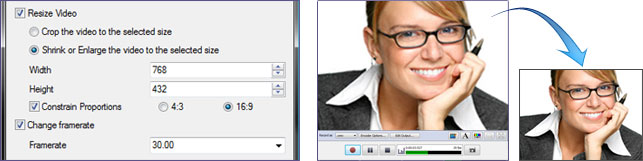 Debut is an easy-to-use video recorder application that lets you capture video files directly from your PC using a webcam or other input source. Debut’s use-interface has many powerful features including the ability to record as .avi or .wmv (and more), the ability to automatically email your movies once recording has stopped, and the ability to record for specific periods of time. Though, there is a commercial version of this program; the freeware version is however, available for non-commercial use only. Debut is an easy-to-use video recorder application that lets you capture video files directly from your PC using a webcam or other input source. Debut’s use-interface has many powerful features including the ability to record as .avi or .wmv (and more), the ability to automatically email your movies once recording has stopped, and the ability to record for specific periods of time. Though, there is a commercial version of this program; the freeware version is however, available for non-commercial use only.
Debut allows you to choose the size and frame rate used to capture your video; it also lets you create either 4:3 or 16:9 videos. This flexibility makes this application perfect for people creating videos for many different outputs (i.e. YouTube, CD or television).
Some key features that you can find highly useful in this program include the following; capture video directly to your hard drive, record video in many video file formats, screen capture records the entire screen, record audio from your microphone and speakers simultaneously, ideal for recording video conferences, time lapse video recording, mouse highlighting spotlight the location of cursor, digital zoom with the mouse scroll wheel, create photo snapshots of any video at any time, and many more.
Want to check it out? Visit Nchsoftware.
Rating: Loading... 3 Comments »
O. James Samson - June 26, 2011
 Library Manager is an application that has an easy to use interface. Library Manager can be used as personal information system for students and staff members. Books can be arranged and easily managed. Library Manage also has the following features; fine over late deposit of books can be maintained, Library Database can be backed up whenever desired, it has various facilities such as printing of different types of reports, it can keep track of the Magazines and Newspapers in Library and print their Bill Accordingly, fine Settings and number of books to be Issued can be changed whenever required, Bar Code 39 can be printed for Books by their Accession Number, books for staff members can be issued separately. Library Manager is an application that has an easy to use interface. Library Manager can be used as personal information system for students and staff members. Books can be arranged and easily managed. Library Manage also has the following features; fine over late deposit of books can be maintained, Library Database can be backed up whenever desired, it has various facilities such as printing of different types of reports, it can keep track of the Magazines and Newspapers in Library and print their Bill Accordingly, fine Settings and number of books to be Issued can be changed whenever required, Bar Code 39 can be printed for Books by their Accession Number, books for staff members can be issued separately.
Library Manager’s Institution can also be divided into various departments. Complete Records of Book Agencies can be kept; and you can also Issue/Deposit Books, Digital Media, Magazines and Newspapers. Library Manager is fully customizable, various settings and visualization can be changed as desired.
Library Manager is one shareware program that is highly customizable, and requires .NET Framework 2.0 to run properly on your system. Library Manager runs on Windows 7, Windows XP, Windows 2000, Windows 2003, Windows Vista, and Windows 2008.
Want to check it out? Visit Sawansoft.
Rating: Loading... No Comments »
O. James Samson - June 26, 2011
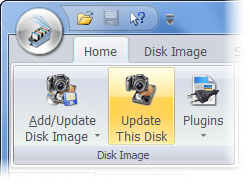 Where Is It? is an application designed to be the best media cataloging tool available on the shareware market today. It is a successor of successful DOS program Floppy Master, extending its capabilities to new and larger media storage devices and providing even more comprehensive access to stored data. Where Is It? is an application that also supports Unicode encoding on all Unicode-capable Windows operating system. The publishers have been able to introduce a host of changes in this version. Some of these changes and additions include the following; updated DcrawPlugin to the latest version of dcraw.c, considerably improved scanning performance in certain cases, like having thousands of archive files in one folder, updated IMDB plug-in to support new techniques recently used on the IMDB website, and a few others. Where Is It? is an application designed to be the best media cataloging tool available on the shareware market today. It is a successor of successful DOS program Floppy Master, extending its capabilities to new and larger media storage devices and providing even more comprehensive access to stored data. Where Is It? is an application that also supports Unicode encoding on all Unicode-capable Windows operating system. The publishers have been able to introduce a host of changes in this version. Some of these changes and additions include the following; updated DcrawPlugin to the latest version of dcraw.c, considerably improved scanning performance in certain cases, like having thousands of archive files in one folder, updated IMDB plug-in to support new techniques recently used on the IMDB website, and a few others.
Where Is It? can also be used to handle any kind of data, which includes the following; downloaded programs, magazine CD-ROMs, music collections like MP3s or audio CDs, graphics collections, document backups, etc. Where Is It? can handle lots of them, too, a couple hundreds or thousands disks in a catalog is nothing unusual, yet catalogs remain reasonably small, single-filed and easy to transfer or send to other users. Once you install this program on your system, you can create more than one catalog, and at any time open and work with as many catalogs at once as needed.
Want to check it out? Visit Whereisit-soft.
Rating: Loading... No Comments »
O. James Samson - June 23, 2011
 Hide Folder Ext is an application that hides folders on external drives and protects them with a password. If you remove the external drive (or external media) with the hidden folder and connect the drive to another computer, the hidden folder will stay invisible. Hide Folder Ext is an application that hides folders on external drives and protects them with a password. If you remove the external drive (or external media) with the hidden folder and connect the drive to another computer, the hidden folder will stay invisible.
Basically, other folder hiding applications are intended to hide folders on internal drives; Hide Folder Ext on the other hand enables you to hide folders on external drives (external HDD, flashdrive, pendrive, etc) or removable media (Secure Digital cards, CompactFlash cards, Memory Sticks).
Hide Folder Ext has a lot of features that include the following; portable mode (Hide Folder Ext can run not just from the installation location, but from another folder or drive), fast and easy user-interface implemented as a common wizard, hidden folders are invisible if computer is running in safe or started from another copy of operating system, protected folders will be visible on your computer and on other computers, to make hidden folder visible, users must run Hide Folder Ext and input correct password, supports NTFS, FAT32, and FAT volumes, you can hide one folder on a disk (the total number of disks are not limited), and uninstalling Hide Folder Ext will not render hidden files unprotected.
Hide Folder Ext is a shareware, but is available for free for a limited period.
Want to check it out? Visit Fspro.
Rating: Loading... No Comments »
O. James Samson - June 23, 2011
 Debian is a free operating system (OS) for your computer. An operating system is the set of basic programs and utilities that make your computer run. Debian uses the Linux kernel (the core of an operating system), but most of the basic OS tools come from the GNU project; and that is why it called GNU/Linux. Debian GNU/Linux provides more than a pure OS: it comes with over 18733 packages; precompiled software bundled up in a nice format for easy installation on your machine. Debian is available in a few other languages besides English; users can check the international section once they get to the homepage of this program. Debian is a free operating system (OS) for your computer. An operating system is the set of basic programs and utilities that make your computer run. Debian uses the Linux kernel (the core of an operating system), but most of the basic OS tools come from the GNU project; and that is why it called GNU/Linux. Debian GNU/Linux provides more than a pure OS: it comes with over 18733 packages; precompiled software bundled up in a nice format for easy installation on your machine. Debian is available in a few other languages besides English; users can check the international section once they get to the homepage of this program.
Debian is built to run on almost all personal PC, including most older and newer models each new release of Debian generally supports a larger number of computer architectures. You can find a complete list of currently supported ones when you go visit the homepage to read the documentation for the database release of this version.
You may however, find Debian to be a bit difficult to install, but this also looks to have been taking care of because contact the publishers via email in case you run into installation hitch.
Want to check it out? Visit Debian.
Rating: Loading... No Comments »
|
|
|





