O. James Samson - January 31, 2011
 FavoritesAndFiles2HTML is a program with lots of features that can convert Internet Explorer Favorites, FireFox (up to 3.x), and Opera (up to 10.x) to HTML files or you can create an HTML catalog of CDs, DVDs and hard disks and their folders’ file structure; thereby making it available for offline browsing and searching. These HTML files are easily browsable up and down through the folder’s structure tree by the links in the folders and subfolders names. These files are ideal to view in your smartphone’s HTML browser; and without any problem. FavoritesAndFiles2HTML is a program with lots of features that can convert Internet Explorer Favorites, FireFox (up to 3.x), and Opera (up to 10.x) to HTML files or you can create an HTML catalog of CDs, DVDs and hard disks and their folders’ file structure; thereby making it available for offline browsing and searching. These HTML files are easily browsable up and down through the folder’s structure tree by the links in the folders and subfolders names. These files are ideal to view in your smartphone’s HTML browser; and without any problem.
The program has been updated by the publishers to include a lot of new features; thereby making this version better than previous versions. FavoritesAndFiles2HTML 1.1.9 is a shareware application with a fourteen days trial period for any user who would love to check it out before ordering for the full version, which costs $16.00. The program supports the following operating systems; Windows 2000, Windows 2003, and Windows XP.
Of course, there are a couple of shareware programs that supports various features just like FavpritesAndFiles2HTML 1.1.9; but this is definitely one of the best. However, version 1.1.9 comes with an uninstaller, which makes it worth the price placed on it by the publishers.
Want to check it out? Visit FavsandFiles2Html.
Rating:  Loading... No Comments »
O. James Samson - January 28, 2011
 NVIDIA BIOS Editor (NiBiTor) is a definitive BIOS tweaking program that supports one of the latest NIVIDIA graphics cards. The program allows graphics card lovers to maximally enjoy control over advanced features and functionally found on firmware on supporting cards. The essence of this is to gain extra performance, and enable hidden features, as well as extra stability on the NVIDIA graphics cards. NVIDIA also supports extensive information, adapt bootup settings, changing fan speed options or get extra ability on their NVIDIA based graphics accelerator, which will simply give them that little or extra value. NVIDIA BIOS Editor (NiBiTor) is a definitive BIOS tweaking program that supports one of the latest NIVIDIA graphics cards. The program allows graphics card lovers to maximally enjoy control over advanced features and functionally found on firmware on supporting cards. The essence of this is to gain extra performance, and enable hidden features, as well as extra stability on the NVIDIA graphics cards. NVIDIA also supports extensive information, adapt bootup settings, changing fan speed options or get extra ability on their NVIDIA based graphics accelerator, which will simply give them that little or extra value.
This newly released version has some few additions, they include; GeForce GTX 580, GeForce GTX 570, GeForce GTX 140, and a few others. This version is also an improvement upon the last version; and has been designed to support some few unknown devices as well. In other words, version 6.0 also witnessed a lot of redesigning; with a few changes here and there just as been mentioned already. Actually, users complained a lot about the last version; paving way for some of the minor changes that already taken place.
NVIDIA BIOS Editor is a freeware program, and is available for free download.
Want to check it out? Visit Mvktech.
Rating: Loading... No Comments »
O. James Samson - January 27, 2011
 Game Prelauncher is an application that optimizes your system for gaming sessions by automatically disabling unnecessary startup programs, services, Explorer Shell, registered DLLs, Sound themes and other Windows components; on average about 120 – 160 processes, depending on your system. You can easily create individual profiles for each of your favorite games, and also specify additional programs that you want to launch along with the game to make sure that these remain enabled. Since your Windows operating system launches continually run resident user applications and services; you need a program like Game Prelauncher in order to release more resources while playing your game. Game Prelauncher is an application that optimizes your system for gaming sessions by automatically disabling unnecessary startup programs, services, Explorer Shell, registered DLLs, Sound themes and other Windows components; on average about 120 – 160 processes, depending on your system. You can easily create individual profiles for each of your favorite games, and also specify additional programs that you want to launch along with the game to make sure that these remain enabled. Since your Windows operating system launches continually run resident user applications and services; you need a program like Game Prelauncher in order to release more resources while playing your game.
As soon as you are set to start playing your game, all you need to do is simply click on the provided shortcut and Game Prelauncher will restart your system in optimized gaming mode and automatically launch your game for you. However, you can simply restart your system into normal mode with the click of a button. It doesn’t look like this program is going to affect the quality of the graphics in your game.
Some of the features include; disable most Windows shell, disable program from RUN sections from HKCU and HKLM registry keys, disable sound theme, unload unused libraries, safe and simple to use, and many more.
Want to check it out? Visit GamePreLauncher.
Rating: Loading... No Comments »
O. James Samson - January 27, 2011
 FireDaemon is a system utility that can be simply used to install and run any native Win32 application or script. It features easy configuration (via GUI or XML), a low memory/CPU overhead, subprocess prioritisation, custom environments, CPU binding plus monitoring and logging to the event log and on-disk log files. Version 3.1.2526 has some newly added features that include; CPU utilization info, detachable pre/post application, new CLI options, numerous GUI improvements, and some minor bug fixes, and uninstaller, and many more. FireDaemon is a system utility that can be simply used to install and run any native Win32 application or script. It features easy configuration (via GUI or XML), a low memory/CPU overhead, subprocess prioritisation, custom environments, CPU binding plus monitoring and logging to the event log and on-disk log files. Version 3.1.2526 has some newly added features that include; CPU utilization info, detachable pre/post application, new CLI options, numerous GUI improvements, and some minor bug fixes, and uninstaller, and many more.
FireDaemon has the following features and supports; you can monitor and restart your application if they suddenly crash, hang or shutdown, schedule applications to run at specific times or dates, manage pro and Windows services via your browser, provide granular access control, compatible with iPhone or iPad, report on, terminate and restart services when CPU or memory thresholds are reached, restart groups of services in a structured orderly manner, and many more.
This program is compatible or runs on Windows 7/2003/2008/Vista/XP. Users can download a 30 days trial version; and later decide if they want the unlimited version that costs $29.00 per download. FireDaemon is basically useful for both individuals and companies in order to maintain application uptime, and continuity.
The fact that some minor fixes were made to this version, makes it worth the price placed on it.
Want to check it out? Visit Firedaemon.
Rating: Loading... No Comments »
O. James Samson - January 27, 2011
 Aria is a simple program that comes with an easy to understand user-interface that lets you get into the mix right from first installation. There is no need to pour over a complicated user manual; Aria for Windows is just simple, social, fun and absolutely entertaining. It is without doubt one of the ultimate media player for MAC and Windows Computers. If you are one of those who want to achieve more with your media; then you need to check out Aria. It simply features three modes: The DJ (disc jockey) MODE makes it easy to DJ and mix music. The DJ MODE is also a VJ (video jockey) MODE that enables Aria users to mix music videos too. Aria is a simple program that comes with an easy to understand user-interface that lets you get into the mix right from first installation. There is no need to pour over a complicated user manual; Aria for Windows is just simple, social, fun and absolutely entertaining. It is without doubt one of the ultimate media player for MAC and Windows Computers. If you are one of those who want to achieve more with your media; then you need to check out Aria. It simply features three modes: The DJ (disc jockey) MODE makes it easy to DJ and mix music. The DJ MODE is also a VJ (video jockey) MODE that enables Aria users to mix music videos too.
You can almost immediately turn your computer into a virtual Karaoke program powerhouse because of its huge library classics, standards and pop hits to choose from. Aria also gives you the opportunity to change the key of the song in order to accommodate your local range; this makes for a better Karaoke. The publishers have also made it possible for more Karaoke songs to be purchased and downloaded for users who would love to sing along and keep their part humming at its peak; and of course, KaraokeLocker.com is already installed.
Aria for Windows is a shareware program, with 14 days trial period.
Want to check it out? Visit Ariaparty.
Rating: Loading... No Comments »
O. James Samson - January 26, 2011
 Now, if you have a particular email address you send an email to virtually all the time; then this application is for you. MailMyFile is a freeware program designed to simplify the way you send your emails all the time. You can download and install this freeware program without encountering any major difficulty. As a matter of fact, as soon as the file is downloaded and installed, the ‘Settings’ box will automatically be opened for easy configuration. All you have to do is fill in the required fields with your email address or ID, password, Port details, Host, SendTo email address Email title, and many more. Now, if you have a particular email address you send an email to virtually all the time; then this application is for you. MailMyFile is a freeware program designed to simplify the way you send your emails all the time. You can download and install this freeware program without encountering any major difficulty. As a matter of fact, as soon as the file is downloaded and installed, the ‘Settings’ box will automatically be opened for easy configuration. All you have to do is fill in the required fields with your email address or ID, password, Port details, Host, SendTo email address Email title, and many more.
You may also opt to have this application set to function in automatic mode, which allows it to send emails. All you will see is a dialogue box that will be displayed as soon as the message is being sent by MailMyFile. This makes sending of emails quite easier and convenient for you once you have it installed on your system; and this time around, there is no need to visit the website or open your mail client.
A sought of software that makes things quite easy; especially when it comes to sending regular email. Being a freeware program makes it worth giving a try.
Want to check it out? Visit TheWindowsClub.
Rating: Loading... 1 Comment »
O. James Samson - January 26, 2011
 AIDA64 Extreme Edition is a streamlined Windows diagnostic and benchmarking software for home users. It has capacity to provide a lot of wonderful features to assist a user in overclocking, hardware error diagnosis, stress testing, and sensor monitoring. AIDA64 Extreme Edition has unique capabilities to assess the performance of the processor, system memory, and disk drives. The program is also compatible with all current 32-bit and 64-bit Microsoft Windows operating systems. AIDA64 Extreme Edition is a streamlined Windows diagnostic and benchmarking software for home users. It has capacity to provide a lot of wonderful features to assist a user in overclocking, hardware error diagnosis, stress testing, and sensor monitoring. AIDA64 Extreme Edition has unique capabilities to assess the performance of the processor, system memory, and disk drives. The program is also compatible with all current 32-bit and 64-bit Microsoft Windows operating systems.
Some of its latest additions or features include: storage/SMART/special support for Marvell 88SS9174 based SSDs; identification of AMD C-xx (aka Ontario); identification of AMD E-xxx (aka Zacate); chipset information for AMD Hudson-1 FCH; chipset information for AMD K14 IMC; and GPU information for new Nvidia gEfORCE GTX 570 (gf110).
AIDA64 Extreme Edition supports over 150 different sensor devices in order to measure temperatures, voltage, fan speed, and power draw. The measured value can be displayed on your System Tray Icons, OSD panel, Sidebar Gadgets, and Logitech G15/G19 Gaming Keyboard LCD. This program can also be configured to warn you through an alarm when it detects overheating, over-voltage or cooling fan failure.
There are other features capable of helping you diagnose your hardware, analyze you’re your software and operating system, and benchmark your CPU, memory, and disk. However, AIDA64 Extreme Edition is a shareware program; but you can download a trial copy that will last you for 30 days.
Want to check it out? Visit Aida64.com.
Rating: Loading... No Comments »
O. James Samson - January 26, 2011
 CopyTrans Manager is a reliably fast application that can be of great use when it comes to organizing and managing your iPod, iPhone/iPod, Touch music without iTunes and many more. It is a fine program that can also be useful in managing and quickly adding or deleting iPod songs and iPhone videos. You can improve your user experience as a result of the newly added user-interface, and a built-in iPod music player. CopyTrans Manager is a reliably fast application that can be of great use when it comes to organizing and managing your iPod, iPhone/iPod, Touch music without iTunes and many more. It is a fine program that can also be useful in managing and quickly adding or deleting iPod songs and iPhone videos. You can improve your user experience as a result of the newly added user-interface, and a built-in iPod music player.
If you are always irritated about the problems usually associated with iTune; you can install CopyTrans Manager on your computer in order to make your iPod work faster. Pone of the features of this program is its ability to manage your iPod in order to make it faster. Besides that, CopyTrans Manager is also very light; thereby taking up just a little space on your system after installation. I am not too sure if it is a perfect solution or replacement for your iPhone or iPod; but definitely this is no doubt a fine freeware program. You can add music and video to your playlists, preview tracks with the integrated music player, and enjoy a few other features as well. You can also add music from multiple computers; of course, iTunes only lets you synchronize from just one system.
Want to check it out? Visit Copytrans.net.
Rating: Loading... 1 Comment »
O. James Samson - January 24, 2011
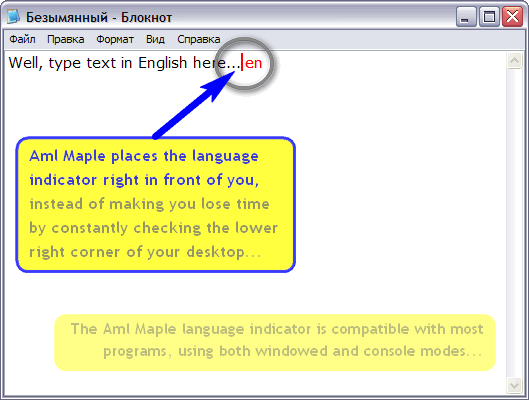 Aml Maple is a very small indicator of the active keyboard layout (current language) that is always where you are typing text. Aml Maple is a program for you if you always switch your keyboard layout between multiple languages. The program displays the current active language as part of the mouse cursor or caret, either with a flag or a color coded form documents written in different languages. Aml Maple is a very small indicator of the active keyboard layout (current language) that is always where you are typing text. Aml Maple is a program for you if you always switch your keyboard layout between multiple languages. The program displays the current active language as part of the mouse cursor or caret, either with a flag or a color coded form documents written in different languages.
Aml Maple 2,50 Build 478 comes with a couple of new changes that include the following: exceptions for text cursor coloring; addition of sample of flags to settings dialog; addition of new help files; website command moves to root menu; use bold font for selected settings item; and fixing of detection storage in AmMaple.DLL. Besides, this version also comes with an uninstaller and a forty days trial period.
Some of the features include: easy setup; nine different interfaces with support for thirty languages layouts; compatibility with most programs, including Windows and consoles; current layout can be indicated with colored symbols and national flag icon; and many more. Some of the supported languages include; English, French, German, Italian, Russian, Belorussian, Ukrainian, and many others.
Aml Maple is a shareware program with a price tag of $19.00 per download.
Want to check it out? Follow AMLPages.com
Rating: Loading... No Comments »
O. James Samson - January 24, 2011
 Flash menu builder is a program that creates horizontal or vertical navigation bar in clicks. Both HTML and XML sitemaps can be generated to make the flash menu SE-friendly; and auto-calculate menu size, and adjust item size to display better flash menu effects. Flash menu also shows above web elements; and version 1.1 works well with most popular browsers. Flash menu builder is a program that creates horizontal or vertical navigation bar in clicks. Both HTML and XML sitemaps can be generated to make the flash menu SE-friendly; and auto-calculate menu size, and adjust item size to display better flash menu effects. Flash menu also shows above web elements; and version 1.1 works well with most popular browsers.
This version comes with an uninstaller and is available for a 30 days trial before actually purchase a user may or may not decide for the unlimited time-based version. Some of its features or functions include: 68 built-in flash menu enterprise; 35 preset files; SE Friendly coder maker, XML sitemap; sounds also available for submenus; 50 effects for showing/hiding sub-menus; four categories of image libraries for various menu elements; Google XML Sitemap that can generate code and save sitemap in XML format; float menu locates in a fixed position on webpage without table or div; support for non-English language menu; and a couple of others.
Flash Menu Builder has an easy to use interface; and most users may not find it difficult to customize some of its features or functions. This version in review installs easily on Windows 7. The program costs $49.00 per download; and that is a fair price to pay for Flash Menu Builder.
Want to check it out? Visit Menu-Flash.
Rating: Loading... No Comments »
|
|
|

 FavoritesAndFiles2HTML is a program with lots of features that can convert Internet Explorer Favorites, FireFox (up to 3.x), and Opera (up to 10.x) to HTML files or you can create an HTML catalog of CDs, DVDs and hard disks and their folders’ file structure; thereby making it available for offline browsing and searching. These HTML files are easily browsable up and down through the folder’s structure tree by the links in the folders and subfolders names. These files are ideal to view in your smartphone’s HTML browser; and without any problem.




