O. James Samson - July 12, 2010
 BurnAware is freeware that available for Windows which allows users to easily create and perform the most common disc burning tasks such as: write to all CD/DVD media types, including Blue-Ray; burn disc images; Audio and MP3 CD; write Audio CDs and DVD-Video files; ISO and Cue Image; CD or DVD to ISO image; create write multi-session discs and much more; and, erase or format rewritable disc. BurnAware is freeware that available for Windows which allows users to easily create and perform the most common disc burning tasks such as: write to all CD/DVD media types, including Blue-Ray; burn disc images; Audio and MP3 CD; write Audio CDs and DVD-Video files; ISO and Cue Image; CD or DVD to ISO image; create write multi-session discs and much more; and, erase or format rewritable disc.
The interface is better, very basic and simply program without a folder tree. It works very well and has a drag-and-drop destination particularly for creating Audio-CD’s.
BurnAware has unique features which include: burn Data, bootable and multisession discs; burn Audio, Video and MP3 discs; create and burn ISO/CUE/BIN images; copy discs to ISO images; erase rewritable discs; and it is user-friendly.
BurnAware is supports the following: all media types including Double Layer; all current hardware interfaces including AHCI; UDF/ISO9660/Joliet file systems; on-the-fly writing; verification of written files; multisession DVD-RW/DVD+RW; unicode CD-Text (tracks and disc); and Windows NT/2000/XP/Vista/7.
Be that as it may, since the tool is designed for drag-and-drop it would have been helpful to provide users with an option to the system remember Window size and location that was last used.
Want to check it out? Visit BurnAware
Rating:  Loading... No Comments »
O. James Samson - July 12, 2010
 GeniusConnect is a tool that works by turning Windows Outlook into a more powerful information management tool through database connectivity. GeniusConnect can easily be used with any of the most popularly used database systems. It simply will synchronize Outlook data with any relational database that supports ODBC (mySOL, MS Access, Oraclem, MS SQL Server, etc). GeniusConnect is a tool that works by turning Windows Outlook into a more powerful information management tool through database connectivity. GeniusConnect can easily be used with any of the most popularly used database systems. It simply will synchronize Outlook data with any relational database that supports ODBC (mySOL, MS Access, Oraclem, MS SQL Server, etc).
If you have ever been frustrated by the mere fact that you have not been able to use view or use the vital information in your database while working with Outlook or Exchange, then look no farther than GeniusConnect.
This is so because you can use your own table structure and define conversions for columns with data type’s that are not usually compatible with an Outlook field. It is now possible to use it on multiple Outlook or Exchange folders and multiple databases.
GeniusConnect comes with key features like: improved efficiency while working in Outlook through immediate access to current database information; has the capacity to create tasks in Outlook based on events in user database; provides easy access to contact, calendar and customer information, stored in database; ability to quickly update and back-up information; 2-way sync and attachment support; and provides complete flexibility by allow connectivity to any standard SQL Database.
Want to check it out? Visit Geniusconnect
Rating: Loading... No Comments »
O. James Samson - July 12, 2010
 System Explorer gives users detailed information about Processes, IE, Addons, Uninstallers, Startups, Explorer, Windows, Services, Drivers, Opened files and Connections. It also allows “Action History” for monitoring processes activities. System Explorer gives users detailed information about Processes, IE, Addons, Uninstallers, Startups, Explorer, Windows, Services, Drivers, Opened files and Connections. It also allows “Action History” for monitoring processes activities.
System Explorer offers Making of Registry and Files snapshots to users for easy comparing of system changes. It can be used for analyzing product installers/uninstallers (example is Total Uninstall), performance graphs for monitoring usage of system resources in time, easy check of suspicious files via Virus Total, Easy search details about file/process via online databases and easy access to System Utilities among others.
System Explorer supports Windows XP, Windows Vista and Windows 7. Its main features are as follows: it provides detailed information about tasks, processes, modules, startups, IE, Windows, services, drivers, connections, uninstallers and opened files; launcher with integrated auto-search and auto-completion; easy check of suspicious files via Jotti or Virus-Total service; easy search details about files/process via online database; action history for monitoring; system report builds rich text report containing major information about the system; Multilanguage and plugins support; security features with online file reviews; and brand new tray hint with detailed system and battery status and so on.
System Explorer is also free both for private and commercial use.
Want to check it out? Visit Systemexplorer
Rating: Loading... No Comments »
O. James Samson - July 12, 2010
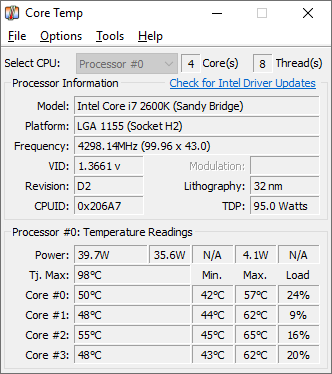 Core Temp can be defined as a compact, no fuss, and small footprint program to monitor a computer CPU temperature. One unique aspect of Core Temp is the fact that it actually shows the temperature of each individual core in each processor in computer system. Users have the opportunity of seeing in real time how the CPU temperature varies when a user load his CPU. Core Temp can be defined as a compact, no fuss, and small footprint program to monitor a computer CPU temperature. One unique aspect of Core Temp is the fact that it actually shows the temperature of each individual core in each processor in computer system. Users have the opportunity of seeing in real time how the CPU temperature varies when a user load his CPU.
Core Temp is designed in such a way that it has a logging feature which allow a user to easily record the temperature of his processor(s) over any period of time, then the data can be easily transferred into an excel datasheet for easy graphing.
Core Temp supports Windows XP Service Pack 2, 2003 Server, Vista and Windows 7 (both 32bit and 64bit versions). It has a digitally signed Core Temp driver which on all the Window programs that it supports.
The new feature in Core Temp the plug in that allows any programmer with an idea of its new feature\extension to create one, add it to Core Temp and the plug in becomes a part of it. It also has a DTS (Digital Thermal Sensor) which provides higher accuracy and more relevant temperature reading than the standard Thermal diode sensors do.
Want to check it out? Visit Alcpu
Rating: Loading... 1 Comment »
Ciaran Moore - July 12, 2010
 Mozilla have released the first public beta of Firefox 4, and whilst it’s not exactly stable so far, the browser already includes a few worthy of note changes that are well worth a closer look. Mozilla have released the first public beta of Firefox 4, and whilst it’s not exactly stable so far, the browser already includes a few worthy of note changes that are well worth a closer look.
Take Flash, for example – are you tired of applets crashing your browsing session? Mozilla are, too, and so beta 4 gains different crash avoidance features to inhibit this from happening. If Flash, QuickTime or Silverlight crash or lock up in that case they will no longer bring down the complete browser, and you can simply refresh the current page and attempt to view it again. Sounds fine to us.
One obvious interface tweak sees the tabs moved to the very top of the browser window, which Mozilla say this is giving them “top visual priority for more efficient and intuitive browsing”. Everyone else will say it’s simply borrowing from Chrome, however either way, it does fit in for a cleaner, simpler interface.
Also along the same lines, it’s good to set eyes on the menu bar replaced by a solo Firefox button, top left of the screen. Clicking this gives you entry to a good number of the options you require: New Window, Save Page As, Print, Find, History and the rest. Furthermore again, it altogether helps to make simpler the browser, cutting down the amount of places where you have to click to look for commands, as well as leaving the biggest quantity of space available for the web page you’re looking at.
The Add-Ons Manager has been changed, now taking up an entire tab of its own, and making it easier to discover new-found extensions and handle the ones you have already.
And elsewhere there are privacy improvements, recent support for HTML5 and CSS3, and several changes that may perhaps turn out to be very useful in the future. Indexed DB, for instance, will permit sites to save data locally, therefore apps like GDocs can operate even while you’re not connected to the internet.
There’s enough to discover and performance seems good quality for a beta. If you’d like to give it a check out, then download your copy here.
Rating: Loading... 3 Comments »
O. James Samson - July 12, 2010
 SCars is a kind of program that is designed to provide aid to users in performing their regular PC maintenance tasks which should be done to keep their PC working very well. Some the tasks that SCars that can be performed includes updating Windows and security software, and cleaning temporary files which are important to a PC’s health. SCars can equally be used to remind users of whatever they have chosen as it comes with the capability for users to create custom reminders. SCars is a kind of program that is designed to provide aid to users in performing their regular PC maintenance tasks which should be done to keep their PC working very well. Some the tasks that SCars that can be performed includes updating Windows and security software, and cleaning temporary files which are important to a PC’s health. SCars can equally be used to remind users of whatever they have chosen as it comes with the capability for users to create custom reminders.
SCars comes with several unique features which include: built computer security and maintenance reminders-all customizable; automatic or manual updating; custom reminders for any purpose; full help and support available to users; back-up reminders simply by using “export” function; and multiple languages support.
SCars can be regarded as among the better programs that have been introduced to help people clean up their PC. Users can set reminders to run clean-up programs once a week and once it is that time of the week it automatically remind users.
Another good thing about SCars is the fact that it can be used to update itself. This can be done by selecting the automatic update section so that whenever there is any update and automatically update itself.
Want to check it out? Visit Scars.SecurityCadets
Rating: Loading... No Comments »
O. James Samson - July 12, 2010
 Advanced SystemCare (formerly known as Advanced WindowsCare) can be described as a comprehensive computer care utility that requires a one-click approach to help protect, repair and optimize user’s computer. Advanced SystemCare offers an all-in-one and highly super convenient solution for computer maintenance and protection and it is available free of charge. Advanced SystemCare (formerly known as Advanced WindowsCare) can be described as a comprehensive computer care utility that requires a one-click approach to help protect, repair and optimize user’s computer. Advanced SystemCare offers an all-in-one and highly super convenient solution for computer maintenance and protection and it is available free of charge.
With this tool, users will no longer have to waste money when you can make use of Advanced SystemCare. It is 100% safe with no adware, viruses and spyware. It is computer maintenance program that is very easy to use.
Advanced SystemCare features are as follows: it is extremely easy to use; it fixes multiple system errors; speed-up computer performance and internet access; next-generation free Windows XP/Vista/7 registry cleaner and system optimization; quick and extensive system clean-up; power hard drive defragmentation; defends computer security with extra protection; and it is safe and free.
Advanced SystemCare comes in various languages like Albanian, Brazil, Czech, Dutch, English, Finnish, French, German, Hebrew, Hungarian, Japanese, Korean, Persian, Polish, Romanian, Russian, Spanish, Srpski, Svenska, Swedish, and Turkish and so on.
Whatever version of Windows users are running, this tool allows them to enjoy that “good as new” speed that is usually experienced on a brand new computer.
Want to check it out? Visit Iobit
Rating: Loading... No Comments »
Ciaran Moore - July 9, 2010
 Compact disc and digital versatile disc are two of the most convenient external storage device because of its large storage capacity and very cheap prices. They are very portable and you can bring them anywhere you want or need them. But what if you’ve got very confidential data burn on a CD/DVD and then you accidentally lost it or was stolen. Since CD/DVD can be opened effortlessly – all you need is an optical drive, your confidential data is in danger of being exposed or stolen. In situations that involves confidentiality, conventional burning won’t do any good. What you need is a burning software that can encrypt your data to restrict others from viewing or using it – and GiliSoft CD/DVD Encryption can give you a hand on this matter. Compact disc and digital versatile disc are two of the most convenient external storage device because of its large storage capacity and very cheap prices. They are very portable and you can bring them anywhere you want or need them. But what if you’ve got very confidential data burn on a CD/DVD and then you accidentally lost it or was stolen. Since CD/DVD can be opened effortlessly – all you need is an optical drive, your confidential data is in danger of being exposed or stolen. In situations that involves confidentiality, conventional burning won’t do any good. What you need is a burning software that can encrypt your data to restrict others from viewing or using it – and GiliSoft CD/DVD Encryption can give you a hand on this matter.
GiliSoft CD DVD Encryption is a file encryption software dedicated for encrypting your data to be burned on your CD’s and DVD’s. it offers full support for data protection inside your compact disc. The program is compatible with the latest hardware specifications available in the market (like the Intel dual core processors and AMD Athlon 64X2 dual-core processors. Compatible with Windows 2000 and later versions.)
A very simple but friendly user interface, that’s what to expect when you first run this file encryption software; no complex menus and tabs whatsoever, just single plain window. Buttons for different functionality are very accessible. Perfect for basic users.
Reliable encryption and decryption, that’s what this software does best. Use this software to encrypt your data before burning them or your compact disc. You can now password protect your disc and prevent others from accessing it. You can now ensure that everything inside your disc is safe and secured. The core functionality of the encryption method is its sector level encryption.
Aside from its foolproof encryption, the decryption feature is also outstanding. You can decrypt the data inside your disc using the password you used to encrypt them. The decryption process lasts only for a couple of minutes depending on the data. There’s still more to discover after you install and explore the program on its full potential.
CD DVD Encryption offers one of the best encryption and decryption methods in the market. With its very intuitive and user friendly interface, both the basic and advanced users can utilize the program to the fullest.
You can download or purchase CD DVD Encryption Software at Gilisoft
Rating: Loading... No Comments »
O. James Samson - July 9, 2010
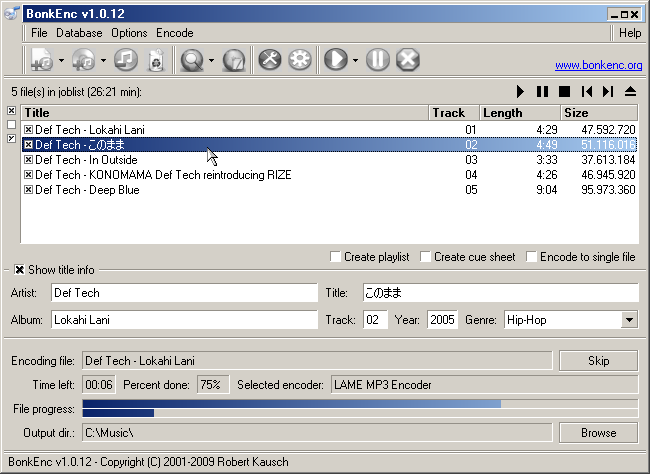 BonkEnc can at best be described as CD ripper, audio encoder and converter that can be used for various formats. BonkEnc can be used to produce MP3, MP4/M4A, Vorbis, AAC, Ogg, Bonk and FLAC files. So many more formats are available through plug-ins. BonkEnc can at best be described as CD ripper, audio encoder and converter that can be used for various formats. BonkEnc can be used to produce MP3, MP4/M4A, Vorbis, AAC, Ogg, Bonk and FLAC files. So many more formats are available through plug-ins.
BonkEnc also makes it quite easy for users to convert their audio CDs to MP3 or Ogg Vorbis files which users can use in their hardware player or with their favorite audio software. The program supports the CDDB/freedb online CD database and CDText and can automatically writes song information to ID3V2 or Vorbis comment tags.
BonkEnc actually makes it easy for users who want to convert CD’s to whatever format of their choice and it is available for free. This version is very much a stable one than the previous ones. It has bugs and clear Total Time Computation for users benefit.
This version is much more stable than 1013, though it does still have bugs, even a glaring one in the interface involving the Total Time computation.
The disadvantage of this software is the fact that most of the MP3 files that used to make BonkEnc choke and crash have been taken care of. The Decoder to a version though has been fixed. It is also not keyboard friendly in the main “Job List” interface.
Want to check it out? Visit Bonkenc
Rating: Loading... No Comments »
O. James Samson - July 9, 2010
 Parted Magic Operating System employs main programs of GParted and Parted to handle partitioning tasks with relative ease, while also featuring other useful programs. The featured programs it has are: Partimage; TestDisk; Clonezilla; Truecrypt; G4L; ddrescue; SuperGrubDisk, and much more. Parted Magic also comes with an excellent set of documentation to benefit every user. Parted Magic Operating System employs main programs of GParted and Parted to handle partitioning tasks with relative ease, while also featuring other useful programs. The featured programs it has are: Partimage; TestDisk; Clonezilla; Truecrypt; G4L; ddrescue; SuperGrubDisk, and much more. Parted Magic also comes with an excellent set of documentation to benefit every user.
Parted Magic has an extensive collection of file system tools as it supports the following: ext2, ext3, ext4, fat16, fat32, jfs, hfs, hfs+, ntfs, Linux-swap, reiserfs, reiser4, and xfs. Its basic requirement is at least i586 processor and 256MB of RAM to operate or 128MB in “Live” mode.
Parted Magic has its uniqueness in the its features which are the capability to: format internal and external hard drives; move, create, copy, delete, expand, and shrink hard drive partitions; clone hard drive to create a full backup; test memory for bad sectors; test hard drives for impending failure; benchmark computer for a performance rating; securely erase entire hard drive to wipe it clean from all data; gives access to non-booting systems thereby allowing users to rescue important data; and runs from the CD without requiring installation.
Parted magic is user-friendly and equally supports various languages like German, Italian, Brazilian, French, Norwegian and Russian.
Want to check it out? Visit Partedmagic
Rating: Loading... No Comments »
|
|
|





