Tilgore Kraut - December 18, 2008
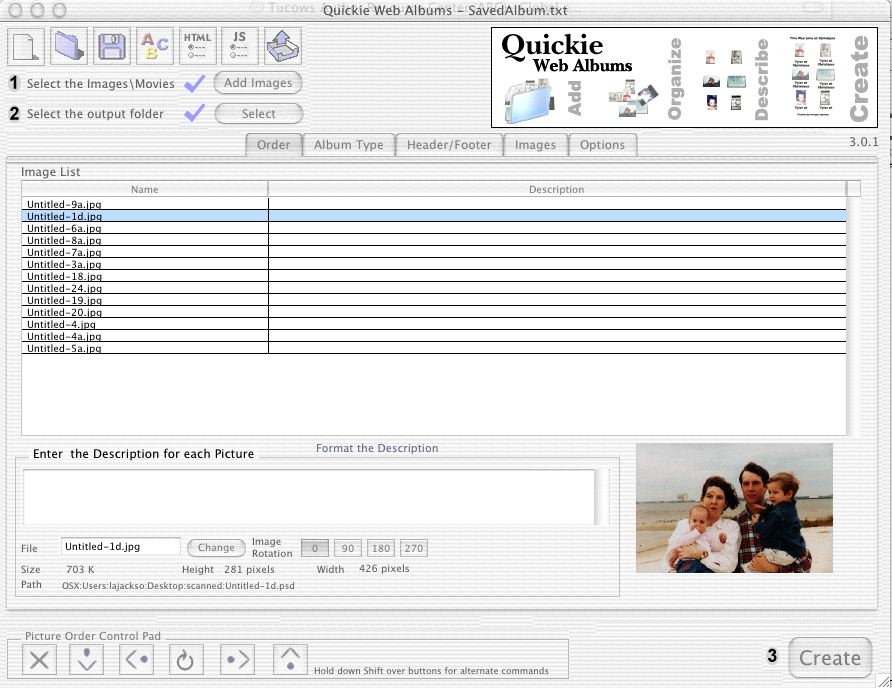 Quickie Web Albums gives the ability to order the images, put a description for each image, and many other options. Quickie Web Albums gives the ability to order the images, put a description for each image, and many other options.
Pros: This application provides you the facility to create photo albums and then publish to the Internet. Friends and family then can share the same with ease. The interface provides the means to select photos. You have a set of icons/controls that let you select the order in which to arrange the photos in the album. Image rotation tools allow you to set up the images in the album the way you want it.
You can add descriptions to each of them. Text formatting facilities are available. These formatting include HTML font, size, alignment, format or even the thumbnail size. There are templates available and you could create custom templates if you need it. Configurations set up can be saved so that for creating more albums one can automate the process further. You could mark the images with a logo at the bottom of the page that decides if the image would be displayed or not. Saving/loading of albums, custom logo options and updates are available too. If you need to you can add AVI and Quick-time movies into your albums.
Cons: Basic photo editing such as color, contrast, brightness enhancements should have been included in the application, as while processing a bunch of digital photos you would need these functionalities. It’d be much more convenient to have them integrated rather than trying to find another editor.
{More Info and Download}
Rating:  Loading... No Comments »
Tilgore Kraut - December 17, 2008
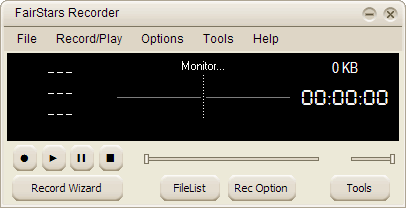 Real-time audio recorder, offering professional recording features with support for WMA, MP3, OGG, APE, FLAC and WAV formats. Additional features include silent skip, file size limits, recording schedule. Real-time audio recorder, offering professional recording features with support for WMA, MP3, OGG, APE, FLAC and WAV formats. Additional features include silent skip, file size limits, recording schedule.
Pros: FairStars Recorder is a audio recorder. It can record everything that can be played through the sound card of the system. Whether the microphone or the line-in jack or anything else playing through the card are fair game for the application. That includes music, sound track of a movie or a video clip, game audio or any streaming audio. While doing the recording you have additional feature support such as silence skip, file size limits, scheduled recording, a recording wizard, tag editor and so on. File formats supported are WMA, MP3, OGG, APE, FLAC and WAV.
The interface is simple and has a spectrum display as well as the file size and time display. Simple controls lets you set up everything very easily. You have the playback options for preview with the usual control of play/pause, fast forward and rewind of course. File list opens a box where you can specify the batch of files to be recorded. Recording options lets you choose record control, record sources, volume level and formats etc. Tools give you the controls to tag editor, recording schedules and opening of record device or the playback device controls. Options have selections for skins, file lists, record options etc. Remove environmental noise automatically with the option filters setting. Support for writing of ID3 tag when recording and showing when playback is available.
{More Info and Download}
Rating: Loading... No Comments »
Tilgore Kraut - December 17, 2008
 As we continue to use our computers, nearly each passing day, we create and store files on to it. With the passage of time our computers become enormous data repositories from where finding out a single file may take time. It happens quite frequently that you fail to remember in which folder did you store your data and invariably you use the search function. However the standard windows search function often comes short of our expectations. To perform better search an advanced tool like Content Central 4.5 is needed. This remarkable tool is capable of capturing documents through scanner, automatic uploading, and even supports to drag and drop the electronic file for better organization and safety. The browser based application also provides the features to search for the required document. All these and even more features are present with the application, which helps in providing effective document management. As we continue to use our computers, nearly each passing day, we create and store files on to it. With the passage of time our computers become enormous data repositories from where finding out a single file may take time. It happens quite frequently that you fail to remember in which folder did you store your data and invariably you use the search function. However the standard windows search function often comes short of our expectations. To perform better search an advanced tool like Content Central 4.5 is needed. This remarkable tool is capable of capturing documents through scanner, automatic uploading, and even supports to drag and drop the electronic file for better organization and safety. The browser based application also provides the features to search for the required document. All these and even more features are present with the application, which helps in providing effective document management.
Content Central 4.5 is browser-based management system for documents that supports effective organization, uploading, capturing, retrieving and protection for your entire documents. For commencing the work with Content Central, first you need to login and it would present the consisting features. Coming to the interface, it is divided such to give suitable proportion to different functions. The search, catalog, document type, etc features are placed at left panel and the containing file details are displayed on the right. While starting with to use it, you can easily manage the documents and perform different related functions like email, print, edit, append, etc, and also includes Work Queue where you can accept or reject the landing document. Using its features, it’s easy for you to find and capture the documents. Further, you can check out the messages on the dashboard, search catalogs, upload document folders, check the custom policies, zip and save, assign to work flow, and do much more.
Content Central 4.5 provides you with wide range of features that help in effective management of your documents, and perform variety of related functions.
{More Info and Download}
Rating: Loading... No Comments »
Tilgore Kraut - December 17, 2008
 Enhance your movie watching experience with tons of cool features and options that you just can’t get from a standard DVD player. Enhance your movie watching experience with tons of cool features and options that you just can’t get from a standard DVD player.
Pros: The biggest feature of this player application is that it plays all kinds of formats of DVDs to make your movie viewing experience hassle free. For example if you have some HD DVD and some in Blu-ray disks, you do not need to organize the different players required by the two different formats. In fact now that HD format has completely lost in the format war it may actually be very hard to find a player that would play the HD DVD. If you do have one, there are no guarantees that it could be maintained easily as time goes by. This application has put together players for all the available formats of DVD content. The formats include even the content recorded on writeable media. It plays Blu-ray discs of course but it can handle AVCHDs, CDs, VCDs, and a variety of multimedia files, including QuickTime, RealPlayer, DVR-MS, WMV HD, and H.264 HD videos also. It supports full Hi definition video specifications at 720p and 1080p that can support basic 1280×720 and 1920×1080 pixel resolutions. All three Blu-ray high definition movie formats are supported that include HD MPEG-2, AVC and VC1 and other HD formats such as WMV HD, DivX HD and H.264 HD. That should take care of most of the latest formats you are likely to see in the near future. Several language versions are available.
Cons: It is possible with all these format support that some combinations will create visual artifacts and that can be visually very distracting. One simple check would be to actually play a disc of all the types in your collection and make sure they play without problems.
{More Info and Download}
Rating: Loading... No Comments »
Tilgore Kraut - December 16, 2008
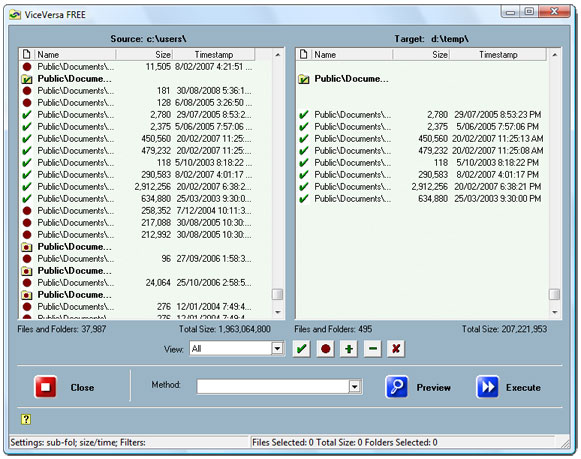 A free file sync utility for Windows that lets you compare and synchronize files and folders quickly and easily. It works with laptops, desktops, PCs, USB drives, hard-disks, network disks. A free file sync utility for Windows that lets you compare and synchronize files and folders quickly and easily. It works with laptops, desktops, PCs, USB drives, hard-disks, network disks.
Pros: Typically, these days, your work extends across multiple machines. Your office desktop, a laptop and your home machine is a typical scenario. Quite often work files are spread across these machines but then may not be the same version! You may need to have sync between a local drive and a drive somewhere across the network. ViceVersa Free lets you do just that. This is a free file sync tool for Windows XP and Vista that syncs files quickly and easily between computers, laptops, desktops, floppy drives, hard-drives, USB drives, CD-ROM drives, Zip drives, network drives, etc. To get the sync done, select the two folders and do a compare and find out what matches and what does not. Then simply ask for a sync between the folders; the source one and the destination one.
There are several criteria that you can use to synchronize. CRC, time stamps, or file size to decide the newer versions of files. You could specify filters that include/exclude files and support delete or copy operations for letting you do manual sync. Several sync methods are offered that include augment, refresh and update. The interface is very simple and easy to use. It lets you do compare, sync, back ups quite easily. You can do that with all kinds of files including e-mails, photos, iTunes, MP3s, and almost anything else!
Cons: This is not necessarily a problem. But would it not have been nice if I could just specify two files and the application did the compare+ sync on its own!
{More Info and Download}
Rating: Loading... No Comments »
Tilgore Kraut - December 16, 2008
 Screen capture program, very easy to use. Right-click provides access for contextual menu access. Move and size the window to the desired location, and select the “Capture” command for a region capture of the screen and Save the capture with the “Save” command. Screen capture program, very easy to use. Right-click provides access for contextual menu access. Move and size the window to the desired location, and select the “Capture” command for a region capture of the screen and Save the capture with the “Save” command.
Pros: This is a easy to use screen capture application. Access to the program is integrated with contextual menu and you can access the features through right click. You can place the capture window where you want and size it appropriate to capture only the region you are interested in. You can, of course, decide to capture the full screen too. Captured image is saved through a save command. You can decide to capture a screen with precise dimensions in terms of pixels on two dimensions. Image size menu item provides you those options. The format of capture is the PNG. A thumbnail capture also is possible.
The “Transparent Mode” command preserves the window and the image in transparency: you can use the capture like a tracing paper. There are several effects you can use besides raw capture. Lighten option cranks up the brightness to make the picture lighter, similarly reducing brightness will darken the captured image. One is able to enhance color, contrast and RGB components individually too. Turn the capture into a complete black and white image by getting rid of all the color information- if that is what you need to do. Psychedelic, black and white sketch and color emboss are some more effects available for your use. A “no border “ mode lets you get rid of the windows borders. If you need to create a photo montage, just open several instances of the program, arrange the windows and just capture the images.
Cons: Capture area can only be rectangular. Some kind of mark up tool would have been useful as a content creation tool.
{More Info and Download}
Rating: Loading... No Comments »
O. James Samson - December 16, 2008
 Baby Diary keeps a multimedia album for every record of your baby’s milestones. Baby Diary keeps a multimedia album for every record of your baby’s milestones.
With Baby Diary, you can keep files like notes, photos, and videos of prenatal development, delivery, first steps or custom categories for multiple children. The diary content can be arranged in a blog style with help of built-in calendar. Each diary entry displays the corresponding baby age.
Your baby’s growth process can be controlled by creating weight, length, and head circumference charts from birth to 36 months of age. Dental and vaccination schedule charts are included as well. This program offers you the possibility of creating your own percentile enabled charts of the baby development.
Baby Diary can also quickly and easily transform its multimedia album into the complete baby web site ready to be published on the web or stored on CD. Information on the Baby web site can include photos, videos, notes, age calculations and charts.
Conclusively, Baby Diary makes it possible to create your own web site templates. So, the possibilities of baby web site design using Baby Diary are virtually unlimited.
Features of Baby Diary:
General
- Easy to use drag & drop user interface.
- Can keep diaries for multiple children.
- Allows creating custom hierarchy of notes’ categories.
- Sortable list of notes with drag & drop support for each category.
- Trash node in category tree that holds recently deleted notes.
- Ability to arrange diary content in a blog style with help of built-in calendar.
- Date range filter for notes
Get more on: http://www.aktisoft.com/BabyDiaryAbout.htm
Rating: Loading... No Comments »
O. James Samson - December 15, 2008
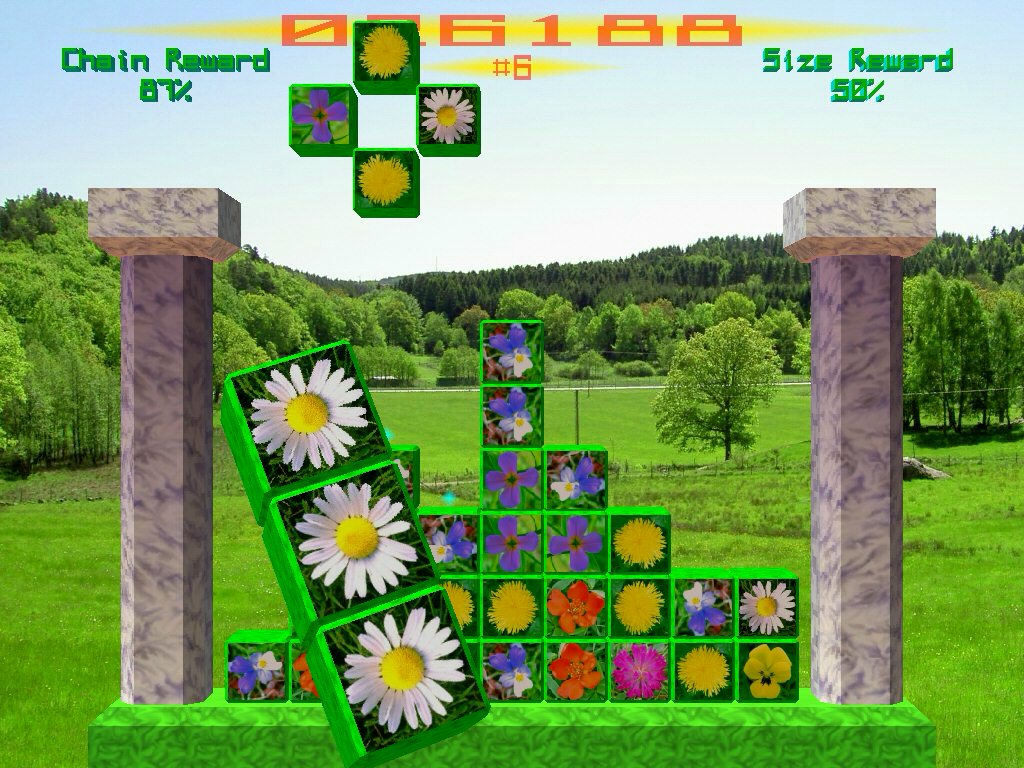 Petal Palace is game that takes you to an enchanted palace, surrounded by beautiful scenery where flowers grow in great abundance. Interestingly, there isn’t nearly enough space in the garden, so there’s only one thing to do and that is picking the flowers by arranging them in lines, to keep the palace from being overgrown. Use any tools you may find to overcome obstacles. Petal Palace is game that takes you to an enchanted palace, surrounded by beautiful scenery where flowers grow in great abundance. Interestingly, there isn’t nearly enough space in the garden, so there’s only one thing to do and that is picking the flowers by arranging them in lines, to keep the palace from being overgrown. Use any tools you may find to overcome obstacles.
Picking the flowers as supposed offers you bonuses and rewards that will help you in your task. In Petal Palace you get lots of game variations with varying surroundings and gameplay.
Special features:
- Stunning 3D graphics.
- Lots of different game variations.
- Endless replayability!
- Supports both mouse and keyboard.
- Easy to learn (gameplay somewhat similar to games like Columns and Tetris).
- Hard to master, since every game variation requires different tactics and skills.
- Customizable keyboard keys.
- Customizable mouse buttons.
- Mouse scroll wheel support.
- Import/export highscores OpenGL support*.
Petal Palace always uses OpenGL on Mac OS X, but the Windows version may use DirectX if OpenGL-compatible hardware can’t be found.
Get more info from: http://www.norbyte.com/PetalPalace.html
Rating: Loading... No Comments »
O. James Samson - December 15, 2008
 There is a new diagnostic tool for Windows NT based systems and that is ESET SysInspector. It is free and state of the art. It provides details like running processes, registry content, startup items and network connections. Whenever a snapshot of the system is made, ESET SysInspector applies heuristics to assign a risk level for each object logged. There is a new diagnostic tool for Windows NT based systems and that is ESET SysInspector. It is free and state of the art. It provides details like running processes, registry content, startup items and network connections. Whenever a snapshot of the system is made, ESET SysInspector applies heuristics to assign a risk level for each object logged.
The graphical user interface enables the user to gain access to the large volume of data. ESET SysInspector is a convenient for all users.
Basic Features:
- Ability to generate and save a detailed log to be used by an IT expert or uploaded to an online forum for diagnosis
- Option to exclude private, personal information from being saved in logs
- Integrated Anti-Stealth technology allows discovering hidden objects (e.g. rootkits) in MBR, registry entries, drivers, services and processes
- Ability to compare two existing logs for differences makes it easy to detect changes over time
- Log entries are assigned a color code risk level for easy filtering
- Intuitive hierarchical navigation of logs
- Fast and compact single file executable, ideal for first responders to run from a USB drive without lengthy installation
For more information check: http://www.eset.com/download/sysinspector.php
Rating: Loading... No Comments »
O. James Samson - December 15, 2008
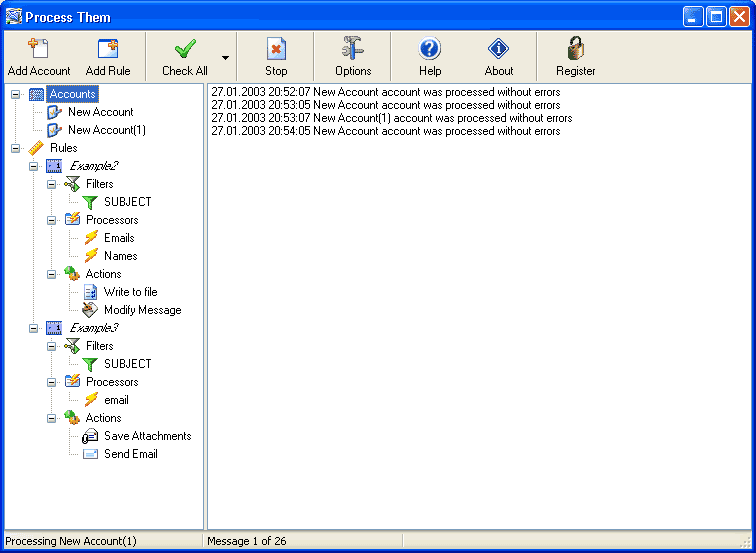 You can now automatically process all emails you have in your POP3 mailbox (including Gmail) or in Mozilla Thunderbird, Outlook Express, Microsoft Outlook, Vista Windows Mail email client with the use of an email parser called Process Them. The email parser can do the following instantly: You can now automatically process all emails you have in your POP3 mailbox (including Gmail) or in Mozilla Thunderbird, Outlook Express, Microsoft Outlook, Vista Windows Mail email client with the use of an email parser called Process Them. The email parser can do the following instantly:
Process web forms you receive by email, extract common data and save it to a database (Excel, Access, MS SQL or MySQL) or to a text file. This is a must have tool for Ebay sellers or anyone who has online store and get order notifications by email.
- Save attachments to dedicated folder and remove these attachments from emails
- Send emails using extracted data. For example, it can be used as autoresponder with custom parameters
- Launch files with parameters using extracted data. So you can pass extracted data information directly to other applications
- Start Process Them as Windows Service if you want to use it on a server and it will process all your email automatically and unattended 24/7
- Delete, move or copy messages between folders. This feature can be used as perfect antispam filter or just to sort email according to your needs
More information is available on http://www.kadmy.com/process.html
Rating: Loading... No Comments »
|
|
|





