Tilgore Kraut - February 7, 2008
 Have you ever thought of making yourself into a cartoon? Well even if you do not have a good hand in drawing there is a remarkable utility called Photo to Cartoon 1.2 that can help you to convert your images into stylish cartoons and portraits. You can get colored or black and white cartoons that you can utilize for various purposes. You can easily load your digital images and then get your images converted into cartoon easily by a click. Now think of this using your caricatures in the form of the clip arts and put them as the sign o the emails, letters, etc. It will make your work more expressive, attractive and would make a mark on the viewer’s mind. Have you ever thought of making yourself into a cartoon? Well even if you do not have a good hand in drawing there is a remarkable utility called Photo to Cartoon 1.2 that can help you to convert your images into stylish cartoons and portraits. You can get colored or black and white cartoons that you can utilize for various purposes. You can easily load your digital images and then get your images converted into cartoon easily by a click. Now think of this using your caricatures in the form of the clip arts and put them as the sign o the emails, letters, etc. It will make your work more expressive, attractive and would make a mark on the viewer’s mind.
Photo to Cartoon 1.2 can be used without any trouble as the features are rather simple even for the average computer user. First you need to load the picture with the given option on the screen. The loaded picture’s preview is shown at the right side of the screen and them you can easily locate the face that you want to create the cartoon of. When you have done the selection then you just need to click on draw Cartoon and done. While saving the image you can save it with desired width and height. You can make the selection of the cartoon style and also you can enable the Constrain Proportion. The preview of the cartoon is also shown on the screen according to the selected style. Make different cartoons of your friend’s pictures and gift them to your friends to make them feel happy that you made the sketch for them. The software is quite easy to be used by anyone and its all fun to use.
Photo to Cartoon 1.2 would make various cartoons from any of your pictures. Make portraits and place them at your walls or frame it and gift it to your friend. The utility will surely add a new flavor to your digital imagery.
{More info and Download}
Rating:  Loading... 1 Comment »
Ciaran Moore - February 7, 2008
 There’s a lot of online storage services in the last few years, some better than others. But ADrive has to be the one with the largest amount of storage space yet (tell me if I’m wrong) with a massive 50GB of space. No, it wasnt a typing error, thats right 50GB of online storage space for free. There’s a lot of online storage services in the last few years, some better than others. But ADrive has to be the one with the largest amount of storage space yet (tell me if I’m wrong) with a massive 50GB of space. No, it wasnt a typing error, thats right 50GB of online storage space for free.
Its currently in beta and is totally free to sign up to and use. You simply sign up with your email address for a free account and then you can start using it immediately. It even allow you to do complete folder uploads, as well as drag and drop support. You also can optionally share files. What’s more, the maximum file upload size is a whopping 2gb.
I’d recommend trying out this site to anyone who has a lot of data they’d like to back up remotely, as the site is very well designed and very usable, the user upload interface is very easy to use too. This storage service is surely raising the bar in online storage with the huge amount of storage offered alone. Another good thing is they seem to take data storage very seriously and professionally as you can see by reading this link http://adrive.com/technology
More info and try it out for yourself by visiting the homepage here.
Rating: Loading... 7 Comments »
Ciaran Moore - February 6, 2008

CanYouRunIt is an online tool that gamers are sure to find useful.
If you’ve ever bought a game and excitedly brought it home only to find out that your computer is unable to run it, then this is a site worth adding to your bookmarks. It has an ever-growing list of computer games, mostly current popular titles. You simply select the one you’re interested in buying/installing, – you can safely accept any prompts that pop up, as it needs to scan your system. This takes about a minute or so.
It gives a detailed rundown on several areas such as graphics card, free memory and processor requirements for the game in question. The report is detailed yet simple enough for just about anyone to understand. It compares the games minimum system requirements to your systems capabilities, letting you know clearly if you’re able to run that game. This is a cool tool for example, for parents who’d like to make sure their computer can run the game their little one has been begging them for,(also suitable for the big kid in all of us who needs a break from work at times!)
Further info and start using it right away by going to the homepage here.
Rating: Loading... 1 Comment »
Ciaran Moore - February 4, 2008
 Quickbot is an online bot that can be a useful addition to your MSN Messenger contact list. You simply add Quickbot to your MSN buddy list and then it can help you out in several ways. You do this by simply adding “bot@techie.com” to your buddy list. Quickbot is an online bot that can be a useful addition to your MSN Messenger contact list. You simply add Quickbot to your MSN buddy list and then it can help you out in several ways. You do this by simply adding “bot@techie.com” to your buddy list.
The functions it has are controlled by typing commands (listed on the homepage below or just type “help” to it in MSN Messenger). It can provide translations for most of the European languages and Chinese. You can also do a bunch of other things ranging from doing calculations, telling the weather, news headlines, reversing text, random quotations,and generating insults, among others.
It’s an interesting tool as there’s nothing to install or download and it therefore takes up no space on your computer. It also replies to non command specific messages with humorous (if somewhat limited) artificial intelligence, which is a fun touch.
For full list of features check out the homepage here.
Rating: Loading... 1 Comment »
O. James Samson - February 4, 2008
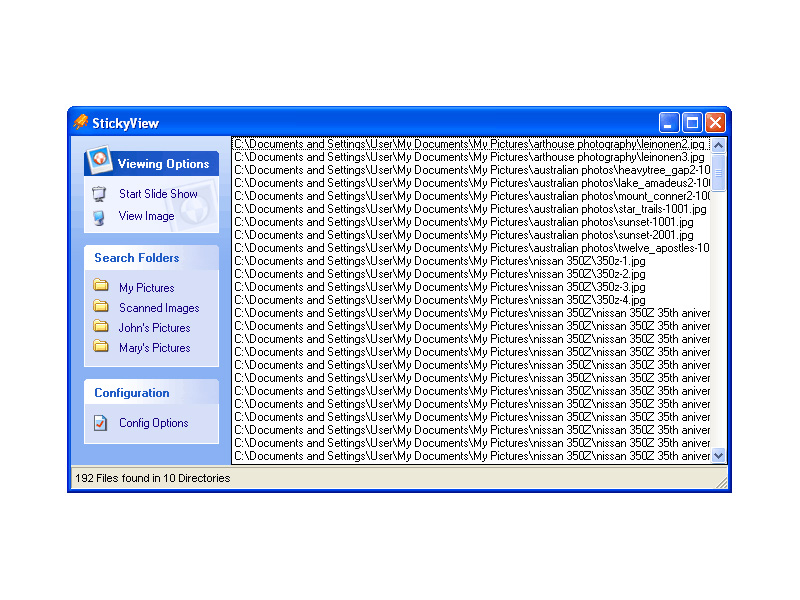
StickyView is an interesting piece of software because what it allows you to do is to view all of your images from different directories in one slide show without having to worry about going around and moving pictures around incessantly.
If you are like most people with computers, images will find their way into multiple folders and categories that will be removed from each other. This is not necessarily even because of disorganization, although for some people that probably does play a part! Even an organized person will have different folders for pictures and they might even have more folders than a disorganized person because of all of the different categories they have for their different pictures.
StickyView as a piece of software has a lot of good things about it, but the main is the extra convenience it provides. Windows can not play a slide show from multiple folders and this can make it very frustrating for you if you have similar pictures in different folders that you want to view at once (i.e. if you happen to arrange your folders by the date they were taken, for example). StickyView on the other hand will find all of your different picture files across directories and play them for you as much as you want. That makes it a truly worthwhile piece of software.
More information on it can be found at http://www.stickyview.com/
Rating: Loading... No Comments »
Tilgore Kraut - January 31, 2008
 While searching for the perfect candidates for your organization you need to surf many sites and get the ones that suit to your organization needs. Employees form most important part of the organization and selecting the efficient ones is much crucial task. But now you can directly find the resumes of capable candidates with the suitable qualification. With the ResumeFinder 2008 you can search for candidates and it carries out resume search with Google. You can find resumes using the filters like the keywords, location, years of experience, etc. With it you can also send the automatic or bulk emails to the candidates by using the pre-defined templates. While searching for the perfect candidates for your organization you need to surf many sites and get the ones that suit to your organization needs. Employees form most important part of the organization and selecting the efficient ones is much crucial task. But now you can directly find the resumes of capable candidates with the suitable qualification. With the ResumeFinder 2008 you can search for candidates and it carries out resume search with Google. You can find resumes using the filters like the keywords, location, years of experience, etc. With it you can also send the automatic or bulk emails to the candidates by using the pre-defined templates.
ResumeFinder 2008 helps you to find the resumes based on various aspects like location, job portals, etc. The toolbar is set with the explorer window that makes the search easier and the results are shown in the explorer window itself. It work with best search scripts and makes your work easier. For making the search perfect you need to set the Options given with the program. First you need to set the Search Settings; select the Search Engine, Regional Settings and Search Settings for searching in the updated WebPages. Script Settings are there for creating and selecting script, etc. Job Portals Settings allow you to search resumes with specified job portals or websites. You can set the URLs for the sites with the Site Settings features for using them in the portal search. Even if you’re looking for someone from the same location them you can have the search conducted by the location. Set the location with the settings and then make the selection of the desired ones for the resume search. You can also select the location filter for having more specified search. So set your preferences and start searching for the resumes.
With ResumeFinder 2008 you can also save the search setting for use in future and also search for the resumes that have been updated or posted in recent time.
{More Info and Download}
Rating: Loading... No Comments »
Tilgore Kraut - January 31, 2008
 While copying your digital pictures you often may experience the problem that the system asks you to replace the pictures because of the same names. Every time you need to change the name of the pictures and then save them which ends up being a major hassle. Imagine the situation when you have to save a large numbers of pictures, then what? Well with the PicRename 1.0.1.9 software it would become easy for you rename the pictures with the shots dates, etc. It makes it easy for you to remember the date and also arrange them in proper sequence in which they were taken. While copying your digital pictures you often may experience the problem that the system asks you to replace the pictures because of the same names. Every time you need to change the name of the pictures and then save them which ends up being a major hassle. Imagine the situation when you have to save a large numbers of pictures, then what? Well with the PicRename 1.0.1.9 software it would become easy for you rename the pictures with the shots dates, etc. It makes it easy for you to remember the date and also arrange them in proper sequence in which they were taken.
PicRename 1.0.1.9 opens with the pleasant looking screen that has the simple options to work with. To start work with it you need to select the directory that contains the pictures and the containing pictures are shown on the left side of the screen. You can have the preview of the images on the right side screen; it also lets you assure that that you selected the right images. You can make the selection to click to Select All that places the mark on all the boxes that are placed in front of the images. For having the name changed you need to make the selection from ‘Settings’ option. For rename you can use from the given options. You can choose the Date Picture Taken, Date Originally Created, Date Created, and also set to enable to Show Previews and Milliseconds. The program can read the EXIF tags and set the Date accordingly if chosen. When you’re done with the selections then you are required to click ‘Rename’. The images would get rename and you can save the changes that you made.
The functions and working of the PicRename 1.0.1.9 is as simple as it appears from the description. You would not require much to do and also one of its best of the features is that the software can read the EXIF tags itself for setting the name.
{More Info and Download}
Rating: Loading... No Comments »
Tilgore Kraut - January 29, 2008
  WinGet is a download manager that can increase download speeds by up to 300 percent. You may automatically resume broken downloads if your connection is lost or if your computer accidentally shuts down. WinGet is a download manager that can increase download speeds by up to 300 percent. You may automatically resume broken downloads if your connection is lost or if your computer accidentally shuts down.
Pros: WinGet download manager supports both ftp and http servers. One is able to queue all downloads in one go, the application will ensure downloads are reliably completed via unlimited retries and individual monitoring of each download scheduled. Even when there are breaks in the download the package is able to resume at appropriate points. WinGet lets you browse around the ftp site chosen to decide the pieces you’d like to download.
WinGet gets integrated into the browsers Internet explorer, Opera or the Firefox and operates as the default download manager. It is integrated into the right click menu.
Download speed can be tuned through parameter settings such as number of threads operating the download and simultaneous files being downloaded. In this age of multiple cores, whenever one has spare power, it could be utilized for speeding up the download process. The application is able to work through proxy servers too and communicate through the firewall.
Cons: Whether downloads get speeded up to 300% or not is questionable. This could not be measured. However, qualitatively the download speed does get speeded up.
Overall a easy to use application, easy to learn, fairly well designed it is a 4 star item.
Rating: Loading... No Comments »
Tilgore Kraut - January 29, 2008
 AllKeys Macro is a macro program plus work/break timer and mouse replacement tool. Provides a flexible but robust macro solution that allows users to record and organize a large number of macros. AllKeys Macro is a macro program plus work/break timer and mouse replacement tool. Provides a flexible but robust macro solution that allows users to record and organize a large number of macros.
Pros: This application is a macro manager, work/break timer and a mouse replacement tool. As a macro manager it lets macros to be recorded, edited and arranged properly. Macros could be applicable to specific applications or to all of them. Macro would be a nice way to create keyboard short cuts for repetitive tasks such as filling your address somewhere or to launch your favorite web mail. The software lets you remap the keys to whatever location you want a particular key or a set of keys to be. When defining a macro one could specify an application for the macro. The macro would then operate only in the environment of that application. Import/export of macros are provided for. Editing facilities for editing a macro recorded already or imported can be done through a simple interface.
One really nice feature of the macro playback is the speed of playback. One usually takes a bit of time to type in the commands. But since a computer can take in the input much faster and yet recognize the key strokes, macros can be arranged to be played back at a faster rate.
If you would prefer, you could replace the mouse operation by keyboard strokes. Initially you define a set of keys to be the up/down and lateral movement keys as also left and right clicks on the mouse.
The work/ break timer functionality lets the user define his continuous work time in one stretch and the break time there after. You get alerts for the break time. What’s more is performance statistics like keystroke and mouse clicks done per minute are recorded and displayed.
Cons: The user interface feels a little too complicated for the application. Learning time too could be significant. Unless you use a lot of macros, investing in learning time may not be worthwhile.
Overall the application does perform a useful function, overall rating 4 stars.
Rating: Loading... No Comments »
Ciaran Moore - January 28, 2008
 WebmailSafety from Gwebs is free encryption for webmail. It ensures that emails sent across the internet are unreadable except by the sender and receiver. It does this by using RSA2048 & AES-256 Public Key encryption, ensuring very strong security. WebmailSafety from Gwebs is free encryption for webmail. It ensures that emails sent across the internet are unreadable except by the sender and receiver. It does this by using RSA2048 & AES-256 Public Key encryption, ensuring very strong security.
In order for it to work, the person you send to must also be using it. The site says it will soon be compatible with all other PGP software though and they’re also working on a Web Client for receiving secure email, but currently you must invite your friends in order for them to send or receive secure email with you. Also, note that it currently only works with Internet Explorer, but they say FireFox support will soon be on the way.
It currently supports Gmail, Hotmail, MSN mail, Live mail, Yahoo mail and AOL mail.
This is very interesting software for those of you interested in security and privacy online (or maybe just a little paranoid?)
To download it and try it out for yourself, (along with the over 210 thousand others and counting) go to the website here for further details.
Rating: Loading... No Comments »
|
|
|


 (5 votes, average: 4.20 out of 5)
 (4 votes, average: 4.50 out of 5)

