O. James Samson - January 8, 2007
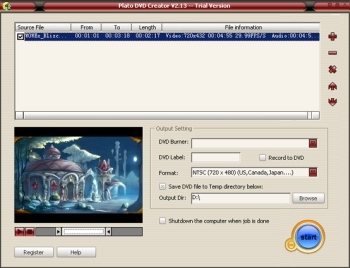 With Plato DVD Creator you can create DVD , from AVI, DivX , MPEG, WMV , MOV video with ease. With Plato DVD Creator you can create DVD , from AVI, DivX , MPEG, WMV , MOV video with ease.
It is really easy to use you don’t even need a strong experience with multimedia tools to use it. You just add source video file , set beginning and end position of source file , and the output setting panel is so easy to use that you could finish creating your own DVD without any multimedia knowledge base.
One really nice thing about this software is its automatically shutdown function. Normally when you add several large video files to convert , it takes a long time , but with Plato DVD Creator, you just go to sleep , its automatically shutdown function could help you shutdown your computer after all task done making it so convenient to create DVDs easily.
Go check it out, CLICK HERE!
Rating:  Loading... 1 Comment »
O. James Samson - January 8, 2007
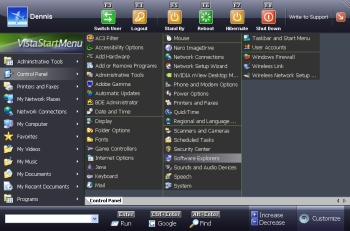 If you’ve found the Start Menu on your Windows inconvenient and you are in the search for a viable alternative, you need to check out Vista Start Menu. If you’ve found the Start Menu on your Windows inconvenient and you are in the search for a viable alternative, you need to check out Vista Start Menu.
Vista Start Menu gives quick and easy access to your system’s applications. It is easy and convenient to use. With an improved interface and quick access to information, you can start working with pleasure using the new version of Vista Start Menu. It’s interface takes into account how the brain processes visual information and turns the start menu into a simple and effective tool.
Don’t be misled by the name Vista, it’s not only compatible with Windows Vista; Vista Start Menu is also compatible with Windows NT, 2000, 2003 and XP.
Changes in the latest version, Vista Start Menu 2.1 include:
- The performance rate has considerably increased due to splitting into threads
- The program has a new icon
- Sorting is now available (leave in places, sort by name, sort by name and type)
- Now you can specify the main program in each folder manually and use the entire power of the «single-click launch» feature
- Update check feature. Now you can learn about the releases of new version by just clicking the logo of Vista Start Menu
Want to check it out? CLICK HERE!
Rating: Loading... 12 Comments »
O. James Samson - January 6, 2007
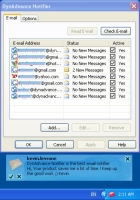 if you have a hard time keeping track of your mail because you have different email accounts, then you are going to love this. Here is a nice email notifier for you. DynAdvance Notifier. It is a program that notifies you when you have new Email on a variety of account types, including Gmail, Hotmail, MSN, Yahoo! Mail, POP3 or IMAP mail. if you have a hard time keeping track of your mail because you have different email accounts, then you are going to love this. Here is a nice email notifier for you. DynAdvance Notifier. It is a program that notifies you when you have new Email on a variety of account types, including Gmail, Hotmail, MSN, Yahoo! Mail, POP3 or IMAP mail.
DynAdvance Notifier simply sits in your system tray and opens a pop-up window whenever you receive new e-mail. I’m sure you’ll appreciate the fact that it shows you a preview of the new message and automatically logs you in to your webmail account, or automatically launches your favorite email client.
With this software you don’t have to log into your email account very day to know whether you have new mail or not. DynAdvance Notifier makes keeping track of your email quick and easy.
The current version has these changes incorporated in the software:
- Complete Windows Vista support
- New Hotmail (Windows Live) fixed support
- Other small improvement
CLICK HERE for more info
Rating: Loading... 1 Comment »
Ciaran Moore - January 6, 2007
 CMS stands for content management system, a popular way to run a website. By setting up and using a CMS system as your website you can easily run a pretty interactive site. It allows you to have forums, download areas, news, reviews, and much more if you add block and modules. CMS stands for content management system, a popular way to run a website. By setting up and using a CMS system as your website you can easily run a pretty interactive site. It allows you to have forums, download areas, news, reviews, and much more if you add block and modules.
This site i’m reviewing allows you to test out many different kinds of CMS software without having to go the long way of installing them on your webspace and trying them out. It has them all installed already and has a username and password for each demo so you can mess around and experiment with them all you want!
It resets every 2 hours, more than enough time for you to know if a particular CMS is suitable for you or not. You can do all this right over at the website right here!
A very useful site for anyone into this kind of thing and of course, being Open Source, they are all free! Just be prepared to have a lot of free time if you decide to use one, because setting them up just how you want them can take some time!
Rating: Loading... No Comments »
O. James Samson - January 6, 2007
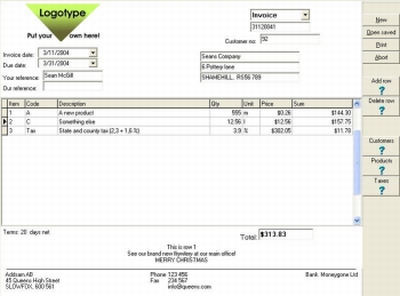
In need of cool professional invoices? Why don’t you create your own? With AB Invoicing you can create professional invoices with your own logotype without any limits in time or quantity. You can even extend the program with low cost modules for customer database, products database, invoice archive and so on. The nice thing about this software is that you get to extend with what you need, when you need it and pay only for that.
What I really appreciate about this software is that you get to try it out for free for 30 days at no cost to you and enjoy creating as many invoices as you can.
CLICK HERE for more info and trial download.
Rating: Loading... 1 Comment »
O. James Samson - January 4, 2007
 In case you’ve not yet found the right software for your DVD making needs yet, here is one software you need to check out, DVDBuilder Pro. In case you’ve not yet found the right software for your DVD making needs yet, here is one software you need to check out, DVDBuilder Pro.
DVDBuilder is designed to convert your mpeg file to DVD. You can use this software to create DVD from your digital video recorder, Webcam, or downloaded file. DVDBuilder is a powerful, splendid and simple to use application.
Tagged as a total solution for you to create your DVD, DVDBuilder Pro includes iMpeg converter, IphotoDVD , DVDBuilder. With DVDBuilder Pro you can create, Share and Preserve your memories on DVD.
The cool thing about DVDBuilder Pro is that it has all the tools you need to be your own movie producer. What I love about this great software is that it doesn’t matter whether you are new to disc authoring or an advanced user, creating movie or photo slideshow DVDs is an easy experience.
If you are ready to try it out, CLICK HERE!
Rating: Loading... No Comments »
O. James Samson - January 3, 2007
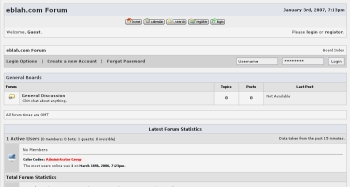 If you run a forum or you are planning to start forum boards, this software might come in handy. E-Blah is a forum system that features passworded boards, click tracking, extensive thread moderation, a full admin center, clean posting format, themes, user message blocks, attachments, message search and more. If you run a forum or you are planning to start forum boards, this software might come in handy. E-Blah is a forum system that features passworded boards, click tracking, extensive thread moderation, a full admin center, clean posting format, themes, user message blocks, attachments, message search and more.
A new version, E-Blah 10.2 has just been released for the new year. This release is a major release, with enhanced security features along with much needed cosmetic changes. The new version now requires administrator verification i.e. a pass code has to be entered for any administrator function.
The really cool thing about E-Blah is that it’s FREE! Yeah, it’s a free, open source software. Go check it out and get your own download.
Check it out: http://www.eblah.com/
Rating: Loading... 5 Comments »
O. James Samson - January 3, 2007
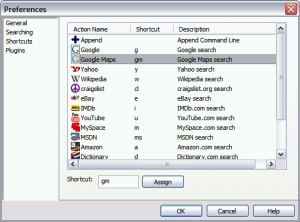 When you have a lot of applications on your system it can really be a tough task accessing them. Guillotine is a lightweight Windows utility that allows you to quickly and naturally access items you commonly (and uncommonly) use like programs, bookmarks, contacts, and web searches. When you have a lot of applications on your system it can really be a tough task accessing them. Guillotine is a lightweight Windows utility that allows you to quickly and naturally access items you commonly (and uncommonly) use like programs, bookmarks, contacts, and web searches.
With Guillotine you find things quickly and easily. The idea is to find things quickly just by typing a few keys, selecting your item, and having a nice time. It’s much more intuitive and easier than hunting down those items as you normally would. But the truth is it will take some time getting used to it as old habits die hard. But once you do, you’ll see how much more intuitive, easier and quicker it is to your normal workflow.
The latest version of Guillotine, 1.2.0.0, has this recent changes:
- Fixed Opera plugin looking in opera profile folder
- You can now use relative paths in the FileSystem plugin
- You can now use the following psuedo-environment variables in the FileSystem plugin, which will expand to their corresponding paths on your system: %START_MENU%, %START_MENU_ALL%, %MY_DOCUMENTS%, %DESKTOP%, %DESKTOP_ALL%, %RECENT%, and %QUICK_LAUNCH%
- FileSystem extensions now upgraded to full file filters (i.e. can now use wildcards like: *.exe and *work*.doc)
CLICK HERE for download and more info. Oh! Did I fail to mention? IT’S FREE!
Rating: Loading... No Comments »
O. James Samson - January 3, 2007
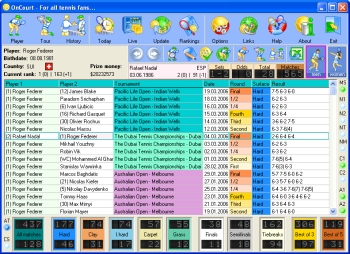 If you are a tennis fan you are going to love this game. OnCourt is a program for tennis fans. The beautiful thing about this program is that it gives you access to statistical information about any tennis player, tennis tournament, and a history of matches of any two players. I love the fact that it contains databases of both men and women tennis and they can be updated daily via Internet. If you are a tennis fan you are going to love this game. OnCourt is a program for tennis fans. The beautiful thing about this program is that it gives you access to statistical information about any tennis player, tennis tournament, and a history of matches of any two players. I love the fact that it contains databases of both men and women tennis and they can be updated daily via Internet.
If you are still not sure this program will meet your “tennis love needs”, check out the functions. The main functions are:
- Obtaining statistical data on any tennis player, the history of his games on courts with various surfaces, at the tournaments of various levels, his current position in the ranking list, the win and loss percentage in tie-breakers, finals, semi-finals, three and five-set matches, the players specialization, his ascendant and current biorhythms and lots of other information
- Obtaining information on the results of any tennis tournament either as a table or as a tournament draw
- The possibility of exporting the data into Microsoft Excel keeping the original colors which allows the data to be saved in a file, converted into some other format or printed out or be e-mailed
- Daily on-line database updates make sure that you are always well informed with the results of the latest matches played and the important data for the analysis of the forthcoming matches.
Etc.
Want to try it out? CLICK HERE!
Rating: Loading... 3 Comments »
Ryan Kulla - December 31, 2006
TortoiseSVN can be thought of as a Win32 GUI front end to the source code control system Subversion, which is an open-source software engineering tool to allow developers to easily maintain their projects.
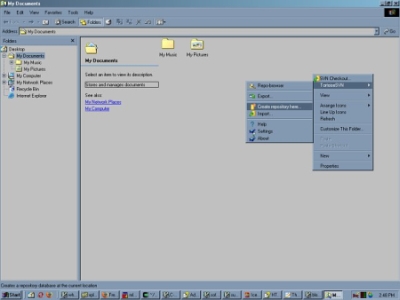
Once you install Subversion via Windows Installer, grab the TortoiseSNV Installer. You can of course just use the svn command-line tool that comes with Subversion but there are some benefits for using TortoiseSVN instead. For one, TortoiseSVN allows you to work completely in a Graphical User Interface to manage your projects, but it does more than that; TortoiseSVN is basically a shell add-on to the windows shell, which means you can right-click on any file/folder in windows–be it on the Desktop or from within Windows Explorer–and you will have access to TortoiseSVN via the pop-up menu. What’s more is, only commands that make sense for the selected file/folder are shown. You won’t see any commands that you can’t use in your situation!
Here’s a couple hints to make your life easier:
- When you install Subversion note that the client runs on Win9x/Me but the server does not. If you use Win9x/Me then add the following line to your autoexec.bat:
SET APR_ICONV_PATH=”C:\Program Files\Subversion\iconv” (or whatever your path to it is if not this)
(Don’t forget to reboot windows for the changes to take effect after you edit your autoexec.bat)
- When you install Subversion it comes with documentation, which is actually the official book on Subversion. It will be in .chm format (Compiled HTML) but you can get other versions, like PDF (if you want to print it out) or both single page or multi-page HTML versions to download for off-line viewing from here. Trust me, you will want to read this if you’re new to Subversion–at least chapters 2, 3, and 1–in that order. That site also has dead-tree versions for sale.
- If you’re not a programmer but still want to use TortoiseSVN then check out this tutorial
Rating: Loading... 1 Comment »
|
|
|



 (4 votes, average: 3.75 out of 5)