O. James Samson - September 3, 2016
 Looking for a program that offers high quality animated scenes for your desktop? Planet9 does look like a program that has some attractive features to help you achieve that and much more. The software is a multipurpose visualizer that offers you a lot. Looking for a program that offers high quality animated scenes for your desktop? Planet9 does look like a program that has some attractive features to help you achieve that and much more. The software is a multipurpose visualizer that offers you a lot.
Plane9 is a revolutionary new 3d visualizer where you never have to settle for just one view ever again. From the start you have over 70 predefined scenes to choose from. If your feeling creative you can start up the editor and create new scenes that you can then share with the world. Read the rest of this entry »
Rating:  Loading... No Comments »
O. James Samson - September 2, 2016
 It’s great to have plenty of options when it comes to editing on the web. When you have loads of tools or software to choose from, it simply makes your job easier. Twistpad just as the name sounds, is a fully-featured text editor that works on Windows operating system. It’s great to have plenty of options when it comes to editing on the web. When you have loads of tools or software to choose from, it simply makes your job easier. Twistpad just as the name sounds, is a fully-featured text editor that works on Windows operating system.
Twistpad is a fully featured text editor for Windows. The tool can be used as a simple notepad replacer, or a featured packed editor targeting web and software developers. Features include Easy to design syntax highlighting, find and replace in files, outline blocks of text and many more features.
Version 2.51 was recently updated with a lot of additions to make the software more attractive to users. Some newly added features include: a new interface to edit snippet sets; improved snippet editing directly from the dock window, allowing to create new set of snippet and delete sets of snippets without having to manually edit the snippet files; new Copy Snippet command on the Snippet dock window; new shortcuts to find next and previous differences in the Compare window (F2\Shift F2); and many more.
Twistpad has a 30-day trial limit for new users; but costs $19.95, which is a bit fair.
Want to check it out? Visit Carthagosoft.net.
Rating: Loading... No Comments »
O. James Samson - September 2, 2016
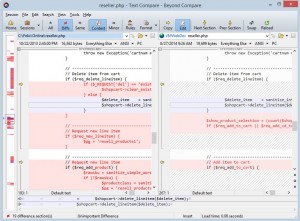 Being able to focus on those files and documents you are urgently interested in while leaving the not-so important ones can save you a lot of time. Having a simple utility that takes care of how you view and sort files or documents on your system with a few and easy command is all that matters. Beyond Compare is one useful tool that has been around for a while; it has some cool features too. Being able to focus on those files and documents you are urgently interested in while leaving the not-so important ones can save you a lot of time. Having a simple utility that takes care of how you view and sort files or documents on your system with a few and easy command is all that matters. Beyond Compare is one useful tool that has been around for a while; it has some cool features too.
Beyond Compare is a useful tool for comparing text files, folders, zip archives, and FTP sites. It comes in very handy when you want to manage source code, keep folders in sync, compare program output, and validate CD copies. Beyond Compare can create a snapshot of a live directory structure, and compare it against the live copy at a later date.
Beyond Compare enables you to compare an entire drive and folder, and thoroughly verify every file with byte-by-byte comparisons. The utility is very useful for a lot of things on your system, does not waste your time and comes with a lot of comparison techniques. A few errors have been fixed in this version, including: scripting error when creating a new OneDrive profile; Explorer right-click menu translations of “Compare Using” submenu; and displaying custom messages on Home view.
Beyond Compare has a 30-day trial time-out for new users. To get the full version get ready to spend up to $60 for a version 4 Pro edition (or $30 for a Standard version – you can compare Pro and Standard version on this page).
Want to check it out? Visit: ScooterSoftware.com.
Rating: Loading... No Comments »
O. James Samson - September 2, 2016
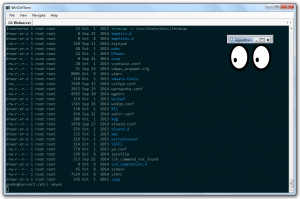 Being able to improve productivity is very important to everyone, especially when you have very limited resources to work with. Maximizing your output is achievable with a tool that enables you do that with keyboard shortcuts and intelligent navigations. WinSSHTerm is a portable software with easy to use interface for accessing remote systems via SSH. Being able to improve productivity is very important to everyone, especially when you have very limited resources to work with. Maximizing your output is achievable with a tool that enables you do that with keyboard shortcuts and intelligent navigations. WinSSHTerm is a portable software with easy to use interface for accessing remote systems via SSH.
WinSSHTerm is a portable PuTTY/KiTTY interface for accessing remote systems via SSH. It helps you to be more productive. Using keyboard shortcuts and intelligent navigation tools allows you to quickly switch between or start new SSH sessions even if you have to manage many systems. The tool has a built-in support for copying files and running X applications. The terminal colors are carefully selected to minimize the stress for your eyes. WinSSHTerm is easy to use, lightweight and stable.
The publisher has been busy lately, and recently added license information in “About” dialog and a “Readme” file. These two changes sort of provide more information to anyone who wants to use WinSSHTerm, especially as a newbie. Some of its features include; multiple tabs, supports file transfers, portable, and multiple windows.
Want to check it out? Visit Winsshterm.
Rating: Loading... No Comments »
O. James Samson - September 1, 2016
 Want to convert text to speech? Balabolka could help you do just that; and some other amazing things as well. The software supports multiple file types, including TXT, EPUB, CHM, DOCX, DOC, HTM and HTM. Want to convert text to speech? Balabolka could help you do just that; and some other amazing things as well. The software supports multiple file types, including TXT, EPUB, CHM, DOCX, DOC, HTM and HTM.
Balabolka is a Text-To-Speech (TTS) tool. The software’s on-screen text can be saved as a WAV, MP3, MP4, OGG or WMA file. Balabolka can read the clipboard content, view the text from DOC, EPUB, FB2, HTML, ODT, PDF and RTF files, customize font and background colour, control reading from the system tray or by the global hotkeys.
The tool uses various versions of Microsoft Speech API (SAPI). It allows you to alter a voice’s parameters, including rate and pitch. You can apply a special substitution list to improve the quality of the voice’s articulation. This feature is useful when you want to change the spelling of words. The rules for the pronunciation correction use the syntax of regular expressions.
Balabolka can save the synchronized text in external LRC files or in MP3 tags inside the audio files. When an audio file is played with players on a computer or on modern digital audio players, the text is displayed synchronously (at the same way, as lyrics for songs).
Balabolka is a great software with nothing to worry about.
Want to check it out? Visit: Balabolka.
Rating: Loading... No Comments »
O. James Samson - September 1, 2016
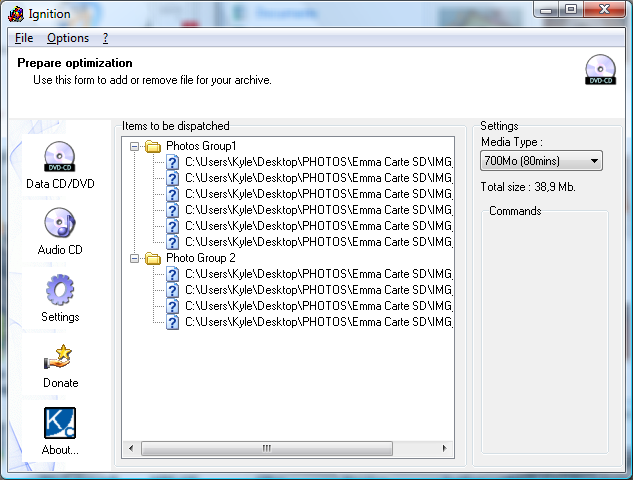 Want to save space on your brand new blank disc? This is important because you can easily place more data on an empty space on your disc. With a clean look and well-arranged features, Ignition looks like that sort of program that could get the job done for you. Want to save space on your brand new blank disc? This is important because you can easily place more data on an empty space on your disc. With a clean look and well-arranged features, Ignition looks like that sort of program that could get the job done for you.
Ignition is a CD burning tool to save you a lot of stress, especially if you are tired of burning Gigabytes of archives and finally get 10Mb to burn on the last CD of your set. It is a space optimizer that has some basic features to dispatch the files on the minimal number of CDs.
Ignition supports a lot of very popular disc formats, including 650 MB or 700 MB CDs, DVDs and Dual Layer discs. The software also provides dedicated tools to create ISO images with the selected content. If you are looking for a tool that has all the basic features that works with most operating systems, then Ignition should be top on your list. It gets the job done without requesting for admin privileges.
Ignition is a useful tool with some basic features. However, the configuration feature needs to be improved upon.
Want to check it out? Visit kcsoftwares.com.
Rating: Loading... No Comments »
O. James Samson - August 28, 2016
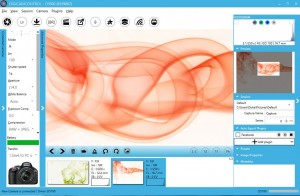 Did you know you can save a lot of time when transferring images directly from your camera to your computer as you take each shot? digiCamControl may not have an attractive interface, but you will you won’t struggle to find your way around its menus. Did you know you can save a lot of time when transferring images directly from your camera to your computer as you take each shot? digiCamControl may not have an attractive interface, but you will you won’t struggle to find your way around its menus.
digiCamControl allows you to remotely control your Nikon or Canon DSLR camera from your Windows computer. This is a free and open source software that allows you to save time by transferring images directly from your camera to your computer as you take each shot and allow to control camera shooting parameters.
digiCamControl supports handling multiple cameras and can also show the histogram and the metadata of the picture. Snapping images on the app is very easy and can be done through user-defined keyboard triggers using any key combined with one of the supported modifiers.
Despite not being one of the most advanced software for handling camera directly from the computer, the program boasts of a lot of fine features and functionalities for every user. If you love photography, this is has to be one of the programs to look out for.
The software is easy to use and does not have any downside at first sight. However, it is important to check if the software is compatible with your camera.
Want to check it out? Visit DigiCamControl.com.
Rating: Loading... No Comments »
O. James Samson - August 25, 2016
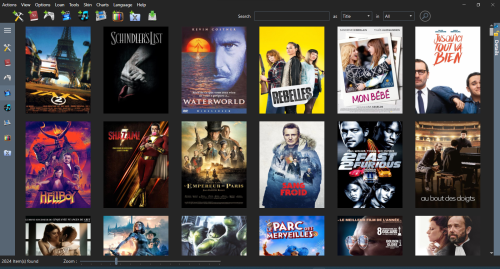 Do you want to have all your apps, books, games, music and movies in one place? MyCollections is a program that can catalog and manage all your numeric collections; and it doesn’t require much technical skills. Do you want to have all your apps, books, games, music and movies in one place? MyCollections is a program that can catalog and manage all your numeric collections; and it doesn’t require much technical skills.
myCollections will help you to catalog and manage all your numeric collections. Using just a title or a barcode you will be able to collect a lot of item details of your collections from the internet. It is also able to find contents automatically from your hard drive. It will ensure that you do not lose a book because you have lent it to someone, that you never forget what a movie is all about, that you can easily locate that album you want to listen to, and more. It is the perfect tool to catalog Applications, Books, Games, Music, Movies, TV show or Adult contents, into the same and unique tool.
Current version of myCollections has been updates to include some nice features including: addition of Spotify Music provider; addition of AutoRename Functionality; improved TMDB provider; improved SugarVod Provider; improved AlloCine provider; and improved AdultDvdEmpire Provider.
myCollections easily helps you to organize your music collection.
Want to check it out? Visit MyCollections.fr.
Rating: Loading... No Comments »
O. James Samson - August 24, 2016
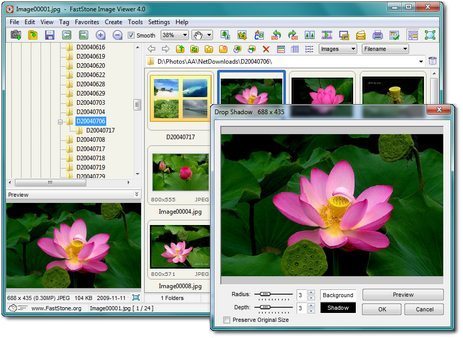 Some software get better the more often they get updated—that is a description that suits FastStone Image Viewer. It is a program that works as an image browser, viewer, converter and editor. Some software get better the more often they get updated—that is a description that suits FastStone Image Viewer. It is a program that works as an image browser, viewer, converter and editor.
FastStone Image Viewer is an image browser, viewer, converter and editor with an easy to use interface and a nice array of features that include resizing, renaming, cropping, color adjustments, watermarks and more. It also includes an intuitive full-screen mode that provides quick access to EXIF information and thumbnail browser via hidden toolbars that emerge when you touch the edge of your screen with the mouse.
FastStone Image Viewer also boasts of some other nice features such as high quality magnifier and built-in slideshow with 60+ transitional effects, as well as lossless JPEG transitions, drop shadow effects, image frames, scanner support, histogram and much more. The software supports all major graphic formats including BMP, JPEG, JPEG 2000, GIF, PNG, PCX, TIFF, WMF, ICO and TGA.
FastStone Image Viewer has improved significantly since it first hit the spotlight. Version 5.7 just goes to show how good the program is against some other software online. It doesn’t have any downside.
Want to check it out? Visit Faststone.org.
Rating: Loading... No Comments »
O. James Samson - August 24, 2016
 Looking for a feature-rich network protocol analyser for Windows or Unix? Wireshark is a program that examines data from a live network. Among some many other things it can be used for, Wireshark can be used to interactively browse captured data, view summary and detail information for every packet. Looking for a feature-rich network protocol analyser for Windows or Unix? Wireshark is a program that examines data from a live network. Among some many other things it can be used for, Wireshark can be used to interactively browse captured data, view summary and detail information for every packet.
Wireshark is a network protocol analyzer for Unix and Windows. It allows you to examine data from a live network or from a capture file on disk. You can interactively browse the capture data, viewing summary and detail information for each packet. Wireshark has several powerful features, including a rich display filter language and the ability to view the reconstructed stream of a TCP session.
Wireshark is a very useful program that is useful for solving loads of network issues that usually plague your connection. Want to have a feel of what is happening behind your network? Wireshark lets you see what is happening on your network at a microscopic level. Excellent program to rely on when you are constantly having network and connection issues.
Wireshark is an excellent program that has shaped the way a lot of people solve issues on their network. It doesn’t have any downside—but might require a bit of experience to get the best out of it.
Want to check it out? Visit WireShark.org.
Rating: Loading... No Comments »
|
|
|






