Archive for November, 2006
Thursday, November 2nd, 2006
 Vista’s coming to our PC’s. It’s going to be really soon enough. Microsoft is going to release Windows Vista by the end of the month. At least according to APC Magazine… Vista’s coming to our PC’s. It’s going to be really soon enough. Microsoft is going to release Windows Vista by the end of the month. At least according to APC Magazine…
So, hear this everybody: Microsoft will release Windows Vista November 30 for business customers and January 30 (2007) for all consumers. In case you forgot or even didn’t know let me remind you Vista’s retail prices for your reference:
- Windows Vista Home Basic – $385
- Windows Vista Home Basic Upgrade – $199
- Windows Vista Home Premium – $455
- Windows Vista Home Premium Upgrade Academic – $179
- Windows Vista Home Premium Upgrade – $299
- Windows Vista Ultimate – $751
- Windows Vista Ultimate Upgrade – $495
- Windows Vista Business – $565
- Windows Vista Business Upgrade – $379
via APC Mag
Posted in Main | No Comments »
Thursday, November 2nd, 2006
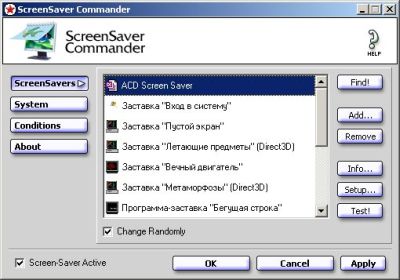 Screensaver Commander is a great little freeware program I found when I was searching for a screensaver randomizer. Finding a decent screensaver randomiser was harder than you might think, and this one is the best one I’ve ever found, plus it’s free! Screensaver Commander is a great little freeware program I found when I was searching for a screensaver randomizer. Finding a decent screensaver randomiser was harder than you might think, and this one is the best one I’ve ever found, plus it’s free!
It allows you to add your favorite screensavers to a list that it randomly picks from each time the screensaver starts. A great idea, as you’re bound to get bored of just the one screensaver all the time, i know i did! It also has the useful feature of setting a list of programs that you don’t want the screensaver coming on during. This can be useful for times such as when you’re watching a dvd or video file, or doing anything processor intensive such as defragmentation or a virus or spyware scan.
You can also control the settings for each screensaver from within the program,test them, and set the period of time before the screensaver turns on and before the monitor powers off, if you should choose so. It’s a neat little easy-to-use program that makes using your computer (well, not using your computer) that little bit more interesting.
You can grab it for free and get more info by going here
Posted in Main | 1 Comment »
Thursday, November 2nd, 2006
SIW is my favorite Windows System Information display program.
SIW (System Information for Windows) is a program that performs computer configuration analysis and diagnostics. It gives detailed information about your computer properties and settings, detailed specs for CPU, motherboard, chipset, BIOS, CPU, PCI/AGP, USB and ISA/PnP devices, memory, monitor, video card, disk drives, CD/DVD devices, SCSI devices, S.M.A.R.T., ports, network cards, printers, operating system, installed programs and hotfixes, processes, services, serial numbers (CD keys), users, open files, system uptime, network, network shares, as well as real-time monitors for CPU, memory, page file usage and network traffic. It displays currently active network connections, passwords hidden behind asterisks, installed codecs, and more.
This program also creates a report file, and is able to run in batch mode.
Everest – Home Edition used to be my favorite system information tool but the company that makes it decided to stop developing the free version. I’ve also tried other ones like Fresh Diagnose but I like SIW much better; and it doesn’t require installation or registration either.
Posted in Main | 4 Comments »
Thursday, November 2nd, 2006
Wake-on-Lan (WoL) is both a hardware and software solution to allow a computer to be woken up remotely.
 Much like a modern television set, a computer that is Advanced Configuration Power Interface (ACPI) compliant can be turned on remotely, note that while you can currently only turn your television set on from within a certain distance WoL allows you to remotely start a computer from anywhere in the world, that is as long as it has an internet connection. Much like a modern television set, a computer that is Advanced Configuration Power Interface (ACPI) compliant can be turned on remotely, note that while you can currently only turn your television set on from within a certain distance WoL allows you to remotely start a computer from anywhere in the world, that is as long as it has an internet connection.
WoL works by sending what’s called a “magic packet” (no joke). When your PC shuts down, the NIC still gets power, and keeps listening on the network for a ‘magic’ packet to arrive. The basic premise is that a specifically formatted packet send over a network is send to every network card and identifying features in this packet allow the network card to identify that the magic packet is intended for it. All the other cards therefore reject or rather dispose of the packet. It is analogous to standing in a crowded room of people and shouting out somebody’s name, where nobody in the room has the same name, although everybody would hear you hopefully the only person to answer would be the person who’s name you have just called out.
This only works with network cards and motherboards that are Wake on LAN compliant. For more information on this and links to download the software check out:
Posted in Main | 3 Comments »
Wednesday, November 1st, 2006
 Surfin’ throw the web you can find nearly anything – useful or not much. I’d like to talk about something that can be placed in the first category – a tool named InstallPad. It is an open source app for Windows that will help you to save lots of your precious time. It lets you automate the download and installation of entire suites of programs. Surfin’ throw the web you can find nearly anything – useful or not much. I’d like to talk about something that can be placed in the first category – a tool named InstallPad. It is an open source app for Windows that will help you to save lots of your precious time. It lets you automate the download and installation of entire suites of programs.
InstallPad relies on special “application lists” (XML files) that tell the app where to download the programs from and how to install them. You always can edit XML program list (by hand if you like or using the built-in GUI). So after you’ve set everything InstallPad takes charge and makes the rest. With it’s help you don’t have to look after the every action on installation process and give your permission on every command – it’ll do it all for ya.
It also lets you pass arguments to the installers and invoke scripts when installation is complete. This app can download from HTTP and FTP sources as well as run local installers or network resources. I’ve got your attention? Then what are you waiting for go get yourself a useful buddy – InstallPad.
Ps: Wanna find out more about this one? Head to the Lifehacker or just read the instructions.
Posted in Main | No Comments »
Wednesday, November 1st, 2006
 Planestate is a pretty impressive freeware 3d screensaver for Windows. Planestate is a pretty impressive freeware 3d screensaver for Windows.
It’s kinda hard to describe what it looks like without seeing it, but imagine endless partterns twisting and turning as they float through a starfield. If that’s hard for you to imagine… Here’s some screenshots because its better than me attempting to describe it!
It’s hard to appreciate how good this screensaver looks until you actually see it moving, so the screenshots don’t really do it justice .
It also claims to have very low cpu usage which is an added bonus. Theres no nag screens or anything like that, just a title that fades away after the first few seconds when it starts up. I’ve seen scrensavers that aren’t even as good as this that make you pay for them! So its worth checkin’ out if you want a pretty cool screensaver for your PC!
To see for yourself, grab the free download here.
Posted in Main | No Comments »
Wednesday, November 1st, 2006
This little program is a free add-on for the Windows Task Manager, for finding out about what’s running on your computer.
Firstly, let’s get to the Windows Task Manager, this can tell you whats running on your computer. To get to it right click the taskbar (or press control-alt-delete), click Task Manager, and then click Processes. There you’ll see a list of all the processes running on your computer. A lot of this stuff is useful and needed stuff, but sometimes it can be unneeded stuff. It can be stuff that isn’t necessary and is just slowing up your computer by running, or it can even be bad stuff such as spyware.
So how can you know what all those things listed actually are? Well this program adds a little “I” link beside each thing listed (standing for ‘Information’ i guess!). So now with a simple click, it opens up a webpage telling you exactly what each one means. So you can learn exactly what it does and if it’s needed or not. Handy little program that saves a lot of typing into Google!
Theres over 9000 entries in the processlibrary.com database of running tasks,and more added weekly. So you’re pretty sure to find out what you’ve got running.
Here’s a task manager tip while we’re on the subject: You can easily see which programs are using the most RAM on your PC by clicking the memory column header in task manager to arrange them by memory use.This free little add-on program just does one useful job really well!
For more info and to download it, go here!
Posted in Main | No Comments »
Wednesday, November 1st, 2006
 When using registry cleaners, you really gotta be careful. It can be a little dangerous as they have the potential to delete things they shouldn’t, potentially really messing things up. Registry Booster is another registry cleaning program, but its not ju-u-u-ust another registry cleaning program! It seems to be a very safe one that knows what its doing! Unlike the vast majority of others! When using registry cleaners, you really gotta be careful. It can be a little dangerous as they have the potential to delete things they shouldn’t, potentially really messing things up. Registry Booster is another registry cleaning program, but its not ju-u-u-ust another registry cleaning program! It seems to be a very safe one that knows what its doing! Unlike the vast majority of others!
It claims to be “the safest and most trusted solution to clean and optimize your system, free it from registry errors and fragmented entries through Advanced Error Detection Technology”. But I still recommend you create a system restore point before using software like this though! Just in case (better be safe then sorry)! As added protection, the program can also fully undo any changes it makes.
I have good faith in this program as it really saved my computer a few weeks ago when nothing else I tried would help at all (including some other popular registry cleaners). I was having some issues with my computer crashing just after start up and I tried a couple of different registry cleaners and this was the only one that totally fixed it. Everything was back to normal after i ran it. So now me and registry booster are pretty much the best of friends! If you check the homepage,you’ll see it received a bunch of awards, so i guess there might be something to it and i didn’t just get lucky!
Although someone else’s system may not react as positively as mine did. So make sure you know what you’re doin’ and do so at your own risk!
You can get more info here.
Posted in Main | 2 Comments »
Wednesday, November 1st, 2006
 EvilLyrics automatically searches for lyrics as your song is played in your player (supports: Foobar2000, Winamp, Windows Media Player, iTunes, Real Player, MusicMatch or QCD) EvilLyrics automatically searches for lyrics as your song is played in your player (supports: Foobar2000, Winamp, Windows Media Player, iTunes, Real Player, MusicMatch or QCD)
EvilLyric’s Features:
- Searches over 15,000,000 lyrics and INCREDIBLY FAST
- Karaoke: create & share timestamps
- Stores lyrics for offline viewing
- Translates lyrics
- Allows searching for guitar chords, AMG profiles, album covers arts, posters etc
- Only 300 kB installation file
- Contains no spyware or adware and is free
This program is anything but “Evil”. Going to most lyrics websites is evil because they bombard you with popup ads and this puppy is ad and spyware free. EvilLyrics isn’t the prettiest lyrics program yet, but it’s free to use unlike others like minilyrics.
You can use EvilLyrics as a stand-alone program and just manually type artist names and song titles into it to have it instantly find and display the lyrics or you can have it automatically load lyrics as you’re playing songs in your audio player.
Tips for Using EvilLyrics with foobar2000 (more…)
Posted in Main | 9 Comments »
Wednesday, November 1st, 2006
 I’m recommending all four of these anti-spyware tools because they make a great team to keep you spyware/adware free. I’m recommending all four of these anti-spyware tools because they make a great team to keep you spyware/adware free.
Spyware is a relatively new kind of threat that common anti-virus applications do not yet fight very well. If you see new toolbars in your Internet Explorer that you didn’t intentionally install, if your browser crashes, or if you browser start page has changed without your knowing, you most probably have spyware. But even if you don’t see anything, you may be infected, because more and more spyware is emerging that is silently tracking your surfing behavior to create a marketing profile of you that will be sold to advertisement companies. (more…)
Posted in Main | 9 Comments »
|
|
|






