Author Archive
Sunday, July 29th, 2012
 VSO Downloader is a freeware that allows you to download videos and music online. It automatically detects and downloads streaming content online. Its download is highly optimized for fast downloads and it does not use much of your system resources. This program works independently from web browsers, so it works very well with all of them, Internet Explorer, Firefox, Chrome, Opera, and more. It automatically converts files to various formats such as .mp3, .avi, xvid, mp4 for iPhone and iPads. VSO Downloader is a freeware that allows you to download videos and music online. It automatically detects and downloads streaming content online. Its download is highly optimized for fast downloads and it does not use much of your system resources. This program works independently from web browsers, so it works very well with all of them, Internet Explorer, Firefox, Chrome, Opera, and more. It automatically converts files to various formats such as .mp3, .avi, xvid, mp4 for iPhone and iPads.
Some of its unique features includes: pausing function and auto resume of download, smart file names and a ad blocker included. Other features are: capturing streaming content from various sites, automatic detection and downloading of movies and music content. You could also save the streaming content without having to copy and paste URLs. Support for several formats such as FLV, WMV, ASF, MP3, MP4, SWF e.t.c. it comes fitted with audio & video and MP3 converter.
It is absolutely free and 100% clean. It does not contain any adware, spyware or toolbars. It has free streaming downloader. It is able to detect ads and does not download the ads. It records streaming quickly and does not wait on buffering. You can also use it to download multiple files at once. Should you pause or when there is a break in download, you can always resume right from where you left off.
To familiarize yourself more with this program, please do visit VSO-Software.
Posted in Main | 1 Comment »
Sunday, July 29th, 2012
Is your computer experiencing slowdowns, freezing or crashing problems, Windows startup issues, partial program removal, obsolete application shortcuts, Java Script Errors, Missing DLL or OCX, Internet Explorer errors, ActiveX Components difficulties, Outlook Express wrongdoings?
Most of all system registries are damaged by hidden errors that slow down system performance. PC Fix Cleaner’s free system scan will give you a complete diagnosis of your Registry’s damage level. Most of the time, this is caused by problems in the registry that accumulate over time. Installing and uninstalling programs leave behind fragments — stray files, orphaned startup tasks, corrupted drivers. Over time the registry starts to get clogged and conflicts emerge. If left unchecked, your computer will become increasingly unstable, run more slowly and crash more frequently.
PC Fix Cleaner is the easy answer to registry problems. It carries out deep scans of your registry to check for errors and conflicts, then repairs and optimizes the registry to peak performance and stability. Occasional scans will keep your registry clean and will significantly improve your system’s performance and stability. There will be noticeable improvements in the speed of your computer and much less system conflicts.
With PC Fix, you’d say good bye to slow system, frequent computer crashes, registry problems etc. To find out more about this amazing software, please do visit PC-Fix.
Posted in Main | No Comments »
Sunday, July 29th, 2012
 Experiencing communication problems in your company? Do you spend so much time trying to call up your colleagues for a meeting? Do you dislike having to walk round the company complex to pass across rather trivial information? Why not try Sofftros LAN Messenger software for your corporate instant messaging. Experiencing communication problems in your company? Do you spend so much time trying to call up your colleagues for a meeting? Do you dislike having to walk round the company complex to pass across rather trivial information? Why not try Sofftros LAN Messenger software for your corporate instant messaging.
Softros LAN Messenger is an easy-to-use LAN messaging application suitable for effective intra-office communication. It is very easy to install and does not need a server. It can accurately identify and work with Windows NT/2000/XP/Vista limited user accounts (without administrative privileges).
Some of the key features of this software are: message notification alarms, personal or group messaging, file transfer and an intuitive interface. Its IM utility is supported by strong encryption for all incoming and outgoing messages, thus guaranteeing safety and confidentiality. You can use it to provide group notification or for contacting individual users. It is easy to use even for a newbie.
Others include: offline messaging, no server or dedicated storage is needed, group broadcast messages, AES encryption protects all messages, IM with LAN chatting utility, chat rooms with multiple user conversations and user grouping. It does not require any internet connection. You do not need to set up and maintain a dedicated messaging server on your corporate network. This program’s instant messaging tool is a stand-alone client application.
To find out more about this software, please visit Softros.
Posted in Main | No Comments »
Saturday, July 28th, 2012
 Thinking of how best to delete files from your computer and free up disk space without the fear of exposing your privacy? Then you are exactly at the right place. Files Terminator Free is an easy to use application that allows users to safely, securely and permanently delete their files and wipe free disk space. So you can now completely and permanently delete sensitive files, videos, images from you system. It thus protects the privacy of the user. Thinking of how best to delete files from your computer and free up disk space without the fear of exposing your privacy? Then you are exactly at the right place. Files Terminator Free is an easy to use application that allows users to safely, securely and permanently delete their files and wipe free disk space. So you can now completely and permanently delete sensitive files, videos, images from you system. It thus protects the privacy of the user.
In order to permanently delete files, the software deploys several shredding methods (one pass Pseudorandom, British HMG IS5, two pass Russian GOST P50739-95, three pass US DoD 5220.22M, seven pass German VSITR, Canadian RCPM TSSIT OPS-II, Bruce Schneier and the 35-pass Peter Gutmann). It also offers support for drag and drop for easier use. During the process of file shredding, the content of the selected files are overwritten so many times with random data and predefined characters and cannot be recovered any more.
It is very easy to use application with a very friendly user interface that helps users permanently delete sensitive documents and swap free disk space. To familiarize yourself with the unique features of this amazing program, please do visit Elefantsoftware.
Posted in Main | 1 Comment »
Friday, July 27th, 2012
 TweakNow PowerPack is a fully-integrated suite of utilities that let you fine-tune every aspect of your computer’s operating system and Web browser. The RAM Idle program included in the application manages the free memory that is available to run Windows programs. It prevents performance from degrading as you swap files and programs in and out of memory. Also, the AutoShutdown program lets you suspend, hibernate, or shut down your computer after a specified period of time. In addition to saving resources, this program keeps your system more secure by making it unavailable to unauthorized people. TweakNow PowerPack is a fully-integrated suite of utilities that let you fine-tune every aspect of your computer’s operating system and Web browser. The RAM Idle program included in the application manages the free memory that is available to run Windows programs. It prevents performance from degrading as you swap files and programs in and out of memory. Also, the AutoShutdown program lets you suspend, hibernate, or shut down your computer after a specified period of time. In addition to saving resources, this program keeps your system more secure by making it unavailable to unauthorized people.
TweakNow PowerPack also has a CD AutoRun, which is an extension of Windows’ CD and DVD autorun features that give you additional options for starting programs or listening to music. The Virtual Desktop program lets you run as many as four custom-designed desktop configurations simultaneously, allowing you to tailor your computer screen to your mood and your work requirements. The suite gives you a complete picture of all aspects of your computer’s hardware, including detailed information about your motherboard, processor, video card, memory, hard disk and network.
The program is a shareware, but has a 15 day trial limitation; which may not be enough to find out all about its features especially for a newbie.
Want to check it out? Visit Tweaknow.
Posted in Main | No Comments »
Friday, July 27th, 2012
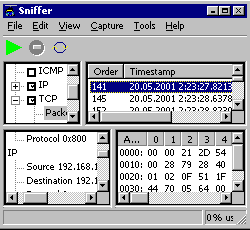 Wireless Snif (formerly Sniffer) is a network sniffer that is designed for capturing and analysis of the packets going through the network. Using the packet driver, it requests all the packets from the network card driver (even the packets not addressed to this computer). Then the packets go to protocol analyzers which are written as separate modules and their set may be extended by the user himself. Various analyzers may be interdependent and are organized in a tree structure. The results of each analyzer’s work may be saved in the Database. Wireless Snif (formerly Sniffer) is a network sniffer that is designed for capturing and analysis of the packets going through the network. Using the packet driver, it requests all the packets from the network card driver (even the packets not addressed to this computer). Then the packets go to protocol analyzers which are written as separate modules and their set may be extended by the user himself. Various analyzers may be interdependent and are organized in a tree structure. The results of each analyzer’s work may be saved in the Database.
Wireless Snif is designed to intercept ICQ, IRC and email messages across a LAN; and it is also possible to observe these messages in the same time the real users will receive it. All intercepted messages are stored in files, which can be later processed and analyzed. There are two versions for your convince IcqSnif with GUI, and console only IcqDump. The functionality is the same, except it is possible to select which machines to arp-spoof exactly in the GUI version. Wireless Sniff is based on the reliable and well-known Ufasoft Sniffer engine. The program is also built to intercept every message available on the network adapter.
Want to check it out? Visit Ufasoft.
Posted in Main | No Comments »
Thursday, July 26th, 2012
 Avira Protection Cloud is a user friendly utility that scans your computer using its state-of-the-art latest technologies available. It offers protection based on the most current malware information at all times, not just when your antivirus software downloads virus definitions. It matches the files accessed by your computer against the fingerprints of files stored in the cloud. The more scanning is done in the cloud, the lesser the processing power is required by the antivirus application. When Virus Lab has access to unknown files at an earlier stage, it can classify them sooner and with more sophisticated analysis systems. Avira Protection Cloud is a user friendly utility that scans your computer using its state-of-the-art latest technologies available. It offers protection based on the most current malware information at all times, not just when your antivirus software downloads virus definitions. It matches the files accessed by your computer against the fingerprints of files stored in the cloud. The more scanning is done in the cloud, the lesser the processing power is required by the antivirus application. When Virus Lab has access to unknown files at an earlier stage, it can classify them sooner and with more sophisticated analysis systems.
In order to join the Avira Protection Cloud, simply install the Protection Cloud client. Next download and install the Protection Cloud client from the Avira Beta Center. Start the scan by clicking the corresponding button. Fingerprints of all suspicious files are sent to the Protection Cloud for real-time inspection. Executables are instantly identified as clean, infected or unknown. Suspicious unknown executables are uploaded for detailed automatic analysis. You can then view the scan results anytime in the application interface.
It also offers access to Avira’s super computing malware analysis grid and gets the best Avira detection ever. It prevents false positives as it can classify unknown files at an earlier stage. It can also serve as a central point to observe through out its user base.
To find out more about this program, please visit Avira.
Posted in Main | 1 Comment »
Thursday, July 26th, 2012
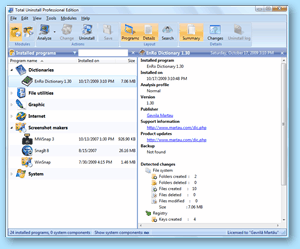 Total Uninstall is a complete uninstaller. Just before you install a new program, it creates a snapshot of your entire system. Then after the installation, it takes another snapshot. It then compares the two snapshots and displays all changes in a graphical tree view, marking all registry values and/or files that have been added, changed or deleted. Total Uninstall then saves the changes and, if you choose to uninstall the program, it restores your system to the state prior to the installation. Total Uninstall is a complete uninstaller. Just before you install a new program, it creates a snapshot of your entire system. Then after the installation, it takes another snapshot. It then compares the two snapshots and displays all changes in a graphical tree view, marking all registry values and/or files that have been added, changed or deleted. Total Uninstall then saves the changes and, if you choose to uninstall the program, it restores your system to the state prior to the installation.
It comes in two modes. Installed Programs module analyzes the installed programs on your system and creates a log with installation changes. It is able to uninstall programs even without going through the Add Remove program.
Monitored Programs module helps to monitor any changes made to your system during the installation of a new program. It allows you to carry out a complete uninstall without having to rely on the supplied Add Remove programs which can leave files or changes behind.
Some key features of this program are: Uninstall completely and thoroughly analyzed or monitored programs. Accurately analyze existing installations and create a log with installation changes. It allows you to monitor changes from registry and file system for new installations. Find the program to uninstall by keyword quickly and easily. It shows a detailed uninstall log.
To learn more about this program, please visit Martau.
Posted in Main | No Comments »
Thursday, July 26th, 2012
 DeviceLock allows network administrators to specify which users can access which devices (ports, floppies, MOs, etc.) on the local computer. It provides network administrators the ability to set and enforce permissions for how, when, where to, and by whom data can or can’t be moved to or from company laptops or desktop PCs via devices like phones, digital cameras, USB sticks, CD/DVD-R, tablets, printers or MP3 players. DeviceLock allows network administrators to specify which users can access which devices (ports, floppies, MOs, etc.) on the local computer. It provides network administrators the ability to set and enforce permissions for how, when, where to, and by whom data can or can’t be moved to or from company laptops or desktop PCs via devices like phones, digital cameras, USB sticks, CD/DVD-R, tablets, printers or MP3 players.
Once installed, administrators can assign permissions to LPT ports, CD-ROMs, COM Ports, or any other device, just as they would to any share on the hard disk. Network administrators may use DeviceLock to flush a storage device’s buffers and to get extended information about devices and NTFS partitions.
ContentLock is an amazing feature that provides the ability to check inside files and other data for sensitive information such as social security numbers, credit card numbers, bank account numbers or other user-definable information and to allow or deny access decisions based on policies having to do with file contents.
It is originally integrated with Microsoft Active Directory Group Policy, and is very easy and straight-forward to install and configure. Typical installations are handled by Microsoft Network Administrators and do not require expensive, specially trained resources.
One other great customer benefit of this program’s tight integration with Active Directory is that it offers the solution virtually limitless scalability. The DeviceLock Endpoint DLP Suite can effortlessly run on every endpoint listed in your Active Directory database.
To find out more about this software, please visit http://devicelock.com/products/
Posted in Main | No Comments »
Wednesday, July 25th, 2012
 In our modern world, there are so many passwords that one would need to remember- windows network logon, email accounts, FTP password of your website, passwords of your membership sites and so many more. It is therefore very easy to forget one or two of these passwords. Worse than forgetting your password is the risk of password theft. Have you ever imagined what will happen if someone had access to your very important and sensitive information? In our modern world, there are so many passwords that one would need to remember- windows network logon, email accounts, FTP password of your website, passwords of your membership sites and so many more. It is therefore very easy to forget one or two of these passwords. Worse than forgetting your password is the risk of password theft. Have you ever imagined what will happen if someone had access to your very important and sensitive information?
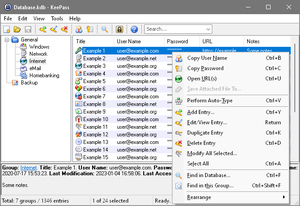
KeePass Password Safe is a freeware that helps you to manage all your passwords in a safe and secure way. You can safely put all your passwords in one database, which is locked with one master key or a key-disk. So all you have to remember is a single master password or insert the key-disk to unlock the whole database. The databases are encrypted using the best and most secure encryption algorithms currently known (AES and Twofish).
Some of the capabilities of this program include: it supports the Advanced Encryption Standard (AES, Rijndael) and the Twofish algorithm to encrypt its password databases. Both of these ciphers are regarded as being very secure. Only a single master password is needed to decrypt the entire database. You could also use key files which are considered to be more secure than the master password it is very portable and can easily be carried on a USB Flash Drive and runs well on Windows. This program does not save anything on your system
To find out more about this freeware, please do visit Keepass.
Posted in Main | No Comments »
|
|
|




