Author Archive
Wednesday, July 25th, 2012
 WinPatrol is a security application that monitors your computer and does not allow applications to simply add themselves to the start-up menu or associate files to themselves. Everything is caught by WinPatrol. It then asks if you agree to what modifications are being done or not. The program’s easy to use interface allows you to explore deep inside your computer without having to be a Windows registry expert. This particular version in review has been updated to work even better than previous ones that caused a few problems for users. WinPatrol is designed to complement virtually all kinds of antivirus programs installed on your system. WinPatrol is a security application that monitors your computer and does not allow applications to simply add themselves to the start-up menu or associate files to themselves. Everything is caught by WinPatrol. It then asks if you agree to what modifications are being done or not. The program’s easy to use interface allows you to explore deep inside your computer without having to be a Windows registry expert. This particular version in review has been updated to work even better than previous ones that caused a few problems for users. WinPatrol is designed to complement virtually all kinds of antivirus programs installed on your system.
WinPatrol is available both for free and commercial versions; but the premium or commercial version runs faster than the free one. The program is also designed to monitor locations ignored by traditional security software. Contrary to what they might read you from a support script, the application works and plays well with others. You can run WinPatrol alongside your favourite Anti-Malware package and you’ll never detect any difference in performance. Those who had issues with previous versions are definitely going to commend the publishers because this version is a bit more stable than it used to be. The program is actually worth every dime invested on it.
Want to check it out? Visit WinPatrol
Posted in Main | No Comments »
Tuesday, July 24th, 2012
 UltraMon is a robust utility for multi-monitor systems, created to significantly increase productivity and unlock the full potential of multiple monitors. Its additional window buttons, allows you to quickly move from one window to another or stretch a window across the desktop. With its Smart Taskbar, you can manage several applications simultaneously, with a taskbar on each monitor and each taskbar only showing the tasks from the monitor it is on. UltraMon is a robust utility for multi-monitor systems, created to significantly increase productivity and unlock the full potential of multiple monitors. Its additional window buttons, allows you to quickly move from one window to another or stretch a window across the desktop. With its Smart Taskbar, you can manage several applications simultaneously, with a taskbar on each monitor and each taskbar only showing the tasks from the monitor it is on.
Using the Shortcut Extensions, you can easily position various applications on the desired monitor. The UltraMon screen saver and wallpaper manager allows you to use different wallpaper and screen saver on each monitor. It also has a flexible mirroring feature, with support for mirroring one or more monitors, and use different resolutions for each monitor.
Some of the basic functionalities of this utility includes: the Smart Taskbar allows you to manage multiple applications efficiently by adding extra taskbars for each secondary monitor. You can choose from two modes- the standard and the mirror mode. You can also use it to create shortcuts that enable you to open programs on a particular monitor or at specific position. You could also change the display settings before launching the application or restoring them when you close the application. You can also use it to open the properties of an existing windows shortcut, adjust windows position and display settings on the extra tabs that was added by UltaMon.
To know more about this program, please visit http://www.realtimesoft.com
Posted in Main | No Comments »
Tuesday, July 24th, 2012
 WinISO is a CD-ROM image file utility that can convert BIN to ISO, extract/edit/create ISO files directly, make bootable CDs, and serve as a BIN/ISO converter/extractor/editor. The program has the ability to process almost all CD/DVD/Blu-ray image files, including ISO and BIN/CUE. It has the ability to open an image file, display the file tree, and then run files within the image file. This is useful when viewing files, or running programs. WinISO is a CD-ROM image file utility that can convert BIN to ISO, extract/edit/create ISO files directly, make bootable CDs, and serve as a BIN/ISO converter/extractor/editor. The program has the ability to process almost all CD/DVD/Blu-ray image files, including ISO and BIN/CUE. It has the ability to open an image file, display the file tree, and then run files within the image file. This is useful when viewing files, or running programs.
WinISO is also a utility tool that you can open, create, edit, extract, mount, convert ISO files and other image file formats. It can also make bootable CD/DVD/BD and burn ISO image file to CD/DVD/Blu-ray Disc. The program is also capable of processing almost all CD/DVD/BD image files, including ISO and BIN. WinISO provides a comprehensive solution. You can handle the ISO image files as you wish.
WinISO has a lot of amazing features that include the following; open and edit ISO files, extract ISO files and CD/DVD/Blu-ray Disc image files, convert image files between ISO/BIN and other formats, burn ISO image file to CD/DVD/Blu-ray Disc and burn image files on-the-fly, backup CD/DVD/BD to image files from CD/DVD/BD Driver, make bootable CD/DVD/Blu-ray Disc, and mount ISO image files.
Want to check it out? Visit WinISO.
Posted in Main | No Comments »
Monday, July 23rd, 2012
 qBittorrent is an advanced and multi-platform BitTorrent client with a nice Qt4 user interface as well as a Web UI for remote control and an integrated search engine. The program aims to meet the needs of most users while using as little CPU and memory as possible; and that is why it is designed with some of the most advanced and easy to use features that include a well-integrated and extensible Search Engine. qBittorrent is an advanced and multi-platform BitTorrent client with a nice Qt4 user interface as well as a Web UI for remote control and an integrated search engine. The program aims to meet the needs of most users while using as little CPU and memory as possible; and that is why it is designed with some of the most advanced and easy to use features that include a well-integrated and extensible Search Engine.
qBittorrent is an open source applications that gives you access to a lot of features that include: polished µTorrent-like User Interface, simultaneous search in most famous BitTorrent search sites, per-category-specific search requests (e.g. Books, Music, Movies), all Bittorrent extensions, a well-integrated and extensible Search Engine, DHT, Peer Exchange, full encryption, Magnet/BitComet URIs, remote control through a Web user interface, nearly identical to the regular UI, all in Ajax, advanced control over trackers, peers and torrents, Torrents queuing and prioritizing, Torrent content selection and prioritizing, UPnP / NAT-PMP port forwarding support, available in 25 different languages (Unicode support), Torrent creation tool, advanced RSS support with download filters (inc. regex), bandwidth scheduler, IP Filtering (eMule and PeerGuardian compatible) IPv6 compliant, and sequential downloading (aka “Download in order”). qBittorrent is also available on most platforms: Linux, Mac OS X, Windows, OS/2, FreeBSD.
Want to check it out? Visit qBittorrent.
Posted in Main | No Comments »
Monday, July 23rd, 2012
 Rainlendar is a feature rich calendar application that allows you to keep all your important event and tasks always visible on your desktop. It does this without taking up much space on your system and it is very easy to use. It works well on both Windows and Linux platforms. You can customize the appearance with various skins. Rainlendar is a feature rich calendar application that allows you to keep all your important event and tasks always visible on your desktop. It does this without taking up much space on your system and it is very easy to use. It works well on both Windows and Linux platforms. You can customize the appearance with various skins.
Some of the basic functions of this program are: it offers support for events and tasks which stored in different lists. This helps to make you better organized and shows you your upcoming events. Its alarm enables you to get notified in advance before the event so you don’t have to worry about forgetting any of your important events. You could also schedule the alarm to snooze to remind you later. It stores all the data in the standard iCalendar format which is supported by most popular calendar applications. You can easily customize the skin to suit your choice. It has been translated into over 50 different languages so you can use it in most of the popular languages and even in your own native language. This application works well with all major operating systems- Windows, Mac OS X and Linux.
To find out more about this software, please visit Rainlendar.
Posted in Main | No Comments »
Monday, July 23rd, 2012
 SpiderOak provides an easy, secure and consolidated free online backup, sync, sharing, and access & storage solution for Windows, Mac OS X, and Linux. Though, SpiderOak is still in beta stage; the publisher has however, introduced some minor changes and fixes to this version in review. Some of these fixes and updates include the following; fixing of minor bugs affecting the preview generator, fixing a bug causing the program to crash when attempting to create a sync with an entire drive in Windows, fixing bug causing single files selected for backup (ie. not part of a folder which is selected for backup) to not be monitored for immediate changes, and fixing sync bug causing subfolder contents not to be synced in some circumstances. SpiderOak provides an easy, secure and consolidated free online backup, sync, sharing, and access & storage solution for Windows, Mac OS X, and Linux. Though, SpiderOak is still in beta stage; the publisher has however, introduced some minor changes and fixes to this version in review. Some of these fixes and updates include the following; fixing of minor bugs affecting the preview generator, fixing a bug causing the program to crash when attempting to create a sync with an entire drive in Windows, fixing bug causing single files selected for backup (ie. not part of a folder which is selected for backup) to not be monitored for immediate changes, and fixing sync bug causing subfolder contents not to be synced in some circumstances.
Some of the key features included in SpiderOak include the following; access all your data in one duplicated location, configurable multi-platform synchronization, preserve all historical versions and deleted files, share folders instantly in web shareRooms w/RSS, retrieve files from any internet-connected device, comprehensive zero knowledge data encryption, 2 GBs free / $10 per 100 GBs / unlimited devices, and many more. SpiderOak is a freeware, and runs on Linux, Mac, and some Windows OS including Vista/7/XP.
Want to check it out? Visit SpideRoak.
Posted in Main | 3 Comments »
Wednesday, July 18th, 2012
 Win7DSFilterTweaker is a tool that allows you to configure your preferred DirectShow filters with just a few mouse clicks. The tool is quick, easy, and changes can always be undone. Windows 7 uses its own DirectShow filters for decoding several audio and video formats. However, using third party filters instead of the native filters is not possible without making changes to the Windows Registry. If you for example prefer to use ffdshow or CoreAVC for decoding H.264 video then you can do so by using this tool. Win7DSFilterTweaker tool is particularly useful for the Microsoft players, such as Windows Media Player and Media Centre, certain advanced third party players, such as Media Player Classic, are already capable of using third party filters without using this tool. Win7DSFilterTweaker is a tool that allows you to configure your preferred DirectShow filters with just a few mouse clicks. The tool is quick, easy, and changes can always be undone. Windows 7 uses its own DirectShow filters for decoding several audio and video formats. However, using third party filters instead of the native filters is not possible without making changes to the Windows Registry. If you for example prefer to use ffdshow or CoreAVC for decoding H.264 video then you can do so by using this tool. Win7DSFilterTweaker tool is particularly useful for the Microsoft players, such as Windows Media Player and Media Centre, certain advanced third party players, such as Media Player Classic, are already capable of using third party filters without using this tool.
Win7DSFilterTweaker is a also a tool capable of completely disabling Media Foundation and other Microsoft playback components by renaming certain files. However, you should be aware that doing so might have noticeable side effects. For example, playback of live TV in Media Centre could stop working. The great news however, is that any change made by the tool can easily be undone to restore the system to its original state.
Want to check it out? Visit CodecGuide.Com.
Posted in Main | No Comments »
Tuesday, July 17th, 2012
.gif) Process Monitor is an advanced monitoring freeware for Windows that shows current file system, Registry and process/thread activity. It combines the features of Sysinternals utilities, Filemon and Regmon, and includes a comprehensive list of enhancements such as rich and non-destructive filtering, a detailed event properties such as session IDs and user names, reliable process information, full thread stacks with integrated symbol support for each operation, simultaneous logging to a file, and much more. Its uniquely powerful features will make Process Monitor a core utility in your system troubleshooting and malware hunting toolkit. Process Monitor is an advanced monitoring freeware for Windows that shows current file system, Registry and process/thread activity. It combines the features of Sysinternals utilities, Filemon and Regmon, and includes a comprehensive list of enhancements such as rich and non-destructive filtering, a detailed event properties such as session IDs and user names, reliable process information, full thread stacks with integrated symbol support for each operation, simultaneous logging to a file, and much more. Its uniquely powerful features will make Process Monitor a core utility in your system troubleshooting and malware hunting toolkit.
Some of the functional capabilities of this software are: it captures more data for operation input and output parameters, its non-destructive filters allows you to set filters without any data loss, reliable capture of process details. Filters can also be set for any data field, including fields not configured as columns. Its advanced logging architecture scales to several tens of millions of captured events and gigabytes of log data. The detailed tooltip allows for convenient access to formatted data that doesn’t fit into the column. The native log format preserves all data for loading in a different process monitor instance. It also records all boot time logging of all operations.
To familiarize yourself with this program, please visit SysInternal.
Posted in Main | No Comments »
Tuesday, July 17th, 2012
 Resource Tuner is a software that lets you view, extract, replace, edit, and delete the embedded resources of executable files: icons, strings, images, sounds, dialogs, menus – all that make up the visual part of your Windows programs. Also with this program you could customize your branding to an application, change dialog messages, and customize toolbar actions, and so on without having access to the actual source code. Resource Tuner is a software that lets you view, extract, replace, edit, and delete the embedded resources of executable files: icons, strings, images, sounds, dialogs, menus – all that make up the visual part of your Windows programs. Also with this program you could customize your branding to an application, change dialog messages, and customize toolbar actions, and so on without having access to the actual source code.
Resource Tuner is very useful even if you aren’t a programmer. It’s perfect for translators, tweakers, and anyone else who wants to change the look and feel for an application. Some of the benefits of this software are that it helps you to open problem executable files and edit the hidden data which the other editors simply cannot see, wide range of supported resource types, UPX unpacker, and more. It is very easy to use, simply run the program and then select the EXE or DLL file to read the data from.
Some of the things this program will do for you include: browse all types of resources very fast with its Resource Viewer, re-brand your applications by replacing icons and customize GUI elements of your favorite Windows programs. You can also use it to translate third party applications, ask Vista to run your applications with administrative privileges and extract images, icons, sounds and animations. Some of the advanced features of this program include Resource optimizing, error checking and repairing automatically performed when opening a file.
To find out more about this program, please visit HeavenTools.
Posted in Main | No Comments »
Monday, July 16th, 2012
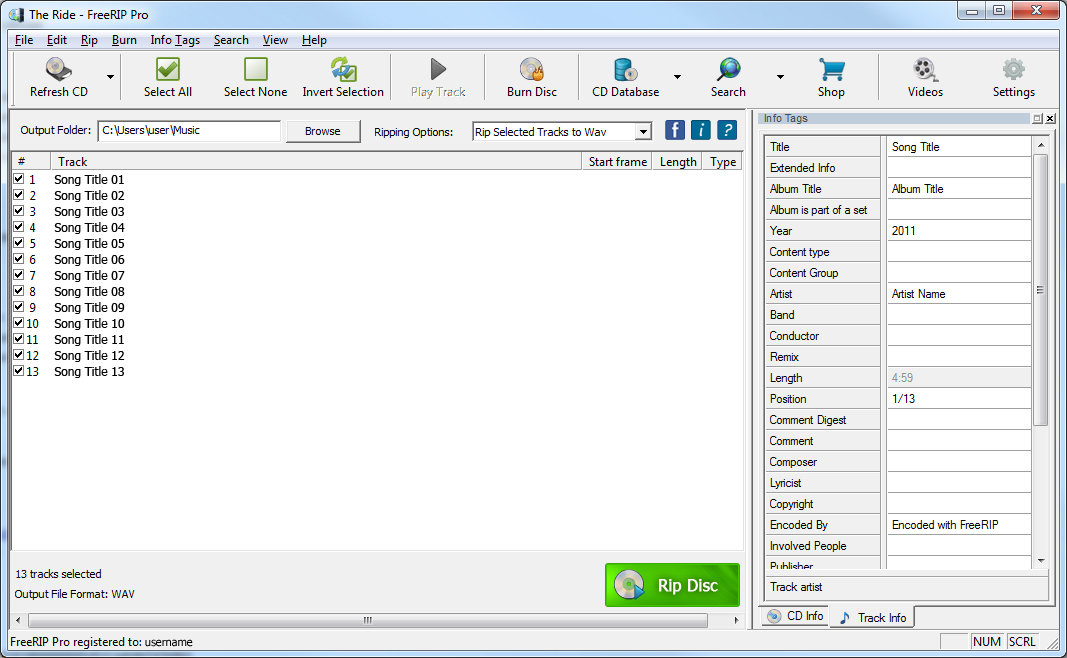 FreeRIP is a program that can record digital audio tracks directly from compact discs, without going through your sound card. The program enables you to save tracks as CD-quality WAV files or encode them to Ogg Vorbis or MP3 compressed format. FreeRIP is freeware; however, you can register the program in order to suppress the splash screen at start-up. FreeRIP is a program that can record digital audio tracks directly from compact discs, without going through your sound card. The program enables you to save tracks as CD-quality WAV files or encode them to Ogg Vorbis or MP3 compressed format. FreeRIP is freeware; however, you can register the program in order to suppress the splash screen at start-up.
FreeRIP is an advanced CD to MP3 Converter that comes packed with features. At its core, FreeRIP reads audio from your CDs and allows you to save them to your computer in a variety of digital formats including WMA, MP3, Ogg, Wav, or FLAC audio files (this process is known as CD ripping CD or CD to MP3 conversion). Converting your CD audio collection to digital audio files is also very easy with FreeRIP; and all you need to do is put your audio CD into your computer’s CD drive, run FreeRIP and click on the Rip button.
The program can also work as an audio and MP3 converter. It can convert MP3 and other audio files from one format to another. What this means is that FreeRIP can convert audio files from WMA to MP3, or OGG to MP3, FLAC to MP3 or WAV to FLAC and so on.
Want to check it out? Visit FreeRip.
Posted in Main | No Comments »
|
|
|




