Author Archive
Sunday, June 17th, 2012
 Thinking of how best to protect yourself from the dangers posed by malware, spyware, keyloggers, rootkits e.t.c as you browse the internet when your regular anti-virus and anti-spyware have consistently failed you? DefenseWall HIPS (Host Intrusion Prevention System) comes to your rescue. It is the simplest and easiest way to protect yourself from all such malicious software. Thinking of how best to protect yourself from the dangers posed by malware, spyware, keyloggers, rootkits e.t.c as you browse the internet when your regular anti-virus and anti-spyware have consistently failed you? DefenseWall HIPS (Host Intrusion Prevention System) comes to your rescue. It is the simplest and easiest way to protect yourself from all such malicious software.
Deploying the next generation proactive protection technologies, sandboxing and virtualization, this program helps you attain a maximum level of protection against malicious software. It is so simple to use that even computer newbies find it simple to use. All those confusing program pop ups and questions that new users are generally faced with which may lead to them making a wrong choice that may even damage their computers that are usually associated with other programs are significantly reduced in this software. It does not require ongoing online signature updates, no popup windows, no false positives. It is safe, secure dependable and very easy to use.
It does its work in the back ground. You will not even notice it is installed yet it provides you with the highest level of firewall and system protection. It comes with an integrated firewall which means the malware will not have the “rights” to carry out any undesired changes to your system or make any unwanted connections.
Some of the key features of this outstanding software are: it requires no special knowledge unlike other firewall and HIPS programs, it produces very minimal pop ups, it supports third party security software and programs and there is no application checksum re-calculations.
To find out more about this software, please do visit Softsphere.
Posted in Main | No Comments »
Sunday, June 17th, 2012
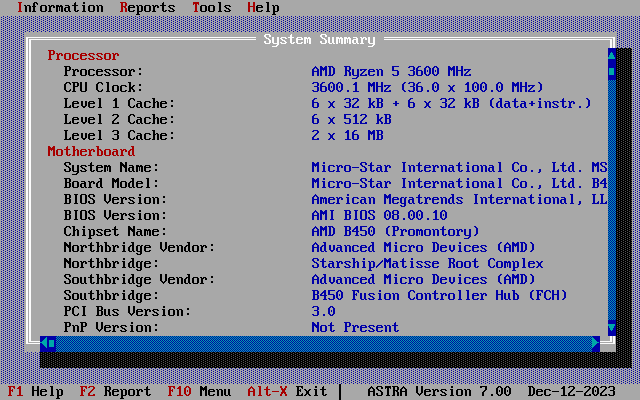 ASTRA is a program that enables you to perform computer configuration analysis and diagnostics. It provides detailed information about the status of your computer hardware and devices operational modes, including undocumented information. This program comes with a unique quick HDD Health Status checker. It provides information on CPU, motherboard, hard disks, S.M.A.R.T., CD/DVD devices, SCSI devices, memory modules, chipset, BIOS, PCI/AGP, ISA/PnP and PnP devices, monitor, video card, sound card, network card, printer, etc. ASTRA also creates a report file in plain text, INI, HTML, XML and CSV format, and is able to run in batch mode. The DOS version is specifically designed for system restore purposes and may be used by repair professionals, Windows version also available. ASTRA is a program that enables you to perform computer configuration analysis and diagnostics. It provides detailed information about the status of your computer hardware and devices operational modes, including undocumented information. This program comes with a unique quick HDD Health Status checker. It provides information on CPU, motherboard, hard disks, S.M.A.R.T., CD/DVD devices, SCSI devices, memory modules, chipset, BIOS, PCI/AGP, ISA/PnP and PnP devices, monitor, video card, sound card, network card, printer, etc. ASTRA also creates a report file in plain text, INI, HTML, XML and CSV format, and is able to run in batch mode. The DOS version is specifically designed for system restore purposes and may be used by repair professionals, Windows version also available.
Some of the key features of this program are: detects 423 processor and coprocessor types from the following: Intel, AMD, Cyrix, VIA, Centaur/IDT, Rise, Transmeta, NexGen, UMC, IBM, e.t.c, identifies processor frequency, CPU clock multiplier and FSB clock, detects expected processors frequency, processor number, socket ( both slot, socket) and package (Platform ID) processor type, identifies processor features (MMX, SSE, SSE2, SSE3, Supplemental SSE3, SSE4, XOP, 3DNow!, 3DNow! Extensions and others) and L1/L2/L3 processor cache size.
If you would like to know more about this program, please do visit SysInfoLab.
Posted in Main | No Comments »
Saturday, June 16th, 2012
 ChrisPC Free Anonymous Proxy is freeware that allows you to browse the internet anonymously, and it is absolutely free, no charge whatever for non-commercial use. Now you can enjoy high quality live streaming of on-demand television while living abroad, traveling on a business trip or in your choice vacation location! If you look forward to a higher level of security and privacy, this freeware ensures all that and more while you surf the internet. You don’t need to buy a VPN service anymore, just install and run ChrisPC Free Anonymous Proxy. ChrisPC Free Anonymous Proxy is freeware that allows you to browse the internet anonymously, and it is absolutely free, no charge whatever for non-commercial use. Now you can enjoy high quality live streaming of on-demand television while living abroad, traveling on a business trip or in your choice vacation location! If you look forward to a higher level of security and privacy, this freeware ensures all that and more while you surf the internet. You don’t need to buy a VPN service anymore, just install and run ChrisPC Free Anonymous Proxy.
ChrisPC Free Anonymous Proxy comes in two running modes: Anonymous Proxy Mode and Expat Internet Browsing Mode. If you are looking for greater security and privacy while surfing the internet from the comfort of your home, the Anonymous Proxy Mode ensures you get exactly that.
Are you an expatriate living and working abroad, are you on a business trip abroad, or on a foreign vacation? You don’t have to miss your favorite TV shows. The Expat Internet Browsing Mode makes watching UK, USA, German, Canadian, French, Italian and Spanish TV, live or on demand, wherever you are, easy & accessible, using your TV, laptop or PC. Start watching iPlayer abroad, ITV Player abroad & many more channels today. However, in order to use and enjoy the features of the Expat Internet Browsing Mode, you need to buy Expat Internet Browsing Add-on for ChrisPC Free Anonymous Proxy from our publisher’s online store.
Some of the key features of this program include: Protect your privacy and browse anonymously on the internet, many proxy servers available from all over the world: USA, Germany, Canada, U.K., France, Italy, Austria, Spain, Switzerland, India, China and other countries. You can also bypass area restrictions of websites and have access to full content.
To find out more about this freeware, please visit Chris-PC.
Posted in Main | No Comments »
Saturday, June 16th, 2012
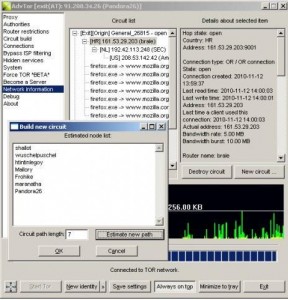 Advanced Onion Router is a portable client for the OR network. It is designed to be an improved alternative for Tor+Vidalia+Privoxy bundle for Windows users. Some of the improved features of this new version include UNICODE paths, it supports HTTP and HTTPS proxy protocols on the same Socks4/Socks5 port. It has a User Interface that makes Tor’s options and actions easily accessible and several more. Advanced Onion Router is a portable client for the OR network. It is designed to be an improved alternative for Tor+Vidalia+Privoxy bundle for Windows users. Some of the improved features of this new version include UNICODE paths, it supports HTTP and HTTPS proxy protocols on the same Socks4/Socks5 port. It has a User Interface that makes Tor’s options and actions easily accessible and several more.
Some of the key features of this program include: it does not write settings on the system registry but rather on the application folder, when it run on a read-only media, no file are written, it encrypts configured files using AES technology, and it offers support for corporate proxies. You can also build circuits by choosing the node list you want and it can also estimate good circuits. This application point and pick process interceptor allows you to redirect all the connections of a program and offers restriction on some of the local system information.
You favorite nodes can be easily added from existing circuits or routers. It permits you to change circuit priorities. It also offers better separation between private identities, supports several plugins, interception for all child processes. It also comes in several languages.
To know more ab out the amazing functionality of this program, please visit Advtor.
Posted in Main | No Comments »
Friday, June 15th, 2012
 Timéo is a complete projects management and time tracking solution specially designed for freelance and small companies. It can also be used as a simple to do list. Timeo can help you organize and manage your time by computing the dead line of a given project based on the pre-determined constraints. You could easily record the volume of work done with just a few clicks. Timéo is a complete projects management and time tracking solution specially designed for freelance and small companies. It can also be used as a simple to do list. Timeo can help you organize and manage your time by computing the dead line of a given project based on the pre-determined constraints. You could easily record the volume of work done with just a few clicks.
This program has rich features which include the following:
– Project planning: it can help you organize and manage your time by computing the dead line of a given project based on the pre-determined constraints. These constraints could include the start date, the duration of the project, the projected end date and the project’s priority. It helps to compute the start and end date of all the projects and sub-projects.
– Time tracking: this allows you to keep track of all the tasks you perform. It is also possible to start, pause and re-start a task right off the Windows notification area.
– Projects tracking: it helps you to notice immediately any deviation from the predicted path and identifies tasks that require priority. With this feature, you can choose the projects you want to display. You could either choose to have the display it in an ascending or descending order.
To know more about this program, please visit Timeopro.
Posted in Main | No Comments »
Friday, June 15th, 2012
 Remote Desktop Manager is a small application used to manage all your remote connections and virtual machines. Add, edit, delete, share, organize and find your remote connection quickly. Remote Desktop Manager is compatible with Microsoft Remote Desktop, Terminal Services, VNC, LogMeIn, Team Viewer, Ftp, SSH, Telnet, Dameware, X Window, VMWare, Virtual PC, PC Anywhere, Hyper-V, Citrix, Radmin, Microsoft Remote Assistance, Sun Virtual Box and many more. Remote Desktop Manager is a small application used to manage all your remote connections and virtual machines. Add, edit, delete, share, organize and find your remote connection quickly. Remote Desktop Manager is compatible with Microsoft Remote Desktop, Terminal Services, VNC, LogMeIn, Team Viewer, Ftp, SSH, Telnet, Dameware, X Window, VMWare, Virtual PC, PC Anywhere, Hyper-V, Citrix, Radmin, Microsoft Remote Assistance, Sun Virtual Box and many more.
The program’s interface is very attractive, and its features something worth looking out for. Remote Desktop Manager natively supports multiple VPN types, such as: Microsoft VPN, Cisco VPN, SonicWall VPN and TheGreenBow VPN. Remote Desktop Manager has some unique features that include the following; allows you to easily view all sessions within selected groups and subgroups, and find a specific group(s) using the search filter, easily view all sessions within selected groups and subgroups, and find a specific group(s) using the search filter, open several sessions at the same time by selecting a group, use the quick connect feature to quickly access a remote machine using Microsoft Remote Desktop, VNC or a web page. Simply enter a host name or IP address; conveniently use the tray icon context menu to access and manage your connections, view open sessions, and many more.
Want to check it out? Visit RemoteDesktopManager.
Posted in Main | No Comments »
Thursday, June 14th, 2012
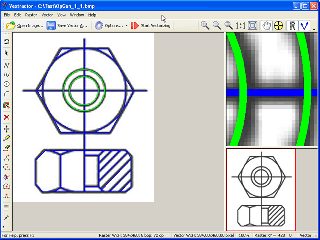 Vextractor is a tool for transforming raster images into vector formats by building centrelines and outlines. This vectorizer tool could be used for vectorizing of charts, maps, schemes and other similar images for input to CAD & GIS systems. The application has an option to setup a reference for images, in other words to assign a real coordinates to certain raster points. That means you can get vector data not only in the raster coordinates, but real geographical coordinates or in the chart coordinates. With Vextractor, you can save converted raster images to the following vector formats: DXF, WMF, EMF, EPS, AI or SVG. Vextractor is a tool for transforming raster images into vector formats by building centrelines and outlines. This vectorizer tool could be used for vectorizing of charts, maps, schemes and other similar images for input to CAD & GIS systems. The application has an option to setup a reference for images, in other words to assign a real coordinates to certain raster points. That means you can get vector data not only in the raster coordinates, but real geographical coordinates or in the chart coordinates. With Vextractor, you can save converted raster images to the following vector formats: DXF, WMF, EMF, EPS, AI or SVG.
Vextractor has all necessary tools for viewing images including; scaling, scrolling, and color selection. Some of the key features of the program include the following; TWAIN support for importing images from any scanner, automatic recognition of orthogonal lines, arcs, and circles saving the original drawing’s scale, convert halftone and color images to black-and-white images for further recognition, rotate and change the orientation of raster images, etc.
This shareware program has a built-in vector editor, which can be used for the editing of vectorization results; and also comes with a feature that lets you create curves using Bezier splines, which allow obtaining images smoother than the original raster.
Want to check it out? Visit VextraSoft.
Posted in Main | No Comments »
Thursday, June 14th, 2012
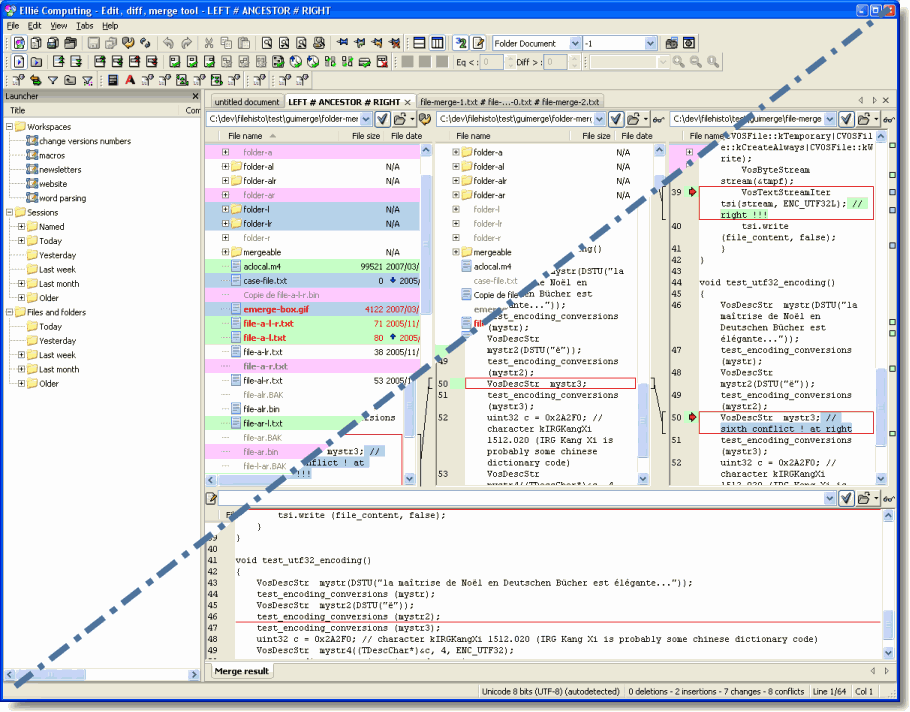 ECMerge is complete comparison and merge solution for texts, images and folders, local, through FTP/S and even inside SCC repositories, side-by-side or 3-way. The application provides syntax colouring for C/C++, Java, HTML, ASP, PHP and many others, in-line differences. ECMerge generates and can apply or preview Unix patches between files. A shell extension is provided under Windows. The program is great because it saves you precious time by its precision and all the handy shortcuts and macro-commands that are developed in standard JavaScript. A few changes have been made to this version, which include the following; support of SFTP, fly by toolbar to resolve conflict, support of Cocoa under Mac OS X, installation with Debian and RPM package, automatic check for updates, and updated SCC plugins with better support under Unixes and Mac OS X. ECMerge is complete comparison and merge solution for texts, images and folders, local, through FTP/S and even inside SCC repositories, side-by-side or 3-way. The application provides syntax colouring for C/C++, Java, HTML, ASP, PHP and many others, in-line differences. ECMerge generates and can apply or preview Unix patches between files. A shell extension is provided under Windows. The program is great because it saves you precious time by its precision and all the handy shortcuts and macro-commands that are developed in standard JavaScript. A few changes have been made to this version, which include the following; support of SFTP, fly by toolbar to resolve conflict, support of Cocoa under Mac OS X, installation with Debian and RPM package, automatic check for updates, and updated SCC plugins with better support under Unixes and Mac OS X.
ECMerge has a lot of key benefits such as; formats XML files for a better presentation and differentiation, numerous options available in the contextual menu save you from the error prone process of typing text, it not only accesses files over FTP/FTPS, on your computer or local network, but as well directly within your source code repositories in your SCC / SCM, and many more.
Want to check it out? Visit EllieComputing.
Posted in Main | No Comments »
Thursday, June 14th, 2012
 Areca is an advanced personal file backup program that allows you to select files or directories to backup, filter, encrypt and compress their content, and store them on your backup location. It takes only minutes to get used to some of its basic features; but basically Areca is a great application that anyone can easily get used to. The program does not require any complex configuration files to edit. Your backup configuration (which is stored as an XML file) can be edited with Areca’s graphical user interface. Areca is an advanced personal file backup program that allows you to select files or directories to backup, filter, encrypt and compress their content, and store them on your backup location. It takes only minutes to get used to some of its basic features; but basically Areca is a great application that anyone can easily get used to. The program does not require any complex configuration files to edit. Your backup configuration (which is stored as an XML file) can be edited with Areca’s graphical user interface.
Areca Backup has lots of benefits and features that include the following; archives compression (Zip & Zip64 format), archives encryption (AES128 & AES256 encryption algorithms), storage on local hard drive, network drive, USB key, FTP, FTPs (with implicit and explicit SSL / TLS) or SFTP server, source file filters (by extension, subdirectory, regular expression, size, date, status, with AND/OR/NOT logical operators), incremental, differential and full backup support, Support for delta backup (store only modified parts of your files), transaction mechanism : All critical processes (such as backups or merges) are transactional. This guarantees your backups’ integrity, files permissions, symbolic links and named pipes can be stored and recovered (Linux only), and many more.
Want to check it out? Visit Areca-Backup.
Posted in Main | No Comments »
Thursday, June 14th, 2012
 AppCleaner is a robust and powerful freeware you could use to search for and delete obsolete data and files on your computer. It removes several files like temporary files, history, cookies, internet logs and many more. AppCleaner frees disk space and optimizes your computer’s performance. It additionally cleans up the Registry and removes unused and old entries. AppCleaner is a robust and powerful freeware you could use to search for and delete obsolete data and files on your computer. It removes several files like temporary files, history, cookies, internet logs and many more. AppCleaner frees disk space and optimizes your computer’s performance. It additionally cleans up the Registry and removes unused and old entries.
While deleting these files, it protects your privacy and optimizes computer performance and security. It is quite a small and easy to download, plus it is free of adware. Been a freeware, you do not need to bother about license fees or registration cost.
AppCleaner cleans you’re the internet browsers on your computer for an optimized system and better privacy. It finds obsolete data and files and removes them from your system. This frees up disk space and optimizes overall performance. AppCleaner helps with privacy issues and cleans up Internet browser related obsolete data such as browsing histories, cookies etc. It contains no spyware, no adware and installs no toolbar or other crapware you do not want on your computer. It is clean and it cleans your computer! AppCleaner removes Windows related obsolete data and files and also includes an advanced registry cleaner, which removes many kinds of unused and old entries from the Registry.
To find out more on what you could do with this freeware, please kindly visit UpdateStar.
Posted in Main | No Comments »
|
|
|





