Author Archive
Tuesday, May 1st, 2012
 TestDisk is a powerful data recovery freeware. It was mainly designed to help recover lost partitions and to make disks that are not booting due to faulty software, viruses or human errors as in when you mistakenly delete your partition Table bootable again. TestDisk is a powerful data recovery freeware. It was mainly designed to help recover lost partitions and to make disks that are not booting due to faulty software, viruses or human errors as in when you mistakenly delete your partition Table bootable again.
This program has features that are useful to both newbies and experts. For novices, TestDisk has can be very helpful in collecting information about a drive that is refusing to boot which can be further analyzed by techies. For the experts, this freeware comes in handy for carrying out onsite data recovery.
TestDisk can be used to recover deleted partitions, fix partition table, retrieve FAT 32 boot sector from its backup and fix FAT tables. It could also be used to rebuild NTFS boot sector and recover NTFS boot sector from its backup, use MFT mirror to fix MFT, retrieve deleted files from exFAT, FAT, NTFS and ext2 files.
This program can recover lost partitions from the following file systems: BeFS, BSD disklabel, CramFS, compressed file systems, DOS/Windows FAT12, FAT16 and FAT32 and several more file systems.
TestDisk can run under the following Operating Systems: DOS, Windows (NT4, 2000, XP, 2003, Vista, 2008, Windows 7, Linux, Sun and Mac OS X.
To learn more about this freeware, please visit TestDisk.
Posted in Main | No Comments »
Tuesday, May 1st, 2012
 Graph Earth is an application that enables marketing and other business professionals to create stunning visual representations of their data, all without the time and costs associated with a full-featured GIS. With it, you can create one of a kind deliverables and distribute them to the world, recipients need only install Google Earth to view the resulting standards compliant KML/KMZ files. Graph Earth is now suitably designed with some new additions and features to enable you carry out your task without any major difficulty. Some of the newly added features include the following; expanded territory map with many new features, visual HTML editor for KML file placemark descriptions, support for optional attribution elements, allowing Google to better find your documents, KML file rendering speed enhanced for large KML files, and lots of other usability enhancements. Graph Earth is an application that enables marketing and other business professionals to create stunning visual representations of their data, all without the time and costs associated with a full-featured GIS. With it, you can create one of a kind deliverables and distribute them to the world, recipients need only install Google Earth to view the resulting standards compliant KML/KMZ files. Graph Earth is now suitably designed with some new additions and features to enable you carry out your task without any major difficulty. Some of the newly added features include the following; expanded territory map with many new features, visual HTML editor for KML file placemark descriptions, support for optional attribution elements, allowing Google to better find your documents, KML file rendering speed enhanced for large KML files, and lots of other usability enhancements.
Graph Earth is an advanced program that requires some technical skills to use; and that means non professionals may find it a bit difficult to get used to it. Some of its advanced features include the following; four basic 3D graph/map types (bar, chloropleth, prism and territory), embedded statistics and descriptions (global and local), embedded 2D Charts (via Google Charts), screen overlays which allow you to show customized legends, titles and organization graphics (logo), simple spreadsheet style interface, and many more.
Want to check it out? Visit: Graphearth.
Posted in Main | No Comments »
Tuesday, May 1st, 2012
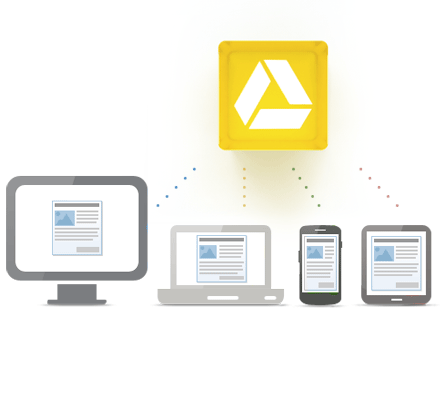 Google Drive is a synchronization tool for Google’s online storage service. If you are a Mac or PC user this is a dedicated synchronization tool that enables you to keep a local folder in sync with your online storage – add or remove a file in either location and the changes will be reflected in the other. The essence of the program can best be appreciated when the need arises to store large files, and still be able to access them from home, office or just anywhere. Though, a lot of people would prefer offline storage; Google Drive is still a highly recommended way to keep your files safe without going through a lot of stress. You can start with 5 GB free storage according to the publisher; and that is not a bad way to start. Google Drive is a synchronization tool for Google’s online storage service. If you are a Mac or PC user this is a dedicated synchronization tool that enables you to keep a local folder in sync with your online storage – add or remove a file in either location and the changes will be reflected in the other. The essence of the program can best be appreciated when the need arises to store large files, and still be able to access them from home, office or just anywhere. Though, a lot of people would prefer offline storage; Google Drive is still a highly recommended way to keep your files safe without going through a lot of stress. You can start with 5 GB free storage according to the publisher; and that is not a bad way to start.
Google Drive enables you to share files with exactly who you want and edit them together, from any device. It also gives you instant access to Google Docs, a suite of editing tools that makes working together better; even when your teammates are miles away. However, users are required to pay $2.50 per month when they upgrade to 25 GB of storage.
Want to check it out? Visit Drive.Google.com.
Posted in Main | No Comments »
Monday, April 30th, 2012
 ICE Book Reader Professional is a powerful e-book reader. It can also be used as a teleprompter. It iis a very good alternative e-book reader and provides support for the following formats: .LIT, .CHM and .ePub files, and other files which do not use any Microsoft Reader or Microsoft HELP components. It could also serve as a file converter. You could store over 250,000 books as separate files making it a sort of book library with a guaranteed database and the integrity of the stored data is intact. ICE Book Reader Professional is a powerful e-book reader. It can also be used as a teleprompter. It iis a very good alternative e-book reader and provides support for the following formats: .LIT, .CHM and .ePub files, and other files which do not use any Microsoft Reader or Microsoft HELP components. It could also serve as a file converter. You could store over 250,000 books as separate files making it a sort of book library with a guaranteed database and the integrity of the stored data is intact.
Since reading e-books is quite different form reading hard copies, this program is designed to make reading of large text files in e-book formats more convenient and less stressful to the eyes. In order to do this, it has some features such as extra smooth text scrolling, auto adjustable scrolling speed and so much more. You can conveniently read at a distance from your computer monitor, just as if you are watching TV. So you don’t have to sit close to the monitor to read using this software. This helps to prevent short-sightedness.
Some key features of this program are: support for multiple documents formats like HTML, XML, RTF, Microsoft Word documents, PALM books (.PDB and .PRC), PSION/EPOC books (.TCR), Microsoft Reader Books (.LIT), Microsoft HELP files (.CHM) and FictionBook files (all versions) (.FB2, .XML) formats. This program has 5 book-reading modes: automatic smooth scrolling, automatic page-down, automatic wave scrolling, manual browsing and book view mode. It can read files in the following formats: TXT, HTML, XML, RTF, Microsoft Word documents, PALM books (.PDB and .PRC), PSION/EPOC books (.TCR), Microsoft Reader Books (.LIT), Microsoft HELP files (.CHM). With an array of e-books in public libraries on the internet, there is no need to pay for e-books any more. This software can do so much more.
To find out more about this program, please visit .
Posted in Main | No Comments »
Saturday, April 28th, 2012
 HyperSnap is a screen capture and image editing tool for Windows. It is built with easy to use features that enable you to capture screens from standard desktop programs and even those hard-to-grab DirectX, Direct3D, 3Dfx Voodoo, and Glide mode games. HyperSnap is a screen capture and image editing tool for Windows. It is built with easy to use features that enable you to capture screens from standard desktop programs and even those hard-to-grab DirectX, Direct3D, 3Dfx Voodoo, and Glide mode games.
HyperSnap can capture frames from many software DVD players and other video playing software. This standard edition of the program comes with a lot of changes that include the following; marking stamps for auto-insert damaged stamp files; auto-inserting stamps with “underlay” (emboss) style did not work correctly, inserting stamps with “underlay” (emboss) style did not work correctly when target image had 32 BPP colour, turning off the “default button” style on edit stamp or text box when editing the text (Enter key enters new lines in text then), zoom up above 400% and down twice permanently hid objects drawn over the image. Now they are shown back if they were visible before the zoom, and a few others.
HyperSnap is a shareware application that also comes with a lot of top features that include the following; image captures from anywhere on the screen or multiple monitors, in any shape or size, unlimited undo/redo, snags also those difficult-to-grab screens from DirectX and Glide games, and a host of others.
Want to check it out? Visit: Hypersnap-DX.
Posted in Main | 1 Comment »
Friday, April 27th, 2012
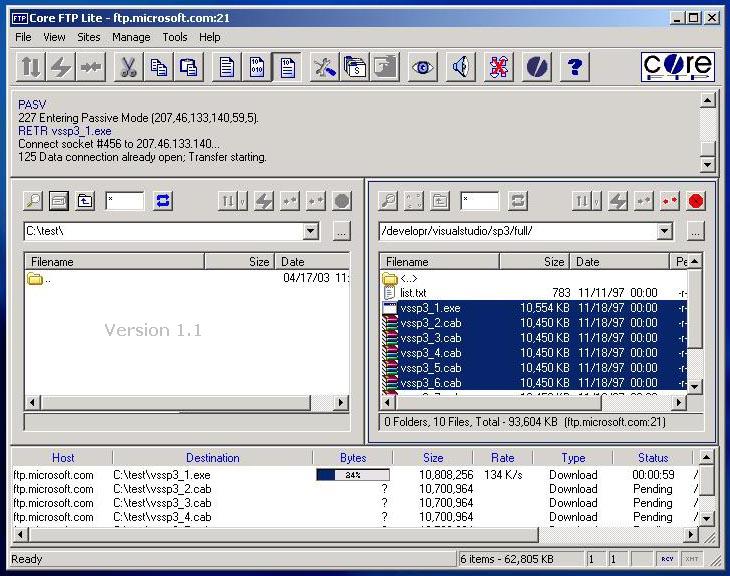 Core FTP is a secure ftp client that includes SSH/SFTP, SSL/TLS, IDN, browser integration, site to site transfers, drag and drop support, file viewing, file editing, transfer resuming, firewall support, custom commands, URL parsing, command line transfers, and much more. This client gives you a fast, easy, reliable way to update and maintain your web pages. It also provides a secure method (via SSL, TLS, or SFTP) to upload and download files from FTP servers. Core FTP Lite includes a few additions or features such as; CDUP problems on some paths caused crash, fixed, corecmd.exe updates, fixes spaces & share issues, Putty SFTP command line cert rejection issues fixed, SFTP hanging problem, fixed, Command line -encoding option (Unicode), and Command line – putty option putty compact sftp. Core FTP is a secure ftp client that includes SSH/SFTP, SSL/TLS, IDN, browser integration, site to site transfers, drag and drop support, file viewing, file editing, transfer resuming, firewall support, custom commands, URL parsing, command line transfers, and much more. This client gives you a fast, easy, reliable way to update and maintain your web pages. It also provides a secure method (via SSL, TLS, or SFTP) to upload and download files from FTP servers. Core FTP Lite includes a few additions or features such as; CDUP problems on some paths caused crash, fixed, corecmd.exe updates, fixes spaces & share issues, Putty SFTP command line cert rejection issues fixed, SFTP hanging problem, fixed, Command line -encoding option (Unicode), and Command line – putty option putty compact sftp.
Core FTP Lite includes a number of features such as the following; secure SFTP, SSL & HTTPS support, international Domain support, fast and secure transfer, mode Z compression, user-friendly interface, site to site file transfer, full drag and drop support, auto retry of failed transfers, browser integration, transfer bandwidth control, keep Alive functionality, remote file searching, file permissions (CHMOD), command line support, favorites via menu & drop down, advanced directory listings, and many more.
Want to check it out? Visit CoreFTP.com.
Posted in Main | No Comments »
Wednesday, April 25th, 2012
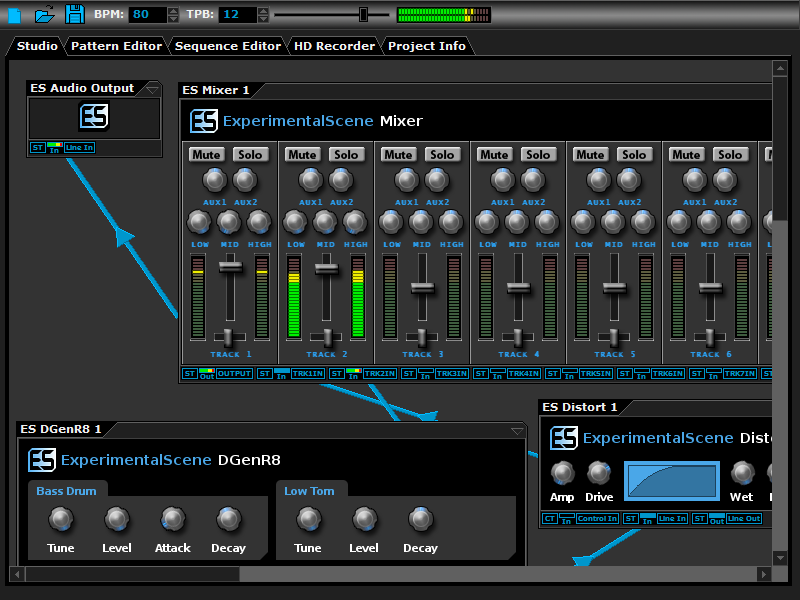 DarkWave Studio is an application designed for the composition, synthesis and recording of digital music. It is great as a production tool and is also very suitable for live performance. If you have a little knowledge of music composition and sound design you will have no trouble making great music with DarkWave Studio. DarkWave Studio is a free, open source, Digital Audio Workstation for Windows. DarkWave Studio is an application designed for the composition, synthesis and recording of digital music. It is great as a production tool and is also very suitable for live performance. If you have a little knowledge of music composition and sound design you will have no trouble making great music with DarkWave Studio. DarkWave Studio is a free, open source, Digital Audio Workstation for Windows.
DarkWave Studio is an open source program with a lot of easy to use features including; a modular Virtual Studio, Pattern Editor, Sequence Editor and Multitrack Hard Disk Recorder. DarkWave Studio supports VST/VSTi instrument and effect plugins. Some of the features in DarkWave Studio include; virtual studio that has a modular design allowing machines to be connected in an ad-hoc fashion, pattern editor that enables quick creation and modification of patterns by clicking to add or delete notes and dragging notes to move or resize them, sequence editor allows you to queue patterns to play for each control track in any arrangement, enabling reuse of patterns and quickly remixing projects, Multitrack Hard Disk Recorder allows you to record the output of any machine and record it to 16-bit Integer of 32-bit Floating Point PCM encoded, WAV files for full-quality post-production editing or for conversion to MP3/FLAC, and a few others.
Want to check it out? Visit http://www.experimentalscene.com/software/darkwave-studio/
Posted in Main | No Comments »
Wednesday, April 25th, 2012
 Document.Editor is a multitab text editor for Windows that includes plain and rich text format support, multi tab interface so you can edit multiple documents in a session, compact application size, and multiple commands. The program also comes with support for opening FlowDocument, Html and plain/rich text formats and support for saving FlowDocument and plain/rich text formats. Document.Editor is a multitab text editor for Windows that includes plain and rich text format support, multi tab interface so you can edit multiple documents in a session, compact application size, and multiple commands. The program also comes with support for opening FlowDocument, Html and plain/rich text formats and support for saving FlowDocument and plain/rich text formats.
The Multiple tab interface ensures you can edit more than one document in a session, Tab rearranging support, compact application size, and multiple Edit/Insert/Format commands. You also enjoy Multiple startup options like Open New Document, load previous documents, do nothing and many more.
Semagsoft Document.Editor also comes with support and key features such as; editing commands like undo/redo, cut(and cut paragraph, cut line), copy(and copy paragraph, copy line), paste(and paste text only), delete(and delete paragraph, delete line), select all(and select paragraph, select line), find, replace and go to, Insert objects, images, links, text files, tables, videos, horizontal lines, date, time, headers and footers into your documents, format you documents with font, font colour, highlight colour, bold, italic, underline, strikethough, subscript, superscript, indent more/less, bullet/number lists, align left/centre/right/justify, line spacing and ltr/rtl and clear formatting, spell check, text to speech, translate and definitions.
Want to check it out? Visit DocumentEditor.
Posted in Main | No Comments »
Tuesday, April 24th, 2012
 Gradually your system that used to be very fast is now so slow that you begin to imagine if it was not the same PC that used to load very fast. It now takes a longer to boot up in the morning and sometimes it takes forever to shut down at the end of the day. Things are no longer the way they used to be because you can have your system running at the speed you thought it should be running at. The publishers of System Cleaner have designed the program to help you get your system up and running as it should be. This version also includes a comprehensive “secrets eraser” that scrubs all of your computer and internet activity files and removes every last trace of where you have been and what you did while you were there. Gradually your system that used to be very fast is now so slow that you begin to imagine if it was not the same PC that used to load very fast. It now takes a longer to boot up in the morning and sometimes it takes forever to shut down at the end of the day. Things are no longer the way they used to be because you can have your system running at the speed you thought it should be running at. The publishers of System Cleaner have designed the program to help you get your system up and running as it should be. This version also includes a comprehensive “secrets eraser” that scrubs all of your computer and internet activity files and removes every last trace of where you have been and what you did while you were there.
System Cleaner fixes and prevents errors by finding and cleaning error-producing and space-wasting garbage files. It operates by regularly scanning your hard drive for various error producing files and then optionally cleaning them from your system for you. Some of the features of System Cleaner include; restores your hard drive’s performance, fixes system errors that slow your PC down and cause it to crash, speeds up your PC’s execution of software programs, removes space-wasting temporary files and other unnecessary disk clutter, tunes up and optimizes the Windows Registry, etc.
System Cleaner only comes with 15 days trail period for new users; and this might be too short to find out all there is about it.
Want to check it out? Visit Pointstone.
Posted in Main | No Comments »
Monday, April 23rd, 2012
 Live File Backup is the user-friendly real-time/live backup program for your home and business PC. The program is designed to help you backup your files while you continue your work in the office or any other place. Live File Backup continuous to important data to external storage media (locally as well as over the network); and if required, the backup software restores your lost or corrupted data including its older versions (generations) as well. Live File Backup is the user-friendly real-time/live backup program for your home and business PC. The program is designed to help you backup your files while you continue your work in the office or any other place. Live File Backup continuous to important data to external storage media (locally as well as over the network); and if required, the backup software restores your lost or corrupted data including its older versions (generations) as well.
Live File Backup is an additional real-time (continuous data protection CDP) or live backup which continuously saves the working files in the background and keeps several older versions of each file for restoration. The program does its tasks in an outstanding straightforward and user-friendly manner so that you never again have to bother about your most valuable data – namely your working files. Some of its key benefits or key features include the following; intelligent algorithms save also open files (e.g. of Word and Excel), flexibility in choosing storage media for the saved data, no loss of valuable work time since in case of necessity the backed up data of the day or the data between regular backups can be restored instantly, extensive help system, online/offline as well as printable manual, and many more.
Want to check it out? Visit: LiveFileBackup.
Posted in Main | No Comments »
|
|
|




