Author Archive
Saturday, March 3rd, 2012
 ImBatch is a batch image processor with a nice graphical user interface. It will allow you to edit multiple image files at the click of a button by using scripts. The script will be created by combining Tasks. ImBatch can batch resize and convert images in minutes instead of hours or days if you do it manually. With added features, and a couple of other updates here and there, ImBatch program is a bit more stable than it used to be with past editions. The newly added features include the following; set tag task, remove tags task, shift time task, a lot new template parameters for ‘file name parameter,’ new template parameters for ‘folder parameter,’ and a host of others. ImBatch is a batch image processor with a nice graphical user interface. It will allow you to edit multiple image files at the click of a button by using scripts. The script will be created by combining Tasks. ImBatch can batch resize and convert images in minutes instead of hours or days if you do it manually. With added features, and a couple of other updates here and there, ImBatch program is a bit more stable than it used to be with past editions. The newly added features include the following; set tag task, remove tags task, shift time task, a lot new template parameters for ‘file name parameter,’ new template parameters for ‘folder parameter,’ and a host of others.
ImBatch can handle a lot of popular image formats including the following; BMP, DIB, RLE, TIF, TIFF, FAX, G3N, G3F, XIF, GIF, JPG, JPEG, JPE, JIF, PCX, PNG, TGA, TARGA, VDA, ICB, VST, PIX, PXM, PPM, PGM, PBM, WBMP, JP2, J2K, JPC, J2C, DCX, DAT, PSD, WDP, and HDP. ImBatch is different from a couple of other programs out there because of its “Task Structure.” You can combine Tasks to make processing sequence that will give you exactly what you want. ImBatch offers many imaging functions (Tasks) like converting or resizing.
Want to check it out? Visit HighMotionSoftware.
Posted in Main | No Comments »
Friday, March 2nd, 2012
 Hardware Helper’s custom device identification engine automatically determines the exact components and peripherals installed on your PC or laptop and quickly pings our Smart Update software update location system to successfully search for available stability and performance updates for your particular hardware. Hardware Helper backs up every driver installed on your PC or laptop, compressing the backup drivers to a zip file that is easy to export and reinstall with once you have completed your reinstall or upgrade. Save hours on searching for and reinstalling device driver software. Hardware Helper’s custom device identification engine automatically determines the exact components and peripherals installed on your PC or laptop and quickly pings our Smart Update software update location system to successfully search for available stability and performance updates for your particular hardware. Hardware Helper backs up every driver installed on your PC or laptop, compressing the backup drivers to a zip file that is easy to export and reinstall with once you have completed your reinstall or upgrade. Save hours on searching for and reinstalling device driver software.
With lots of users spending a lot of hours just trying to get devices such as webcams, printers, scanners, video cards, and a host of others working properly; and actually there has to be a better way to this. Helper was designed to automate this process and do the heavy lifting for you, automatically installing and updating nearly any Windows device in minutes. Hardware Helper’s custom device identification engine automatically determines the exact components and peripherals installed on your PC or laptop and quickly pings our Smart Update software update location system to successfully search for available stability and performance updates for your particular hardware.
Want to check it out? Visit PChelpsoft.
Posted in Main | No Comments »
Friday, March 2nd, 2012
 tunXten is an OpenVPN GUI client for the Windows platform. Usability is the most important concern when dealing with multiple OpenVPN connections at the same time, and this is the main reason why this software was designed. This is a great program to use if you have ever used multiple Open VPN connections all at once; of course, you know that can be very challenging. With tunXten, you can use multiple Open VPN connections without all that challenges or issues that usually come with it. tunXten is an OpenVPN GUI client for the Windows platform. Usability is the most important concern when dealing with multiple OpenVPN connections at the same time, and this is the main reason why this software was designed. This is a great program to use if you have ever used multiple Open VPN connections all at once; of course, you know that can be very challenging. With tunXten, you can use multiple Open VPN connections without all that challenges or issues that usually come with it.
tunXten enables you to do a lot of things including the following; you don’t need to install .NET, Java or any other runtime. Consequently, it has a very small memory footprint and performs really fast, extensive logging and information filtering capabilities, your credentials can be securely stored for later reuse to save you the trouble of entering them over and over again, you won’t have to navigate through multitudes of menus and property pages to do simple things, you can run it even under a restricted user account (although you still have to install it under an admin account), custom actions can be bound to any of your VPN connections, so that you can have your most frequently used shortcuts readily available within reach.
Want to check it out? Visit Tunxten.
Posted in Main | No Comments »
Friday, March 2nd, 2012
 Xfire is the instant messenger for gamers. See when your friends are playing online games; see what game they are playing; see where they are playing; and join their game with just one click. Unlike existing Instant Messengers, this one lets you receive IM’s without disrupting your game. Xfire finds the games you play and tracks how long you play them. We’ll also let your friends know what you’re playing so they can join you. Xfire is the instant messenger for gamers. See when your friends are playing online games; see what game they are playing; see where they are playing; and join their game with just one click. Unlike existing Instant Messengers, this one lets you receive IM’s without disrupting your game. Xfire finds the games you play and tracks how long you play them. We’ll also let your friends know what you’re playing so they can join you.
With Xfire, you can enjoy a lot of possibilities including chatting and playing games all at the same time without any problem. The program is designed to automatically update itself, and that is not the best part of it because you can also use it without paying a dime for it. amazingly too, Xfire supports lots of online PC games that include the following; server and non-server based First Person Shooters, Role Playing games, and Real Time strategy.
Xfire has a few and easy to use features that include the following; in game voice and IM that enables you to chat with other users of the programs as well as your friends on AIM, Google Talk, MSN Messenger, and Yahoo Messenger, screenshots and videos, live broadcasting, server browser, and groups.
Want to check it out? Visit Xfire.
Posted in Main | No Comments »
Wednesday, February 29th, 2012
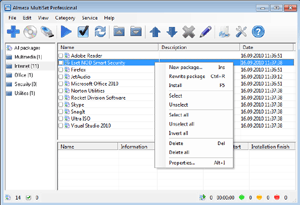 Almeza MultiSet Enterprise will allow you to reduce expenses on calling administrators for every client computer, save a lot of time for everyone and therefore provide more time for employees to spend on their direct duties. With the program, you can create a Windows installation disk or USB Flash Drive that will automatically install the operating Windows without asking questions about username, product key, time as well as locale settings. Your favorite applications are automatically installed, the necessary keys are entered into the registry, drivers are updated, new patches (service packs) from Microsoft are installed. It’s possible and you can do it easily with Almeza MultiSet. Almeza MultiSet Enterprise will allow you to reduce expenses on calling administrators for every client computer, save a lot of time for everyone and therefore provide more time for employees to spend on their direct duties. With the program, you can create a Windows installation disk or USB Flash Drive that will automatically install the operating Windows without asking questions about username, product key, time as well as locale settings. Your favorite applications are automatically installed, the necessary keys are entered into the registry, drivers are updated, new patches (service packs) from Microsoft are installed. It’s possible and you can do it easily with Almeza MultiSet.
Almeza MultiSet will automatically install all the applications you require, either onto your original computer or onto a new one. It’s an ideal solution for rebuilding your systems quickly. Some of the features of the program include the following; create a bootable USB Flash Drive for automatic installing Windows and software onto a computer, create a universal disk for automatic installing software onto a computer using any media (CD/DVD/Flash/Hard Drive), install the programs in any location and as many times as you want – just insert the disk into the CDROM, DVDROM or FlashDrive, and MultiSet will undertake the complete installation procedure for you, and a few other things as well.
Want to check it out? Visit Almeza.
Posted in Main | No Comments »
Wednesday, February 29th, 2012
 Office Ribbon Editor is a small tool that will assist developers in the creation of these ribbons for the Office 2007 & 2010 programs, by providing access to the XML that generates the ribbons. This lightweight, but very effective tool is designed specifically to help you edit the RibbonUI for Excel, as well as PowerPoint. The reason behind this decision lies on the fact that the ribbonUI is managed with XML. The publisher of Office Ribbon Editor also includes a few changes such as the following; addition of functionality message to the bottom of the toolbox control, addition of Drag and Drop a container or control from the toolbox to editor window, fixing of application crashed when attempting to apply Option changes without a file open, and a few others. Office Ribbon Editor is a small tool that will assist developers in the creation of these ribbons for the Office 2007 & 2010 programs, by providing access to the XML that generates the ribbons. This lightweight, but very effective tool is designed specifically to help you edit the RibbonUI for Excel, as well as PowerPoint. The reason behind this decision lies on the fact that the ribbonUI is managed with XML. The publisher of Office Ribbon Editor also includes a few changes such as the following; addition of functionality message to the bottom of the toolbox control, addition of Drag and Drop a container or control from the toolbox to editor window, fixing of application crashed when attempting to apply Option changes without a file open, and a few others.
Office Ribbon Editor has a lot of features that simply makes it one of the most effective freeware tools in its category. Some of the features to find in this version of the program include the following; creating Office 2007 and 2010 documents without the requirement of having Office actually installed, syntax highlighting and Autocomplete capability, and access o all Office 2007 and 2010 features from the ribbon to the new Backstage feature found in Office 2010.
Want to check it out? Visit LeafCreations.
Posted in Main | No Comments »
Wednesday, February 29th, 2012
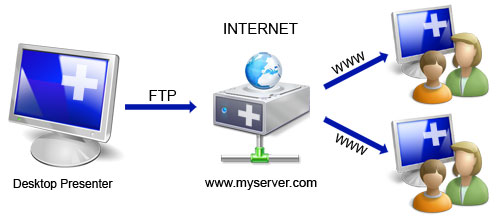 Online Desktop Presenter is a program that lets you present your windows desktop via Internet to any other user without any problems of firewalls or any other security related installations. The program also lets you transmit your screen content online via Internet or Intranet for presentations, trainings, sales conversations etc. to one or several remote Internet users. With Online Desktop Presenter, your screen content will be transmitted via FTP to your own web server or to free web space automatically and continuously. Your remote dialog partners such as customers, partners, colleagues and co-workers can follow your desktop presentation system-independent (Windows, Mac, Linux etc.) only by opening the corresponding web address in their browser; no additional installation of any kind is needed on their side. Online Desktop Presenter is a program that lets you present your windows desktop via Internet to any other user without any problems of firewalls or any other security related installations. The program also lets you transmit your screen content online via Internet or Intranet for presentations, trainings, sales conversations etc. to one or several remote Internet users. With Online Desktop Presenter, your screen content will be transmitted via FTP to your own web server or to free web space automatically and continuously. Your remote dialog partners such as customers, partners, colleagues and co-workers can follow your desktop presentation system-independent (Windows, Mac, Linux etc.) only by opening the corresponding web address in their browser; no additional installation of any kind is needed on their side.
Online Desktop Presenter has some nice and easy to use features that include the following; data transmission of your Windows desktop in rapid sequences (from about 1 second per image of 800×600 pixels without background image, depending on your Internet access speed and the one of the remote Internet user), start/pause/stop of transmission of your desktop, begin presentation automatically after program has started, setting of any possible subdirectory of a web server or web space accessible by FTP, use of free web space if no own web server is available, and a host of others.
Want to check it out? Visit Infonautics.
Posted in Main | No Comments »
Tuesday, February 28th, 2012
 EMDB is a small utility to keep track of your DVD collection. With an automatic import from the database of IMDB, export to csv, text or complete website, thumbnail cover preview, a loan tracker, search function and multi-language user interface. EMDB is written in C++ using Microsoft Visual Studio 2008 and doesn’t need a .NET framework or any other external libraries. EMDB is a small utility to keep track of your DVD collection. With an automatic import from the database of IMDB, export to csv, text or complete website, thumbnail cover preview, a loan tracker, search function and multi-language user interface. EMDB is written in C++ using Microsoft Visual Studio 2008 and doesn’t need a .NET framework or any other external libraries.
Users of this program can enjoy it because it is available in various languages including the following; English, Dutch, Danish, German, Italian, Portuguese, Slovak, Spanish, Hungarian Croatian, Swedish, Greek, Catalan, Czech, Norwegian, Japanese, French, Finnish, Polish, Russian, Turkish, Simplified Chinese, Serbian, Slovenian, Arabic and Portuguese (Brazil) translations are included in the setup.
EMDB 1.42 now includes a number of changes and fixes that include the following; directors that used to be mixed up now and then have now been fixed, when inserting a movie the new movie showed up twice in the list (although correctly saved in the database), addition of IMDB button in IMDB multiple results dialog to check IMDB for the selected title(s), unknown directors were included in the search results when searching for a specific director, popups with “No matches found” replaced by a logging message, and a host of others.
Want to check it out? Visit Heesakkers3.
Posted in Main | No Comments »
Tuesday, February 28th, 2012
 Bandizip is free archiver that can be used both at home and in the office. The program handles the most popular compression formats, including Zip, 7z, and Rar files for free. Bandizip also has support for ZIP, 7Z, RAR, ALZ, EGG, TAR, BH, LZH, GZ, BZ2, ISO, CAB, WIM, XZ, ARJ, and Z archives files and users can create self-extracting files (.EXE) and multi-volume (split) archives files. It is a nice freeware program that has a lot of amazing features that you can get used to without any difficulty. Bandizip is free archiver that can be used both at home and in the office. The program handles the most popular compression formats, including Zip, 7z, and Rar files for free. Bandizip also has support for ZIP, 7Z, RAR, ALZ, EGG, TAR, BH, LZH, GZ, BZ2, ISO, CAB, WIM, XZ, ARJ, and Z archives files and users can create self-extracting files (.EXE) and multi-volume (split) archives files. It is a nice freeware program that has a lot of amazing features that you can get used to without any difficulty.
Bandizip is built to support Unicode to display international characters which displays for influences in archives. Some of the amazing features included in Bandizip include the following; unpack ZIP, ZIPX, RAR, 7Z, ARJ, ALZ, EGG, LZH, TAR, BH, GZ, BZ2, JAR, ISO, CAB, WIM, XZ, Z, ACE, TXZ, TLZ, PMA, and J2J archives, create ZIP, ZIPX, EXE, TAR, and TGZ archives, bypass the bad compression files automatically by “High Speed Archiving” function, extract the files to the destination folder directly by “Fast Drag & Drop” function, create self-extracting file (.EXE) and multi-volume (split) archives, optional archive encryption using ZipCrypto, context menu access including “Preview Archive” function, create or extract multiple zip files simultaneously from windows explorer, and it is free for both home and office use.
Want to check it out? Visit Bandicam.com.
Posted in Main | 1 Comment »
Monday, February 27th, 2012
 Directory List & Print Pro is an application for Windows that enables listing and printing of a directory structure in a simplest way. By copying to the clipboard the directory listing can be exported into other programs or opened directly in Word and Excel. Directory List & Print Pro can directly be embedded in the context menu of Windows Explorer for immediate display of the requested directory structure. In addition, Directory List & print offers a wide variety of further useful functions such as; MP3 and video lists can be displayed with information about the length, the requested depth for subdirectories is freely selectable, and the set up and display of file lists can individually be defined by different selection and filter options. Directory List & Print Pro is an application for Windows that enables listing and printing of a directory structure in a simplest way. By copying to the clipboard the directory listing can be exported into other programs or opened directly in Word and Excel. Directory List & Print Pro can directly be embedded in the context menu of Windows Explorer for immediate display of the requested directory structure. In addition, Directory List & print offers a wide variety of further useful functions such as; MP3 and video lists can be displayed with information about the length, the requested depth for subdirectories is freely selectable, and the set up and display of file lists can individually be defined by different selection and filter options.
Directory List & Print Pro includes lots of features such as the following; selection of directories by entering the path as a text string, drag & Drop of directories (or a file) from Windows Explorer, integration of “Open in Directory List & Print” in the directory context menu of Windows Explorer, direct selection of important system directories as “My Documents” etc, listing of sub-directories and/or files and looping through sub-directories (recursion), update file list automatically or manually, display of last modification date, display of file size, and many more.
Want to check it out? Visit Infonautics.
Posted in Main | No Comments »
|
|
|




