Author Archive
Wednesday, December 28th, 2011
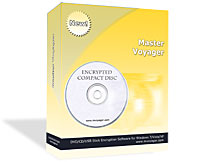 Master Voyager is especially designed to create protected DVD/CD discs and USB Memory Sticks. It creates protected areas on the media and it is required that you enter password to see protected contents. Protected Disc/USB Stick is fully autonomous and does not need any special software installed on computer. It has strong encryption of protected contents. Advanced Encryption Standard 256 bit is used to protect your records. Also added in this update is the AES, which is a new Federal Information Processing Standard (FIPS) and used to protect sensitive information by U.S. Government organizations (and others). Master Voyager is especially designed to create protected DVD/CD discs and USB Memory Sticks. It creates protected areas on the media and it is required that you enter password to see protected contents. Protected Disc/USB Stick is fully autonomous and does not need any special software installed on computer. It has strong encryption of protected contents. Advanced Encryption Standard 256 bit is used to protect your records. Also added in this update is the AES, which is a new Federal Information Processing Standard (FIPS) and used to protect sensitive information by U.S. Government organizations (and others).
Master Voyager also supports CDR/CDRW/DVD+-R/DVD+-RW disc types; and there is no need to buy special CD burning software. Also, there is no need to have Master Voyager software on computer to read protected media. Every protected disc/USB stick contains AutoPlay module. You just need to insert disc into CD Drive (or connect your Flash Stick to USB port) and it will ask password to continue. The only requirement is to have Windows and CD-ROM/USB port. The protected media does NOT install any software to the target computer. It is fully autonomous.
The publisher has been able to fix a bug, which has to do with “Titles of file panels displayed incorrect information for public areas and secure partition.”
Want to check it out? Visit Mvoyager.com.
Posted in Main | No Comments »
Monday, December 26th, 2011
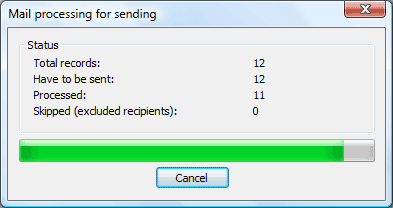 Mail Merge Toolkit is powerful add-in for Microsoft Office to extend mail merging capabilities in Outlook, Word and Publisher. The toolkit allows you to insert data fields into subject field, add attachments, and send emails in GIF, HTML, RTF and text formats. The mail merging is virtually the same as standard merging, but it gives you more opportunities and is more reliable in operation. Mail Merge Toolkit is powerful add-in for Microsoft Office to extend mail merging capabilities in Outlook, Word and Publisher. The toolkit allows you to insert data fields into subject field, add attachments, and send emails in GIF, HTML, RTF and text formats. The mail merging is virtually the same as standard merging, but it gives you more opportunities and is more reliable in operation.
Mail Merge Toolkit allows you to use all the features of Microsoft Office for professional mass mailing. You can also enjoy the easiest and at the same time most effective work with Mail Merge in Word. Being one of the basic text editors nowadays, Microsoft Word is applied by the most of PC users. So, Mail Merge in Microsoft Word is of the paramount importance for.
Some of the things you can use Mail Merge Toolkit for include the following; insert data fields into the message subject, so that not only the contents of a message but also its subject is personalized, attach a single file or numerous ones to messages, send messages to multiple recipients in HTML, RTF and GIF formats directly from Microsoft Publisher, and a host of others.
Want to check it out? Visit Mapilab.com.
Posted in Main | No Comments »
Monday, December 26th, 2011
 nomacs is a free image viewer for Windows and Linux systems, which is licensed under the GNU Public License v3. The program is small, fast and able to handle the most common image formats. Additionally it is possible to synchronize multiple viewers. A synchronization of viewers running on the same computer or via LAN is possible. nomacs allows to compare images and spot the differences (e.g. schemes of architects to show the progress). nomacs is a free image viewer for Windows and Linux systems, which is licensed under the GNU Public License v3. The program is small, fast and able to handle the most common image formats. Additionally it is possible to synchronize multiple viewers. A synchronization of viewers running on the same computer or via LAN is possible. nomacs allows to compare images and spot the differences (e.g. schemes of architects to show the progress).
nomacs has a lot of new features that include the following; hide player and nasty labels (e.g. loading) on fullscreen (thanks to asen), display information for slideshows, format metadata, bugfix in save jpg dialog (now the compression rate can be modified again), and bugfix in network. Older features of nomacs include the following; start up time improved, locate your geo referenced images on google maps, change the image resolution/image size, metadata: added path, file size, resolution, you can add a temp path – all screenshots or pasted images are stored there, sync: panning without position matching (for similar images having a different resolution), set maximal zoom level for the interpolation (you can even turn off interpolation), direct link to bug report/feature request added in the help menu, etc.
Want to check it out? Visit Nomacs.org.
Posted in Main | No Comments »
Monday, December 26th, 2011
 KLS Backup is a powerful backup and synchronization program that allows you to back up or synchronize your data to local and network drives, CD/DVD media, FTP (SSL/TLS) or WebDAV server. The backup files can be stored uncompressed (flat copy) or compressed in standard Zip, 7Zip or SQX format. KLS Backup 2011 can back up files and folders from local drives, network locations, FTP, WebDAV servers (including locked files and UNICODE file names) and databases (MySQL, SQL Server). Advanced version management feature makes it possible to find and restore any backup version within seconds. The synchronization feature allows you to easily synchronize the contents of two different folders. Running as a windows service the built-in scheduler provides a powerful automated backup solution. KLS Backup is a powerful backup and synchronization program that allows you to back up or synchronize your data to local and network drives, CD/DVD media, FTP (SSL/TLS) or WebDAV server. The backup files can be stored uncompressed (flat copy) or compressed in standard Zip, 7Zip or SQX format. KLS Backup 2011 can back up files and folders from local drives, network locations, FTP, WebDAV servers (including locked files and UNICODE file names) and databases (MySQL, SQL Server). Advanced version management feature makes it possible to find and restore any backup version within seconds. The synchronization feature allows you to easily synchronize the contents of two different folders. Running as a windows service the built-in scheduler provides a powerful automated backup solution.
This is the professional version, and it includes a number of key features such as; backup from FTP and WebDAV server, encrypted archives, synchronization wizard (folder-folder, folder-ZIP file, folder-FTP server), differential backup, database backup (MySQL, SQL Server), easy-to-use but powerful integrated workspace, backup data from local and network drives, cloud storage, FTP and WebDAV servers, Windows Registry, backup of open files and NTFS permissions, full incremental and differential backup, backup to local and network drives, FTP and WebDAV servers, CD/DVD media, and many more.
Want to check it out? Visit Kls-Soft.com.
Posted in Main | 1 Comment »
Sunday, December 25th, 2011
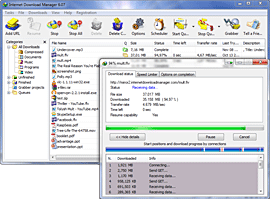 Internet Download Manager is one of the world’s famous download applications for increasing download speeds by up to 5 times, and for resuming, scheduling, and organizing downloads. The program will resume unfinished downloads due to network problems, or unexpected power outages. Internet Download Manager is one of the world’s famous download applications for increasing download speeds by up to 5 times, and for resuming, scheduling, and organizing downloads. The program will resume unfinished downloads due to network problems, or unexpected power outages.
Internet Download Manager features a full-fledged site grabber that downloads files that are specified with filters, for example, all pictures from a Web site, different parts of web sites, or complete web sites for offline browsing. The program supports HTTP, HTTPS, FTP and MMS protocols, and has an adaptive download accelerator for MP3 audio and MPEG video files. Internet Download Manager can be used to download FLV videos from YouTube, Google Video, MySpaceTV, and other popular sites. It integrates into Opera, Mozilla, Internet Explorer, Firefox, MSN, AOL, and into any application that uses FTP, or HTTP protocols. Internet Download Manager fully supports Windows Vista and Internet Explorer 7.
Internet Download Manager makes it very easy to download any program from the internet. It remains one of the fastest download applications that also support proxy servers, FTP and HTTP protocols, firewalls, redirects, cookies, authorization, MP3 audio and MPEG video content processing. This version in review has been updated to include support for socks.
Want to check it out? Visit InternetDownloadManager.
Posted in Main | No Comments »
Saturday, December 24th, 2011
 Router IP Console DeNovo is a powerful tool that can be used for quick control and management of any SNMP device. You can supervise the basic parameters of the device, such as uptime, amount and status of interfaces, routing, address tables and many, many more. You can also control Cisco, Hewlett-Packard and any other device which support SNMP. Router IP Console DeNovo periodically checks all given devices and at presence of critical conditions (the interface has changed the status, there was an CPU overload, it is not enough of RAM) can raise an alarm and send it to the desired email destination. With Router IP Console DeNovo, you can create alarm on any SNMP variable with any condition. Router IP Console DeNovo is a powerful tool that can be used for quick control and management of any SNMP device. You can supervise the basic parameters of the device, such as uptime, amount and status of interfaces, routing, address tables and many, many more. You can also control Cisco, Hewlett-Packard and any other device which support SNMP. Router IP Console DeNovo periodically checks all given devices and at presence of critical conditions (the interface has changed the status, there was an CPU overload, it is not enough of RAM) can raise an alarm and send it to the desired email destination. With Router IP Console DeNovo, you can create alarm on any SNMP variable with any condition.
Router IP Console consists of two parts, which are the client and server. The server part (core) runs as system service. You can access the core with client from any computer workstation from domain or workgroup. Also, the core has built-in security control for prevent unauthorized access. Some of the features of the program include the following; supervises the basic and extended parameters of the SNMP device, receive, analyze and log SNMP traps, repeaters monitoring, control of repeater’s ports, TCP connection table monitoring, SNMP parameter history, graph and log, and many more.
Want to check it out? Visit InnerDive.
Posted in Main | No Comments »
Saturday, December 24th, 2011
 ScreenConnect is a program that will quickly and securely access remote users’ screens. With just a few clicks, anyone on any operating system is immediately connected. With ScreenConnect, you can do a couple of things including the following: Remote control any computer over the internet; Access unattended computers; Share your own screen with other people; Support Windows, Mac, and Linux users; and Support with Android and iOS phones and tablets. The program enables you to customize messages, colors, and images. You can easily edit to closely align with your brand, and make some basic changes in seconds through the administration panel. Full web source is provided for advanced customization. ScreenConnect is a program that will quickly and securely access remote users’ screens. With just a few clicks, anyone on any operating system is immediately connected. With ScreenConnect, you can do a couple of things including the following: Remote control any computer over the internet; Access unattended computers; Share your own screen with other people; Support Windows, Mac, and Linux users; and Support with Android and iOS phones and tablets. The program enables you to customize messages, colors, and images. You can easily edit to closely align with your brand, and make some basic changes in seconds through the administration panel. Full web source is provided for advanced customization.
ScreenConnect is compatible with the following; client targeted automatically based on remote operating system and capabilities, .NET ClickOnce Client compatible with over 99% of Windows machines, Java Web Start Client compatible with over 90% of Windows, Mac, and Linux machines, Java Android Host Client compatible with Android smart phones including Motorola Droid, HTC Droid Incredible, Nexus One, G1, etc.
The program also includes a number of key features that include the following; lightning-quick remote screen, keyboard, and mouse control performs great on any connection, unattended access for instant connectivity to familiar machines, blank the remote monitor for privacy from your guest, and many more.
Want to check it out? Visit ScreenConnect.
Posted in Main | 1 Comment »
Friday, December 23rd, 2011
.jpg) ZoomIt is screen zoom and annotation tool for technical presentations that include application demonstrations. ZoomIt runs unobtrusively in the tray and activates with customizable hotkeys to zoom in on an area of the screen, move around while zoomed, and draw on the zoomed image. ZoomIt is screen zoom and annotation tool for technical presentations that include application demonstrations. ZoomIt runs unobtrusively in the tray and activates with customizable hotkeys to zoom in on an area of the screen, move around while zoomed, and draw on the zoomed image.
Anyone running ZoomIt for the first time will be presented with an onscreen configuration dialog that describes the program’s behavior that lets you specify alternate hotkeys for zooming and for entering drawing mode without zooming, and customize the drawing pen color and size. The publisher uses the draw-without-zoom option to annotate the screen at its native resolution, for instance. ZoomIt also includes a break timer feature that remains active even when you tab away from the timer window and allows you to return to the timer window by clicking on the ZoomIt tray icon.
ZoomIt is compatible with the following versions of Windows; 7, 2000, 2003, Vista, and XP. You can use pen input for ZoomIt drawing on tablet PCs. As a freeware program, ZoomIt has a couple of functions that simply makes it worth checking out. However, you may need a couple of trials to actually get used to the program; especially if you are not an experienced user.
Want to check it out? Visit Microsoft.com.
Posted in Main | No Comments »
Friday, December 23rd, 2011
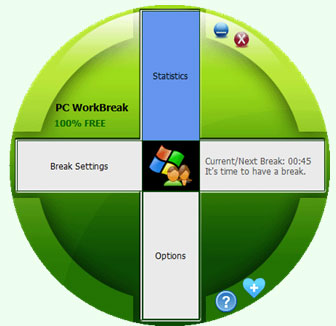 PC WorkBreak provides proper reminders to reduce your RSI (Repetitive Strain Injury) risk. It offers multi-type break reminders such as micro-break, stretch, eye exercises and walk, based on your PC usage model. Compliance rates are also provided. Follow a good break setting will help heavy PC user to release body pain induced by long sitting or frequent keyboard/mouse usage. All break settings are configurable, and you can use your favorite picture or animation (gif) as reminder demo. PC WorkBreak provides proper reminders to reduce your RSI (Repetitive Strain Injury) risk. It offers multi-type break reminders such as micro-break, stretch, eye exercises and walk, based on your PC usage model. Compliance rates are also provided. Follow a good break setting will help heavy PC user to release body pain induced by long sitting or frequent keyboard/mouse usage. All break settings are configurable, and you can use your favorite picture or animation (gif) as reminder demo.
PC WorkBreak supports top 11 most popular international languages including the following; English, Simplified Chinese, Traditional Chinese, Spanish, Japanese, Portuguese, German (Deutsch), Arabic, French, Russian, and Korean. PC WorkBreak has a number of features that include the following; flexible break settings, professional stretch demos, break compliance statistics, portable application, Unicode supportable, 32 and 64-bit application in one copy, and supports multi-language.
PC WorkBreak is compatible with the following operating systems; Windows 2000, 2003, Windows XP, Windows 7 or higher. The program is portable software for Windows popular versions, no installation needed. However, you will need to run “FirstRun!!!.vbs” first to check your system environment. PC WorkBreak is a freeware program that may require some technical experience on the part of the user.
Want to check it out? Visit Trisunsoft.com.
Posted in Main | No Comments »
Friday, December 23rd, 2011
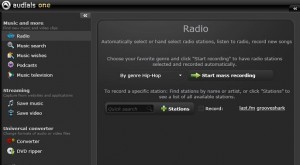 This is one of those applications that work almost like a clock; producing excellent results. AudialsOne works around the clock to provide you with tons of music. Just enter in a genre, artist or song title and AudialsOne searches the Internet for the best online radio stations to record music and even finds matching videos. AudialsOne finds all the music you want from 80 genres and over 100,000 artists in a matter of minutes. You can even choose from a large selection of podcasts. It records everything you hear on any website or streaming application and automatically saves the file as a new MP3 on your computer. It takes care of DRM copy protection and file format problems with music and audio book files via its PerfectAudio quality guarantee. This is one of those applications that work almost like a clock; producing excellent results. AudialsOne works around the clock to provide you with tons of music. Just enter in a genre, artist or song title and AudialsOne searches the Internet for the best online radio stations to record music and even finds matching videos. AudialsOne finds all the music you want from 80 genres and over 100,000 artists in a matter of minutes. You can even choose from a large selection of podcasts. It records everything you hear on any website or streaming application and automatically saves the file as a new MP3 on your computer. It takes care of DRM copy protection and file format problems with music and audio book files via its PerfectAudio quality guarantee.
AudialsOne can record a lot of music online for you and then automatically save it as an MP3 file. No matter if it is a streaming service like Simfy or a music portal such as Last.fm, Grooveshark or Spotify. The program also magically displays a button next to videos and films in any browser or stream player that lets you make recordings. All you have to do is click the button with your mouse and AudialsOne automatically saves the video.
Want to check it out? Visit Audials.com.
Posted in Main | No Comments »
|
|
|





