Author Archive
Thursday, December 1st, 2011
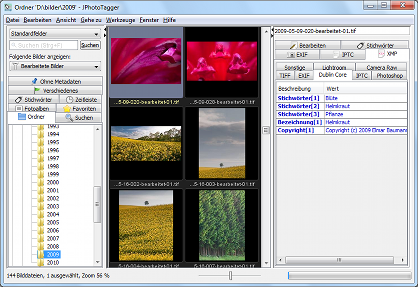 JPhotoTagger is a platform independent Photo Manager. The program lets you manage and find fast your photos through keywords, descriptions and other so called metadata (“tags”). JPhotoTagger also speeds up adding or editing tags through automatic keyboard input completion and other features. JPhotoTagger is a platform independent Photo Manager. The program lets you manage and find fast your photos through keywords, descriptions and other so called metadata (“tags”). JPhotoTagger also speeds up adding or editing tags through automatic keyboard input completion and other features.
All tags will be written into XMP sidecar files and JPhotoTagger’s database. The images are left untouched. The program is open to work together with other applications such as Adobe Photoshop Lightroom. JPhotoTagger automatically reads tags from new and changed sidecar files and updates its database. You also have the opportunity to tag your photos with a program like Adobe Photoshop Lightroom and JPhotoTagger both even on different operating systems. JPhotoTagger runs on every system where Java is installed.
Some of the features in JPhotoTagger include the following; file system folders, favourite file system folders (user defined and ordered by importance), timeline, saved searches, photo albums (image collections), photo albums (image collections), smart collections, images without specific metadata (images without a copyright notice), Fast search input field in the application’s window with auto complete, keywords and rating stars can be overlaid to the thumbnails, embedded IPTC metadata, copy complete metadata from and paste to selected images, and a couple of others.
Want to check it out? Visit Jphototagger.
Posted in Main | No Comments »
Thursday, December 1st, 2011
 Web Architect is an extremely powerful application for creating modern and professional Websites, homepages and Web applications. The program supports all relevant Web standards and technologies including the following; HTML, XHTML, CSS, JavaScript, PHP and a host of others. Web Architect fully supports Unicode which allows creating Web pages using all international languages and character sets (ANSI, UTF-8, UTF-16). Web Architect is an extremely powerful application for creating modern and professional Websites, homepages and Web applications. The program supports all relevant Web standards and technologies including the following; HTML, XHTML, CSS, JavaScript, PHP and a host of others. Web Architect fully supports Unicode which allows creating Web pages using all international languages and character sets (ANSI, UTF-8, UTF-16).
The very intuitive task- and context-centred user interface makes it very easy both for professionals and first-time users to become familiar with the application. The program supports the following; powerful code-based web/HTML editor, supports (X( HTML, CSS, JS, PHP, page preview with Internet Explorer, WebKit and Firefox, integrated desktop CMS, supports HTML5 and CSS3, secure FTP Client with two-way sync, supports jQuery, prototype, etc, as well as modern Office 2010 user interface.
Web Architect also includes a number of highly advanced features such as the following; browser previews (Internet Explorer as integrated preview, Firefox/Mozilla as integrated preview, and WebKit as integrated preview.), supports various JavaScript frameworks (jQuery, MooTools, Prototype, Script.aculo.us, Dojo, YUI), Integrated spellchecking, upload and download files from/to a remote FTP server, support for SFTP / SSH and SSL+FTP, change file attributes directly on the remote server, and many more.
Want to check it out? Visit Mirabyte.
Posted in Main | No Comments »
Thursday, December 1st, 2011
 Passwords Base is a program for storing accounts data that is ideal for personal use. The program allows you to easily operate passwords for programs of any kind, like web browsers or email client or network resource, and many more. Passwords Base has an easy to use interface that requires only a little effort to understand. The program allows copy data like password or account name to the clipboard with one mouse click. The user interface is very flexible to make up for your needs and see only information, which is necessary for you. Passwords Base is a program for storing accounts data that is ideal for personal use. The program allows you to easily operate passwords for programs of any kind, like web browsers or email client or network resource, and many more. Passwords Base has an easy to use interface that requires only a little effort to understand. The program allows copy data like password or account name to the clipboard with one mouse click. The user interface is very flexible to make up for your needs and see only information, which is necessary for you.
Passwords Base has an events history, which means you can always cancel casual changes. System tray functions allow access to the program with ease and get necessary data. To make your work more comfortable you can place a program window over the other programs. Passwords Base interface was developed to keep useful place on the desktop. To make it more progressive you can disable unnecessary columns in the main grid and minimise window size.
Passwords Base has a 10 days trial period for users; and is available for $14.95 per download. The program runs on virtually all Windows Operating systems.
Want to check it out? Visit Miklsoft.com.
Posted in Main | No Comments »
Sunday, November 27th, 2011
 CodeLobster PHP Edition is a handy and easy-in-use editor that is primarily intended for quick and easy creation and editing of PHP files. The program includes debugger, dynamic help, built-in parser, auto-complete and Class View window for comfortable work with PHP code. CodeLobster PHP Edition also supports such file formats as Text, HTML, and XML. CodeLobster PHP Edition streamlines and simplifies PHP development process. There is simply no need to keep in mind names of functions, arguments, tags and their attributes any more when you have it on your system. The program has been designed to help you enjoy autocomplete feature for PHP, HTML, JavaScript and even CSS. You can also get necessary help information by F1 or using special Help control. CodeLobster PHP Edition is a handy and easy-in-use editor that is primarily intended for quick and easy creation and editing of PHP files. The program includes debugger, dynamic help, built-in parser, auto-complete and Class View window for comfortable work with PHP code. CodeLobster PHP Edition also supports such file formats as Text, HTML, and XML. CodeLobster PHP Edition streamlines and simplifies PHP development process. There is simply no need to keep in mind names of functions, arguments, tags and their attributes any more when you have it on your system. The program has been designed to help you enjoy autocomplete feature for PHP, HTML, JavaScript and even CSS. You can also get necessary help information by F1 or using special Help control.
CodeLobster PHP Edition also comes with internal free PHP Debugger, which allows validating code locally. It automatically detects your current server settings and configures corresponding files in order you can use the Debugger.
It is not every day you find a freeware program like this one that gives you opportunity to do a lot of things. The program also includes a couple of nice plugins including WordPress, Facebook, CakePHP CodeIgniter, Drupal, Joomla, JQuery, and Smarty.
Want to check it out? Visit Codelobster.com.
Posted in Main | 1 Comment »
Friday, November 25th, 2011
 Wuala is secure online storage, a haven in the cloud to store your files. The program is designed in a way that enables you to safely access and share your files with friends, family, and co-workers. Wuala encrypts the data on your computer before it is uploaded. A couple of other things you can do with Wuala include the following; protect your files with automatic backup and file versioning, keep your files in sync with just one click, access your files from any computer with an Internet connection, wherever you are, instead of emailing files, share documents, photos, and media directly from your Wuala account, create a Wuala Group of your own design and build a social network. Wuala is secure online storage, a haven in the cloud to store your files. The program is designed in a way that enables you to safely access and share your files with friends, family, and co-workers. Wuala encrypts the data on your computer before it is uploaded. A couple of other things you can do with Wuala include the following; protect your files with automatic backup and file versioning, keep your files in sync with just one click, access your files from any computer with an Internet connection, wherever you are, instead of emailing files, share documents, photos, and media directly from your Wuala account, create a Wuala Group of your own design and build a social network.
Wuala is easy to use, especially as files get encrypted and are stored redundantly. No one unauthorized – not even the provider – can have access to the files. You can sync your files online and across multiple computers, keep them (files) up to date – anywhere, anytime, share files with selected friends and co-workers. You choose who has access to which folder, securely store and back up your files online and access them from anywhere, etc.
Want to check it out? Visit Wuala.
Posted in Main | No Comments »
Thursday, November 24th, 2011
 Photo Blemish Remover quickly removes blemishes and other imperfections in your photos. The application is normally used to fix point-like stains, blemishes and acnes on skin/face. Photo Blemish Remover works similarly to the Clone Stamp by doing the following; it paints with sampled pixels from an image or pattern and matches the texture, lighting, and shading of the sampled pixels to the pixels being healed. However, and unlike the Clone Stamp, the Blemish Remover does not require you to specify a sample spot. Photo Blemish Remover automatically samples from around the retouched area. However, you can use Clone Stamp Tool in case you need to retouch a large area or need more control over the source sampling. Photo Blemish Remover quickly removes blemishes and other imperfections in your photos. The application is normally used to fix point-like stains, blemishes and acnes on skin/face. Photo Blemish Remover works similarly to the Clone Stamp by doing the following; it paints with sampled pixels from an image or pattern and matches the texture, lighting, and shading of the sampled pixels to the pixels being healed. However, and unlike the Clone Stamp, the Blemish Remover does not require you to specify a sample spot. Photo Blemish Remover automatically samples from around the retouched area. However, you can use Clone Stamp Tool in case you need to retouch a large area or need more control over the source sampling.
You can use Photo Blemish Remover by simply choosing a spot size in the options bar. A spot size that is slightly larger than the area you want to fix works best so that you can cover the entire area with one click. Though, the program is a bit easy to use, users may require a couple of days to truly understand how all its features work. Photo Blemish Remover runs on Windows 7, Vista, and Windows XP.
Want to check it out? Visit Photo-Toolbox.
Posted in Main | No Comments »
Thursday, November 24th, 2011
 SmartUtils Portable Storage is a unique and powerful tool for creating secure portable storages that are fully managed and independent from the main program. All your data is stored in a single executable file that can be saved on a USB flash drive, PC, laptop or transferred via e-mail or Skype. There is no need to install any software or have administrator privileges to use a container therefore your data is always available. With SmartUtils Portable Storage, you can reduce file sizes with flexible compression and keep them completely secure with military-grade AES-256 encryption. SmartUtils Portable Storage is a unique and powerful tool for creating secure portable storages that are fully managed and independent from the main program. All your data is stored in a single executable file that can be saved on a USB flash drive, PC, laptop or transferred via e-mail or Skype. There is no need to install any software or have administrator privileges to use a container therefore your data is always available. With SmartUtils Portable Storage, you can reduce file sizes with flexible compression and keep them completely secure with military-grade AES-256 encryption.
SmartUtils Portable Storage enables you to do a couple of things that include the following; replace applications for USB flash drives encryption that require administrator privileges to work, protect confidential files with strong military-grade AES encryption, designed to hide the complexities of encryption, no unauthorized access to encrypted data is possible, there is no secret code or hidden entry method to fall back on, and a few others.
SmartUtils Portable Storage requires a license, which cost just $19.00 and can be purchased at the publisher’s site. The publisher also added the option of choosing between two compression algorithms in this version.
Want to check it out? Visit Sutils.
Posted in Main | 1 Comment »
Thursday, November 24th, 2011
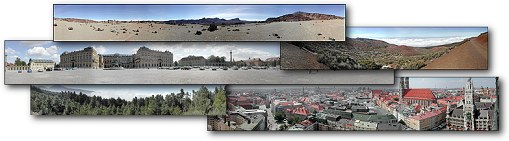 PanoramaStudio is a program that combines simple creation of perfect panoramic images within a few steps with ambitious post processing features for advanced users. The program features a wide range of highly effective and easy to use features that include the following; clear and easy user interface, large work space, automatic alignment of the images, seamless blending into a panoramic images, Manual post-processing of all steps possible, automatic focal length detection, automatic correction of lens distortions, filters for additional image editing, automatic exposure correction, as well as interactive panoramas can be connected to virtual tours using hotspots. PanoramaStudio is a program that combines simple creation of perfect panoramic images within a few steps with ambitious post processing features for advanced users. The program features a wide range of highly effective and easy to use features that include the following; clear and easy user interface, large work space, automatic alignment of the images, seamless blending into a panoramic images, Manual post-processing of all steps possible, automatic focal length detection, automatic correction of lens distortions, filters for additional image editing, automatic exposure correction, as well as interactive panoramas can be connected to virtual tours using hotspots.
PanoramaStudio also enables you to export your panoramas in various image formats, as screensavers and as interactive 3D panoramas or zoom images for websites, print panoramas in poster size on multiple pages, and save panoramas as multi-layered image for professional post-processing.
PanoramaStudio is a shareware program that also features over 200 cameras in its database; and can equally detects more than 1,600 digital compact and SLR cameras. The program is no doubt a great one; but users may require a bit of experience to understand some of its features. However, users are free to try the program for 30 days before downloading a paid version, which costs $42.00.
Want to check it out? Visit Tshsoft.de.
Posted in Main | No Comments »
Wednesday, November 23rd, 2011
 Print Inspector is a print management and auditing solution for your LAN. The application allows you manage print jobs queued to any shared printer and provides easy access to the printer and print server settings. Print Inspector also saves to a database statistics about all printed documents (document name, number of pages, name of the user who created the job, computer name etc.). The collected data can be exported to CSV format or used for creating reports. There have been a couple of changes made to this version in review. Some of these changes and updates include the following; it is now possible to update printing costs on all printers at once, addition of option to produce flat reports not grouped by printer, fixing of issues that have to do with stalled jobs that remain in the queue for extended period of time, filter made persistent and it survives application restart, and a couple of others. Print Inspector is a print management and auditing solution for your LAN. The application allows you manage print jobs queued to any shared printer and provides easy access to the printer and print server settings. Print Inspector also saves to a database statistics about all printed documents (document name, number of pages, name of the user who created the job, computer name etc.). The collected data can be exported to CSV format or used for creating reports. There have been a couple of changes made to this version in review. Some of these changes and updates include the following; it is now possible to update printing costs on all printers at once, addition of option to produce flat reports not grouped by printer, fixing of issues that have to do with stalled jobs that remain in the queue for extended period of time, filter made persistent and it survives application restart, and a couple of others.
Print Inspector lets you manage the print jobs queued to a printer. You can pause or cancel any job, view the printed document properties, resume the job or restart it. It also makes it possible to automatically suspend newly submitted jobs for selective printing, which can be useful in a busy environment like a library or Internet cafe.
The price is a bit high, but users can have a go at this program basically because it includes a couple of new changes.
Want to check it out? Visit SoftPerfect.
Posted in Main | No Comments »
Wednesday, November 23rd, 2011
 Free File Camouflage can hide your files inside a jpeg image; and can be used with the main interface or via the explorer “send to” context menu (the first time you only need to select a directory with some images). All the files are encrypted using AES and hidden inside an image. Free File Camouflage can hide your files inside a jpeg image; and can be used with the main interface or via the explorer “send to” context menu (the first time you only need to select a directory with some images). All the files are encrypted using AES and hidden inside an image.
Free File Camouflage helps you to store those files in a way that no other person would be able to view them. It is such an amazing program with features that beat even some so called paid ones. It is easier to keep your files out of the view of any intruder with a program like this; it is easy to install, and even easier to understand or use. Free File Camouflage doesn’t take up much space on your system as it is very light and gets the job done as quickly as possible.
A couple of users may be a bit skeptical at first because it Free File Camouflage is a freeware program; but the truth is it works without giving you much to worry about in the end. You can start using it as soon as installation is completed; and of course, it runs on Windows 7, 2003, 2008, Vista, and XP.
Want to check it out? Visit MyPortableSoftware.
Posted in Main | No Comments »
|
|
|




