Author Archive
Thursday, August 11th, 2011
 Jordy Video Downloader is a free multi-segment download accelerator which downloads videos from sites like YouTube, DailyMotion, Google Videos, Break, MetaCafe, Trilulilu, Vimeo, MySpace, FaceBook and others. Jordy Video Downloader allows you to download videos in an accelerated mode by splitting the file in multiple parts and without the need to preview the full video like other programs of this kind. This file downloader may not have the kind of features other premium programs have, but you may still find some of its features highly interesting and useful as well. Jordy Video Downloader is a free multi-segment download accelerator which downloads videos from sites like YouTube, DailyMotion, Google Videos, Break, MetaCafe, Trilulilu, Vimeo, MySpace, FaceBook and others. Jordy Video Downloader allows you to download videos in an accelerated mode by splitting the file in multiple parts and without the need to preview the full video like other programs of this kind. This file downloader may not have the kind of features other premium programs have, but you may still find some of its features highly interesting and useful as well.
Jordy Video Downloader enables you to enjoy the following features; download videos from YouTube, DailyMotion, Trilulilu, Metacafe, Break, Vimeo and a couple of other music and video sites, download videos from supported sites directly from your browser (Chrome), works with all system configurations, users can also download videos directly into mp3, Jordy Video Downloader also allows users to convert to other video formats, users can also specify the quality of the video that is downloaded, and a few others.
The publishers of Jody Video Downloader also created a premium version for users who may wish for something more advanced than this free version.
Want to check it out? Visit Jordysoft.
Posted in Main | No Comments »
Wednesday, August 10th, 2011
 RestoreITis is an advanced and highly innovative program designed to recover your entire PC in 2 minutes for an effortless recovery from any disaster. RestoreIT enables you to instantly recover files, system configurations, and an operating system by literally taking a snapshot of your system. RestoreIT 7 is based on FarStone’s patented “Advanced System Restore” technology, and is a new, and powerful innovation that has enough features to help you in many ways. RestoreITis is an advanced and highly innovative program designed to recover your entire PC in 2 minutes for an effortless recovery from any disaster. RestoreIT enables you to instantly recover files, system configurations, and an operating system by literally taking a snapshot of your system. RestoreIT 7 is based on FarStone’s patented “Advanced System Restore” technology, and is a new, and powerful innovation that has enough features to help you in many ways.
RestoreIT 7 helps you restore selected files/folders or an entire operating system from corrupt software, human error, virus attack, or software, unlimited system restore points, password protection, and continuous data protection.
Some of its key features include the following; enter Pre-Windows recovery environment without any premade media, continuously monitor changes to your hard drive, backup only the changed sectors, restore selected files/folders or an entire operating system from corrupt software, human error, virus attack, or a software bug, image compression and incremental backup technology mean that RestoreIT 7 takes up a small portion of hard drive space on most computers, enter Pre-Windows recovery environment without any premade media, and a host of others.
Users without much technical knowledge should be careful when using this program.
Want to check it out? Visit Farstone.
Posted in Main | No Comments »
Wednesday, August 10th, 2011
 VirtualDrive Network is a digital archiving program that creates compressed files, or “virtual discs”, from software, video, photo, and music CDs, DVDs, and BDs. VirtualDrive Network enables you to build thousands of virtual discs and run them 200 times faster than you do with original discs. This shareware program is ideal for educational institutions, government agencies, and businesses. The program allows you to convert physical discs to VCDs and eliminate the need to store and organize physical discs, ensures the protection of your music, games, applications, and more. VirtualDrive Network is a digital archiving program that creates compressed files, or “virtual discs”, from software, video, photo, and music CDs, DVDs, and BDs. VirtualDrive Network enables you to build thousands of virtual discs and run them 200 times faster than you do with original discs. This shareware program is ideal for educational institutions, government agencies, and businesses. The program allows you to convert physical discs to VCDs and eliminate the need to store and organize physical discs, ensures the protection of your music, games, applications, and more.
VirtualDrive Network has a lot of useful features that include the following; run RAM up to 200 times faster than on your hard drive, unlike physical CD, DVD, and BD drives, VirtualDrive Network does not limit the number of VCDs you can play at once, in a virtual setting, your applications run 200 times faster and more effectively, run virtual CDs directly on the hard drive with a response rate up to 200 times faster than a physical disc in a CD/DVD/BD-ROM drive. Plus, there’s no spin-up delay when you launch a virtual disc, protect CDs, DVDs, and BDs from loss, damage, or theft by creating high-quality, compressed digital copies and saving them to the network. Catalogue and manage virtual CDs in a user-friendly interface, and many more.
Users may however, have to be prepared to pay a jumbo price for VirtualDrive Network if they are interested in making use of it. However, VirtualDrive Network is available for free trial.
Want to check it out? Visit Farstone.
Posted in Main | No Comments »
Wednesday, August 10th, 2011
Tom’s lossless Audio Kompressor (TAK) is a lossless audio compressor which promises compression performance similar to Monkey’s Audio “High” and decompression speed similar to FLAC. The program supports a lot of new changes and additions that include the following; support for multi-channel audio (while the stream format supports up to 16 channels, the codec is currently restricted to a maximum of 6 channels), support for the Wave Format Extensible file format, the wave file writer didn’t add an optional zero byte to make the audio data chunk size a multiple of 2. This was only relevant when decoding mono audio with 8- or 24-bit samples without restoring the wave meta data, decoding speed improvements of up to 18 percent for my primary file set. Some of it is attributed to the above-noted modification of the encoder’s predictor order selection algorithm, and many more.
TAK is a freeware application, is compatible with the following operating systems; Windows 7, Windows Vista, and Windows XP. TAK Encoding speed improvements of up to 10 percent for my primary file set; which means that most of it is achieved by a modification of the algorithm which selects the optimal predictor order for each sub-frame.
Want to check it out? Visit Thbeck.
Posted in Main | No Comments »
Wednesday, August 10th, 2011
 Desktop Orbiter is an all-in-one remote management application for Windows networks. The application is a client-server solution capable of providing remote desktop security and management by means of a comfortable and easy-to-use interface. You can apply security restrictions on all your machines without leaving the chair, and perform repetitive or tedious tasks by pressing a mouse-click. If you are a computer administrator, you now have a powerful security application and a management solution all in the same package. Desktop Orbiter is an all-in-one remote management application for Windows networks. The application is a client-server solution capable of providing remote desktop security and management by means of a comfortable and easy-to-use interface. You can apply security restrictions on all your machines without leaving the chair, and perform repetitive or tedious tasks by pressing a mouse-click. If you are a computer administrator, you now have a powerful security application and a management solution all in the same package.
Latest changes in version 8.3.3 include the following; improved satellite unattended installation, fixed Control Center installation bug, and minor internal changes in Control Center. Other features that you can look forward to in Desktop Orbit application include the following; view and kill processes and services running on any computer, apply security restrictions to multiple systems easily, lock down workstations remotely, deploy restrictions and filters easily by using the included profiles, keep track of active connections and open ports used by applications, keep track of user activity. Detect unwanted behavior, print reports, protect and manage workstations from a centralized location, open your Control Center and manage remote computers easily and securely, filter websites, stop unwanted software, stop program installation, stop file-sharing, porn, and many more.
Want to check it out? Visit Anfibia-Soft.
Posted in Main | No Comments »
Wednesday, August 10th, 2011
 Total Backup Recovery Advanced Workstation is a program that assures critical business information is well protected. The program also ensures that you can easily recover your business information through comprehensive backups, and also comes with lots of quality recovery features that include file and folder backup and complete system and incremental image backup. Centralized management allows network administrators to scale Total Backup Recovery Advanced Workstation to many computers, in order to monitor and configure all operations both locally and remotely for efficient and enhanced control. Total Backup Recovery Advanced Workstation is a program that assures critical business information is well protected. The program also ensures that you can easily recover your business information through comprehensive backups, and also comes with lots of quality recovery features that include file and folder backup and complete system and incremental image backup. Centralized management allows network administrators to scale Total Backup Recovery Advanced Workstation to many computers, in order to monitor and configure all operations both locally and remotely for efficient and enhanced control.
Total Backup Recovery Advanced Workstation is compatible with Windows 7, Vista, and XP. Other key features you can look forward to when you install this program on your computer include the following; Google desktop search is incorporated, execute pre-defined commands (scripts) before or after a scheduled backup takes place, useful for complicated disaster recovery requirements, notify administrator with all backup and restore related activities and results via email, takes only minutes for Total Backup Recovery to completely move everything – including all files, photos, music, application settings and your operating system – to your newly purchased computer or hard drive, create and enforce quota limits for the storage usage of each workstation, and many more.
Want to check it out? Visit Farstone.
Posted in Main | No Comments »
Monday, August 8th, 2011
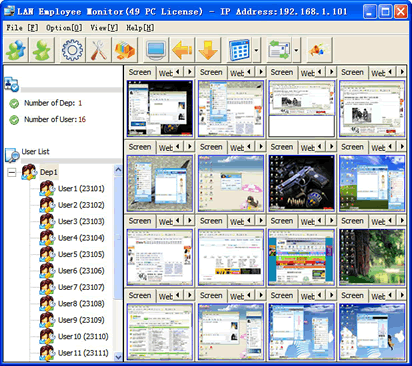 LAN Employee Monitor is“Local Area Monitoring” software as well as employee monitoring software. LAN Employees Monitor software captures the screen of employee’s computer real time by matrix screen. Apart from that, LAN employee monitoring software remote control the employee’s computer, and helps you to work on a remote computer in real time as if you were using its own keyboard and mouse. This also gives you opportunity to restart or turn off the employee’s PC, terminate the program which is running in the employee’s computer, and many more. LAN Employee Monitor is“Local Area Monitoring” software as well as employee monitoring software. LAN Employees Monitor software captures the screen of employee’s computer real time by matrix screen. Apart from that, LAN employee monitoring software remote control the employee’s computer, and helps you to work on a remote computer in real time as if you were using its own keyboard and mouse. This also gives you opportunity to restart or turn off the employee’s PC, terminate the program which is running in the employee’s computer, and many more.
Some of its key features include the following: allows you as a manager to monitor the screen(s) of employee’s PC in real time, and gives you an extremely accurate and visual view of what the person he (she) is monitoring are doing on the computer; log all keystrokes; log network transferring rate including download transferring speed and upload transferring speed; remote control program and remote access program which enables you to work on a remote computer in real time as if you were using its own keyboard and mouse; automatically save screenshots of your employee’s computer at set intervals on your computer when you feel something is happening on the remote computer and you feel a need to keep evidence.
Want to check it out? Visit Lan-monitoring.
Posted in Main | No Comments »
Monday, August 8th, 2011
 DBF Recovery is an application that can restore your damaged DBF files easily and accurately. DBF Recovery has more features than a couple of other similar programs out there. Unlike a few of the programs out there, DBF Recovery does not only fix headers, but also analyzes actual data structures and tries to fix them too. You don’t need to have any skills in restoring DBF files to use this program because it determines file formats automatically. DBF Recovery recognizes all of the formats used by popular DBF processing applications such as; Dbase III/IV, Foxpro, Visual Foxpro and others. The program is completely automated; can be described as a recovery engine that uses its artificial intelligence to repair damaged files as accurately as possible. DBF Recovery is an application that can restore your damaged DBF files easily and accurately. DBF Recovery has more features than a couple of other similar programs out there. Unlike a few of the programs out there, DBF Recovery does not only fix headers, but also analyzes actual data structures and tries to fix them too. You don’t need to have any skills in restoring DBF files to use this program because it determines file formats automatically. DBF Recovery recognizes all of the formats used by popular DBF processing applications such as; Dbase III/IV, Foxpro, Visual Foxpro and others. The program is completely automated; can be described as a recovery engine that uses its artificial intelligence to repair damaged files as accurately as possible.
When DBF Recovery runs, you can see a simple interface with two main fields. Simply select the file for recovery in the first field and the folder for the output in the second. As an added option, you can choose to recover deleted records in the database; and as soon as everything is set, just go ahead to click on the start button. DBF Repair Tool simply takes over the rest of the assignment the rest, and repairs the headers and data structures in an automatic process that involves no interaction with the user.
Want to check it out? Visit Dbf2002.
Posted in Main | No Comments »
Sunday, August 7th, 2011
 Replay Music is an entirely new way to capture online music into individual MP3 files. All you need to do with this application is to play music from your favorite online radio station or streaming music service, and every song is saved on your computer as a high quality MP3 file. You can also automatically tag both the name of the artist and song title; and perfectly separate into individual tracks. With Replay Music, you can even burn songs directly to CDs. Replay Music is an entirely new way to capture online music into individual MP3 files. All you need to do with this application is to play music from your favorite online radio station or streaming music service, and every song is saved on your computer as a high quality MP3 file. You can also automatically tag both the name of the artist and song title; and perfectly separate into individual tracks. With Replay Music, you can even burn songs directly to CDs.
It remains to be seen how most users wouldn’t raise a question or two about the fact that Replay Music is a shareware. Though, the publishers deserve some commendation for some of the latest changes made to this program; the fact remains that a couple of other freeware programs can compete effectively as well.
Replay Music, however, has a few features that may not be easily found in other programs. For instance, this program is among only few that can automatically tag your MP3s. Replay Music uses propriety song recognition technology to identify each song after it is recorded, and subsequently adds the artist, song title, album, and genre information to each MP3 file.
Want to check it out? Visit Applian.
Posted in Main | No Comments »
Saturday, August 6th, 2011
 CodeTwo Outlook Sync was made in response to the huge demand of many people using Microsoft Outlook to organize their work. Having an easy access to Outlook calendars, contacts, documents, tasks, emails or journal entries from two computers, appears to be necessary for many professionals; and that is why CodeTwo Outlook Sync is a perfect solution in many scenarios. The program can be utilized by two people working on one project and accomplishing mutual tasks. With latest additions that include a new licensing module in the main program window and notifications in Windows XP tray are now appropriately displayed; CodeTwo Outlook Sync 1.0.4 appears to be one program you can’t do without for now. CodeTwo Outlook Sync was made in response to the huge demand of many people using Microsoft Outlook to organize their work. Having an easy access to Outlook calendars, contacts, documents, tasks, emails or journal entries from two computers, appears to be necessary for many professionals; and that is why CodeTwo Outlook Sync is a perfect solution in many scenarios. The program can be utilized by two people working on one project and accomplishing mutual tasks. With latest additions that include a new licensing module in the main program window and notifications in Windows XP tray are now appropriately displayed; CodeTwo Outlook Sync 1.0.4 appears to be one program you can’t do without for now.
CodeTwo Outlook Sync allows you to enjoy the following; sync all Outlook data between two computers in a local network with just a few clicks, allows your secretary to view and edit your calendars and share Outlook contacts (as well as other Outlook folders) with you, assign tasks to your co-worker or business partner and keep track of them in Outlook, straightforward so you don’t waste any time learning new software, easy to install and configure, available in freeware version (limited use), and many more.
Want to check it out? Visit Codetwo.
Posted in Main | No Comments »
|
|
|




