Author Archive
Friday, February 25th, 2011
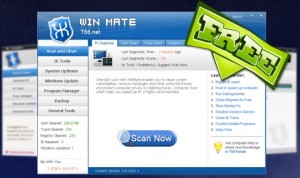 WinMate is a freeware Windows system optimizer that runs an optimization scan on Windows startup. The application also offers various powerful utilities (tools), and Internet Explorer (IE) security tools to make Windows system runs smoother and faster. WinMate utilizes the high-performance detection algorithm that will quickly finds Windows errors to prevent computer freezing, crashing and getting Blue Screen. A few bug fixes here and there make it more effective than the older versions released into the market. The scan error on Windows 7 is one of such bugs that have been fixed by the publishers. WinMate is a freeware Windows system optimizer that runs an optimization scan on Windows startup. The application also offers various powerful utilities (tools), and Internet Explorer (IE) security tools to make Windows system runs smoother and faster. WinMate utilizes the high-performance detection algorithm that will quickly finds Windows errors to prevent computer freezing, crashing and getting Blue Screen. A few bug fixes here and there make it more effective than the older versions released into the market. The scan error on Windows 7 is one of such bugs that have been fixed by the publishers.
WinMate also has built-in junk file cleaner, service optimizer, program uninstaller, plug-in remover, memory tweaker, defragment tool and many more; and as a matter of fact, T55 WinMate will give your computer all-round protection. Some other unique features of WinMate include the following: ability to boost the speed of your computer system; ability to keep your computer clean from junks; online payment safeguard; you can backup all your system files; and many more.
The fact that this program is a freeware, and with a few unique features makes it worth checking out; at least it can be used at no cost.
Sadly, it gives users a lot of headaches and pain each time they want to uninstall it from their system; and this can be very irritating.
Want to check it out? T55.net.
Posted in Main | 1 Comment »
Friday, February 25th, 2011
 MSI Afterburner is an overclocking application for MSI graphic cards. It is designed with features such as: GPU/Shader/Memory clock adjustment; advanced fan speed; and GPU voltage control among others. In order to display the graphic card operating status more accurately, MSI provides a complete monitoring function; with important information that include the following; GPU core clock, memory clock, temperature, voltage, and fan speed have a real-time on-screen-display monitor in games and real-time information in Windows Tray Icon. As a matter of fact, virtually all the adjustments can be saved as five profiles. Users can also quickly switch from one setting to another with hotkeys. MSI Afterburner is an overclocking application for MSI graphic cards. It is designed with features such as: GPU/Shader/Memory clock adjustment; advanced fan speed; and GPU voltage control among others. In order to display the graphic card operating status more accurately, MSI provides a complete monitoring function; with important information that include the following; GPU core clock, memory clock, temperature, voltage, and fan speed have a real-time on-screen-display monitor in games and real-time information in Windows Tray Icon. As a matter of fact, virtually all the adjustments can be saved as five profiles. Users can also quickly switch from one setting to another with hotkeys.
In order to improve upon previous versions; the publishers have introduced a lot of changes. Some of these new features include; addition of AMD Barts and Cayman graphics processors family support, addition of core voltage control for reference design AMD RADEON 6970 graphic cards with CHL8228 voltage regulators, addition of core voltage control reference design AMD RADEON 6970 graphic cards with VT1556 voltage regulators; and a few others.
MSI Afterburner is one of my favorite overlocking programs; and the fact that it a freeware makes it even more attractive.
Want to check it out, visit Afterburner web-page.
Posted in Main | No Comments »
Tuesday, February 22nd, 2011
 Sothink Web Video Downloader is a shareware application that lets you download videos from YouTube, Facebook, Google, MySpace, many other websites. It is one of the easiest YouTube downloader that saves online videos to a lot of popular formats such as; FLV, AVI, MP4, MP3, 3GP, RM, SWF and HD. Sothink Web Video Downloader is capable of capturing any video while browsing a web page. As soon as it captures any video, it immediately downloads it to your favorite format, and then transfers straight into your PC, iPod, iPhone, PSP or mobile phones without using additional software or program. Sothink Web Video Downloader is a shareware application that lets you download videos from YouTube, Facebook, Google, MySpace, many other websites. It is one of the easiest YouTube downloader that saves online videos to a lot of popular formats such as; FLV, AVI, MP4, MP3, 3GP, RM, SWF and HD. Sothink Web Video Downloader is capable of capturing any video while browsing a web page. As soon as it captures any video, it immediately downloads it to your favorite format, and then transfers straight into your PC, iPod, iPhone, PSP or mobile phones without using additional software or program.
Sothink Web Video Downloader version 2.0 has no uninstaller; moreover, there are a couple of freeware programs that can compete with it. The price may not be too much on the high side, but the program sure has a lot of catching up to do with some other free or shareware video grabbers online. The newly added features in this version incude the following: support converting the downloaded videos to different formats such as AVI, MP4, WMV, 3GP, MOV, MKV, SWF and MP3; and support for converting the downloaded videos to iPod, iPhone, iPad, PSP, Zune, PS3, Xbox 360, Wii, mobiles, and many more.
Want to check it out? Visit SothinkMedia.
Posted in Main | No Comments »
Tuesday, February 22nd, 2011
 IObit Uninstaller is a simple lightweight application that helps you uninstall and delete unwanted programs and folders from your computer as quickly and as easily as possible. Some of the built-in features allow you to successfully uninstall any program where the built-in “Windows Add or Remove Programs” option fails. The Uninstaller works as always and picks up the leftover files; and guess what, it is actually a freeware. If you have been using some of the programs from the publishers of this software in particular; then you know something really good can be achieved with this one. IObit Uninstaller is a simple lightweight application that helps you uninstall and delete unwanted programs and folders from your computer as quickly and as easily as possible. Some of the built-in features allow you to successfully uninstall any program where the built-in “Windows Add or Remove Programs” option fails. The Uninstaller works as always and picks up the leftover files; and guess what, it is actually a freeware. If you have been using some of the programs from the publishers of this software in particular; then you know something really good can be achieved with this one.
With a size of about 673 KB, this is definitely one lightweight uninstaller you are not going to have a problem with; especially when it comes to installation. Some of its major features include: uninstall numerous applications without any difficulty (batch uninstall); advanced uninstall function that helps users scan Windows Registry and hard drive for any possible installation leftovers; one click toolbars removal (that means you can easily remove those irritating toolbars); and lots of other benefits.
That means you don’t have to lose sleep over those Windows’ programs without built-in uninstallers. Since the program is light in size, you can download and even install it within a couple of seconds.
Want to check it out? Visit Iobit.com.
Posted in Main | No Comments »
Tuesday, February 22nd, 2011
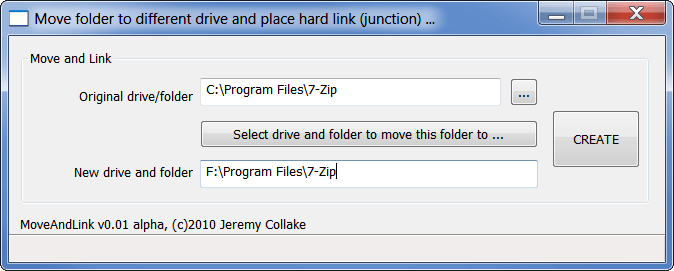 JunctionMaster allows you to move and possibly link a folder to another drive in one easy step. You can easily use this program to replaces the original folder with a hard link (junction point). Actually, these have been around in NTFS since its inception, but only in Windows 7 does it show any indication that it is a link. JunctionMaster allows you to move and possibly link a folder to another drive in one easy step. You can easily use this program to replaces the original folder with a hard link (junction point). Actually, these have been around in NTFS since its inception, but only in Windows 7 does it show any indication that it is a link.
Basically, JunctionMaster x32 edition can be used to move the files to f:\movies, but c:\movies still accesses them just the same (with no perceptible difference at all in the shell until Windows 7, where it now shows a link overlay on the folder icon). JunctionMaster x32 is compatible with all NT based kernels; however, there is a possibility that it is not compatible with the following systems: Windows 95/98/ME. It is also compatible with Windows NT, Windows 2000, Windows 2003, Windows Home Server, Windows XP, Windows Vista, Windows 2008, and Windows 7.
What about the features? Well, there are a couple of them you can use, and these include the following; integrates with shell (explorer), uses shell move operation (SMO), this makes it looks as if you cut and pasted it yourself, and safe and conservative.
JunctionMaster x32 Edition 0.07 is a freeware program; and can be downloaded and installed for free. Not actually a bad program, despite the fact that it is a freeware program.
Want to check it out? Visit JunctionMaster.
Posted in Main | No Comments »
Tuesday, February 22nd, 2011
 MetroTwit is a Twitter client for Windows; and its user-interface is simple even for a novice to quickly understand. With MetroTwit, you have a lot of wonderful features to play around with. With some of these features, there is no telling how much fun you can have with this application. MetroTwit runs on the very latest Microsoft .NET 4.0 and Windows Presentation Foundation 4 frameworks. MetroTwit is a Twitter client for Windows; and its user-interface is simple even for a novice to quickly understand. With MetroTwit, you have a lot of wonderful features to play around with. With some of these features, there is no telling how much fun you can have with this application. MetroTwit runs on the very latest Microsoft .NET 4.0 and Windows Presentation Foundation 4 frameworks.
Some of its highly-advanced and friendly features include the following: infinite scrolling that lets you read more tweets once you scroll down; autocomplete for usernames and hashtags, which means you can search for people you love to hang out with by simply typing a few letters; themes and accents, which allows you choose between background and vice versa including a selection of color accent to personalize the design; URL shortening and previews, this helps you to take control of links with an intuitive URL shortener that automatically saves you space and time tweeting; quick and glance applications that enables you to read excerpts from new tweet updates as they cycle through in the notifications; re-sizable and re-ordable columns; and a few other features.
This is a beta version, and it is possible to run into a few bugs that may cause a few problems; however, it is not a bad program all the same.
Want to check it out? Visit Metrotwit.
Posted in Main | 1 Comment »
Tuesday, February 22nd, 2011
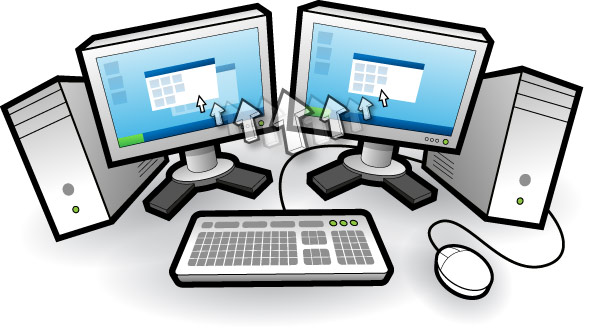 Input Director is an application that allows you control multiple Windows systems with the use of the keyboard or mouse attached to a single computer. The program is designed for users who have up to two or more computers set up at home and find themselves regularly sliding from one system to another. Some of the features of Input Director allow share a single keyboard/mouse across a set of computer systems. Presently, there are no versions being made for other programs such as Linux and Mac. That means only Windows users can take advantage of this great freeware program. Input Director is an application that allows you control multiple Windows systems with the use of the keyboard or mouse attached to a single computer. The program is designed for users who have up to two or more computers set up at home and find themselves regularly sliding from one system to another. Some of the features of Input Director allow share a single keyboard/mouse across a set of computer systems. Presently, there are no versions being made for other programs such as Linux and Mac. That means only Windows users can take advantage of this great freeware program.
Version 1.3 Beta has the following latest changes: ability to auto-switch between master and slave roles allowing users to use any mouse/keyboard control system; ability to right-click on a file Windows Explorer and choose to open it on any computer running Input Director; direct a file to open a different system from Windows Explorer; and ability to bind a keyboard key to a specific system.
Of course the older versions still work as great as this latest beta version. Some other features that have brought this program this far include the following: lock down lock down Input Director configuration so that only administrators can make changes; synchronize the screensavers across computers; hotkeys that can be easily setup to switch control to a specific computer or move to the next computer either to the left or right; and many more.
Want to check it out? Visit InputDirector.
Posted in Main | No Comments »
Thursday, February 17th, 2011
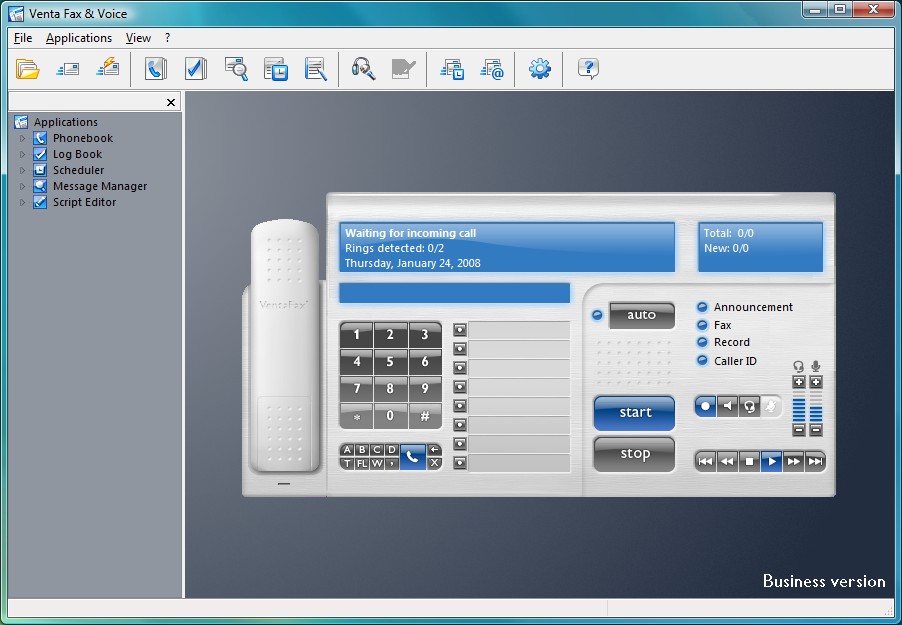 VentaFax is a popular fax/voice messaging system with features and stability that can compete favorably with other popular program like WinFax. It is quick, nimble, with a small footprint. It is able to send and receive fax messages via Class 1, 1.0, 2 and 2.0 faxmodems and emulates an answering machine with tone remote control, supporting most voice modems. VentaFax program is user-friendly and intuitive; the main control panel shows the image of page as it travels out of the visual fax machine slot. However, installation and configuration can give users a lot of problems. The customer service is not also top-notch; but there seems to be a lot of improvements over previous versions. VentaFax is a popular fax/voice messaging system with features and stability that can compete favorably with other popular program like WinFax. It is quick, nimble, with a small footprint. It is able to send and receive fax messages via Class 1, 1.0, 2 and 2.0 faxmodems and emulates an answering machine with tone remote control, supporting most voice modems. VentaFax program is user-friendly and intuitive; the main control panel shows the image of page as it travels out of the visual fax machine slot. However, installation and configuration can give users a lot of problems. The customer service is not also top-notch; but there seems to be a lot of improvements over previous versions.
You can send and receive black and white or color faxes after scaling through the configuration hurdle. You can also retrieve your fax and voice messages from any touchtone phone, and enjoy email and fax forwarding directly as attachment. One other feature that makes it a program worth trying out is its ability to record a telephone conversation with just a single click. Moreover, VentaFax 6.6.133.340 also supports Caller ID (if available).
VentaFax is compatible with the following operating system: Windows 7; Vista; Windows XP; Windows 2000; and Windows 98.
Want to check it out? Visit Ventafax.
Posted in Main | 1 Comment »
Thursday, February 17th, 2011
.gif) Kaspersky Rescue Disk is one of the best programs to easily remove all kinds of viruses from your computer, and make it clean once again. It also has the capacity to reduce or totally eliminate the possibility of having your computer infested with malware programs. You can boost from the Kaspersky Rescue Disk in order to scan and remove threats from a computer that has been attacked by virus. To use this program, you may have to burn the ISO image to a CD. When your system is infested with virus, all you need to do is insert the CD into the CD-ROM drive, enter the PC’s BIOS, set it to boot from the CD, and reboot the computer. Kaspersky Rescue Disk is one of the best programs to easily remove all kinds of viruses from your computer, and make it clean once again. It also has the capacity to reduce or totally eliminate the possibility of having your computer infested with malware programs. You can boost from the Kaspersky Rescue Disk in order to scan and remove threats from a computer that has been attacked by virus. To use this program, you may have to burn the ISO image to a CD. When your system is infested with virus, all you need to do is insert the CD into the CD-ROM drive, enter the PC’s BIOS, set it to boot from the CD, and reboot the computer.
Remarkably, Kaspersky has been in the forefront of providing advanced security and anti-virus programs for a long time. The name Kaspersky is enough to attract attention to this program; however, it is not good to take attention off the importance of this program.
Kaspersky Rescue Disk program is almost as good as other popular programs from the stable of the publisher. The doscsi enables SCSI support in the initial ramdisk boot, while the noscsi disables it; this makes it easier to use this program in removing malware from your system.
The file is huge, and works on virtually all Windows operating system.
Want to check it out? Visit Kaspersky.
Posted in Main | No Comments »
Thursday, February 17th, 2011
 Shareaza is a peer-to-peer file sharing client or application, which supports the Gnutella, Gnutella2, eDonkey Network, BitTorrent, FTP and HTTP network protocols and handles magnet links, ed2k links, Piolet links, and the Gnutella links. Shareaza 2.5.4.0 is available in thirty different languages; making it accessible to as many people as possible. Shareaza is a completely free application that can be downloaded and installed fro free; and that means you might not need to pay for a p2p program anymore. Shareaza is a peer-to-peer file sharing client or application, which supports the Gnutella, Gnutella2, eDonkey Network, BitTorrent, FTP and HTTP network protocols and handles magnet links, ed2k links, Piolet links, and the Gnutella links. Shareaza 2.5.4.0 is available in thirty different languages; making it accessible to as many people as possible. Shareaza is a completely free application that can be downloaded and installed fro free; and that means you might not need to pay for a p2p program anymore.
The program has the capacity to connect up to four different Peer-to-Peer networks, which means you can access thousands of other users from a single program. Downloads/uploads are possible from the following websites: Edonkey2000; Gnutella, BitTorrent, as well as Gnutella2 (G2). Also, the publishers of Shareaza have now introduced a feature known as “collections.” This feature groups preview of album covers, descriptions, and song lists all in one complete package. Once you have discovered the collection, all you need to do is click on the file-list to download.
The user-interface also has a lot to offer; and as a matter of fact, it has more to offer than many of the P2P programs out there. There are many other features that makes it one of the best P2P clients out there.
Moreover, this open source program comes with an uninstaller.
Want to check it out? Visit Shareaza.
Posted in Main | No Comments »
|
|
|

 WinMate is a freeware Windows system optimizer that runs an optimization scan on Windows startup. The application also offers various powerful utilities (tools), and Internet Explorer (IE) security tools to make Windows system runs smoother and faster. WinMate utilizes the high-performance detection algorithm that will quickly finds Windows errors to prevent computer freezing, crashing and getting Blue Screen. A few bug fixes here and there make it more effective than the older versions released into the market. The scan error on Windows 7 is one of such bugs that have been fixed by the publishers.



