Author Archive
Tuesday, February 1st, 2011
 MING Chat Spy supports a few built-in features that can monitor, block, and archive unlimited IM traffic on the company or home network, and these include: AOL; MSN; Yahoo; ICQ; MySpaceIM; FacebookIM; WarcraftIM; and QQ. MING Chat Spy can work in any network environment; and the manager can view instant messages in the database, search the conversations by key word, watch top users, and many more. It is also able to record conversations automatically in real time. As a matter of fact, it is easy to use, and can monitor all conversations on your Local Area Network (LAN) in stealth mode. This latest version supports monitoring Unicode chat and MSN Web messenger chat; and also comes with an uninstaller. MING Chat Spy supports a few built-in features that can monitor, block, and archive unlimited IM traffic on the company or home network, and these include: AOL; MSN; Yahoo; ICQ; MySpaceIM; FacebookIM; WarcraftIM; and QQ. MING Chat Spy can work in any network environment; and the manager can view instant messages in the database, search the conversations by key word, watch top users, and many more. It is also able to record conversations automatically in real time. As a matter of fact, it is easy to use, and can monitor all conversations on your Local Area Network (LAN) in stealth mode. This latest version supports monitoring Unicode chat and MSN Web messenger chat; and also comes with an uninstaller.
MING Chat Spy also comes with a variety of features, which include: support for multi-language; chat logs can be automatically e-mailed to you or uploaded to a remote server, and is password protected, can run in stealth mode, and is accessible with a hot key; the manager can select any computer in the network to monitor; conversations can be conveniently browsed by computer name and date/time; the manager can set custom names for the computers on the network; and it works without any need to install any client software on the target computer.
Want to check it out? Visit ChatSpy.
Posted in Main | No Comments »
Tuesday, February 1st, 2011
 LightScribe is an optical disc recording technology application that utilizes specially coated recordable Compact Dick (CD) and Digital Video Disc (DVD) media to produce laser-etched labels. Keep burning beautiful LightScribe discs by regularly updating your LightScribe System Software. It ties your labeling application software to your optical drive hardware. However, you need to keep updating this program in order to enjoy support for new hardware or recently introduced LightScribe CDs and DVDs; and this will ensure optimal and reliable operation of your LightScribe Labeling system. LightScribe System Software 1.18.21.1 has support for new drives. LightScribe is an optical disc recording technology application that utilizes specially coated recordable Compact Dick (CD) and Digital Video Disc (DVD) media to produce laser-etched labels. Keep burning beautiful LightScribe discs by regularly updating your LightScribe System Software. It ties your labeling application software to your optical drive hardware. However, you need to keep updating this program in order to enjoy support for new hardware or recently introduced LightScribe CDs and DVDs; and this will ensure optimal and reliable operation of your LightScribe Labeling system. LightScribe System Software 1.18.21.1 has support for new drives.
Besides English language, LightScribe System Software also supports other languages such as: French, Italian, Dutch, and Spanish. The minimum system requirements for this program include: Windows 2000, Windows XP, or any minimum requirements that can be found on the web page of the publishers.
LightScribe System Software has a very easy to understand user-interface that provides you with the following options; control over display notifications, system information and links to LightScribe services.
Version 1.18.21.1 has witnessed a lot of improvements over previous versions; and you may not have any problem getting used to the latest changes already made to it by the publishers.
Want to check it out? Visit Lightscribe.
Posted in Main | No Comments »
Tuesday, February 1st, 2011
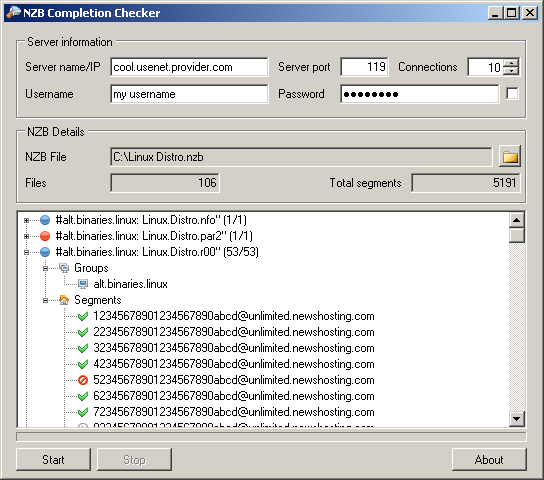 NZB Completion Checker allows you to check if a file on the Usenet/newsgroup server is available or not. As soon as the check is completed, a user will be presented with various statistics that will help them make up their minds if the NZB file is complete enough for download. The good thing about this checker is that it saves you a lot of money that would have been spent when you download per GB. It will enable you to download less; while saving you a lot of money in the process. There is no longer any need to spend hours downloading files using the NZB files; especially when the download fails eventually. Checking of files through NZB Completion Checker also enables you to avoid incomplete download; and is capable of checking programs in only a couple of minutes. NZB Completion Checker allows you to check if a file on the Usenet/newsgroup server is available or not. As soon as the check is completed, a user will be presented with various statistics that will help them make up their minds if the NZB file is complete enough for download. The good thing about this checker is that it saves you a lot of money that would have been spent when you download per GB. It will enable you to download less; while saving you a lot of money in the process. There is no longer any need to spend hours downloading files using the NZB files; especially when the download fails eventually. Checking of files through NZB Completion Checker also enables you to avoid incomplete download; and is capable of checking programs in only a couple of minutes.
NZB Completion Checker is built to run on the Microsoft .NET 4.0 before it can be executed. The program is freeware, and also comes with an uninstaller. Version 0.5 runs on Windows 7, Windows Vista, and Windows XP.
The program has user-interface that is very easy to understand by any user; and configuration only takes a couple of minutes.
Want to check it out? Visit Zoon.dk.
Posted in Main | No Comments »
Tuesday, February 1st, 2011
 Microsoft Fix it is a troubleshooter that can help you diagnose and repair common computer problems automatically. The program is built to provide users with the next steps to take when they encounter any problem within your computer are not fixed. When you run the program on your system, a wizard will guide you through the troubleshooting experience. During download, the program is able to install all required components, and then analyzes your computer to look for issues that can be resolved almost automatically. Microsoft Fix it is a troubleshooter that can help you diagnose and repair common computer problems automatically. The program is built to provide users with the next steps to take when they encounter any problem within your computer are not fixed. When you run the program on your system, a wizard will guide you through the troubleshooting experience. During download, the program is able to install all required components, and then analyzes your computer to look for issues that can be resolved almost automatically.
Microsoft Fix it also has the ability to detect any problem in order to instantly fix it. You can also configure the program to personally select the problems to fix; in case you don’t want it fixed automatically. However, not all problems found on your computer can be automatically. That is why the publishers have included a guide to help you find additional information and resources that are available in order to help you resolve any problem.
Microsoft Fix it requires Microsoft .NET Framework 2.0, and supports the following operating: Windows 7, Windows Server 2003, Windows Server 2008, Windows server 2008 R2, Windows Vista, and Windows XP. You also require a stable internet connection before you can start using the program.
Want to check it out? Visit Microsoft.com.
Posted in Main | No Comments »
Monday, January 31st, 2011
 Artensoft Photo Mosaic Wizard allows you to design true photo mosaic images out of ordinary photos in probably a single click or two. This innovative photo software has wonderful features to help you produce great mosaics out of ordinary photos. Artensoft Photo Mosaic Wizard does all the complex math; taking the load off your shoulder in order to fit tiles so that they form the most realistic mosaic without resorting to tricks such as color overlays. This version runs on the .NET Framework 2.0+, and comes with an uninstaller. Some of its latest changes and bug fixes included; addition of a feature that enables it check for updates addition of a feature that allows you exclude selected cell-images from the database, and some other minor bug fixes. Artensoft Photo Mosaic Wizard allows you to design true photo mosaic images out of ordinary photos in probably a single click or two. This innovative photo software has wonderful features to help you produce great mosaics out of ordinary photos. Artensoft Photo Mosaic Wizard does all the complex math; taking the load off your shoulder in order to fit tiles so that they form the most realistic mosaic without resorting to tricks such as color overlays. This version runs on the .NET Framework 2.0+, and comes with an uninstaller. Some of its latest changes and bug fixes included; addition of a feature that enables it check for updates addition of a feature that allows you exclude selected cell-images from the database, and some other minor bug fixes.
The program is very light, and does not consume much space on your system. You can use Artensoft Photo Mosaic Wizard to build your own images in the shortest possible time. You can enjoy different features that enables you have fun with friends and family, produce perfect photo gifts, and make wonderful pictures in just a few easy steps. You can also build or produce exclusive collages, as well as building photo montages that look great even from a distance.
This is not doubt a great shareware application; the price may be a bit high, but it is worth it.
Want to check it out? Visit Artensoft.
Posted in Main | No Comments »
Monday, January 31st, 2011
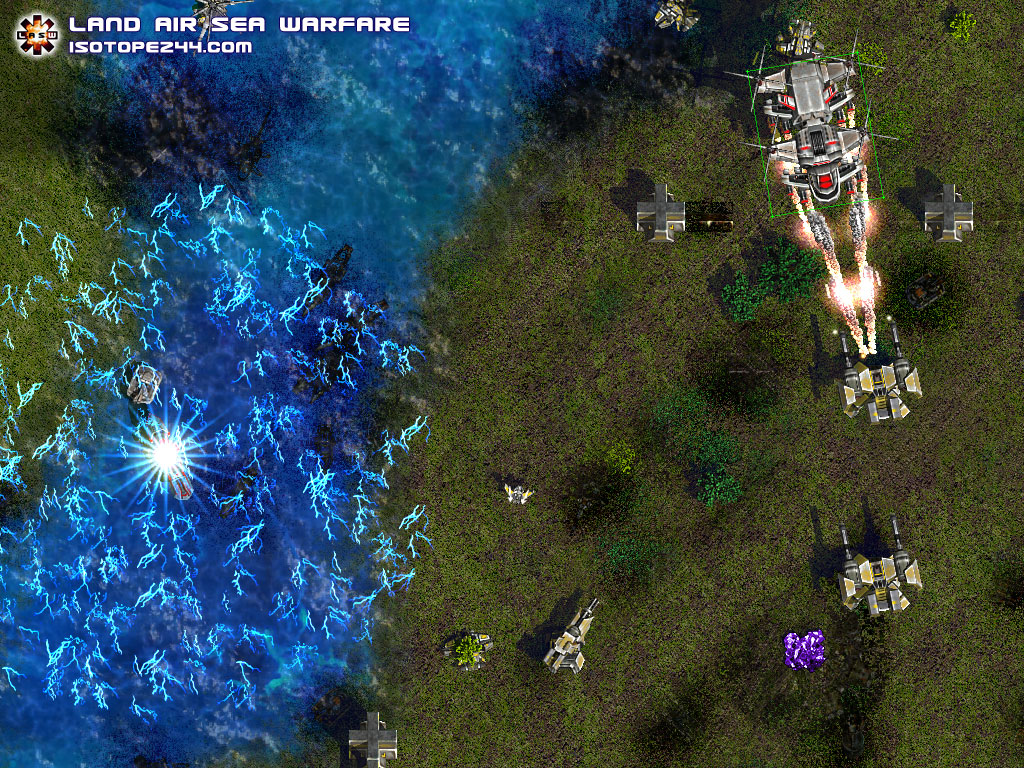 This new strategy real time game is a warfare program that allows you to have fun just the way you love to. You can fortify your base with turrets, surface to air missile launchers, torpedo launchers, and long range cannons. The user interface allows you to form groups, and transport units to prepare for an assault on the enemy. Version 2.1 is designed to run on all versions of Windows, and has the following new additions; a new tactical map, new anti-air defensive unit, new elite units gain XP levels and medals, new newts can convert enemy units, new unit index to research units, and new order menu and commands. This new strategy real time game is a warfare program that allows you to have fun just the way you love to. You can fortify your base with turrets, surface to air missile launchers, torpedo launchers, and long range cannons. The user interface allows you to form groups, and transport units to prepare for an assault on the enemy. Version 2.1 is designed to run on all versions of Windows, and has the following new additions; a new tactical map, new anti-air defensive unit, new elite units gain XP levels and medals, new newts can convert enemy units, new unit index to research units, and new order menu and commands.
Among its main features include: command six new gigantic mega units; highly optimized game engine that runs even on netbooks; direct new ships, subs, and a full naval armament; launch all new ICBM and defense systems; use the new technology research system; new voices for units, over 250 fun remarks; new voice system warns you of attacks and resource shortages; learn the game with new integrated help system and tooltips; challenge the new AI features several attack modes and strategies; navigate stealth fighter aircraft and submarines; attack with new laser and electric shock weapons; construct defensive shields and walls; and many more.
All the maps have been randomized; and this gives you the opportunity to wage battles in different terrains any time you want to.
It is a lovely shareware game with lots of wonderful features for gamers.
Want to check it out? Visit Isotope244.
Posted in Main | No Comments »
Monday, January 31st, 2011
 Cushy Stock is a photostock workflow automation program made for people who have soft spot for photography. With Cushy Stock application, you can simplify working with photostocks because it automates all stages of photographic preparations, stores stock information, and gets financial information from microstocks, and many more. Some of its major benefits include: advanced tagging and automatic IPTC and XMP keywording of your photos; multithread images uploading to microstock agencies; portfolio import; automatic images states management and financial data collecting; enhanced statistics for every microstock and image; detailed reporting system; and script automation. Cushy Stock is a photostock workflow automation program made for people who have soft spot for photography. With Cushy Stock application, you can simplify working with photostocks because it automates all stages of photographic preparations, stores stock information, and gets financial information from microstocks, and many more. Some of its major benefits include: advanced tagging and automatic IPTC and XMP keywording of your photos; multithread images uploading to microstock agencies; portfolio import; automatic images states management and financial data collecting; enhanced statistics for every microstock and image; detailed reporting system; and script automation.
Cushy Stock has a reputation of being one of the most widely used programs for preparing and selling digital photos. The publishers have three different versions of this program. These are: Cushy Stock Lite (freeware version), the standard edition, and the professional edition (which are both for commercial use alone).
This version can be installed even on your pen-drive because of its ultra-light weight or size; and that means you can plug in the device at home or at work. Users may not have to worry about issues that bother on the security to the password; Cushy Stock can be monitored by any firewall. This version is a shareware; and is sold at $49.95, and comes with an uninstaller.
Want to check it out? Visit CushyStock.
Posted in Main | No Comments »
Monday, January 31st, 2011
 FavoritesAndFiles2HTML is a program with lots of features that can convert Internet Explorer Favorites, FireFox (up to 3.x), and Opera (up to 10.x) to HTML files or you can create an HTML catalog of CDs, DVDs and hard disks and their folders’ file structure; thereby making it available for offline browsing and searching. These HTML files are easily browsable up and down through the folder’s structure tree by the links in the folders and subfolders names. These files are ideal to view in your smartphone’s HTML browser; and without any problem. FavoritesAndFiles2HTML is a program with lots of features that can convert Internet Explorer Favorites, FireFox (up to 3.x), and Opera (up to 10.x) to HTML files or you can create an HTML catalog of CDs, DVDs and hard disks and their folders’ file structure; thereby making it available for offline browsing and searching. These HTML files are easily browsable up and down through the folder’s structure tree by the links in the folders and subfolders names. These files are ideal to view in your smartphone’s HTML browser; and without any problem.
The program has been updated by the publishers to include a lot of new features; thereby making this version better than previous versions. FavoritesAndFiles2HTML 1.1.9 is a shareware application with a fourteen days trial period for any user who would love to check it out before ordering for the full version, which costs $16.00. The program supports the following operating systems; Windows 2000, Windows 2003, and Windows XP.
Of course, there are a couple of shareware programs that supports various features just like FavpritesAndFiles2HTML 1.1.9; but this is definitely one of the best. However, version 1.1.9 comes with an uninstaller, which makes it worth the price placed on it by the publishers.
Want to check it out? Visit FavsandFiles2Html.
Posted in Main | No Comments »
Friday, January 28th, 2011
 NVIDIA BIOS Editor (NiBiTor) is a definitive BIOS tweaking program that supports one of the latest NIVIDIA graphics cards. The program allows graphics card lovers to maximally enjoy control over advanced features and functionally found on firmware on supporting cards. The essence of this is to gain extra performance, and enable hidden features, as well as extra stability on the NVIDIA graphics cards. NVIDIA also supports extensive information, adapt bootup settings, changing fan speed options or get extra ability on their NVIDIA based graphics accelerator, which will simply give them that little or extra value. NVIDIA BIOS Editor (NiBiTor) is a definitive BIOS tweaking program that supports one of the latest NIVIDIA graphics cards. The program allows graphics card lovers to maximally enjoy control over advanced features and functionally found on firmware on supporting cards. The essence of this is to gain extra performance, and enable hidden features, as well as extra stability on the NVIDIA graphics cards. NVIDIA also supports extensive information, adapt bootup settings, changing fan speed options or get extra ability on their NVIDIA based graphics accelerator, which will simply give them that little or extra value.
This newly released version has some few additions, they include; GeForce GTX 580, GeForce GTX 570, GeForce GTX 140, and a few others. This version is also an improvement upon the last version; and has been designed to support some few unknown devices as well. In other words, version 6.0 also witnessed a lot of redesigning; with a few changes here and there just as been mentioned already. Actually, users complained a lot about the last version; paving way for some of the minor changes that already taken place.
NVIDIA BIOS Editor is a freeware program, and is available for free download.
Want to check it out? Visit Mvktech.
Posted in Main | No Comments »
Thursday, January 27th, 2011
 Game Prelauncher is an application that optimizes your system for gaming sessions by automatically disabling unnecessary startup programs, services, Explorer Shell, registered DLLs, Sound themes and other Windows components; on average about 120 – 160 processes, depending on your system. You can easily create individual profiles for each of your favorite games, and also specify additional programs that you want to launch along with the game to make sure that these remain enabled. Since your Windows operating system launches continually run resident user applications and services; you need a program like Game Prelauncher in order to release more resources while playing your game. Game Prelauncher is an application that optimizes your system for gaming sessions by automatically disabling unnecessary startup programs, services, Explorer Shell, registered DLLs, Sound themes and other Windows components; on average about 120 – 160 processes, depending on your system. You can easily create individual profiles for each of your favorite games, and also specify additional programs that you want to launch along with the game to make sure that these remain enabled. Since your Windows operating system launches continually run resident user applications and services; you need a program like Game Prelauncher in order to release more resources while playing your game.
As soon as you are set to start playing your game, all you need to do is simply click on the provided shortcut and Game Prelauncher will restart your system in optimized gaming mode and automatically launch your game for you. However, you can simply restart your system into normal mode with the click of a button. It doesn’t look like this program is going to affect the quality of the graphics in your game.
Some of the features include; disable most Windows shell, disable program from RUN sections from HKCU and HKLM registry keys, disable sound theme, unload unused libraries, safe and simple to use, and many more.
Want to check it out? Visit GamePreLauncher.
Posted in Main | No Comments »
|
|
|





