Author Archive
Wednesday, December 8th, 2010
 If you want anonymous and ad-free access to 50+ terabyte worth of MP3s, videos, games, pictures and applications available on the usenet; you should give UseNeXT a try. You can choose from more than 60,000 usenet boards; without any need to upload files just the way it is being done on BitTorrent and Kazaa. You can also get a direct access to servers, and enjoy free 100 MB trial, which include software browser with the ability to search for and download files as quickly as possible. UseNeXT also supports features that automatically unpack, and repair failed downloads, a built-in media player that allows you to preview and play files before downloading even when archived. If you want anonymous and ad-free access to 50+ terabyte worth of MP3s, videos, games, pictures and applications available on the usenet; you should give UseNeXT a try. You can choose from more than 60,000 usenet boards; without any need to upload files just the way it is being done on BitTorrent and Kazaa. You can also get a direct access to servers, and enjoy free 100 MB trial, which include software browser with the ability to search for and download files as quickly as possible. UseNeXT also supports features that automatically unpack, and repair failed downloads, a built-in media player that allows you to preview and play files before downloading even when archived.
UseNeXT may not actually be among the top-rated news group subscription websites, but it is surely improving. It has a lot of other news group websites to compete with; and the competition seems to be getting stiffer by the day.
UseNeXT does not come with an uninstaller and users may have to download and install the .Net Framework to use it on their systems. Also, users have 14 days to use free 100 MB in order to understand what awaits them should they opt for a full subscription, which can be made through a credit card.
Want to check it out? Visit Usenext.
Posted in Main | No Comments »
Wednesday, December 1st, 2010
 UltraVNC is an easy to use program that has the ability to display the screen of another computer, either through the internet or network on your own screen. With UltraVNC, you can use your mouse and keyboard to remotely control another computer. That means you can work unhindered on a remote computer, just as if you were sitting right in front of it. For those who have a business of their own, their customers don’t have to pre-install or execute complex procedures to get remote helpdesk support. UltraVNC is an easy to use program that has the ability to display the screen of another computer, either through the internet or network on your own screen. With UltraVNC, you can use your mouse and keyboard to remotely control another computer. That means you can work unhindered on a remote computer, just as if you were sitting right in front of it. For those who have a business of their own, their customers don’t have to pre-install or execute complex procedures to get remote helpdesk support.
Some of the key features include: file transfer; video driver; optional encryption plugins; MS Logon; Text chat; viewer toolbar; java viewer with file transfer; auto scaling and server side scaling; multiple-monitors-support. Repeater/proxy-support; auto reconnection; good performances; and many more.
The program runs under Windows operating systems such as; Windows 2000, 2003, XP, Vista, and Windows 7. UltraVNC’s embedded java viewer allows its users to connect from a Web browse on any Operating system supporting java.
UltraVNC is made for various categories of users, which include; help desk (both internal and external, IT departments, remote computer support companies, remote demonstration, remote computer access, eLerning, class room control, individual who want to help their families and friends or access their personal computers at home or from the office.
Want to check it out? Visit Uvnc.
Posted in Main | No Comments »
Wednesday, December 1st, 2010
 Corner Bowl Log Manager is a network-wide log monitoring, auditing, consolidation, as well as reporting application. It enables system administrator to proactively monitor networks; thereby meeting all auditing requirements as stipulated by monitoring or regulatory agencies. Corner Bowl Log Manager is a network-wide log monitoring, auditing, consolidation, as well as reporting application. It enables system administrator to proactively monitor networks; thereby meeting all auditing requirements as stipulated by monitoring or regulatory agencies.
Corner Bowl Log Manager comes with support for a self-contained system log server that can be used to both for monitoring and consolidating system log messages from both computers and devices; including firewalls and network routers. It also supports both delimited and non-delimited text log files. The application enables users to monitor files within a directory that correspond to your defined file name.
The features include: consolidate event logs, syslogs, and non-standard application log files; monitor logs in real-time or per user defined schedule; fire multiple types of alerts, notification, and actions including SNMP traps; automatically truncate and archive consolidated logs; create and assign either simple or complex regular expression filters; merge multiple log files into just a single view; single installation monitor entire network; view large log files quickly with minimal system resources; and many more.
Corner Bowl Log Manager 11.0.0.15 is a shareware, but can be downloaded and tried for a limited period of twenty days. The full download cost is $99.95 per copy.
Want to check it out? Visit DiskMonitor.
Posted in Main | No Comments »
Tuesday, November 30th, 2010
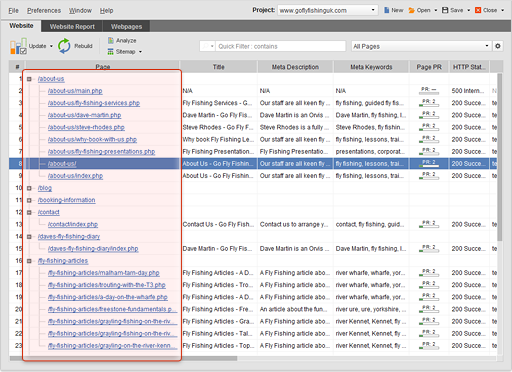 WebSite Auditor is a powerful and easy-to-use optimization application that lets you make a simple, but highly effective web pages with opportunity to use smart optimization methods. WebSite Auditor for Windows for experienced and professionals SEO whose major desire is to provide their clients with optimization reports. WebSite Auditor is a powerful and easy-to-use optimization application that lets you make a simple, but highly effective web pages with opportunity to use smart optimization methods. WebSite Auditor for Windows for experienced and professionals SEO whose major desire is to provide their clients with optimization reports.
The program requires Java Runtime Environment 1.5 to perform effectively. It also comes with the following new features or additions; unique anti-capture feature, social media popularity workplace, and the support for 704 engines. The other older features include; smoke out all problems that impede its performance, learn the exact steps to optimize each webpage for any keyword in any search engine, and optimize your entire website across-the-board.
WebSite Auditor for Windows is one of the best search engine optimization SEO tool that allows you optimize any website on two different levels; on-site (domain) and on-page (content). The application helps you to increase the ranking potential of your whole website and make specific web pages rank higher for the keyword you have chosen.
WebSite Auditor for Windows 2.3.7 is a shareware application, and can be downloaded for $167.00. Apparently one of the best search engine optimization SEO programs available on the internet.
Want to check it out? Visit Link-Assistant.
Posted in Main | No Comments »
Tuesday, November 30th, 2010
 WinNc.Net is a file manager that is aimed at replacing the use of existing Windows Explorer. There is not much difference in terms of having similar key shortcuts, and the same mouse functionality as a well-known DOS file manager, Norton Commander. WinNc.Net gives its users direct drag-and-drop access to servers, network neighborhoods and other network computers in the double-pane interface; of course each of these works independently. Users can also benefit from features such as standard file-management functions such as formatting, copying, deleting and editing files, moving, as well allowing you view compressed files as if they were directories. WinNc.Net is a file manager that is aimed at replacing the use of existing Windows Explorer. There is not much difference in terms of having similar key shortcuts, and the same mouse functionality as a well-known DOS file manager, Norton Commander. WinNc.Net gives its users direct drag-and-drop access to servers, network neighborhoods and other network computers in the double-pane interface; of course each of these works independently. Users can also benefit from features such as standard file-management functions such as formatting, copying, deleting and editing files, moving, as well allowing you view compressed files as if they were directories.
WinNc.Net is a shareware program, and comes with an uninstaller and a few latest additions that include: folder tab autotab per group is now optional, drive toolbar with floppy improved, language update (en/fr), improved search speed, zip 0 size and grayed fixed, and fixing of unzip problem.
This version of WinNc.Net has seen a lot of improvements that make it better positioned to help you manage your files. The program is a shareware, and has a 45 days trial period; for users who want to extend this trial period, the price is $40.00. I dare to say this is one of the best file management programs available.
Want to check it out? Visit Winnc.com.
Posted in Main | No Comments »
Tuesday, November 30th, 2010
 Wise Registry Cleaner Free is a registry cleaning application or tool that can be used for multiple cleaning tasks on your system. Though, not a difficult tool to use in terms of features or functions, this application can be used by not too experienced users to clean and repair their system registry, without any assistance from an experienced user. Users can use it to scan their Windows registry and find incorrect or old information in the registry. Cleaning your system registry will enhance the speed and performance of your computer system; making it perform optimally. Wise Registry Cleaner Free is a registry cleaning application or tool that can be used for multiple cleaning tasks on your system. Though, not a difficult tool to use in terms of features or functions, this application can be used by not too experienced users to clean and repair their system registry, without any assistance from an experienced user. Users can use it to scan their Windows registry and find incorrect or old information in the registry. Cleaning your system registry will enhance the speed and performance of your computer system; making it perform optimally.
The program is easy to install, but users may have to cope with some minor challenges; especially with the toolbar. Even when you wish not to install the ask toolbar; the installer may still go ahead to install it. Some other features may not work as explained or expected; but not a totally bad program all the same. Users who want something more efficient and effective must go for a pro or paid program. The major plan of the publishers is to help users clean their registry without hassles; but one may not achieve this just yet with Wise Registry Cleaner Free 5.87.
Some of the features include: backup registry to make it safe for restore, easy to use, schedule task enabling, and a few others.
Want to check it out? Visit WiseCleaner.
Posted in Main | No Comments »
Sunday, November 28th, 2010
 DRM-Removal is a copier and converter for protected media. The user interface is easy to use, and conversion speed is very high, with a speed of up to 40x. Users will enjoy conversion of their unprotected music in only a few seconds. DRM-Removal can convert protected MP4, AAC, and many more to unprotected WMA/MP3, convert Rhapsody music collection to MP3, AAC, WAV, convert protected RAX to unprotected WMA, MP3 or AAC (iTunes native format). DRM-Removal is a copier and converter for protected media. The user interface is easy to use, and conversion speed is very high, with a speed of up to 40x. Users will enjoy conversion of their unprotected music in only a few seconds. DRM-Removal can convert protected MP4, AAC, and many more to unprotected WMA/MP3, convert Rhapsody music collection to MP3, AAC, WAV, convert protected RAX to unprotected WMA, MP3 or AAC (iTunes native format).
DRM-Removal has the following features: convert all audio formats that can be listened to in your Windows Media Player, iTunes player or Apple Quick Time (Media copy protection will be removed after conversion); convert all video formats that can be played with Windows Media player, iTunes player or Apple Quick player or Apple Quick Time (Media copy protection will be removed after conversion); simple user interface and very fast conversion speed (up to 40x) from playback speed will let you enjoy converted and unprotected audio and video in seconds; save your Napster music to your laptop or mobile phone; copy audio and video to iPod or iPod or iPhone directly from DRM-Removal.
This program has experienced a lot of transformation over the years; the user interface has vastly improved. Users can download a trial version, which has a 30 day timeout; but the unlimited version goes for $14.99.
Want to check it out? Visit DRM-Removal.
Posted in Main | No Comments »
Friday, November 26th, 2010
 Notepad++ is an open source editor with the syntax highlighting and the syntax folding. The program gives extra functionality to define your own language for the syntax folding and syntax highlighting. It also gives you the opportunity to print in code color, edit different documents simultaneously, and edit the same document in two different views, and also supports full drag and drop. Notepad++ is an open source editor with the syntax highlighting and the syntax folding. The program gives extra functionality to define your own language for the syntax folding and syntax highlighting. It also gives you the opportunity to print in code color, edit different documents simultaneously, and edit the same document in two different views, and also supports full drag and drop.
Among the very latest changes made or added to version 5.8.5 include; fixing of shell extension (32bits) icon absent issue, fixing of tab settings not saved under Windows 7 problem, fixing the crash problem if config.xml is not present, fixing of localization switching under Windows 7 problem, fixing x64 system problems not included in recent file history list while closing a file, and fixing of x64 system files problems not remembered in the next session problem, and users can also have the benefit of an uninstaller included in this version.
Though, an open source program; Notepad++ has continued to experience a steady improvement in features and uses over the past few editions. The current version also comes in other languages, which include; French, Spanish, Dutch, Latvian, Portuguese, Polish, Italian, and others. Notepad++ is a freeware program, and is light and very easy to install on your system.
Want to check it out? Visit Notepad-Plus-Plus.
Posted in Main | No Comments »
Friday, November 26th, 2010
 With Axialis IconWorkshop application, you can create, extract, convert, manage, and even redistribute Windows XP Icons. The application comes with integrated workspace that permits a user to work efficiently and create professional and beautiful icons in the shortest possible time. Axialis IconWorkshop is certainly one of the most favorite Icon applications anyone can use. With Axialis IconWorkshop application, you can create, extract, convert, manage, and even redistribute Windows XP Icons. The application comes with integrated workspace that permits a user to work efficiently and create professional and beautiful icons in the shortest possible time. Axialis IconWorkshop is certainly one of the most favorite Icon applications anyone can use.
You can make Icons for Windows, MacOS, and the UNIX. It creates Windows icons of up to 256×256 for Windows Vista and Macintosh icons up to 512×512 for Leopard. IconWorkshop creates PNG images with alpha channel in just a few clicks, which includes Windows already existing.
Some of the features you can find in this program include: alpha channel, which can be used to create very attractive icons with smooth borders and shadows; create, edit icons in image strips for toolbars; create and edit Bitmap images; work effectively with a plug-in for visual studio 2005 and 2008; full support for Windows Vista PNG-compressed icons; create attractive icons using image objects; convert icons between Mac operating system and Windows; automatically create icons from images; export icons to images to illustrate your website; help feature; batch procedure; create a composite icons using drag and drop; and many more features.
Axialis IconWorkshop is a shareware, and you are free to download a trial version before the main program itself.
Want to check it out? Visit Axialis.
Posted in Main | No Comments »
Thursday, November 25th, 2010
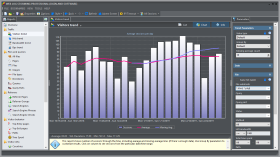 Web Log Storming is an interactive desktop-based application, and is a web log analyzer for Windows. As a matter of fact, Web Log Storming is a new concept of website statistics. Users can use it to browse through stats to drill down into details; including visitor’s session, check the pattern of individual visitor behavior and how it fits into the goals of the user. Once installed on your computer system, Web Log Storming is able to display detailed web statistics with interactive graphs and reports. Web Log Storming is an interactive desktop-based application, and is a web log analyzer for Windows. As a matter of fact, Web Log Storming is a new concept of website statistics. Users can use it to browse through stats to drill down into details; including visitor’s session, check the pattern of individual visitor behavior and how it fits into the goals of the user. Once installed on your computer system, Web Log Storming is able to display detailed web statistics with interactive graphs and reports.
The publishers have made a few changes in this version, which include; tabbed reports, six new report types, new parameters and global filters, better speed and stability, and other usability/user interface improvements.
Some of the additional things you can use Web Log Storming to for include: unlimited interactive reports and graphs; find out if visitors behave as expected; find out if your web log files compressed to save disk space; easily improve your return on investment (ROI) and helps you to save a lot of money; track individual visits with precision; connect to HTTP or FTP server, and download updated log files automatically; export reports to HTML files, send them by electronic mail or copy them straight to the clipboard; and many more.
Users can download their 30 days trial version in order to have a feel of other features before actual purchase is made.
Want to check it out? Visit Weblogstorming.
Posted in Main | No Comments »
|
|
|




